Git Your PCBs Online

Last time, I’ve shown you how to create a local Git repository around your PCB project. That alone provides you with local backups, helping you never lose the changes you make to your files, and always be able to review the history of your project as it developed.

However, an even more significant part of Git’s usefulness is the ability to upload our creations to one of the various online Git repository hosting services, and keep it up to date at all times with a single shell command. I’d like to show you how to upload your project to GitHub and GitLab, in particular!

Continue reading “Git Your PCBs Online” →

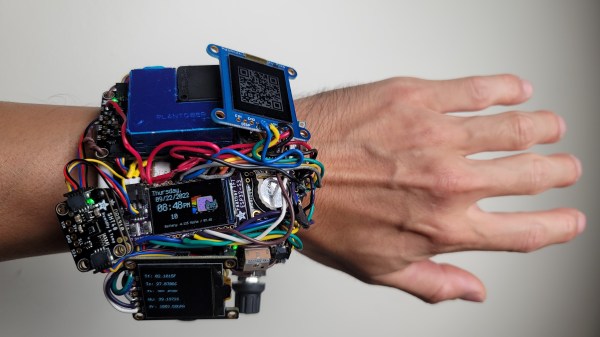
Watch on the wrist, with all the sensors facing the camera. There's a lot of them, and a lot of wires of all kinds tying everything together.

2022 Cyberdeck Contest: IP00-Minus, A Daring Wearable

[Rob]’s IP00-Minus watch stands out on the Cyberdeck Contest project list page; it’s clear he decided to go a different path than most other hackers, and we can certainly see the advantages. For example, if there’s no case, there’s no need to redesign it each time you want to add a module — and [Rob] has added many, many modules to this watch.

Picking between regular LCD, memory LCD, and OLED displays can be a tricky decision to make when planning out your gadget, so he just added all three. The CircuitPython firmware initially attempted to resist the trio, but was eventually defeated through patching. Jokes aside, we can almost feel the joy that [Rob] must have felt after having put this watch on for the first time, and this project has some serious creative potential for a hacker.
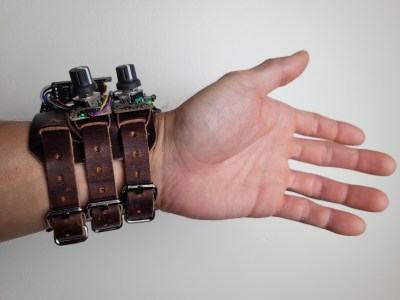
Watch on the wrist, showing the wrist straps and how the watch sits on the arm.[Rob] has been focusing on day-to-day usability first and foremost, with pleasantly clicky encoders, impeccable performance of its watch duty, unparalleled expandability, and comfortable wrist fit — it provides a feeling no commercial wearable could bring.

Out of the myriad of sensors, the air quality sensor has been the most useful so far, letting him know when to open a window or leave a particularly crowded place. The ESP32-S3 powered watch has been quite a playground for [Rob]’s software experiments, and given the sheer variety of hardware attached, we’re sure it will bring unexpected synergy-driven ideas. Plus, it’s no doubt a great conversation starter in nerd and non-nerd circles alike.

Good things happen when you give hackers a wrist-worn watch full of sensors, whether it’s a particularly impressive event badge, a modified firmware for an open source smartwatch, or a custom piece that pushes the envelope of DIY hardware.


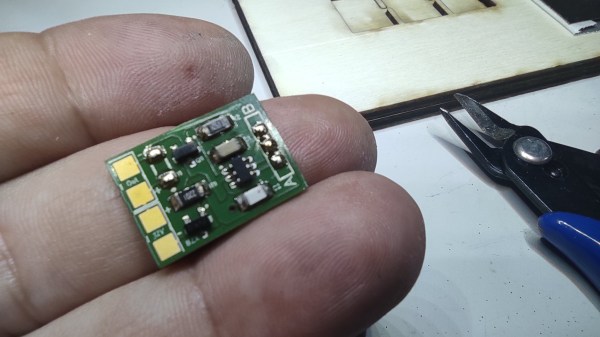
The assembled switch PCB in the palm of its creator's hand

TTP223 Brings Simple Touch Controls To A LED Lamp

You can buy small modules with capacitive touch detection ICs — most often it’s the TTP223, a single-button capacitive model with configurable output modes. These are designed to pair with a microcontroller or some simple logic-level input, but [Alain Mauer] wanted was to bring touch control to a simple LED strip. Not to be set deterred, he’s put together a simple TTP223-based switch board.

Initially, he made a prototype using one of the regular TTP223 boards as a module, but then transferred the full schematic onto a single PCB. The final board uses an NPN transistor capable of handling up to 3 amps to do the switching job, and Zener-based regulation to provide 5 V for the TTP223 itself from the 12 V input. [Alain] shares the schematic, as well as BOM together with Gerber files for a 2×3 panel in case you’re interested in adding a few of these handy boards to your parts bin.

The TTP223 is a ubiquitous and quite capable chip – we’ve seen it used for building a mouse with low actuation force buttons, a soft power switch, and even a UV-sensing talisman that’s equal parts miniature electronics and fascinating metalwork.

Continue reading “TTP223 Brings Simple Touch Controls To A LED Lamp” →

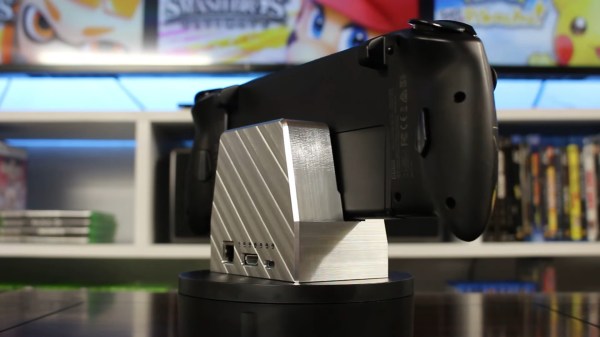
Back of the dock shown. You can see that the dock is milled out of a massive chunk of aluminium, and you can see the charging, HDMI and Ethernet ports being accessible on the back.

Nintendo Switch Stock Dock Imperfect? Mill Your Own!

Despite the seat of honor it enjoys in literally millions of households, the official Nintendo Switch Dock is certainly far from perfect. For one, it’s not milled out of a hefty block of aluminum. A less apparent but no less important issue is that the ports are positioned kind of awkward – [Kevin] from Modified believes that the USB ports should be facing the front side, while the HDMI, Ethernet, and charging inputs should be on the backside — a reasonable position. He set out to fix both of these problems at the same time, and tells us the CNC-heavy rebuild story in a short but captivating video.

The original dock consists of two PCBs, and these two boards are the only thing [Kevin] didn’t redesign from scratch. As they’re connected with a flexible cable, he could freely rotate and thus completely reposition the ports-equipped board without soldering. He added some standoffs to secure this board to the case, and after 3D printing a few iterations for test-fitting, the milling went on for all of us to marvel at.

The resulting dock is pretty, functional, and even has some extra features — for instance, the “i” in the embossed Nintendo logo lights up when the dock is in use. In no small part due to the Nintendo logo, we don’t expect this one to grace store shelves, but we hope that it provides inspiration to other makers to do their builds. If you like this rebuild and crave more, whether you’re looking for inspiration, CNC work insights, or pretty milling videos, [Kevin]’s milled Xbox case project is an excellent “Watch next” choice.

Continue reading “Nintendo Switch Stock Dock Imperfect? Mill Your Own!” →

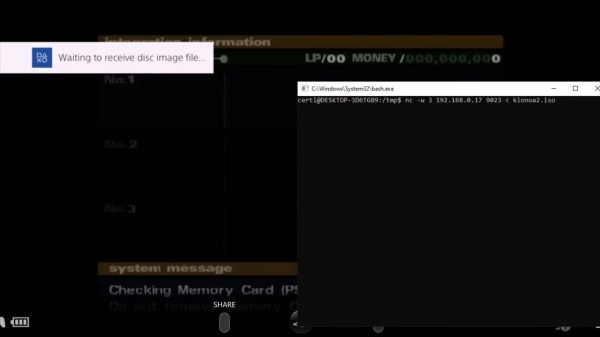
Screenshot of the PS4 screen, showing a "Waiting to receive disc image file..." notification on the left, and a Windows commandline window with nc running on the right, sending an .iso file to some IP address - presumably the PS4

Subverting PS4 And PS5 Through The PS2 Emulator

Game console hacking remains a fascinating area, and we’re glad when someone brings the spoils of exploration for us to marvel at. This time, we’re looking at the [mast1c0re] hack story by [cturt] – an effort to find bugs in PS2 emulation toolkit present on Sony PlayStation 4 and 5 consoles, proving fruitful in the end. What’s more, this exploit seems unpatchable – not technically, but under the Sony’s security practices, this emulator falls under the category of things they refuse to patch when identified.

In this story, we’re taken on a journey through the PS2 emulator internals, going through known-exploitable PS2 games and learning about a prospective entry point. Circling around it, collecting primitives and gadgets, bypassing ASLR on the way there, the emulator is eventually escaped, with a trove of insights shared along the way. As a demonstration, [cturt] successfully loaded a different PS2 game from outside the PS2 emulator, transferring it to the PS4 over WiFi! Continue reading “Subverting PS4 And PS5 Through The PS2 Emulator” →

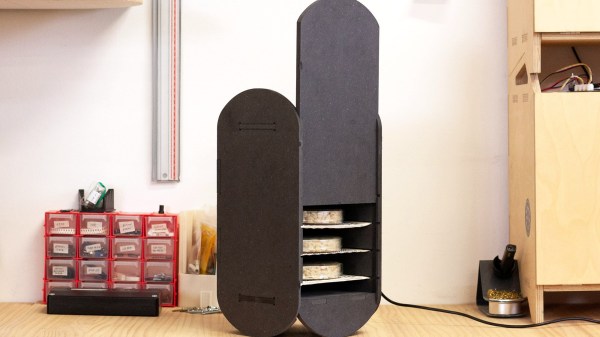
Fermenter on the desk, with the front door opened and some tempeh disks visible inside of it

Hackaday Prize 2022: An Easy-To-Build Fermenter For Tempeh

[Maud Bausier] and [Antoine Jaunard] believe we should all know about tempeh — a traditional Indonesian food made out of legumes fermented with fungi. To simplify the process a bit: you get some soybeans, add a tempeh starter fungi culture to them, ferment them a while, and out comes the tempeh. It’s a great source of proteins that’s relatively easy to grow on your own. One catch, though — you do need a certain kind of climate to have it develop properly. This is why [Maud] and [Antoine] are bringing a tempeh fermenter design to this year’s Hackaday Prize.

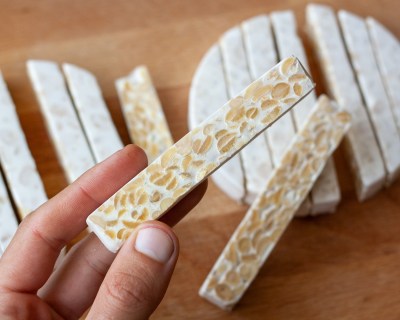
Ready tempeh disks cut into long pieces, showing the cross-section of some. It looks pretty tasty!This fermenter’s controller drives a heating element, which adheres to a pre-programmed fermentation cycle. It also has a fan for airflow and keeping the heat uniform.



The fermenter itself is a small desktop machine with a laser-cut case helped by some CNC-cut and 3D-printed parts, electronics being a simple custom PCB coupling a Pi Pico with widely-available modules. This is clearly a project for someone with access to hackerspace or fab lab resources, but of course, all of the files are on GitHub.

Once built, this design allows you to grow tempeh disks in home conditions on a small scale. It seems the design is mostly finalized, but if you’d like to hear news about this project, they have a blog and a Mastodon feed with some recent updates.

We’ve covered a whole lot of fermentation-related hacks over these years. Most of them have been alcohol-related, but every now and then we see people building fermentation equipment for other food materials, like vinegar, yogurt and sourdough. Now, having seen this fermenter, we’ve learned of one more food hacking direction to explore. This project is one of 10 finalists for our latest Hackaday Prize round, Climate-Resilient Communities. It’s a well-deserved win, and we can’t wait to see where it goes!

Lithium-Ion Batteries Are Easy To Find

In the first article, I’ve given you an overview of Lithium-Ion batteries and cells as building blocks for our projects, and described how hackers should treat their Lithium-Ion cells. But what if you don’t have any LiIon cells yet? Where do you get LiIon cells for your project?

Taking laptop batteries apart,  whether the regular 18650 or the modern pouch cell-based ones, remains a good avenue – many hackers take this road and the topic is extensively covered by a number of people. However, a 18650 cell might not fit your project size-wise, and thin batteries haven’t quite flooded the market yet. Let’s see what your options are beyond laptops. Continue reading “Lithium-Ion Batteries Are Easy To Find” →