Hackday Links: March 10, 2012

We’re throwing money at our monitor and nothing’s happening!

Sometimes we get hacks sent into our tip line that are outrageously awesome, but apart from a YouTube video we’ve got nothing else to write about. So begins the story of the flying Back to the Future DeLorean quadrocopter. Sadly, the story ends with the video as well. (If you’ve got any info, send it in!)

Fine, we’ll throw in another cool car

Mercedes covered a car with LEDs and made the James Bond’s invisible car from Die Another DayThe Mercedes video cost tens of thousands of dollars to produce, so of course there’s camera trickery; we’re just wondering how much credit Adobe After Effects gets for this build.

Microsoft touchscreen demo might be impossible

Yes, Microsoft does care about user experience. Just take a look at this video from their applied sciences group. They did user testing with touchscreens that updated every 1 millisecond, compared to the ~100ms our phones and tablets usually update. Of course the result was a better UX, but now we’re wondering how they built a touch screen that updates every millisecond? That’s a refresh rate of 1 kHz, and we’ve got no clue how they bodged that one together. We’re probably dealing with a Microsoft Surface projector/IR camera thing here, but that doesn’t answer any questions.

Edit: [Philip Rowney] sent in a tip that it could be this TI touch screen controller that can sample above 1 kHz. The only problem is this chip uses a resistive touch screen, instead of a multitouch-enabled capacitive screen. At least that solves one problem.

And now for something that can measure 1 kHz
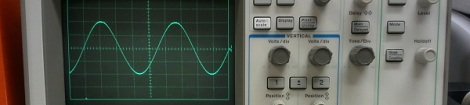
[Paleotechnologist] posted an excellent guide to the care and feeding of an oscilloscope. Most of our readers probably already know the ins and outs of their awesome Techtronix and HP units, but that doesn’t mean the younglings won’t have to learn sooner or later.

Good idea, except the part about saving it for spring

In a moment of serendipity, [Valentin] figured out how to use touchscreens with wool gloves. The answer: rub thermal grease into the tip of the index finger. It works, and doesn’t look to be too much of a mess. We’ll remember this for next winter.

The last one didn’t have a picture, so here’s this

[Darrell] used a little bit of LaTeX and Ruby to make colored labels for his resistor collection. We’re struck with the idea of using test tubes to organize resistors. It’s cool and makes everything look all sciencey and stuff.

3D Printing From An Android Device

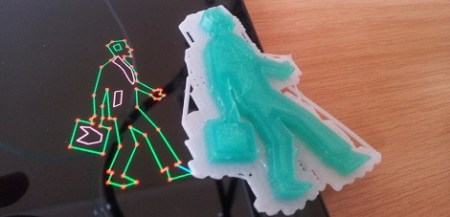
[skullkey] over at the House4Hack hackerspace in Pretoria, South Africa wanted a way to get kids excited about technology and desktop fabrication labs. Wanting to give kids a visceral feel for the march of technology, he created Makerdroid, an android app that allows for the creation 3D objects on an Android tablet and preparing them to be printed on a Reprap or Makerbot.

What’s really interesting about this build is not only the fact that [skullkey] and his lovely beta testers are generating .STL files on an Android device, the object files are also being converted to GCode on the Android, without the need for a conventional computer. Makerdroid uses the very popular Skeinforge to generate the instructions for the printer (although a lot of people are switching over to Slic3r).

Makerdroid doesn’t need a PC to print objects out on a 3D printer, but we think the process of shuffling GCode files from a tablet to the printer with an SD card is a little archaic. It might be possible to print directly from an Android tablet over Bluetooth with the Android Bluetooth Reprap app that is currently in development. Still, we love the idea of printing objects we just created on a touch screen, as shown in the Makerdroid demo video after the break.

Continue reading “3D Printing From An Android Device”

Steganography In Xkcd Comics Without The Img Alt Tag

Inspired by a recent Hackaday post [austin] decided to try his hand at steganography. Steganography, or ‘concealed writing’ has come a long way from ancient Greek slaves/couriers shaving their head, tattooing a message on their scalp, and regrowing their hair. We recently saw a music file masquerading as a picture of a kitten, but that method of hiding data required running a Ruby script. [austin] thought steganography would be a great way to hone his JavaScript skills, so he made an image encoder and decoder purely in JS and HTML.

Like the previous incarnation, [austin]’s work takes a regular .PNG image file and hides stuff in the pixel data. A few of the lower bits for each pixel are modified (three bits from the red and blue, two bits from the green – a good choice, the human eye is very sensitive to green) and a file is embedded inside the .PNG image.

For an example, [austin] embedded some stuff inside the xkcd comic underneath this post’s title. Even though the image is mostly white, we can’t see anything wrong with the colors. If you’d like to decode the message, [austin] put his encoder and decoder up on github. Feel free to take a shot at it.

Installing Military Hardware In A Home Flight Simulator

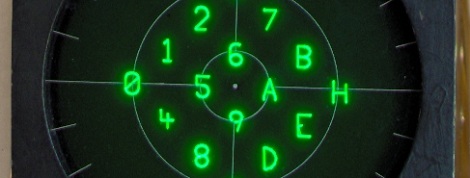
The cockpit of an F-16 Fighting Falcon features a small 3-inch display that monitors and tracks hostile aircraft and missiles, friendlies, and the current target. This Radar Warning Receiver is vitally important to pilots in combat, so [Mike] decided to add one to his homebuilt F-16 simulator that runs Falcon 4.0.

The RWR displays threats as symbols that are usually generated by tens of thousands of dollars worth of military hardware. [Mike] figured a $7 PIC microcontroller would work just as well and set about designing vector graphics that would fit on a single chip.

[Mike] had the graphics displaying correctly on an oscilloscope, but that’s a far cry from the from the surplus RWR display he picked up. Although the display is a simple CRT, the original designers of the radar warning receiver thought it necessary to put the deflection amplifiers in another part of the airplane. After building a pair of 30 Watt amplifiers, [Mike] could finally display more than a single dot on the display.

After all was said and done, [Mike] has a wonderful radar warning display that fits into his F-16 cockpit perfectly. While it’s not quite a 737 in a garage, we’ve got to respect someone who takes surplus avionics and makes them work. Check out [Mike]’s display in action after the break.

Continue reading “Installing Military Hardware In A Home Flight Simulator”

Going Old School With An 8051

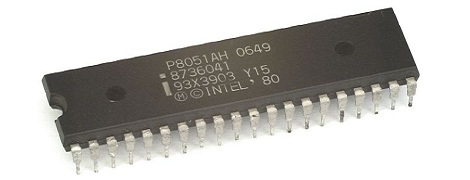
A while back, [Matt] bought a few 8051 MCUs and tucked them away for a future project. He just found these fabulous little chips in a component drawer and decided it was time to figure these guys out. Eventually, [Matt] stumbled across this awesome resource for 8051 programming.

The 8051 featured a still reasonably respectable 4k of ROM and 128 bytes of RAM – not too dissimilar from an ATtiny of today until you realize this 30-year-old chip has 32 IO pins. This microcontroller, along with its bigger brother the 8052, served as the de facto microcontroller standard for 20 years. You’ve no doubt taken a ride in a car that used one, and was even put to use doing low-level grunt work in early PCs.

[Matt] says he couldn’t find a Hackaday project featuring this 30-year-old microcontroller (not true, here’s one of those tilty mazes and an electronic toll booth), but even we have to admit we don’t feature much outside of the usual AVRs and PICs. Even though it’s 32 years old, the 8051 family still has some tricks up its sleeve like playing audio CDs. If you’ve got an 8051 project lying around, send it in on the tip line and we’ll probably throw it up.

Reverse Engineering A Nokia LCD

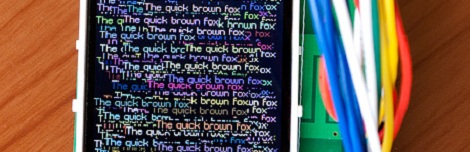
LCD displays taken from old Nokia phones have been a staple of the hardware makers for years now, so we’re very happy to see [Andy] reverse engineering a full color QVGA display so we can move our grayscale projects over to a full-color display.

The screen in a Nokia 2730, 5000, and 7100 cell phone is a wonder of technology – its 18-bit color with a very high-resolution piqued [Andy]’s interest. He bought a second-hand Nokia 2730 off of eBay and started taking it apart. After checking out the schematics for the phone, [Andy] had a few breakout boards made; especially useful since he found a few connectors as well.

With a great deal of Googling, [Andy] found another lost soul who successfully broke into a similar LCD display and discovered it was command-compatible with a Magnachip LCD controller. The only way forward was to send a few of these commands over to the display and watch what happens.

[Andy] managed get pixels drawn on the screen, and found a few interesting features: hardware scrolling is enabled, as is changing between portrait or landscape orientations. From a second-hand phone on eBay, [Andy] now has a very nice QVGA display. We’re calling this a win, but you can judge the video after the break for yourself.

Continue reading “Reverse Engineering A Nokia LCD”

Toaster Oven Reflow Soldering Roundup

SMD components have a lot of advantages over the through-hole parts our fathers and grandfathers soldered. Working with these tiny surface mount components requires a larger investment than a soldering iron and a wire-wrap gun, though. Here’s a few reflow ovens that were sent in over the past week or two.

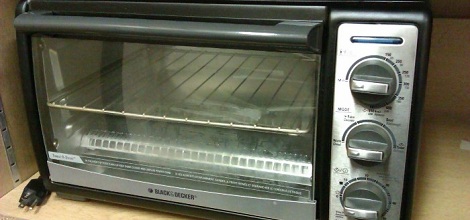
[ramsay] bought a 110 V toaster oven off of eBay. Even though [ramsay] is in England and has 230 V mains, everything in the oven is mechanical and works just fine with a higher voltage. His first test didn’t go quite as planned; the solder paste wasn’t melting at 120° C, so he cranked up the temperature and learned that the FR in FR-4 stands for flame retardant. Never deterred, [ramsay] decided to build a controller so the temperature ramps up and cools off at the right rates for the flux and paste to do their thing.

Solder paste has a temperature profile that requires the board to be kept at a temperature between 150° and 180° C for a minute or so before climbing up to 220° for a second so the solder will melt. [Nicolas] had the interesting idea of putting a USB port in his toaster oven and storing the heating profiles on his desktop. The build uses an MSP430 microcontroller to turn the relays powering heating elements on and off. [Nick] is working on a C# desktop app to monitor and regulate the oven temperature from his computer, so we’re fairly interested in seeing the final results.

Watching the SMD self-alignment videos on YouTube is a lot more fun than messing around with tweezers, stereo microscopes, and extremely fine soldering irons. If you’ve got a better idea for a toaster/reflow oven, send it in on our tip line and we’ll check it out.