Particle Physics On A Small, Affordable PCB

Experimenting in the world of particle physics probably brings to mind large, expensive pieces of equipment like particle accelerators, or at least exotic elements or isotopes that most of us can’t easily find. But plenty of common objects emit various particles, and it turns out that detecting these particles does not require government backing or acres of test equipment. In fact, you can get this job done with a few readily-available parts and [Tim] shows us how it’s done with his latest project.

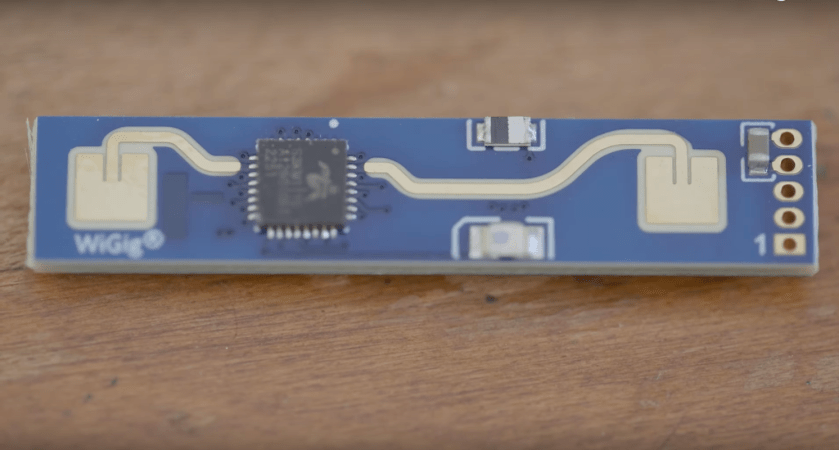
The goal of his build is to have a working particle detector for less than $10 per board, although he’s making them in bulk to be used in an educational setting. The board uses a set of photodiodes enclosed in a protective PCB sandwich to detect beta particles from a Potassium-40 source. The high-energy electron interacts with the semiconductor in the photodiode and creates a measurable voltage pulse, which can be detected and recorded by the microcontroller on the board. For this build an RP2040 chip is being used, with a number of layers of amplification between it and the photodetector array used to get signals that the microcontroller can read.

Getting particle physics equipment into the hands of citizen scientists is becoming a lot more common thanks to builds like this which leverage the quirks of semiconductors to do something slightly outside their normal use case, and of course the people building them releasing their projects’ documentation on GitHub. We’ve also seen an interesting muon detector with a price tag of around $100 and an alpha particle detector which uses a copper wire with a high voltage to do its work.

Arduino PLC Keeps The Beat

For most of our prototype, hobby, or one-off electronics projects it’s perfectly fine to use a development platform like an Arduino Uno or something to that effect. They’re both easy to program and easy to wire up to projects without breaking the bank. But if you step into an industrial setting where reliability is paramount even in places that are noisy, vibrating all the time, hot, or otherwise unpleasant for electronics, you’ll want to reach for a programmable logic controller (PLC) that are much more robust. There is actually a PLC from Arduino, and if you want to dip your toes into the PLC world then take a look at this drum kit based on the Arduino Opta.

With the PLC at the core of the build, it’s on to making the drumming mechanisms themselves. For that, project creator [JC Audio] is using a series of solenoids attached to camera mounts with a custom 3D printed part that allows for quick assembly and disassembly so he can get the positioning of each drum sound just right. The high hat is taken care of by the noise of an internal solenoid, with the other drums striking various real drums and other solid objects in his shops. The solenoids themselves are driven by a solid-state relay expansion module to ensure there’s enough power

While the build doesn’t sit inside a factory and run for years at a time, a musician’s stage is certainly a rough enough environment that we might reach for a PLC over a standard development board for its benefits. The code for this project is available as well at the project’s GitHub page for those looking for a more advanced timekeeper to play along with their music practice, and for more details on why you might choose a PLC for your project take a look at this Arduino vs PLC showdown from a few years ago.

Continue reading “Arduino PLC Keeps The Beat”

Google Drive Now Bootable

USB drives are incredibly useful, both storing files for transport between different computers and for creating bootable drives that let us use or install other operating systems on our computers. While online file storage systems like Dropbox and Google Drive have taken over a large percentage of the former task from USB drives, they have not been able to act as bootable media, ensuring that each of us have a few jump drives lying around. That might not be the case anymore, though, as this guide is the first we know of to be able to use Google Drive to boot to a Linux system.

Unlike the tried-and-true jump drive methods, however, this process is not straightforward at all. It relies on two keys, the first of which is FUSE which allows a filesystem to be created in userspace. The second is exploiting a step in boot process of Linux systems where the kernel unpacks a temporary filesystem, called initramfs, in order to load the real filesystem. Normally a user doesn’t interact much with this step, but that doesn’t mean it’s impossible. A tool called dracut allows using an existing Linux installation to build a custom initramfs and in this case, the custom initramfs is built to include the proper support for both networking and FUSE.

The proof of concept in this demonstration originally ran in a container, using an existing project called google-drive-ocamlfuse to interact with Google Drive itself. From there, after sorting out some issues with root access, networking, malfunctioning symlinks, and various timeouts on the (perhaps predictably) slow system, the whole contraption was moved over to a laptop so it could be tested on real hardware. Everything runs, and although the original creator of this behemoth admits it is a bit “silly” they note that there may be some real-world use cases for something like this. We still won’t expect everyone to throw out their jump drives anytime soon, though. If you’re not feeling like your Linux skills are up to the challenge of something like this, we’d recommend you start with our own [Al Williams]’s Linux Fu series.

Modeling Home Heating Systems With Circuit Simulation Software

Electricity flow is generally invisible, silent, and not something that most humans want to touch, so understanding how charge moves around can be fairly unintuitive at first. There are plenty of analogies to help understand its behavior, such as imagining a circuit as a pipe of water, with pressure standing in for voltage and flow standing in for current. But you can flip this idea in reverse and use electric circuits to model other complex phenomena instead. [Oxx], for example, is using circuit theory to model his home’s heating systems.

To build his model, he’s using LTSpice, a free circuit simulation program. Using voltage to model temperature and current to model heat flow, he’s set up a model for his home to compare the behavior of a heat pump and a propane furnace. A switch model already in LTSpice with built-in hysteresis takes the place of the thermostat. Using temperature data for a single day in January [Oxx] can see how each of his two heating systems might behave, and the model for the heat pump is incredibly close to how the heat pump behaved in real life.

The model includes all kinds of data about the system, including the coefficient of performance of the heat pump and its backup electric resistive heater, and the model is fairly accurate at predicting behavior. Of course, it takes a good bit of work to set up the parameters for all of the components since our homes and heating systems won’t be included in LTSpice by default, but it does show how powerful an electric circuit analog can be when building models of other systems. If you’ve never used this program before, we’ve featured a few guides to getting started that you can take a look at.

Thanks to [Jarvis] for the tip!

Continue reading “Modeling Home Heating Systems With Circuit Simulation Software”

Swapping Vinyl For Cardboard With This ESP32 Turntable

Cardboard is a surprisingly durable material, especially in its corrugated form. It’s extremely lightweight for its strength, is easy to work, can be folded and formed into almost any shape, is incredibly inexpensive, and when it has done its duty it can be recycled back into more paper. For these reasons, it’s often used in packaging material but it can be used to build all kinds of things outside of ensuring that products arrive at their locations safely. This working cardboard record player is one example.

While the turntable doesn’t have working records in the sense that the music is etched into them like vinyl, each has its own RFID chip embedded that allows the ESP32 in the turntable’s body to identify them. Each record corresponds to a song stored on an SD card that instructs the ESP32 to play the appropriate song. It also takes care of spinning the record itself with a small stepper motor. There are a few other details on this build that tie it together too, including a movable needle arm held on with a magnet and a volume slider.

As far as a building material goes, cardboard is fairly underrated in our opinion. Besides small projects like this turntable, we’ve also seen it work as the foundation for a computer, and it even has the strength and durability to be built into a wall or even used as shelving material. And, of course, it’s a great material to use when prototyping new designs.

Continue reading “Swapping Vinyl For Cardboard With This ESP32 Turntable”

Go Forth With This Portable Programmer

When choosing a low-level language, it’s hard to beat the efficiency of Forth while also maintaining some amount of readability. There are open source options for the language which makes it accessible, and it maintains its prevalence in astronomical and other embedded systems for its direct hardware control and streamlined use of limited resources even though the language started over 50 years ago. Unlike 50 years ago, though, you can now take your own self-contained Forth programmer on the go with you.

The small computer is built on a design that [Dennis] built a while back called my4TH which has its own dedicated 8-bit CPU and can store data in a 256 kB EEPROM chip. Everything else needed for the computer is built in as well but that original design didn’t include a few features that this one adds, most notably a small 40×4 character LCD and a keyboard. The build also adds a case to tie everything together, with ports on the back for I2C and power plus an RS232 port. An optional battery circuit lets the computer power up without an external power supply as well.

Continue reading “Go Forth With This Portable Programmer”

Portable, Full-Size Arcade Cabinets

Believe it or not, there was a time when the only way for many of us to play video games was to grab a roll of quarters and head to the mall. Even though there’s a working computer or video game console in essentially every house now doesn’t mean we don’t look back with a certain nostalgia on those times, though. Some have turned to restoring vintage arcade cabinets and others build their own. This hackerspace got a unique request for a full-sized arcade cabinet that was also easily portable as well.

The original request was for a portable arcade cabinet, and the original designs were for a laptop-like tabletop arcade. But further back-and-forth made it clear they wanted full-size cabinets that just happened to also be portable. So with that criteria in mind the group started building the units. The updated design is modular, allowing the controls, monitor, and Raspberry Pi running the machines to be in self-contained units, with the cabinets in two parts that can quickly be assembled on-site. The base is separate and optional, with the top section capable of being assembled on the base or on something like a tabletop or bar, and the electronics section quickly drops in.

While the idea of a Pi-powered arcade cabinet is certainly nothing new, the quick build, prototyping, design, and final product that’s mobile and quickly assembled are all worth checking out. There is even more information on the build at the project’s GitHub page including Fusion 360 models. If you need your cabinets to be even more portable, this tabletop MAME cabinet is a great place to start.