Amazing SDR Built By 16 Year Old

[Lukas] started his epic SDR-from-scratch build when he was 16. Projects like this aren’t completed overnight. (He’s now 18. We’re impressed.)

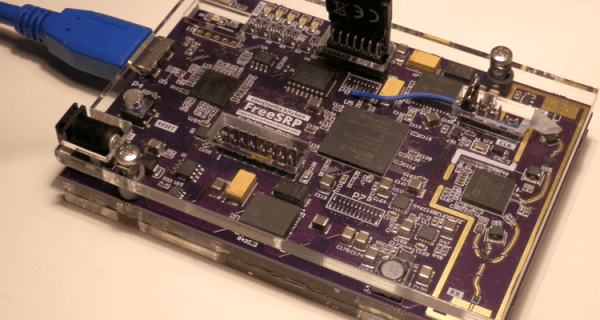
The project itself is a Software-Defined Radio built on top of the 12-bit Analog Devices AD9364 transceiver IC. A big fat FPGA takes the data and runs it off to a USB 3.0 interface, which is necessary for the amount of data this thing will be producing — he’s got it receiving 56 MHz of bandwidth. In short, this is an SDR peripheral that’s in the big leagues.

After two years of work and (only!) three revision, [Lukas] got the thing working. Read his writeup for the blow-by-blow account. In the end, a 6-layer board was necessary for the routing to get the full speed out of the clocking, and he discovered the reason that you use exactly the specified bias resistors — the expensive ADC chip gets very hot. But he didn’t give up, and in the end he pulled off a project of immense complexity. In his own words:

I have discovered that taking on large projects, even when not knowing how to tackle problems that might arise, is a very effective way of learning for me. It’s just important to be persistent, as I’ve seen that almost any problem can be solved on your own — which is incredibly rewarding — even if you get stuck and seem to not make progress for a while.

[Lukas] is now working on the software. He’s already got a hacked osmocom driver working, so it plays nice with GNURadio.

Of course, there are tons of ways to get into SDR without building your own from scratch, but we applaud [Lukas] for going the hard way. If you’re tempted to follow in his footsteps, have a look at [Michael Ossmann]’s great talk on making the RF design process as tractable as possible.

Computer-Designed Portraits, Knit By Hand!

Artist [Petros Vrellis] has done something that we’ve never seen before: his piece “A New Way to Knit” lives up to its name. What he’s done is to take the traditional circular loom, some black thread, and toss some computing at it. And then he loops the string around and around and around.

a-new-way-to-knit-175653201mp4-shot0009_thumbnail

The end result of following the computer’s instructions is a greyscale portrait. Where few black strings overlap, it’s light, and where more overlap, it’s darker. That’s the whole gimmick, but the effect is awesome. As you zoom in and out, it goes from a recognizable face to a tangle of wires and back. Check out his video embedded below.

Continue reading “Computer-Designed Portraits, Knit By Hand!”

Design For Hackers

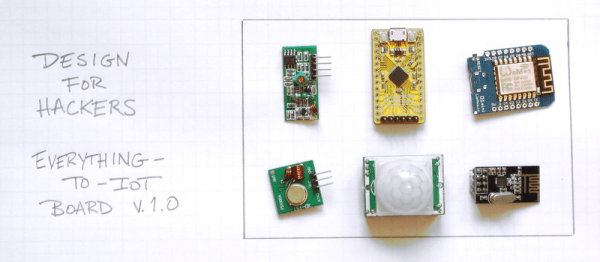
Near the end of the lifecycle of mass-market commercial product development, an engineering team may come in and make a design for manufacturability (DFM) pass. The goal is to make the device easy, cheap, and reliable to build and actually improve reliability at the same time. We hackers don’t usually take this last step, because when you’re producing just a couple of any given device, it hardly makes sense. But when you release an open-source hardware design to the world, if a lot of people re-build your widget, it might be worth it to consider DFM, or at least a hardware hacker’s version of DFM.

If you want people to make their own versions of your project, make it easy and cheap for them to do so and don’t forget to also make it hackable. This isn’t the same as industrial DFM: rather than designing for 100,000s of boards to be put together by robot assembly machines, you are designing for an audience of penny-pinching hackers, each building your project only once. But thinking about how buildable your design is will still be worthwhile.

In this article, I’m going to touch on a couple of Design for Hackers (DFH) best practices. I really want to hear your experience and desires in the comments. What would you like to see in someone else’s open designs? What drives you nuts when replicating a project? What tricks do you know to make a project easily and cheaply buildable by the average hacker?

Continue reading “Design For Hackers”

Root On The Philips Hue IoT Bridge

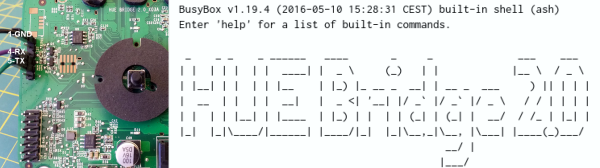
Building on the work of others (as is always the case!) [pepe2k] managed to get root access on the Philips Hue Bridge v2 IoT light controller. There’s nothing unusual here, really. Connect to the device over serial, interrupt the boot process, boot up open firmware, dump the existing firmware, and work the hacker magic from there.

Of course, the details are the real story. Philips had set U-Boot to boot the firmware from flash in zero seconds, not allowing [pepe2k] much time to interrupt it. So he desoldered the flash, giving him all the time in the world, and allowing him to change the boot delay. Resoldering the flash and loading up his own system let him dump the firmware.

The “hacker magic” glossed over in the intro consisted of poking around until he found a script that was called on every boot. This is how [pepe2k] gets around not knowing the root password. The script compares the hash of the typed password with an environment variable, set with the hash of the correct password. Changing that environment variable to the hash of his favorite password (“root”) made him master of the box.

And just in case you’re one of the few Hackaday readers who doesn’t understand why we do these things, besides the fact that it’s just fun, consider Philips’ (eventually retracted) clampdown on the interoperability of this very device, or Google’s red bricks. The fatal flaw of IoT devices is that they place you at the whims of companies who may decide that they’re not making enough money any more, and shut them down. Keep your hacking skills sharp.

Thanks [Jan] for the great tip!

3D Printed Electric Unicycle

Actually riding around at 30 km/h on a 3D printed means of transportation is pretty gnarly, if not foolhardy. So we were actually pleased when we dug deeper and discovered that [E-Mat]’s unicycle build is actually just a very nice cover and battery holder.

We say “just”, but a 3D-printed design takes a couple of cheap parts (the wheel and pedals) from the Far East and turns them into a very finished-looking finished product. Custom bits like this fulfill the 3D printing dream — nobody’s making it, so you make it yourself. And make it look pro.

It turns out that other people have noticed this motor/controller/pedal combo as well. Here’s some documentation to get you started.

It’s funny. Just four years ago, self-balancing powered unicycles were the realm of the insane hacker. Then came some hacker improvements, and now we’re at the point where you can mail-order all the parts and 3D print yourself a fancy enclosure.

Continue reading “3D Printed Electric Unicycle”

Encrypted USB Bootloader For AVRs

It probably doesn’t matter much for the hacker who sleeps with a bag of various microcontroller flash programmers under the pillow, but for an end-user to apply a firmware upgrade, convenience is king. These days that means using USB, and there are a few good AVR USB bootloaders out there.

But [Dmitry Grinberg] wanted more: the ability to encrypt the ROM images and verify that they haven’t been tampered with or otherwise messed up in transit. Combined with the USB requirement, that meant writing his own bootloader and PC-side tools. His bootloader will take unencrypted uploads if it doesn’t have a password, but if it’s compiled with a key, it will only accept (correctly) encrypted hex files.

Since the bootloader, including the USB firmware, is on the hefty side at 3.3 kB, [Dmitry] included hooks to re-use the bootloader’s USB code from within the target application. So if you were going to use V-USB in your program anyway, it doesn’t actually take up that much extra space. It’s a cute trick, but it ties the bootloader and user program together in a way that gives us the willies, without specifically knowing why. Perhaps we can debate this in the comments.

If you need an AVR USB bootloader, but you don’t need the encryption, we like Micronucleus. But if you need to deliver updates to users without them being able to modify (or screw up) the code in the middle, give [Dmitry]’s setup a try.

Bluetooth And Arduino Vaporizer Upends Stoner Stereotypes

Back in the day, stoners were content to sit around, toke on a joint, mellow out, and listen to the Grateful Dead or something. Nowadays, they practically need a degree in electrical engineering just to get high. [Beiherhund] sent us his VapeBox build. Like so many projects on Hackaday, we’re not going to make one ourselves, but we appreciate a well-done project.

First off, there’s a home-built induction heater. A 30A current sensor and switch-mode power supply regulate the amount of juice going to the coil that surrounds the heating chamber. [Beiherhund] discovered that brass doesn’t have enough internal resistance to heat up in an induction heater, so he built a stainless steel insert into the chamber. Optimal temperature is monitored from outside the chamber by a MLX90614 IR thermometer.

Fans, controlled by PWM, keep the box cool. Lights, an LCD, an HC-05 Bluetooth unit, and everything else are all tied to the obligatory Arduino that serves as the brains. A cell-phone application lets [Beiherhund] control all the functions remotely. (We’re guessing, just because he could.) It’s wrapped up in a nice acrylic case. The video, embedded below, starts with real details at 4:28.

Before you loyal Hackaday commenteers get on your high horses (tee-hee!) bear in mind that smoking dope is legal in a number of states in the USA, and that Hackaday has an international readership. We don’t encourage drug abuse or soldering in shorts and flip-flops.

https://www.youtube.com/watch?v=2xSBCHC3Vhs&t=4m28s