Navid Gornall Eats His Own Face

Navid Gornall is a creative technologist at a London advertising agency, which means that he gets to play with cool toys and make movies. That also means that he spends his every working hour trying to explain tech to non-technical audiences. Which is why he was so clearly happy to give a talk to the audience of hardware nerds at the Hackaday Belgrade conference.

After a whirlwind pastiche of the projects he’s been working on for the last year and a half, with tantalizing views of delta printers, dancing-flame grills, and strange juxtapositions of heat sinks and food products, he got down to details. What followed was half tech show-and-tell, and half peering behind the curtain at the naked advertising industry. You can read our writeup of the highlights after the video below.

Continue reading “Navid Gornall Eats His Own Face”

Minimal MQTT: Networked Nodes

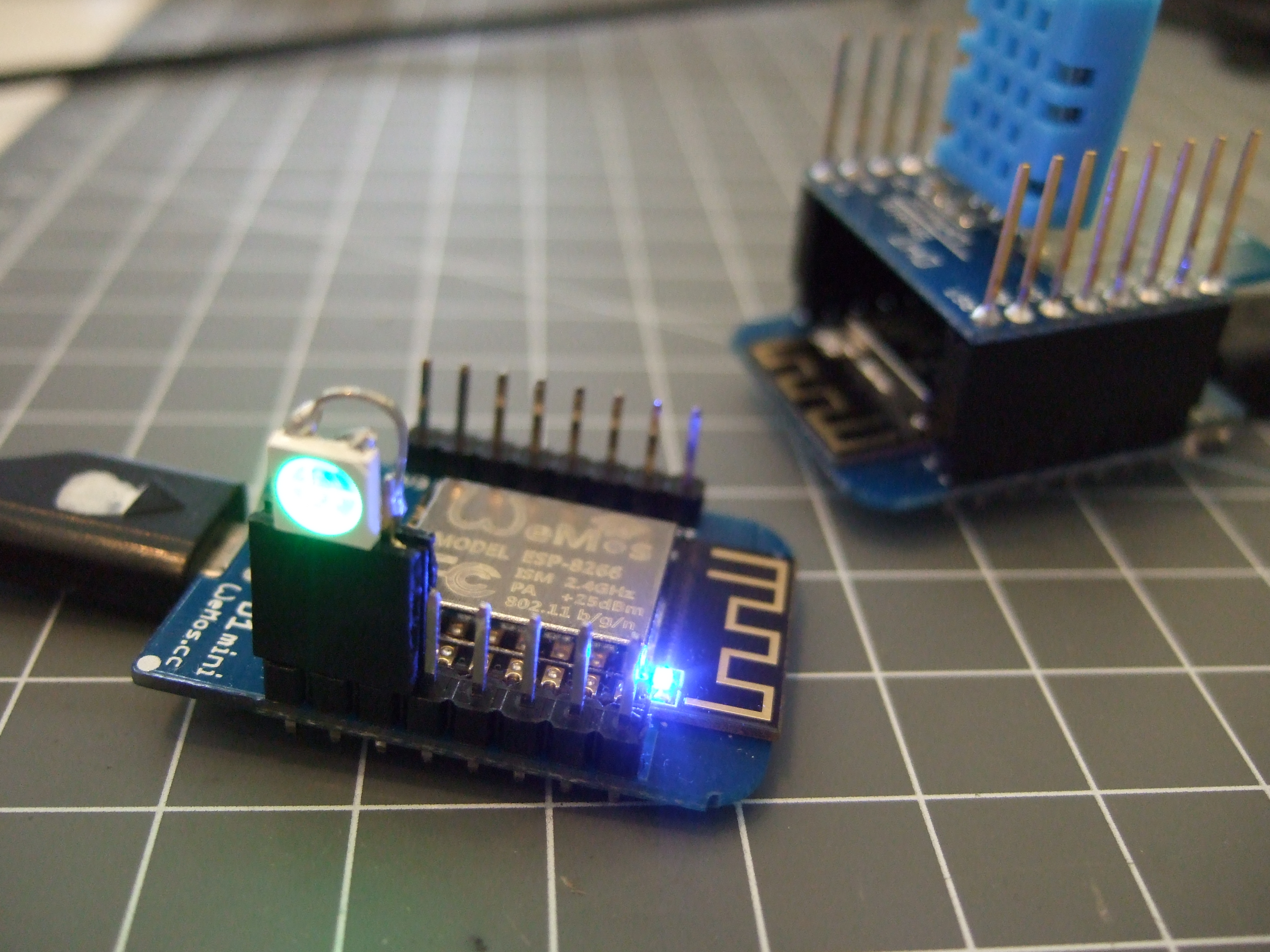
Last time on Minimal MQTT, we used a Raspberry Pi to set up an MQTT broker — the central hub of a home data network. Now it’s time to add some sensor and display nodes and get this thing running. So pull out your ESP-8266 module of choice, and let’s get going.

DSCF8443For hardware, we’re using a WeMos D1 Mini because they’re really cute, and absolutely dirt cheap, but basically any ESP module will do. For instance, you can do the same on the simplest ESP-01 module if you’ve got your own USB-serial adapter and are willing to jumper some pins to get it into bootloader mode. If you insist on a deluxe development board that bears the Jolly Wrencher, we know some people.

NodeMCU: Getting the Firmware

We’re using the NodeMCU firmware because it’s quick and easy to get running. But you’re not stuck with NodeMCU if you want to go it alone: MQTT has broad support. [TuanPM] ported over an MQTT library to the native ESP8266 SDK and of course there’s espduino, a port for an Arduino-plus-ESP combo. He also ported the MQTT module to NodeMCU that we’ll be using today. Thanks, [TuanPM]!

Continue reading “Minimal MQTT: Networked Nodes”

3D Printing And Modelling On The Fly

3D printing is supposed to be about rapid prototyping. Design, print, use, re-design, print, test — iterate until happy. But when you’re laying down filament at 60 mm/s, it can seem anything but rapid.

[Huaishu Peng], [Rundong Wu], and their supervisors at Cornell have come up with a 3D printer that can print almost as fast as you can model, and is able to add and subtract from the model on the fly. The goal is to get an initial model out so quickly that designing and printing can be truly interactive. They look to have succeeded — check out the video below.

3ders.org has a brilliant writeup of the machine that you should also go read once the video’s magic has worn off. There’s a lot going on to make this all work. The printer adds two extra degrees of freedom and a cutter head so that it can make additions and subtractions from the side, and is not constrained to layer-by-layer construction. To get the ABS to cool fast enough to make solid strands, water jets mist it down to temperature just after it’s printed.

Continue reading “3D Printing And Modelling On The Fly”

DIY PCB Fixture Helps You Spread The Paste

(Yeah, we don’t know what that title means either.) But holding your PCBs down in one place and nicely registered while you spread solder paste over them is a problem that needs solving, and [Carsten] did it nicely.

High volume PCB manufacturers have expensive screen printers to do this. The standard hardware hacker solution is to tape some scrap PCBs of the same thickness down to the table to hold the PCBs solidly in place. But if you’re doing a large run, and if you’re already firing up the laser to cut out mylar stencils, you might as well cut out some PCB-holding fixtures to match.

[Carsten]’s blog entry is short on details, but you get the idea just from looking at the picture, right? Adding registration pins to the holder that engage with the stencils could make this a real time-saver as well. As long as you’re lasering the stencil and the holder, there’s nothing stopping you. It’s a simple idea, but a good one, so we thought we’d share. Our only remaining question: what’s a Karate Light?

Unary Clock For The Binary-Challenged

If binary clocks have you confused by all the math required to figure out what time it is, we have the solution for you: a unary clock. After all, what’s simpler than summing up powers of two? Powers of one! To figure out the time, you start with the ones digit. If it’s on, you add one to the total. Then move on to the next digit. Since 12 equals one, you add another one if it’s lit. Then on to the third LED. 13 = 1, so if it’s lit, you add another one, and so on.

OK, we’re messing around. Calling this a “unary” clock is ridiculous. When it’s seven o’clock, there are seven LEDs lit. Nice and easy to read. Sixty minute LEDs is silly, so here each minute LED stands for five minutes. Good enough.

What we really like about this clock is the build. It’s intended as educational for school kids, so it has to be simple to build and easy to personalize. Building the body out of Lego bricks fits the specs nicely. Transparent Lego bricks are used to give the white LEDs some color. That was too bright, so [Shrimping It] added paper cutouts from a hole punch as diffusers.

Clock builds are a great intro to electronics because they offer so many possibilities. Whether you want to go geary, use the clock as an excuse to try out fabrication techniques, or showcase a neat display technology, your imagination has a lot of room to wander. Show us yours?

Phoenix Perry: Forward Futures

There were a lot of very technical talks at Hackaday Belgrade. That’s no surprise, this is Hackaday after all. But every once in a while it’s good to lift our heads up from the bench, blow away some of the solder smoke, and remind ourselves of the reason that we’re working on the next cool project. Try to take in the big picture. Why are you hacking?

image5[Phoenix Perry] raised a lot of big-think points in her talk, and she’s definitely hacking in order to bring more women into the field and make the creation of technology more accessible to everyone. Lofty goals, and not a project that’s going to be finished up this weekend. But if you’re going to make a positive difference in the world through what you love to do, it’s good to dream big and keep the large goal on your mind.

[Phoenix] is an engineer by training, game-coder by avocation, and a teacher for all the right reasons. She’s led a number of great workshops around the intersection of art and technology: from physical controllers for self-coded games to interactive music synthesis devices disguised as room-sized geodesic domes. And she is the founder of the Code Liberation Foundation, a foundation aimed at teaching women technology through game coding. On one hand, she’s a hacker, but on the other she’s got her eyes on a larger social goal.

Continue reading “Phoenix Perry: Forward Futures”

Facebook Open-Sources Their Capture-the-Flag Hacking Challenges

If you want to learn how to defeat computer security, nothing beats hands-on experience. Of course, if you get your hands on someone’s system without their permission, you may end up having a very short training that ends with a jail term. And that’s where capture-the-flag (CTF) events come in.

A CTF is a system of increasingly-difficult challenges that can’t be too easy or too hard. A well-designed CTF teaches all of the participants stuff that they didn’t know, no matter how far they get and what skills they came in with. Designing a good CTF is difficult.

But since it’s also a competition, running one also involves a lot of horrible bookkeeping for the folks running it. Registering teams and providing login pages is the dirty work that you have to do in the background, that takes away time from building the systems which others are going to take apart.

Which is why it’s great that Facebook is opening up their CTF-hosting platform, along with a few starter challenges, for us all to play along. We love CTFs and related hacking challenges. If this spurs the creation of more, we’re all for it. You can find the whole setup on GitHub.

If you’re new to CTFs, here’s an awesome collection of CTF-related material on GitHub to get you started. And if your tastes run more toward hardware hacking, we’ve covered previous firmware CTFs, but frankly there’s a lot more material out there. We feel a feature post coming on…

Thanks [ag4ve] for the unintentional tip!