Omniwheel Robot Build Uses A Bit Of Everything

Machinist, electronics engineer, programmer, and factory worker are all skills you can wield if you take on a project like building this omniwheel robot (translated).

The omniwheels work in this tripod orientation because they include rollers which turn perpendicular to the wheel’s axis. This avoids the differential issue cause by fixed-position wheels. When the three motors are driven correctly, as shown in the video below, this design makes for the most maneuverable of wheeled robots.

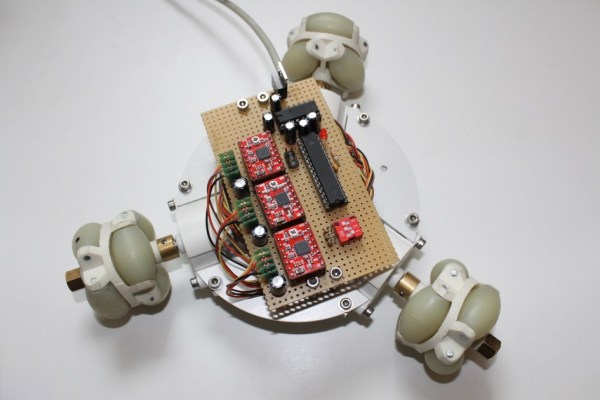
An aluminum plate serves as the chassis. [Malte] milled the plate, cutting out slots for the motor with threaded holes to receive the mounting screws. A few stand-offs hold the hunk of protoboard which makes up the electronic side of the build. The large DIP chip is an ATmega168. It drives the motors via the trio of red stepper motor driver boards which he picked up on eBay.

So far the vehicle is tethered, using a knock-off of a SixAxis style controller. But as we said before, driving the motors correctly is the hard part and he’s definitely solved that problem.

Continue reading “Omniwheel Robot Build Uses A Bit Of Everything”
Raspberry Pi Used To Build A Smart Television

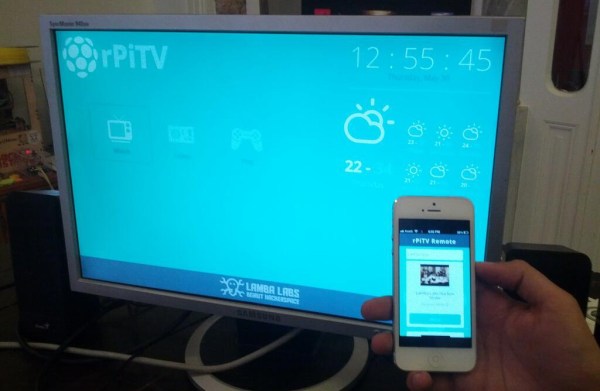
In the title of his post [Donald Derek] calls this a Google TV you can build yourself. That’s certainly an over-reach. But the project is still a very impressive smart television built using a Raspberry Pi.

The open source project starts with the Rasbian OS, an RPi version of Debian Linux. Functionality is built up by installing Chromium to display webpages, a script to download YouTube videos, and OMXPlayer to play videos including 1080P HD content. The image above shows the smart phone controller for the system. This is provided by a Node.js configuration that manages communication between the remote and the RPi board.

On the one hand we love that this is open source. On the other, it’s not going to be able to tap into a lot of the content which makes a Google TV so valuable. For instance, you won’t be able to watch Netflix because that service doesn’t work on Linux systems. But you should be able to watch browser-based content like Hulu.

USB Infrared Receiver Looks Good Sitting In Your Livingroom

usb-ir-receiver

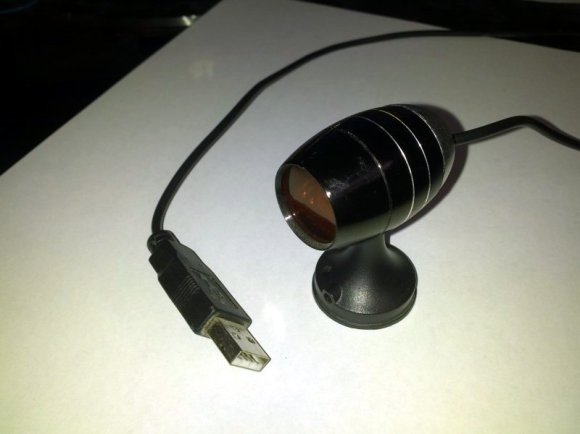
The problem with building your own electronics for the living room is that the final product may not fit your decorating style. This was true with [Itay’s] prototype of a universal USB IR receiver. So after testing it out for a few weeks he decided to build a final version that started by selecting an enclosure he could be proud of.

He came across an LED flash light at the dollar store which has an aluminum body. When we read about this we envisioned a cheap version of a Mag Light from which he removed the cylinder that holds the batteries. But actually, the pod seen above is the entire flashlight (with an added base). It forced him to design a tiny surface mount PCB to fit everything inside.

It’s not too much of a stretch since IR receivers tend to be small anyway. [Itay’s] design put a PIC 18F2553 on one side of the board. The other side hosted the through hole components: an IR receiver, LED for feedback, and the connections for the USB cable that exit through the rubber button cover that used to switch the flashlight on. He had a problem with one of the resistor values which took a while to figure out. But eventually he got it working. It’s been in use now for six months.

Embedded Solution For Uploading Webcam Pictures To The Cloud

carambola-webcam-uploader

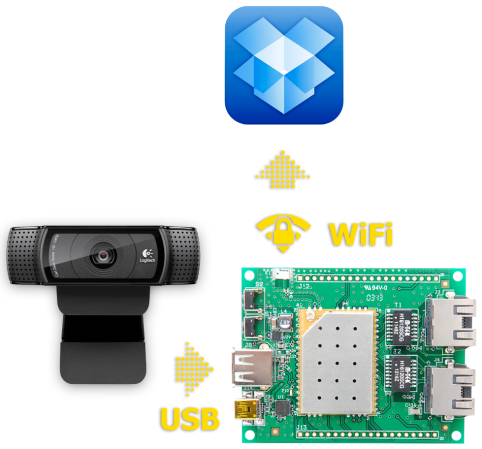
We have friends watch the cats when we go out-of-town. But we always leave a server running with a webcam (motion activated using the Linux “motion” software) so we can check in on them ourselves. But this project may inspire a change. It leverages the features of a Carambola2 to capture images and upload them to Dropbox.

In the picture above the green PCB is a development board for the tiny yellow PCB which is the actual Carambola2. It is soldered on the dev board using the same technique as those HC-05 Bluetooth modules. That shielded board includes a Qualcomm SoC running Linux and a WiFi radio. The dev board feeds it power and allows it connect to the USB webcam.

There’s a bit of command line kung-fu to get everything running but it shouldn’t be out of reach for beginners. Linux veterans will know that taking snapshots from a webcam at regular intervals is a simple task. Uploading to a secure cloud storage site is not. A Bash script handles the heavy lifting. It’s using the Dropbox Application API so this will not violate their TOS and you don’t have to figure out your own method of authenticating from the command line.

IOS Keyboard Exploit Allows Brute Force IPad Lock Screen Attack

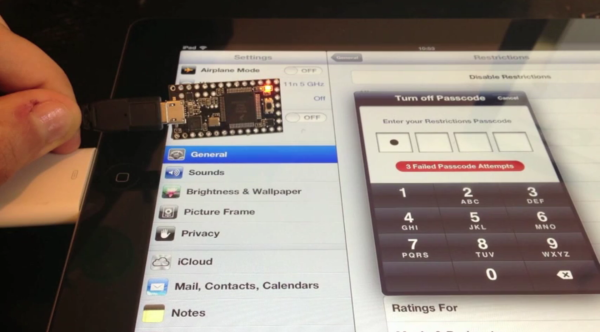
It’s quite common to have a timed lockout after entering several bad passwords. This simple form of security makes automated brute force attacks unfeasible by ballooning the time it would take to try every possible permutation. The lock screen on iOS devices like iPad and iPhone have this built in. Enter your code incorrectly several times and the system will make you wait 1, 5, 15, and 60 minutes between entries as you keep inputting the wrong code. But there is an exploit that gets around this. [Pierre Dandumont] is showing off his hardware-based iPad lock screen attack in the image above.

He was inspired to try this out after reading about some Mac EFI attacks using the Teensy 3. That approach used the microcontroller to spoof a keyboard to try every PIN combination possible. By using the camera kit for iPad [Pierre] was able to do the same. This technique lets you connect wired keyboards to the iPad, but apparently not the iPhone. A bluetooth keyboard can also be used. These external keyboards get around the timing lockout associated with the virtual lockscreen keyboard.

We’re of the opinion that this is indeed a security vulnerability. If you forget your passcode you can simply restore the device to remove it. That wipes all of your personal data which can then be loaded from an iTunes backup. Lockscreens are paramount if a device is stolen. They will give you the time you need to change any online credentials which might be remembered by the device.

Continue reading “IOS Keyboard Exploit Allows Brute Force IPad Lock Screen Attack”

Apple MagSafe Protocol Hacking

[Ken Shirriff] was interested in how the Apple MagSafe works. Specifically he wanted to know what controlled the LED on the connector itself so he tore one open to see what is inside. There’s a chip present and he didn’t waste time figuring out how the MagSafe communication protocol works.

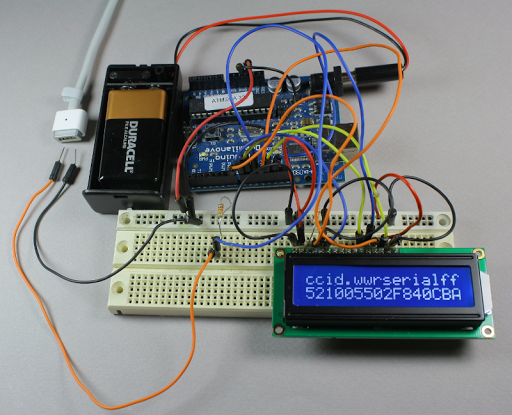
The DS2413 chip he found on the MagSafe’s tiny little PCB has just six pins. Two of these control a pair of LEDs, which give the indicator its color range.  Another pin is used for 1-wire communications. When polled the charger will return a 64-bit identification number that includes a variety of information. [Ken] looks into what data is offered from several different models of charger by using the Arduino setup above. But the results are not entirely straight-forward as he discusses in his article. The 1-wire protocol is also used to switch the LEDs. This process is the responsibility of the computer being charged, but [Ken] shows how the colors can be cycled using an Arduino (with a couple of 9-volts as a source instead of a connection to mains).

Alarm Clock Uses Raspberry Pi To Poll Google Calendar

rpi-google-calendar-alarm-clock

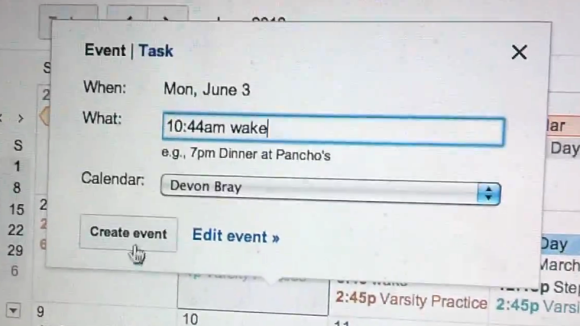
We know a lot of people love using their smart phone as a bedside alarm clock. The problem is that a mobile phone is mobile by nature and eventually you’ll forget to put it in the bedroom one night. That’s why we like the solution that [Devon Bray] has chosen. He set up his Raspberry Pi as an alarm clock that is set using Google Calendar.

The setup which he shows off in his video is quite simple. The Raspberry Pi is connected to a set of powered computer speakers. It plays a song whenever an appointment called “wake” comes up on his Google Calendar. This is accomplished by using the Google Data APIs Python Client Library (isn’t that a mouthful?).

This only scratches the surface of what is possible. With this in place you could easily add LEDs to the room for a sunrise alarm. But if you’d prefer a more bare-bones hardware side of things that’s possible too.

Continue reading “Alarm Clock Uses Raspberry Pi To Poll Google Calendar”