Simple Touch Sensors With The Arduino CapSense Library

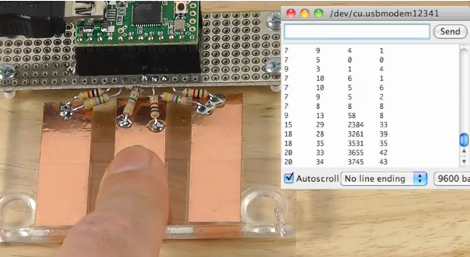
Ever thought of using touch sensors on your projects but didn’t because it would be too much work? [Paul Stoffregen] proves that it can be pretty easy if you use the CapSense library for Arduino. Here he’s created three touch sensors, connecting them to the Teensy microcontroller with two resistors each. The larger resistor (looks like 4.7 megaohms here) sends a signal through the copper pad which is read by the secondary pin. Here that pin is protected from electrostatic discharge with the 1k resistors. The microcontroller takes a reading by measuring how long it takes the voltage to change on the input pin.

Since the CapSense library takes care of the timing involved in these readings, all you have to do is decide how your program will react to the numbers that are coming in. In the video after the break [Paul] is echoing the timing figures back through the serial monitor to get an idea of what the data looks like. He experiments with touching the copper directly, and touching it through a piece of clear tape.

We’ve seen the CapSense library at work before in this interactive exhibit piece.

Continue reading “Simple Touch Sensors With The Arduino CapSense Library”

Black Friday Deals And Contest Giveaways

Winter is coming, and it’s a great time to start accumulating parts and tools to keep you occupied with projects during the dark and cold days ahead.

Black Friday

We got a tip from Pololu about their planned Black Friday deals, and thought we’d check with some of the other parts suppliers that cater to the hobby market too. Here’s what we found:

  • Adafruit Industries Black Friday – Get 10% off of your purchases made any time on Friday if you use the code ‘BLACK’ (12:00am-11:59pm — we’d guess this is Eastern Time) – UPDATE: Get 10% of Monday 11/28 with the code ‘CYBER’.
  • Pololu Black Friday – many items are available at a great discount plus extra savings using their Black Friday coupons. Sales run midnight on Thursday morning through 11:59pm on Monday night (Pacific Time, 11/24 through 11/28)
  • UPDATE: Sugru – we just got an email about a special offer for this moldable material. Now through December 19th you can get your fourth pack for free using the coupon code: YAYCHRISTMAS

We did hear back from SparkFun. They don’t have a Black Friday deal planned, but they are planning on Free Day 2012 happening some time early in the year! We’ll keep our eyes open for details, but if you hear about it before we do send us a tip.

Make also got back to us. No specific details about Black Friday, but we’re told they have some type of deals in the works.

Digikey and Mouser didn’t get back to us in time for this post.

Laser Cutter Giveaways

Do you want a laser cutter to call your own? Yeah, so do we. If you come up with a really cool project perhaps you can win one. It looks like there’s two contests a contest going on right now that is giving one away to the grand prize winner.

  • Build Lounge is giving away a 40W CO2 Deluxe Hobby Laser Cutter to the best project based on light (community votes).
  • Instructables – Oops…. we waited too long to post about this one as the contest closed on the 14th, sorry. But chances are good this will come around again. For now, you’ll have to be satisfied at viewing the entries that made the finals.

Stroboscope Project Uses Optical Drive Motor And Arduino

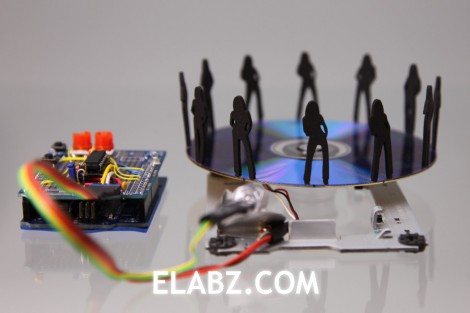
In the quest for a diy laser cutter made from DVD burner parts (that hack’s still in the works) this guy ended up with a junk box full of optical-drive leftovers. He put some of that surplus to good use by building this stroboscope. As the media spins, the white LED just out of focus in the foreground strobes to freeze the little black figure in the same place. The effect, as seen in the video after the break, is a dancing figure created by the optical illusion.

This is the same concept as that amazing 3D rowing skeleton build, but scaled down greatly. Each of the silhouettes seen above are slightly different, showing one pose that makes up a frame of the overall animation. They’re laser cut, but some careful paper-craft could probably accomplish the same thing. Assuming you could keep them from warping when spinning at high speeds.

Continue reading “Stroboscope Project Uses Optical Drive Motor And Arduino”

Experimenting With An Air Muscle And Sensor Feedback

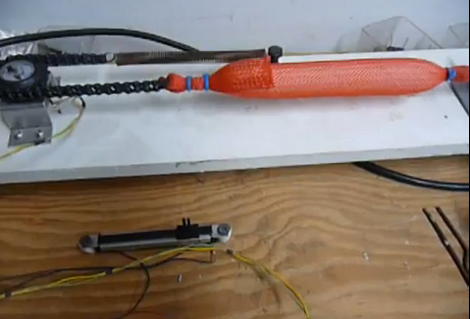
Check out this setup that [Ruenahcmohr] is using in his air muscle experiments. The orange mesh contains an air bladder that is connected to a hose on the right side. The bladder can be filled, or emptied with two solenoid valves not seen here (but you can get a good look in the video after the break). The muscle attached to chain on the other end and is kept under constant tension by a spring. The chain bends 180 degrees around a gear which is connected to a potentiometer. This gives feedback to the ATmega32 which controlling the whole thing. This way, the slider seen above can be used to control the apparatus.

We don’t know if [Ruenahcmohr] has a use in mind for this setup, but it certainly looks promising! We’ve seen these air muscles used for haptic feedback before, but right now we’re drawing a blank when it comes to ideas. What would you use it for?

Continue reading “Experimenting With An Air Muscle And Sensor Feedback”

TI Launchpad Adds Computer Control To A Robot Arm

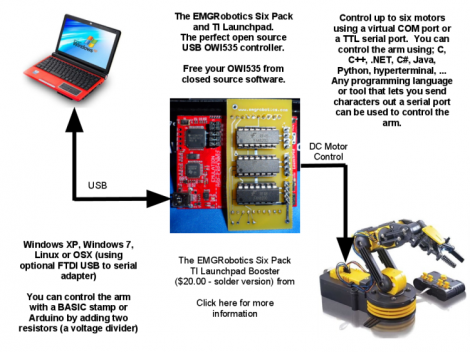
[Eric Gregori] had an OWI535 toy robotic arm. Although cheap (coming it at around $30) the arm is only set up to be used via a wired control box. [Eric] knew he could do better by adding computer control via a TI Launchpad and motor driver peripheral.

The arm has shoulder, elbow, and wrist joints, a rotating base, and a gripper. All of these are actuated by 3V DC motors and have just two control wires. [Eric’s] motor driver add-on for the Launchpad works great in this case. It’s got three FAN8200 dual motor driver chips on board so it can control up to six motors. Once he made the hardware connections it’s just a matter of sending the commands to the Launchpad via its USB interface, but you will also need to use a larger microcontroller than comes with the Launchpad. Here he’s chosen an MSP430G2553.

In order to make things a little bit more fun he also wrote a GUI for controlling the arm from the computer. He used RobotSee, a programming language that lets you use an image of the hardware, and overlay the controls on top of it. Now he just needs to make this into a web interface and he can have a smartphone controlled crane game.

Don’t forget to check out the video after the break. Continue reading “TI Launchpad Adds Computer Control To A Robot Arm”

Gridrunner: A Custom Part For Measuring In Eagle CAD

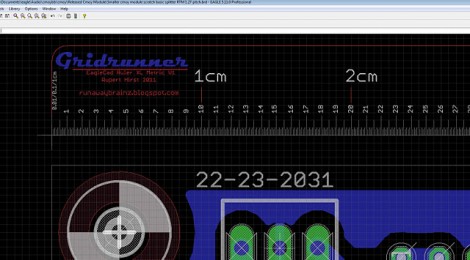
[Koogar] came up with a useful tool for checking the measurements of your layouts in Eagle CAD. He calls it the Gridrunner; a custom part that adds a 200mm ruler to your design. Tick marks are in 1/10th of a millimeter increments for great accuracy when used with the zoom feature of Eagle. Once you’ve got the layout just right, delete the ruler from your design and export it for fabrication. [Koogar] does mention that the beta version of Eagle 6 has a new measuring tool, but he still thinks the Gridrunner offers some things that the built-in tool doesn’t. See just how handy it is in the video after the break. The measuring starts about 1:40 into it.

We found it interesting that [Koogar] is using Eagle for quite a bit more than PCB design. We’ve used it for laying out a drilling template for face plates before, but he’s going far beyond that. He uses the library editor to recreate the parts of his CNC machine which he says are then really easy to align. From there, he exports the CAM files for mounting brackets. Do you use Eagle for something other than PCB design? Let us know about it by leaving a comment. Continue reading “Gridrunner: A Custom Part For Measuring In Eagle CAD”

Experimenting With Bridge Rectifers For AC To DC Power Conversion

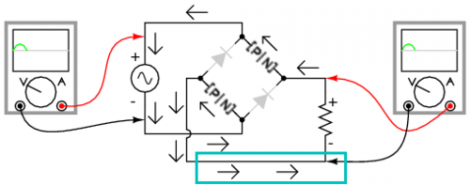
The folks over at Toymaker Television have put together another episode. This time they’re looking at bridge rectifiers and how they’re used in AC to DC converters.

This is a simple concept which is worth taking the time to study for those unfamiliar with it. Since Alternating Current is made up of cycles of positive and negative signals it must be converted before use in Direct Current circuits; a process called rectification. This is done using a series of 1-way gates (diodes) in a layout called a bridge rectifier. That’s the diamond shape seen in the diagram above.

This episode, which is embedded after the break, takes a good long look at the concept. One of the things we like best about the presentation is that the hosts of the show talk about actual electron flow. This is always a quagmire with those new to electronics, as schematics portray flow from positive to negative, but electron theory suggests that actual electron flow is the exact opposite. Continue reading “Experimenting With Bridge Rectifers For AC To DC Power Conversion”