Waveshare’s Pi CM3 Laptop Arrives A Bit Too Late

The good news it that you can now buy a pretty decent laptop that’s based around the Raspberry Pi Compute Module (CM). The bad news is that it was conceived before anyone knew the interface was going to change for the new CM4, so it doesn’t have any of the features that would make it really interesting such as support for PCI-Express. Oh, and it costs $300.

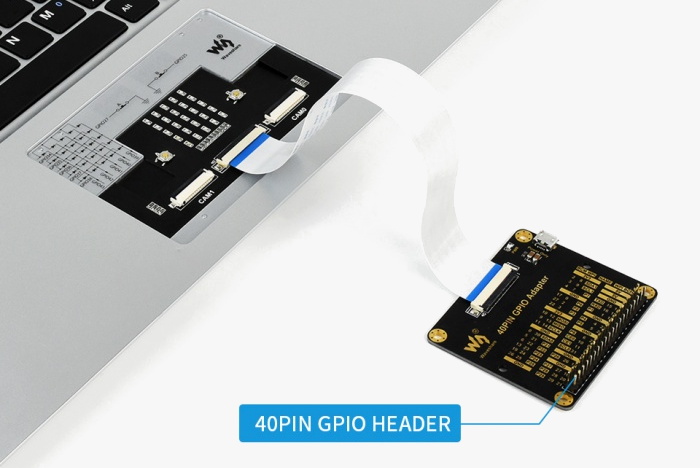
Waveshare, the company that most of us know best as a purveyor of e-paper displays, also made some rather interesting design choices on their laptop. See that black pad under the keyboard? No, it’s not a trackpad. It’s just a decorative cover that you remove to access an LED matrix and GPIO connectors. Make no mistake, a laptop that features a GPIO breakout right on the front is definitely our jam. But the decision to install it in place of the trackpad, and then cover it with something that looks exactly like a trackpad, is honestly just bizarre. It might not be pretty, but the Pi 400 seemed to have solved this problem well enough without any confusion.
On the other hand, there seems to be a lot to like about this product. For one, it’s a very sleek machine that doesn’t have the boxy and somewhat juvenile look that seems so common in other commercial Pi laptops. We also like that Waveshare included a proper Ethernet jack, something that’s becoming increasingly rare even on “real” laptops. As [ETA PRIME] points out in the video after the break, the machine also has a crisp IPS display and a surprisingly responsive keyboard. Though the fact that it still has a “Windows” key borders on being offensive considering how much it costs.

But really, the biggest issue with this laptop is when it finally hit the market. If Waveshare had rushed this out when the CM3 was first introduced, it probably would have been a more impressive technical achievement. On the other hand, had they waited a bit longer they would have been able to design it around the far more capable CM4. As it stands, the product is stuck awkwardly in the middle.

Continue reading “Waveshare’s Pi CM3 Laptop Arrives A Bit Too Late”
Exploring Turn Of The Century RAF Avionics

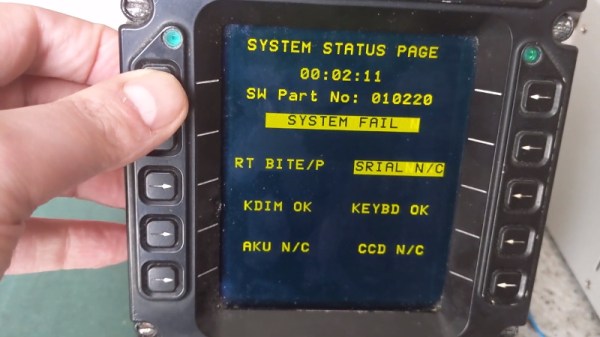
The second hand market is a wonderful thing; you never know what you might find selling for pennies on the dollar simply because it’s a few years behind the curve. You might even be able to scrounge up some electronics pulled out of a military aircraft during its last refit. That seems to be how [Adrian Smith] got his hands on a Control Display Unit (CDU) originally installed in a Royal Air Force AgustaWestland AW101 “Merlin” helicopter. Not content to just toss it up on a shelf, he decided to take a look inside of the heavy-duty cockpit module and see if he couldn’t make some sense out of how it works.

Unsurprisingly, [Adrian] wasn’t able to find much information on this device on the public Internet. The military are kind of funny like that. But a close look at the burn-in on the CDU’s orange-on-black plasma display seems to indicate it had something to do with the helicopter’s communication systems. Interestingly, even if the device isn’t strictly functional when outside of the aircraft, it does have a pretty comprehensive self-test and diagnostic system on-board. As you can see in the video after the break, there were several menus and test functions he was able to mess around with once it was powered up on the bench.

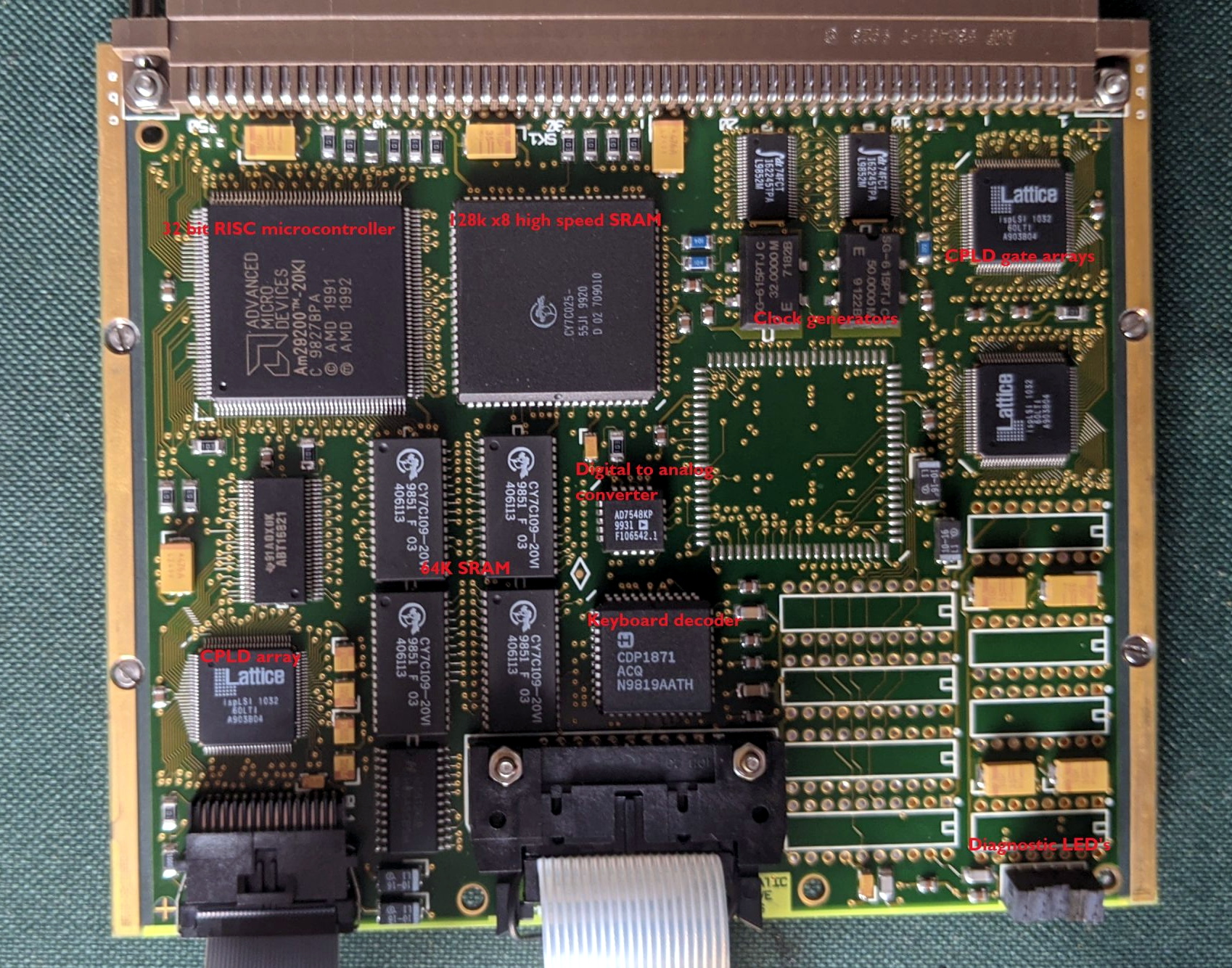
With the case cracked open, [Adrian] found three separate PCBs in addition to the display and keyboard panel on the face of the CDU. The first board is likely responsible for communicating with the helicopter’s internal systems, as it features a MIL-STD-1553B interface module, UART chips, and several RS-232/RS-485 transceivers. The second PCB has a 32-bit AMD microcontroller and appears to serve as the keyboard and display controller, possibly also providing the on-board user interface. The last board looks to be the brains of the operation, with a 25 MHz Motorola 68EC020 CPU and 1Mb of flash.

All of the hardware inside the CDU is pretty generic, but that’s probably the point. [Adrian] theorizes that the device serves as something of a generic pilot interface module, and when installed in the Merlin, could take on various functions based on whatever software was loaded onto it. He’s found pictures online that seem to show as many as three identical CDUs in the cockpit, all presumably running a different system.

[Adrian] has uncovered some interesting diagnostic information being dumped to the CDU’s rear connectors, but he’s still a long way off from actually putting the device to any sort of practical use. If any Hackaday readers have some inside information on this sort of hardware, we’re sure like to hear about it.

Continue reading “Exploring Turn Of The Century RAF Avionics”

Wemo Smart Plug Gets Brain Transplant

Like many modern smart home gadgets, Belkin’s Wemo brand of smart plugs has a tendency to phone home every time you turn on a lamp. [Gigawatts] wasn’t having it, so they figured out how to flash the device with OpenWRT and replicated its original functionality with a web interface. Unfortunately this stopped working after awhile, and rather than trying to diagnose the issue, it seemed the time would be better spent simplifying the whole thing.

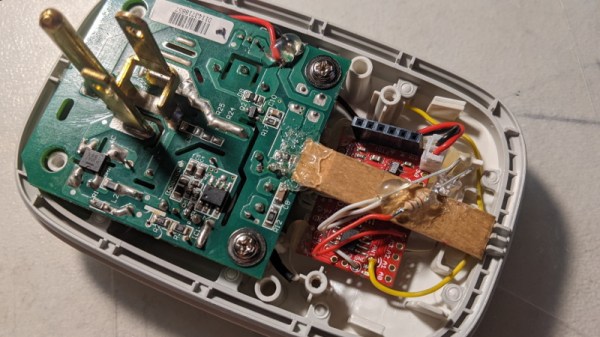
As [Gigawatts] explains, there are actually two separate boards inside the Wemo plug. One holds the relay to do the high-voltage switching, and the other provides the control. They are linked with a three wire connector, making it exceptionally simple to swap out the original controller for something different. The connector supplies 5 V and ground, all you’ve got to do is pull the third wire high to flick the switch.

While the ESP8266 probably would have been the first choice for many a Hackaday reader, [Gigawatts] actually went with the Moteino, a low-power Arduino compatible board with integrated RFM69 transceiver. With an LED to indicate status and a few lines of code tweaked, the Moteino got this once WiFi-only smart plug speaking a new language.

There’s some debate over how effective smart plugs are from an energy efficiency standpoint, but even if this reborn Wemo doesn’t help [Gigawatts] save much power, at least it won’t be blabbing about everything to a third-party.

Hackaday Links Column Banner

Hackaday Links: November 29, 2020

While concerns over COVID-19 probably kept many a guest room empty this Thanksgiving, things were a little different aboard the International Space Station. The four-seat SpaceX Crew Dragon is able to carry one more occupant to the orbiting outpost than the Russian Soyuz, which has lead to a somewhat awkward sleeping arrangement: there are currently seven people aboard a Station that only has six crew cabins. To remedy the situation, Commander Michael Hopkins has decided to sleep inside the Crew Dragon itself, technically giving himself the most spacious personal accommodations on the Station. This might seem a little hokey, but it’s actually not without precedent; when the Shuttle used to dock with the ISS, the Commander would customarily sleep in the cockpit so they would be ready to handle any potential emergency.

Speaking of off-world visitation, the Hayabusa2 spacecraft is nearly home after six years in space. It won’t be staying long though, the deep-space probe is only in the neighborhood to drop off a sample of material collected from the asteroid Ryugu. If all goes according to plan, the small capsule carrying the samples will renter the atmosphere and land in the South Australian desert on December 6th, while Hayabusa2 heads back into the black for an extended mission that would have it chasing down new asteroids into the 2030s.

Moving on to a story that almost certainly didn’t come from space, a crew from the Utah Division of Wildlife Resources recently discovered a strange metal monolith hidden in the desert. While authorities were careful not to disclose the exact coordinates of the object, it didn’t take Internet sleuths long to determine its location, in part thanks to radar data that allowed them to plot the flight path of a government helicopters. Up close inspections that popped up on social media revealed that the object seemed to be hollow, was held together with rivets, and was likely made of aluminum. It’s almost certainly a guerrilla art piece, though there are also theories that it could have been a movie or TV prop (several productions are known to have filmed nearby) or even some kind of military IR/radar target. We may never know for sure though, as the object disappeared soon after.

Even if you’re not a fan of Apple, it’s hard not to be interested in the company’s new M1 chip. Hackers have been clamoring for more ARM laptops and desktops for years, and with such a major player getting in the game, it’s only a matter of time before we start seeing less luxurious brands taking the idea seriously. After the recent discovery that the ARM version of Ubuntu can run on the new M1 Macs with a simple virtualization layer, it looks like we won’t have to wait too long before folks start chipping away at the Walled Garden.

In the market for a three phase servo controller? A reader who’s working on a robotics project worth as much as a nice house recently wrote in to tell us about an imported driver that goes for just $35. Technically it’s designed for driving stepper motors, but it can also (somewhat inefficiently) run servos. Our informant tells us that you’d pay at least $2,000 for a similar servo driver from Allen-Bradley, so the price difference certainly seems to make up for the hit in performance.

Finally, some bittersweet news as we’ve recently learned that Universal Radio is closing. After nearly 40 years, proprietors Fred and Barbara Osterman have decided it’s time to start winding things down. The physical store in Worthington, Ohio will be shuttered on Monday, but the online site will remain up for awhile longer to sell off the remaining stock. The Ostermans have generously supported many radio clubs and organizations over the years, and they’ll certainly be missed. Still, it’s a well-deserved retirement and the community wishes them the best.

Open Hardware GPS Tracker Works On Your Terms

These days, there’s plenty of options if you want to get a GPS tracker for your vehicle. Unfortunately, they come with the sort of baggage that’s becoming increasingly common with consumer tech: subscription fees, third-party snooping, and a sneaking suspicion that you’re more commodity than customer. So [Viktor Takacs] decided to take things into his own hands and create an open GPS tracker designed for privacy minded hackers.

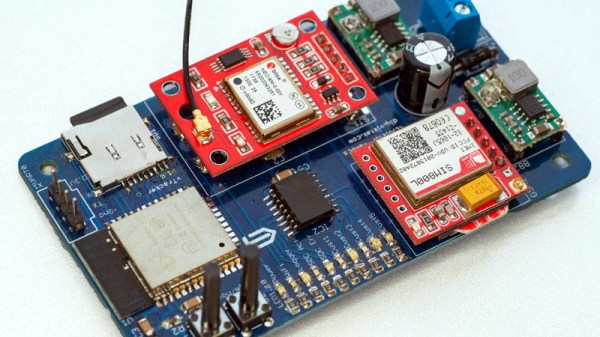
As [Viktor] didn’t want to reinvent the wheel, his design leverages several off-the-shelf modules. The core of the tracker is the ESP32, which gives him plenty of computational power while still keeping energy consumption within reasonable levels. There’s also a NEO-6M GPS receiver which works at the same 3.3 V level as the ESP32, allowing the microcontroller to read the NMEA sentences without a level shifter. He decided to go with the low-cost SIM800L GSM modem, but as it only works on 2G networks, provisions have been made in the board design to swap it out for a more modern module should you desire.

For the code to glue it all together, [Viktor] pulled in nearly a dozen open source libraries to create a feature-complete firmware that uses MQTT to create a database of location data on his personal server. From there the data is plugged into Home Assistant and visualized with Grafana. This is enough to deliver core functionality, but he says that more custom software components as well as a deep-dive into the security implications of the system is coming in the near future.

We’ve seen custom built GPS trackers before, as generally speaking, it doesn’t take a whole lot to spin up your own solution. But we think the polish that [Viktor] has put on this project takes it to the next level, and ranks it up there among some of the most impressive bespoke tracking solutions we’ve seen over the years.

Scratch Building A Supersized CNC Router

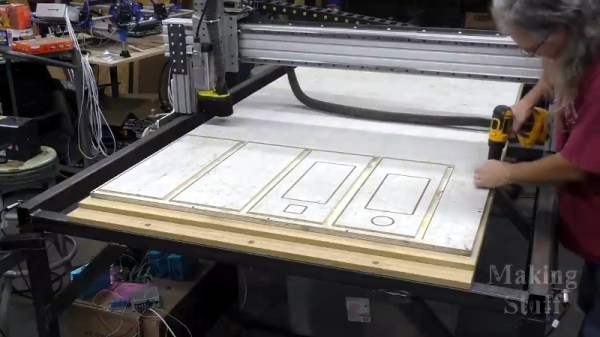
Many of us have spent the better part of a year on COVID-19 lockdown, and what do we have to show for it? Bit of progress on the Netflix queue? Maybe a (slightly) cleaned up garage or workshop? Not if you’re [Bob] of Making Stuff fame: he’s spent the last nine months working on a completely custom CNC router big enough to take a whole sheet of plywood.

The build is documented over a series of nearly a dozen YouTube videos, the first of which was put out all the way back in January of 2020. Seeing [Bob] heading to the steel mill to get his frame components with nary a mask in sight is a reminder of just how long he’s been working on this project. He’s also put together a comprehensive Bill of Materials on his website should anyone want to follow in his footsteps. Coming in at only slightly less than $4,000 USD, it’s certainly not a budget build. But then when we’re talking about a machine of this scale, nothing comes cheap.

Every component on this build is heavy-duty.

Even if you don’t build you own version of this router, it’s impossible to watch the build log and not get inspired about the possibilities of such a machine. In the last video we’re even treated to a bit of self-replicating action, as the jumbo CNC cuts out the pieces for its own electronics enclosure.

You can tell from the videos that [Bob] is (rightfully) proud of his creation, and isn’t shy about showing the viewer each and every triumph along the way. Even when things don’t go according to plan, there are lessons to be learned as he explains the problems and how they were ultimately resolved.

Of course, we know a home-built CNC router doesn’t need to cost thousands of dollars or take up as much space as a pool table. The average Hackaday reader probably has no need of a monster like this, and wouldn’t have anywhere to keep it even if they did. But that doesn’t mean we can’t look on with envy as we wait to see what kind of projects [Bob] churns out with such an incredible tool in his arsenal.

Continue reading “Scratch Building A Supersized CNC Router”

HackRF PortaPack Firmware Spoofs All The Things

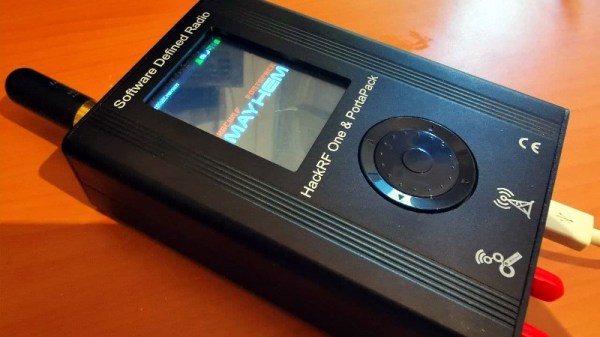
The HackRF is an exceptionally capable software defined radio (SDR) transceiver, but naturally you need to connect it to a computer to actually do anything with it. So the PortaPack was developed to turn it into a stand-alone device with the addition of a touchscreen LCD, a few buttons, and a headphone jack. With all the hardware in place, it’s just a matter of installing a firmware capable enough to do some proper RF hacking on the go.

Enter MAYHEM, an evolved fork of the original PortaPack firmware that the developers claim is the most up-to-date and feature packed version available. Without ever plugging into a computer, this firmware allows you to receive, decode, and re-transmit a dizzying number of wireless protocols. From firing off the seating pagers at a local restaurant to creating a fleet of phantom aircraft with spoofed ADS-B transponders, MAYHEM certainly seems like it lives up to the name.

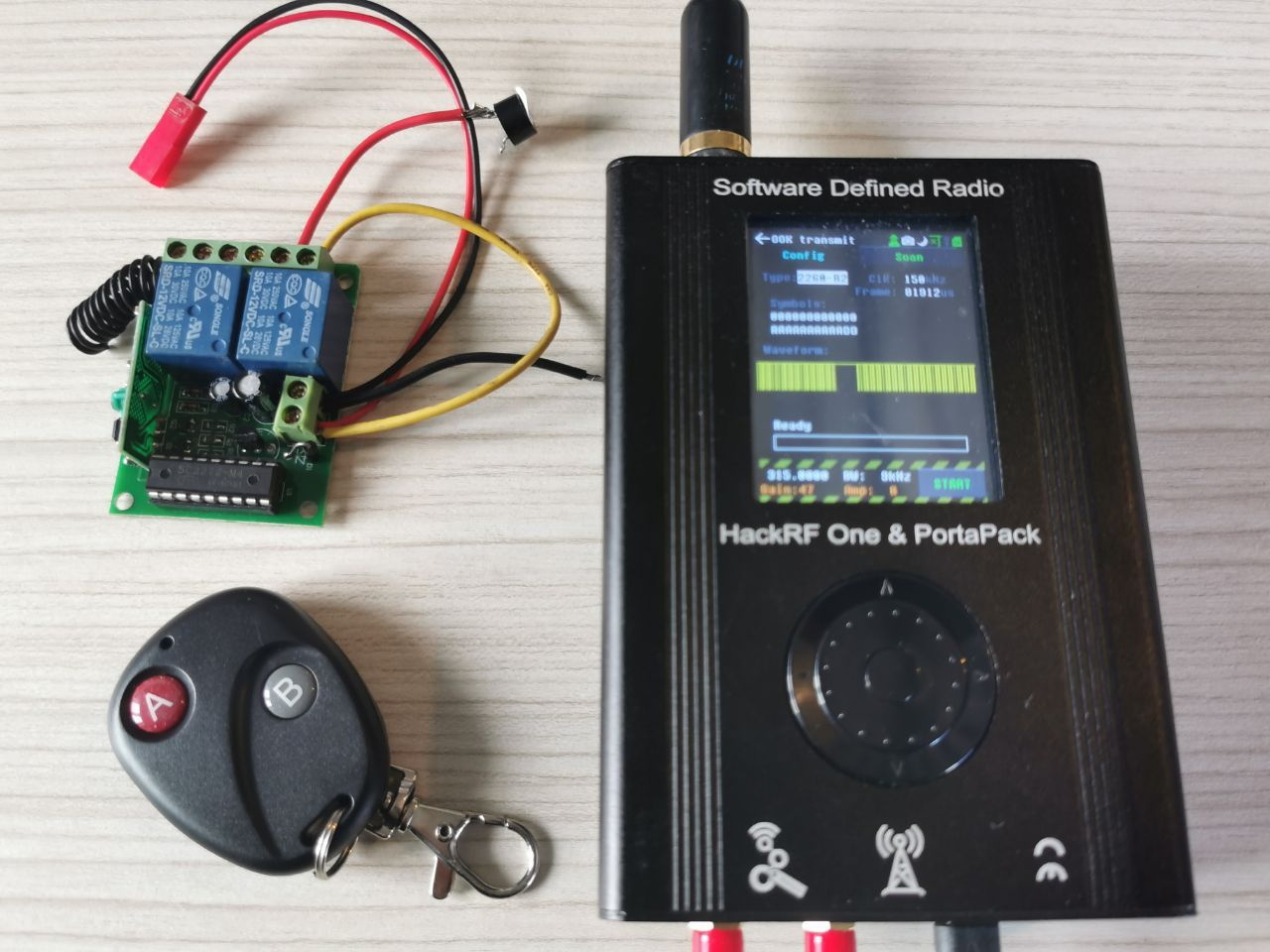
[A. Petazzoni] recently put together a detailed blog post about installing and using MAYHEM on the HackRF/PortaPack, complete with a number of real-world examples that show off just a handful of possible applications for the project. Jamming cell phones, sending fake pager messages, and cloning RF remotes is just scratching the surface of what’s possible.

It’s not hard to see why some have already expressed concern about the project, but in reality, none of these capabilities are actually new. This firmware simply brings them all together in one easy-to-use package, and while there might be an argument to be made about proliferation, we all know that the responsibility to behave ethically rests on the user and not the tools.