Upgrading The RAM In A 25 Year Old Oscilloscope

From reading his extensive write-ups on the subject, there’s one thing we know for sure: [Tom Verbeure] loves his Tektronix TDS 420A oscilloscope. While it might be older than some of the people reading this, it’s still an impressive piece of hardware with more than enough bells and whistles to keep the average hacker occupied. Especially if you’re willing to perform some hardware modifications.
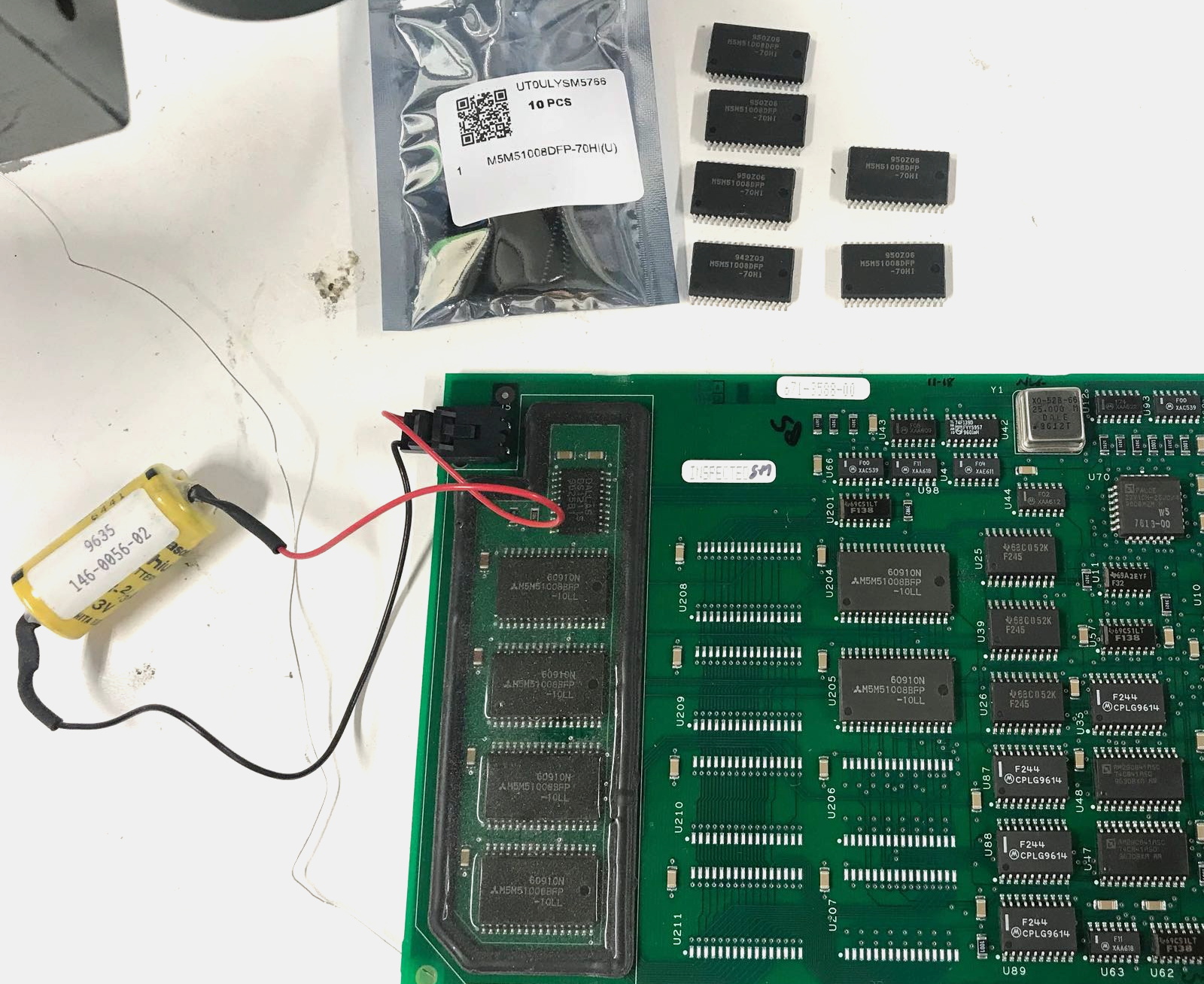
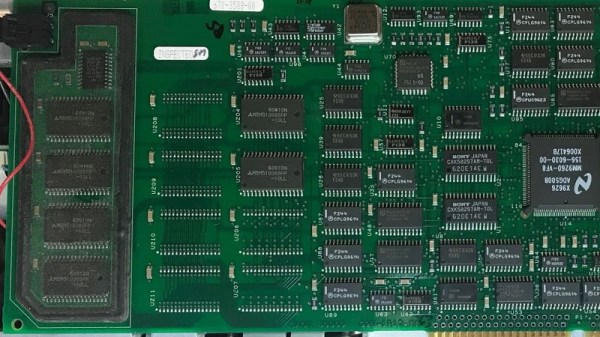
Note the battery to retain calibration data.

[Tom] already knew how to tickle the scope into unlocking software features, a process not unlike what we’ve seen done on more modern scopes. But there’s only so far you can get by toggling software flags.

Some of the more advanced features that are turned off in the firmware actually need additional hardware to function. Simply bumping the sample points to 120,000 in software wasn’t enough, the scope actually needs the memory to hold them in.

Now logically, if there’s a software option to increase the number of samples, there must be a hardware upgrade that goes along with it. Sure enough, [Tom] found there were 6 open spots next to the scope’s existing M5M51008 static RAM ICs.

As luck would have it the chips are still available, albeit from a different manufacturer and a bit faster than the original parts. Digikey wouldn’t sell fewer than 100 of them, but UTSource was happy to sell him 10. In this case, the parts were cheaper than the shipping cost. Installation was about as straightforward as it gets, though [Tom] does note that he had to keep the board powered up during the operation or else the scope would have lost its calibration data.

Squeezing more features out of modern scopes like the Rigol DS2072A just takes a USB cable and some software. Sometimes it’s only a matter of tapping in a code. But we certainly appreciate [Tom] putting in a little extra effort to get the most out of this classic piece of hardware.
Smooth(er) Text Scrolling On HD44780 LCDs

Most Hackaday readers are likely to be familiar with character LCDs driven by the extremely common Hitachi HD44780 controller chip. If you’re looking for a cheap and easy way for your microcontroller project to display some data, they’re pretty much the go-to solution. But as popular as these displays are, there’s no denying that they’re starting to look a bit dated in 2020. Which is why the tweaks [Joseph Rautenbach] is working on are so interesting.

With one of these displays, the controller puts a single character on each 5×8 block of pixels. There’s also support for creating custom characters, which can be used for rudimentary icons. You’re pretty limited by the per-block resolution, but with a little imagination, you can usually get the point across. With a bit of dead space between each block of the display there’s little point in trying to make icons that “bridge” multiple blocks, as they’ll always be segmented.

Hardware support is not guaranteed.

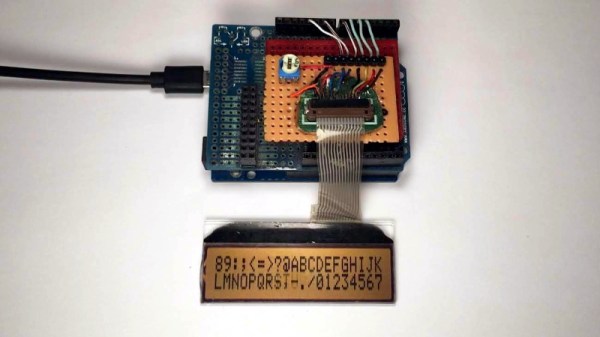
But as [Joseph] realized, that’s less of a problem for scrolling text. So he wrote some code that takes an ASCII string and breaks it down into partial letters and numbers which can be displayed as custom characters. The controller only has space for 8 of these characters though, so the code needs to continually step through the string and generate the appropriate offset characters as the position of the text changes.

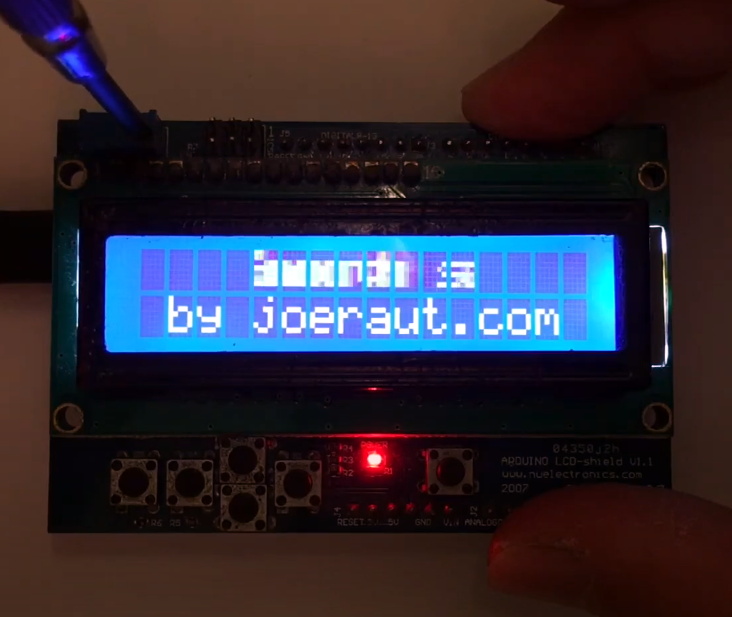
While the effect looks pretty good in the video after the break, [Joseph] has found that real-world utilization is a bit finicky. He tried the same code on one of the displays that uses white text on a blue background, and the scrolling text ended up ghosting together so it looked like gibberish. So while he’s released the source code for others to experiment with this trick, your mileage may vary.

This certainly isn’t the first time we’ve seen somebody make clever use of custom characters on the HD44780. We’ve seen it used for an exceptionally tiny game of Tetris, a rendition of Conway’s Game of Life, and even a horizontal space-shooter.

Continue reading “Smooth(er) Text Scrolling On HD44780 LCDs”

Touch Screen Reflow Oven Pulls Out All The Stops

We’ve seen plenty of simple reflow ovens, and there’s an excellent chance that some of the people reading these words have even thrown their own together. A minimal example isn’t much more than a old toaster oven, a Solid State Relay (SSR), a thermocouple, and a microcontroller to get them all talking. But if you’re like [Mangy_Dog] and willing to put in a bit more effort, the final result can be a capable piece of equipment that will be the envy of the hackerspace.

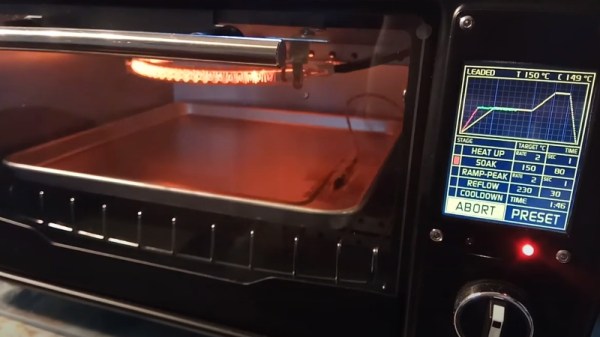
This build started as most do, with a search for a used toaster oven. But in the end he actually found a German model cheap enough that he could buy it new without going over budget for the project. Though he soon found out why: when it arrived, the so-called “pizza oven” was far smaller than he’d imagined. Luckily, it ended up being the perfect size for PCBs.

Unfortunately, the heating elements weren’t quite where he wanted them. Even after wrapping the heating chamber with ceramic insulation, a feature that was likely left off the original oven to cut costs, he says the temperature would only rise about 1 degree per second. So he added an additional halogen heating element at the top of the oven which pushed that rate up to 6 degrees per second.

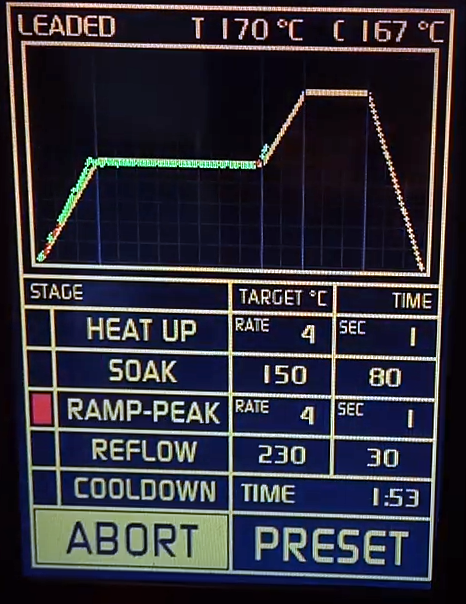
Control is provided by an Arduino Pro Mini and a touch screen display with some very slick graphics. There’s the expected thermocouple to detect the current temperature, but while the earlier versions of the electronics used the aforementioned SSR to control the heating elements, [Mangy_Dog] eventually replaced it with a dimmer module rated for 4000 watts. After coming up with a circuit that allowed him to control the dimmer with the Arduino, this module gave for much finer control over the chamber temperature. Plus it apparently kept all the lights in his house from flickering when the elements kicked in at 100%, which was a nice bonus.

This isn’t the first time we’ve seen somebody shoehorn an LCD into an off-the-shelf toaster oven, but it’s certainly one of the most polished examples to ever come our way. When even commercially available units need some hacking to reach feature parity with DIY versions, building your own reflow oven still seems like the way to go in 2020.

Continue reading “Touch Screen Reflow Oven Pulls Out All The Stops”

Speech To Morse Code, Courtesy Of Google

Google has been responsible for unleashing some pretty incredible hardware and software on the world, but they can only take partial credit for the voice to Morse code gadget that [WhiskeyTangoHotel] recently completed.

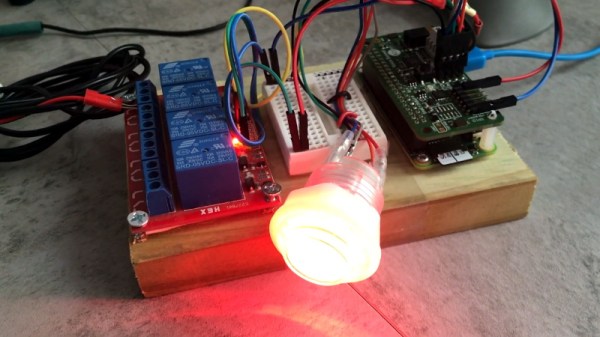
With the Google AIY Voice Bonnet, [WhiskeyTangoHotel] had everything he needed to pick up on human speech and turn that into text the Raspberry Pi can parse and act on. Usually this would get passed to some kind of virtual assistant software, but in this case, a Python script breaks the speech down into individual characters and looks up their Morse representations. All those “dits” and “dahs” are then sent to one of the Pi’s GPIO pins, to which a relay has been connected.

At this point, you’ve got an interesting little toy that can sit on your desk and turn your speech into audible Morse code as the relay clicks and clacks its way through the message. In fact, if you don’t have a ham radio license, this is probably where you should stop. But if you’ve done the appropriate paperwork to transmit over the air, the relay can be connected to a radio to actually transmit messages.

If you think giving Google access to the content of your Morse code messages is a step too far, you’ll just have to learn it yourself. It might not be necessary to get your amateur license anymore, but that doesn’t mean it’s not worth knowing.

Continue reading “Speech To Morse Code, Courtesy Of Google”

Printed It: Print-in-Place PCB Gripper

The goal of Printed It is to showcase creations that truly embrace the possibilities offered by desktop 3D printing. The most obvious examples are designs that can be printed quickly and cheaply enough that they’re a valid alternative to commercially available products. But as previous entries into the series have shown, there are also technical considerations. Is it simply a duplicate of something that could be produced via traditional means, or does the design really benefit from the unique nature of 3D printing?

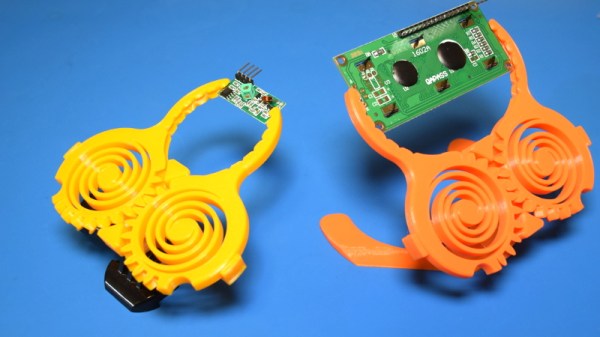
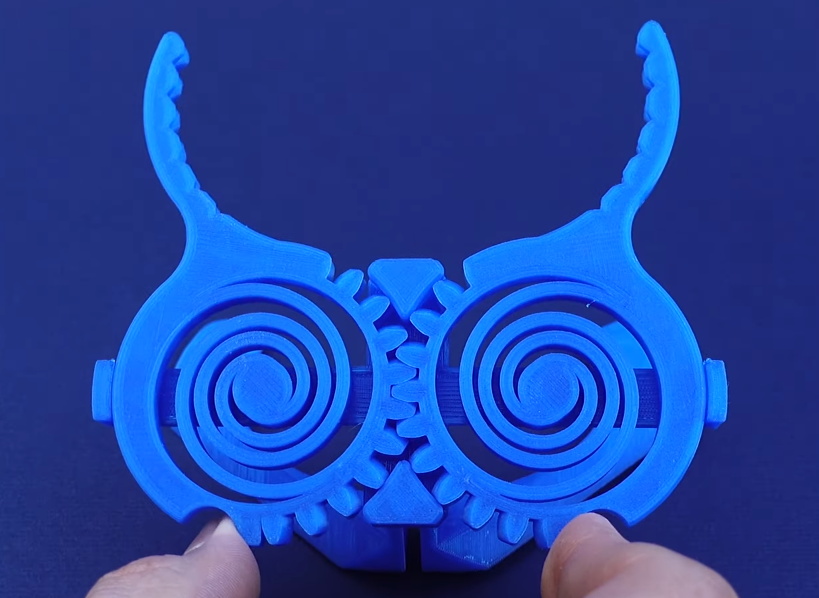
A perfect example is the Print-in-Place PCB Holder/Gripper created by SunShine. This design is able to hold onto PCBs (or really, whatever you wish) without any additional components. Just pull it off the bed, and put it to work. While having to add a rubber band or generic spring would hardly be an inconvenience, there’s always something to be said for a design that’s truly 100% printable.

The secret is the dual flat spiral springs integrated into the device’s jaws. While most of the common thermoplastics used in desktop 3D printing are relatively stiff, the springs have been designed in such a way that they can be printed in standard PLA. The backside of the jaws have teeth that mesh together, so the energy of the springs is combined to provide a clamping force. Serrations have been added to the jaws to catch the edge of the PCB and help stabilize it.

Visually, it’s certainly striking. The design largely eschews right angles, giving it an almost biological appearance. Many have compared it to the head of a mantis, or perhaps some piece of alien technology.

There’s no question that the design leverages the strengths of 3D printing either; there’s no other way to produce its intricate interlocking components, especially without the use of any sort of fasteners. In short, this design is an ideal candidate for Printed It. But there’s still one question to answer: does it actually work?

Continue reading “Printed It: Print-in-Place PCB Gripper”

Don’t Wait, You Need To See Comet NEOWISE Right Now

By now you’ve heard of NEOWISE, the most spectacular comet to visit our little corner of the galaxy since Hale-Bopp passed through over 20 years ago. But we’re willing to bet you haven’t actually seen it with your own eyes. That’s because up until now, the only way to view this interstellar traveler was to wake up in the pre-dawn hours; an especially difficult requirement considering a large chunk of the population has gotten used to sleeping-in over the last few months.

But things are about to change as NEOWISE begins a new phase of its trip through our celestial neck of the woods. Having come to within 44.5 million km (27.7 million miles) of the sun on July 3rd, the comet is now making its way back out of our solar system. Thanks to the complex dance of the heavens, that means that observers in the Northern Hemisphere will now be able to see NEOWISE in the evening sky just above the horizon.

NEOWISE is on a kind of “up and over” trajectory compared to the orbital paths of the planets. Get a better feel for it with JPL’s interactive solar dynamics tool.

While NEOWISE might be beating a hasty retreat from Sol right now, the comet it actually getting closer to us in the process. On July 22nd it will reach perigee, that is, the point in its orbit closest to Earth. On that evening the comet will be approximately 103 million km (64 million miles) away. Not exactly a stone’s throw, but pretty close in astronomical terms. The comet will appear to be getting higher in the sky as it approaches Earth, and should be visible with the naked eye between 10 and 20 degrees above the northern horizon.

Most estimates say that NEOWISE should remain visible until at least the middle of August, though it will be dimming rapidly. After that, you’re going to have to wait awhile for a repeat showing. Given the orbit of this particular comet, it won’t come around our way again for approximately 6,800 years, give or take a few lifetimes.

NASA will be hosting a NEOWISE live stream tomorrow afternoon where researchers will answer questions about this once in a lifetime celestial event, though we think you’ll get a lot more out of it if you just go outside and look up.

Solar Weather Station Listens For Lightning

Custom weather stations are a common enough project these days, especially based around the ESP8266. Wire a sensor up to the MCU, power it up with an old phone charger, and you’re half way there. But if you want something that’s going to operate remotely on the long term, you’ve got to put a little more thought into it.

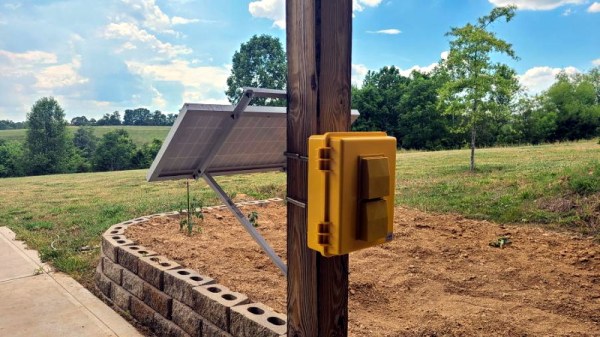
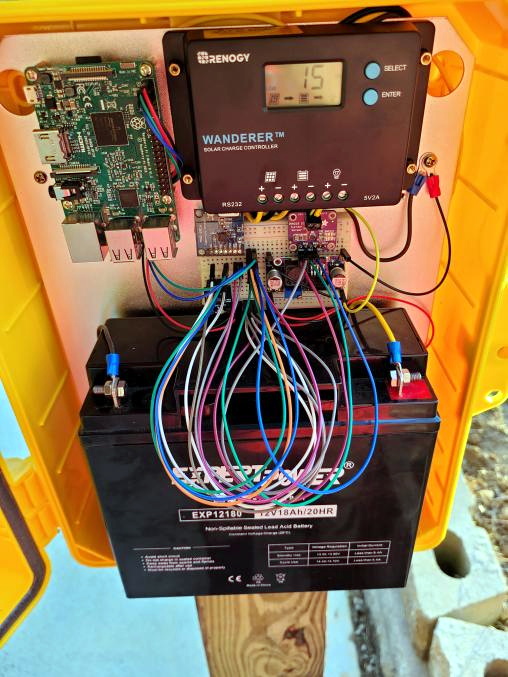
Which is exactly what [BuckarewBanzai] did for his solar powered Raspberry Pi weather station. With an industrial NEMA-rated enclosure, a beefy 35 watt photovoltaic panel, and enough lead-acid battery capacity to keep the show going for days, this build is certainly more robust than most. Some might call it overkill, but we think anyone who’s ever deployed hardware outdoors for more than a few days knows you can never be too careful when Mother Nature is involved.

To keep the 18 Ah battery topped off, [BuckarewBanzai] is using a 10 amp Wanderer charge controller. It sounds as though he burned through a few lesser models before settling on this one; something to consider for your own off-grid projects. An LM2596 regulator is then used to provide a stable 5 V for the Raspberry Pi.

In addition to the BME280 environmental sensor that picks up on temperature, humidity, and pressure, there’s also a AS3935 lightning sensor onboard which [BuckarewBanzai] says can pick up strikes up to 40 kilometers away. All of this environmental data is collected and stored in a local SQLite database, and gets pushed offsite every five minutes with a REST API so it can be visualized with Grafana.

Critics in the audience will no doubt pick up on the solderless breadboard located in the center of the weather station, but [BuckarewBanzai] says he’s already on the case. He’s working on a custom PCB that will accept the various modular components. Not only should this make the station more reliable, but he says it will cut down on the “spaghetti” wiring. Though for the record, this is hardly the worst offender we’ve seen in that department.