What’s The Deal With Snap Packages?

Who would have thought that software packaging software would cause such a hubbub? But such is the case with snap. Developed by Canonical as a faster and easier way to get the latest versions of software installed on Ubuntu systems, the software has ended up starting a fiery debate in the larger Linux community. For the more casual user, snap is just a way to get the software they want as quickly as possible. But for users concerned with the ideology of free and open source software, it’s seen a dangerous step towards the types of proprietary “walled gardens” that may have drove them to Linux in the first place.

Perhaps the most vocal opponent of snap, and certainly the one that’s got the most media attention, is Linux Mint. In a June 1st post on the distribution’s official blog, Mint founder Clement Lefebvre made it very clear that the Ubuntu spin-off does not approve of the new package format and wouldn’t include it on base installs. Further, he announced that Mint 20 would actively block users from installing the snap framework through the package manager. It can still be installed manually, but this move is seen as a way to prevent it from being added to the system without the user’s explicit consent.

The short version of Clement’s complaint is that the snap packager installs from a proprietary Canonical-specific source. If you want to distribute snaps, you have to set up an account with Canonical and host it there. While the underlying software is still open source, the snap packager breaks with long tradition of having the distribution of the software also being open and free. This undoubtedly makes the install simple for naive users, and easier to maintain for Canonical maintainers, but it also takes away freedom of choice and diversity of package sources.

Continue reading “What’s The Deal With Snap Packages?”

An Open Source Tool To Document Your Wiring

Most of us are familiar with the tools available to create circuit diagrams, as generally that’s the first step towards producing a custom PCB. But that about the cables and wiring harnesses that don’t live on your board? How do you easily document the rat’s nest perfectly logical wiring of your latest and greatest creation?

That’s precisely the question that led [Daniel Rojas] to create WireViz. This open source Python tool takes human readable input files and turns them into attractive and functional visualizations of where all the wires in your project are going. It can even be used to generate a Bill of Materials that documents the lengths of wire required and types of connectors needed to hook everything up.

If you’re still using pre-made cables to connect all of your components together, than you might not immediately see the benefit of a tool like this. But as we’ve talked about in the past, the creation of custom wiring harnesses is something that serious hardware hackers should become familiar with. Yes it takes more effort, but the end result is worth it. With a tool like WireViz, the creation of a bespoke harness for your next project just got a little bit easier.

[Daniel] has done a fantastic job documenting this project, providing not only a tutorial on how to feed and care for your WireViz, but a gallery of examples that shows off the kind of complex wiring the tool can help make sense of. But there’s plenty more to be done, and he’s happy to get feedback or code contributions from anyone who wants to get involved.

Popping The Hood On The Flux Beamo Laser Cutter

While the K40 has brought affordable laser cutting to the masses, there’s no question that it took a lot of sacrifices to hit that sub-$400 price point. There’s a reason that we’ve seen so many upgrades and improvements made to the base model machine, but for the price it’s hard to complain. That being said, for users who don’t mind spending a bit more money for a more complete out-of-the-box experience, there are other options out there.

One of them is the beamo, from FLUX. [Frank Zhao] recently picked up one of these $1,900 USD laser cutters because he wasn’t thrilled with the compromises made on the K40. Specifically, he really liked the idea of the internal water cooling system. Oddly enough, something about using a garden hose and buckets of water to cool the laser seemed off-putting. Luckily for us, he’s got a technical eye and the free time necessary to do a teardown and objective analysis of his new toy.

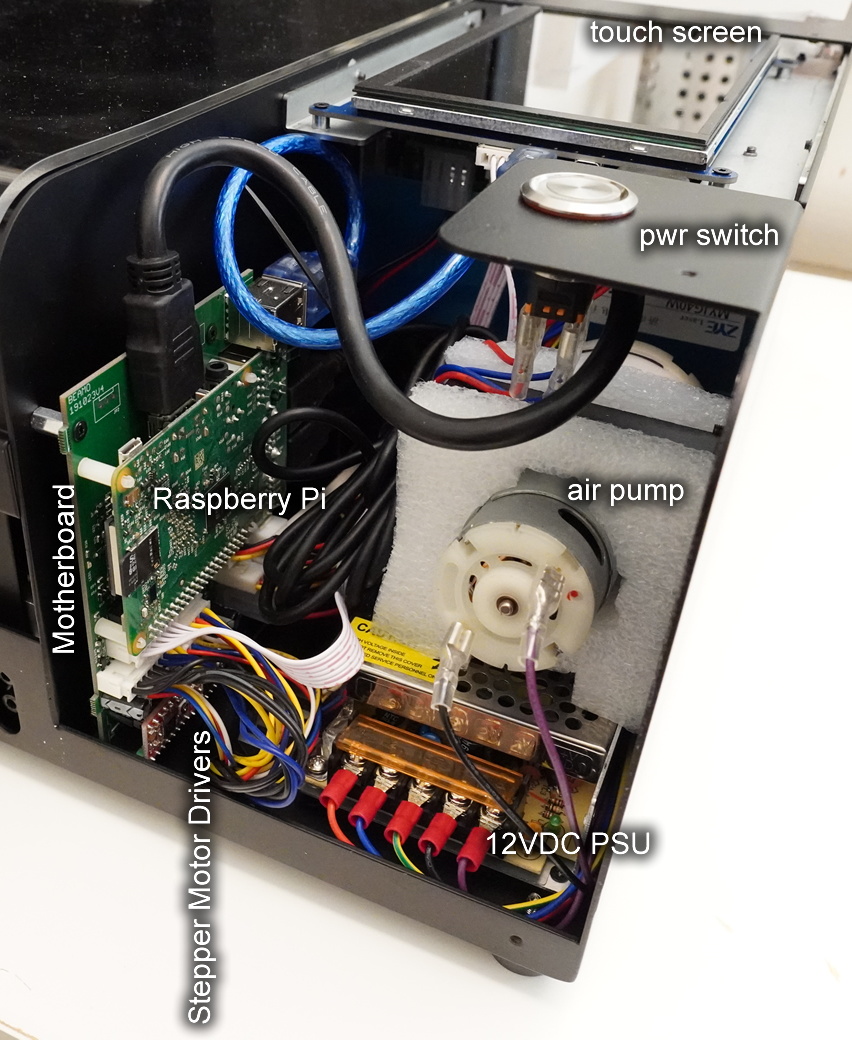
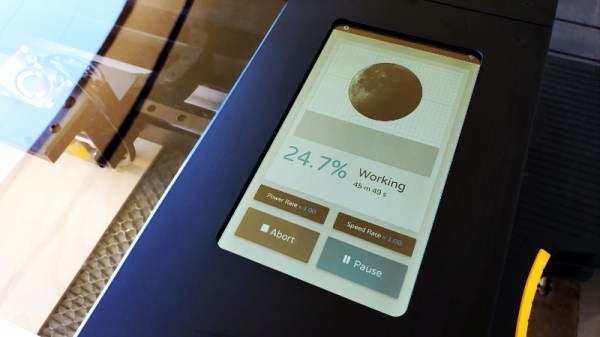
The short version of the story is that [Frank] is not only happy with the results he’s getting, but finds the machine to be well designed and built. So if you’re looking for a rant, sorry. But what you will find is a methodical look at each subsystem of the beamo, complete with annotated pictures and the kind of technical details that Hackaday readers crave.

We especially like his attempts to identify parts which might be difficult to source in the future; it looks like the CO2 laser tube might be proprietary, but everything else looks fairly jellybean. That includes the Raspberry Pi 3B that’s running the show, and the off-the-shelf touch screen HDMI display used for the interface. [Frank] did note that FLUX was unwilling to give him the credentials to log into the Pi and poke around, but with direct access to the SD card, it’s not like that will stop anyone who wants to get in.

In a way, laser cutters are in a similar situation today to that desktop 3D printers were in a few years ago. The cheap ones cut so many corners that upgrades and fixes are almost a necessity, and building your own machine is often less expensive than buying a commercial offering with similar specs. While the beamo is still a bit too expensive for the average hobbyist, it’s good to see machines of this caliber are at least coming down out of the 5 figure range.

Teardown: Wonder Bible

Even the most secular among us can understand why somebody would want to have a digital version of the Bible. If you’re the sort of person who takes solace in reading from the “Good Book”, you’d probably like the ability to do so wherever and whenever possible. But as it so happens, a large number of people who would be interested in a more conveniently transportable version of the Bible may not have the technological wherewithal to operate a Kindle and download a copy.

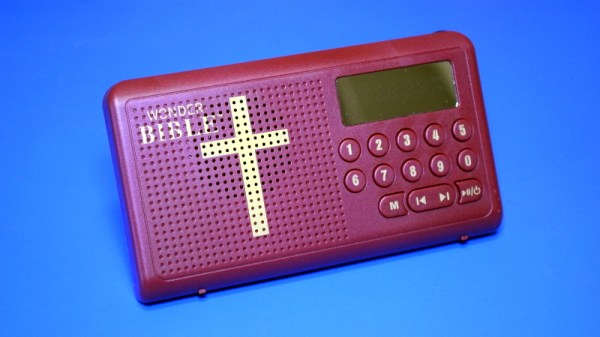
Which is precisely the idea behind the Wonder Bible, a pocket-sized electronic device that allows the user to listen to the Bible read aloud at the press of a button. Its conservative design, high-contrast LED display, and large buttons makes it easy to operate even by users with limited eyesight or dexterity.

The commercial for the Wonder Bible shows people all of all ages using the device, but it’s not very difficult to read between the lines and see who the gadget is really aimed for. We catch a glimpse of a young businessman tucking a Wonder Bible into the center console of his expensive sports car, but in reality, the scenes of a retiree sitting pensively in her living room are far closer to the mark.

In truth, the functionality of the Wonder Bible could easily be replicated with a smartphone application. It would arguably even be an improvement by most standards. But not everyone is willing or able to go that route, which creates a market for an affordable stand-alone device. Is that market large enough to put a lot of expense and engineering time into the product? Let’s crack open one of these holy rolling personal companions and find out.

Continue reading “Teardown: Wonder Bible”

Custom Portable N64 Embraces Modern Making

In the beginning, there was hot glue. Plus some tape, and a not inconsiderable amount of Bondo. In general, building custom portable game consoles a decade or so in the past was just a bit…messier than it is today. But with all the incredible tools and techniques the individual hardware hacker now has at their disposal, modern examples are pushing the boundaries of DIY.

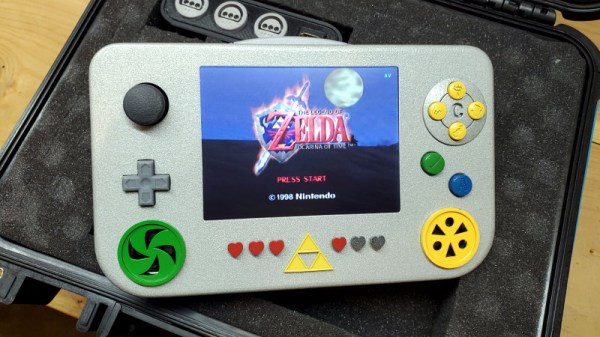
This Zelda: Ocarina of Time themed portable N64 by [Chris Downing] is a perfect example. While the device is using a legitimate N64 motherboard, nearly every other component has been designed and manufactured specifically for this application. The case has been FDM 3D printed on a Prusa i3, the highly-detailed buttons were printed in resin on a Form 3, and several support PCBs and interface components made the leap from digital designs to physical objects thanks to the services of OSH Park.

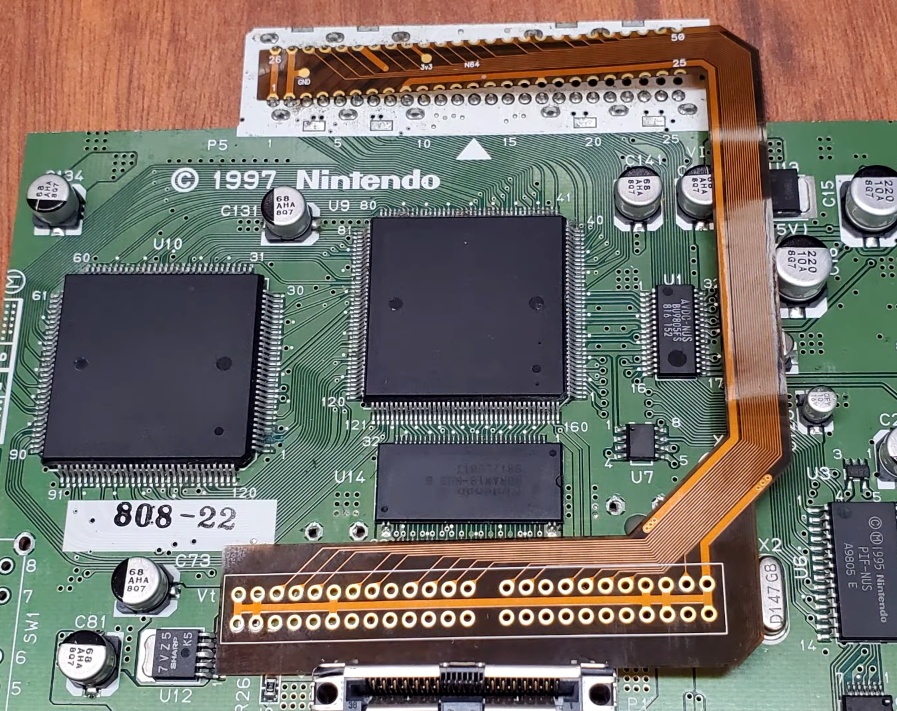
A custom made FFC to relocate the cartridge port.

Today, those details are becoming increasingly commonplace in the projects we see. But that’s sort of the point. In the video after the break, [Chris] breaks down the evolution of his portable consoles from hacked and glued together monstrosities (we mean that in the nicest way possible) to the sleek and professional examples like his latest N64 commission. But this isn’t a story of one maker’s personal journey through the ranks, it’s about the sort of techniques that have become available to the individual over the last decade.

Case in point, custom flexible flat cables (FFC). As [Chris] explains, when you wanted to relocate the cartridge slot on a portable console in the past, it usually involved tedious point-to-point wiring. Now, with the low-volume production capabilities offered by companies like OSH Park, you can have your own flexible cables made that are neater, faster to install, and far more reliable.

Projects like this one, along with other incredible creations from leaders in the community such as [GMan] are changing our perceptions of what a dedicated individual is capable of. There’s no way to be sure what the state-of-the-art will look like in another 5 or 10 years, but we’re certainly excited to find out.

Continue reading “Custom Portable N64 Embraces Modern Making”

WiFi Networks Turned Targets In This Pocket Game

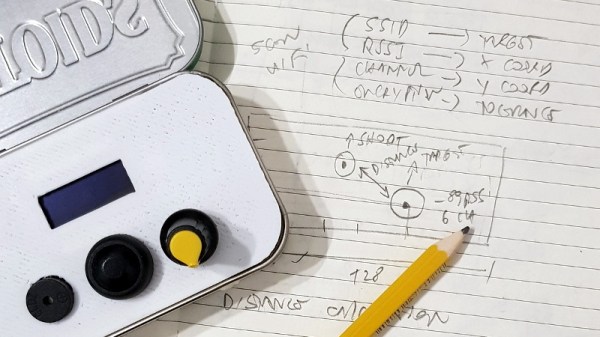
Looking for a way to make his warwalking sessions a bit more interactive, [Roni Bandini] has come up with an interesting way to gamify the discovery of new WiFi networks. Using a Heltec WiFi Kit 8, which integrates an OLED screen and ESP8266, this pocket-sized device picks up wireless networks and uses their signal strength and encryption type as elements of the game.

After selecting which network they want to play against, a target is placed on the screen. The distance between the target and the player is determined by signal strength, and how much damage the target can take correlates to how strong its encryption is. As you can see in the video after the break, gameplay is a bit reminiscent of Scorched Earth, where the player needs to adjust the angle of their artillery to hit distant targets.

The Heltec board is attached to a 3D printed front panel, which fits neatly into an Altoids tin. The controls consist of a button and a potentiometer, and with the addition of a battery pack salvaged from an old cell phone, this little device is ready to do battle wherever you roam.

While this is just a fun diversion for the time being, [Roni] says it wouldn’t take much to actual log networks to a file and generate some statistics about their strength and encryption type. If the idea of a portable WiFi scanning companion seems interesting, you should definitely check out the Pwnagotchi project.

Continue reading “WiFi Networks Turned Targets In This Pocket Game”

Vintage Keyboard Gets The QMK Treatment

While nobody could deny that computing technology has some a long way in the last few decades, there are many out there who believe peak keyboard was sometime before the turn of the new millennium. They prefer the look, feel, and especially the sounds, of those classic keyboards to what passes for an input device these days. So much so that it’s not uncommon to see one of these old mammoths get freshened up and pushed into service with a modern computer.

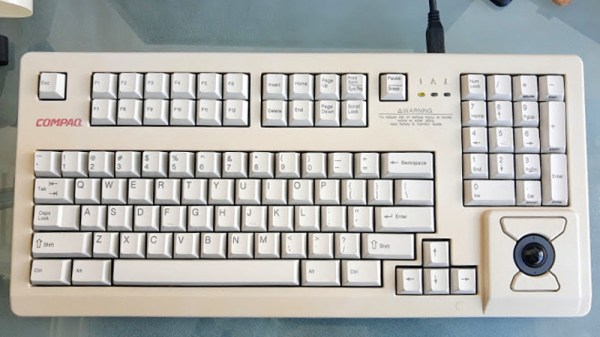
Which is exactly what [Juan Pablo Kutianski] has done with his Compaq MX-11800. This keyboard, which is actually a branded version of the Cherry G80-11800, really stands out in a crowd. With an integrated trackball and a two-row arrangement for the function keys, it’s not hard to see why he’d want to show it off. But while the hardware itself was solid, the features and capabilities of this old school keyboard left something to be desired.

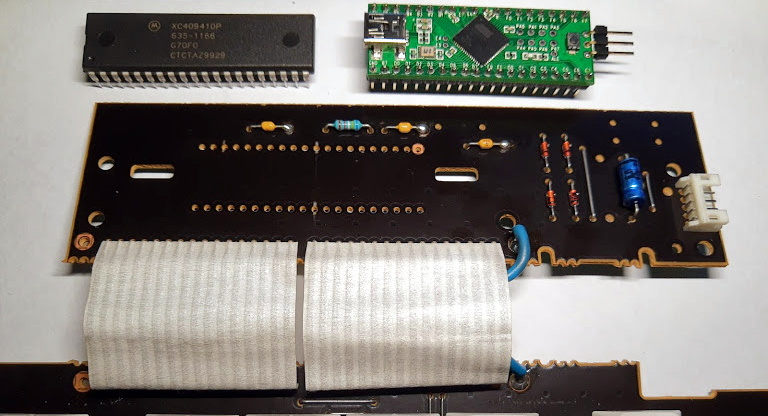
The solution was to replace the keyboard’s original electronics with a Teensy++2.0 running the popular QMK firmware. This not only made the keyboard USB, but allowed [Juan] to tweak things such as the trackball sensitivity and add in support for layers and macros. All of which can be managed through VIA, a graphical configuration tool for QMK.

As we’ve seen in so many projects, the combination of QMK running on the Teensy is a powerful tool for getting the most out of your keyboard. Whether breathing new life into a vintage piece of hardware or creating something truly custom like our very own [Kristina Panos] recently did, it’s definitely something to keep in mind if you’re considering any keyboard hacking.