Clock Project Doesn’t Require A Decision

You decide to build a clock. The first thing you have you determine if it is going to be digital or analog. Or is it? If you build [Ivanek240267]’s clock, you can have both.

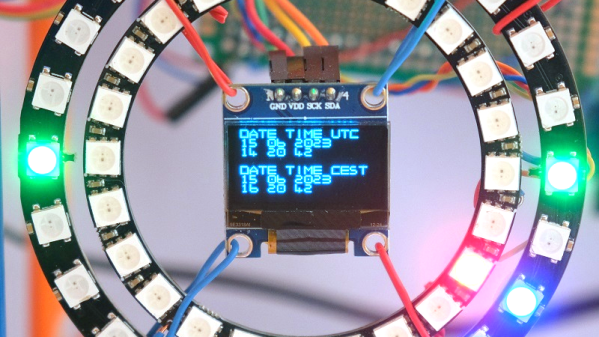
The digital portion uses an OLED display. The analog portion contains two rings of smart LEDs. The WiFi configuration is always an issue in projects like this, and this clock also offers options. In addition, the Raspberry Pi Pico-based clock also sets itself via NTP.

You can, of course, compile the WiFi credentials into the code, and assuming you don’t plan on changing networks, that’s fine. But if you’re in a more dynamic situation, the clock can also read its configuration from a memory card.

The analog clock uses colors. The green LEDs represent quarter hours. The blue LEDs are for minutes, while the red ones are full hours. Of course, reading the OLED doesn’t require any special interpretation.

When debugging, the timing doesn’t drive the smart LEDs. That means if you need to work on that part of the code, you won’t be able to count on debugging support.

We’ve mentioned before that digital clocks are all analog, anyway. If you want to use fewer LEDs, you can get by with only five.

Thermal Camera Reviewed

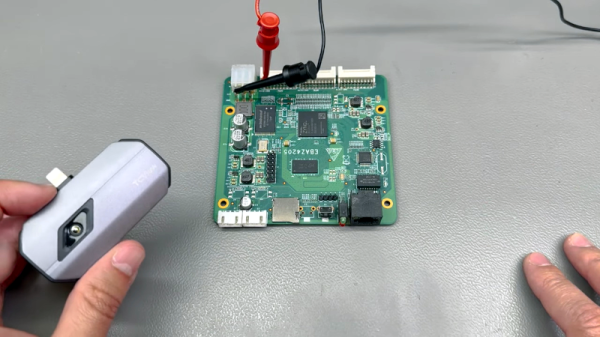
We keep thinking about buying a better thermal camera, as there are plenty of advantages. While [VoltLog’s] review of the Topdon TC002 was interesting though, it has a connector for an iPhone. Even if you aren’t on Android, there is a rumor that Apple may (or may be forced to) change connectors which will make it more difficult to connect. Of course, there will be adapters, and you can get a USB C version of the same camera.

Technically, the camera is pretty typical of other recent cameras in this price range, and they probably all use the same image sensor. The camera provides 256×192 images.

Continue reading “Thermal Camera Reviewed”

Hinged Parts For The 8th Grade Set

I recently agreed to run a 3D printing camp for 8th graders. If you’ve never shared your knowledge with kids, you should. It is a great experience. However, it isn’t without its challenges. One thing I’ve learned: don’t show the kids things that you don’t want them to try to print.

I learned this, of course, the hard way. I have several “flexy”3D prints. You know the kind. Flexy dinosaurs, cats, hedgehogs, and the like. They all have several segments and a little hinge so the segments wobble. The problem is the kids wanted to print their own creations with flexy hinges.

I’ve built a few print-in-place hinges, but not using Tinkercad, the software of choice for the camp. While I was sure it was possible, it seemed daunting to get the class to learn how to do it. Luckily, there’s an easy way to add hinges like this to a Tinkercad design. There was only one problem.

Continue reading “Hinged Parts For The 8th Grade Set”

The Fake Moon Landing Quarantine

We aren’t much into theories denying the moon landing around here, but [Dagomar Degroot], an associate professor at Georgetown University, asserts that the Apollo 11 quarantine efforts were bogus. Realistically, we think today that the chance of infection from the moon, of all places, is low. So claiming it was successful is like paying for a service that prevents elephants from falling through your chimney. Sure, it worked — there hasn’t been a single elephant!

According to [Degroot], the priority was to protect the astronauts and the mission, and most of the engineering money and effort went towards that risk reduction. The — admittedly low — danger of some alien plague wiping out life on Earth wasn’t given the same priority.

Continue reading “The Fake Moon Landing Quarantine”

Clay Makes For DIY Power Source, Just Add Water

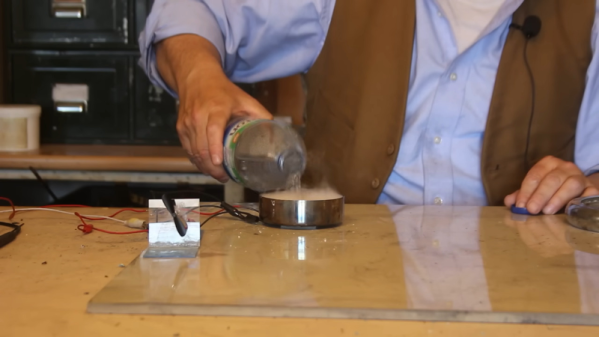
[Robert Murray-Smith] starts out showing us some clay formations that house bees. He couldn’t take any of that clay home, but that’s no problem — clay is plentiful, and apparently, you can make a battery with it. Well, perhaps not really a battery. Adding water to zeolite — a clay often used as a filter material — generates heat, and where there’s heat, there can be electricity.

[Robert] uses a salvaged Peltier device, as you find in small electric refrigerators. These solid-state heat pumps usually convert electricity into a temperature differential, but in this case, it is used as a thermocouple, generating electricity from a temperature difference.

The clay used is a very fine aluminosilicate crystal known as zeolite 13X. Once it comes into contact with plain ordinary water, it immediately starts to boil. It’s a neat experiment, and with the Peltier underneath the metal container holding the clay, enough power is produced to spin a small motor. Of course this won’t power anything large, but on the other hand, plenty of things these days don’t take much power. This technique would work with any exothermic reaction of course, but there’s something compelling about the shelf-stability of water and clay.

Beats a potato, we suppose. Batteries don’t have to be difficult to make. It is only hard to make really good ones.

Continue reading “Clay Makes For DIY Power Source, Just Add Water”

Google Home Scripting

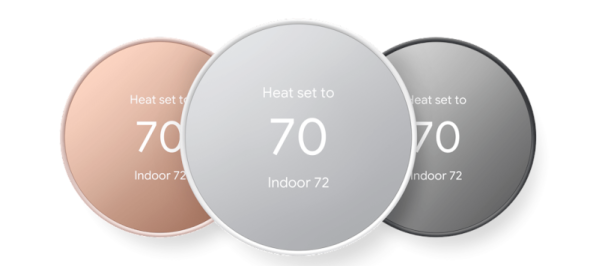
It is always controversial to have home assistants like the ones from Google or Amazon. There are privacy concerns, of course. Plus they maddeningly don’t always do what you intend for them to do. However, if you do have one, you’ve probably thought about something you wanted to do that would require programming. Sure, you can usually do a simple list, but really writing code wasn’t on the menu. But now, Google Home will allow you to write code. Well, at least script using a YAML file.

The script language is available in the web app and if you opt in on the mobile app as well. There’s a variety of ways you can trigger scripts and many examples you can start with.

Continue reading “Google Home Scripting”

Linux Fu: Easy And Easier Virtual Networking

One of the best things about Linux is that there are always multiple ways to do anything you want to do. However, some ways are easier than others. Take, for example, virtual networking. There are plenty of ways to make a bunch of Internet-connected computers appear to be on a single private network. That’s nothing new, of course. Linux and Unix have robust networking stacks. Since 2018, though, Wireguard has been the go-to solution; it has a modern architecture, secure cryptography, and good performance.

There’s only one problem: it is relatively difficult to set up. Not impossible, of course. But it is a bit difficult, depending on what you want to accomplish.

How Difficult?

You must set up a wireguard server and one or more clients. You’ll need to pick a range of IP addresses. You might need to turn on routing. You have to generate keys. You might need to configure DNS and other routing options. You’ll certainly need to modify firewall rules. You’ll also need to distribute keys.

None of these steps are terribly difficult, but it is a lot to keep straight. The wg program and wg-quick script do most of the work, but you have a lot of decisions and configuration management to keep straight.

Browse the official “quick start,” and you’ll see that it isn’t all that quick. The wg-quick script is better but only handles some use cases. If you want really limited use cases, there are third-party tools to do a lot of the rote work, but if you need to change anything, you’ll still need to figure it all out.

That being said, once you have it set up, it pretty much works without issue and works well. But that initial setup can be very frustrating. Continue reading “Linux Fu: Easy And Easier Virtual Networking”