Looking At Fortran In 100 Seconds

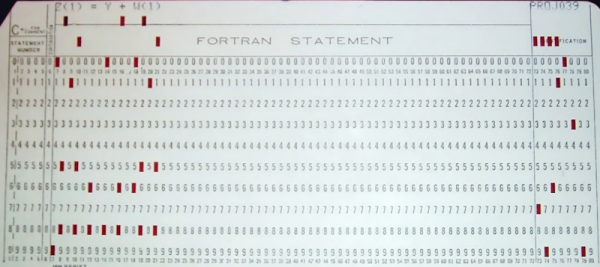
Usually, when we are talking about old computers, we are thinking of BASIC interpreters. But [Fireship] reminds us that it was originally Fortran and promises to give you the essentials in 100 seconds. We didn’t think you could do much in that short amount of time, but we have to admit that they did a pretty good job.

Of course, it doesn’t hurt that we know Fortran — you probably aren’t going to be able to put it on your resume after watching this video. On the other hand, we were impressed with how much they did squeeze in. If you haven’t touched Fortran since the 1960s and 1970s, you should know that it has changed. Pointers, dynamic memory allocation, and even objects are all possible. It is still a very capable language and very adept at crunching large sets of numbers. Besides, there are many sophisticated algorithms you can borrow from decades of Fortran development.

If you decide you want to have a go, there is, of course, GNU Fortran. Honestly, as much time as we spent writing Fortran in years past, we don’t recommend it for new job prospects. But if you have some period hardware and want an authentic experience, it might just be the way to go. Or, just fire up a browser if you want to play.

Not everyone agrees, though, that Fortran is on the wane. There are efforts to bring it even more up to date. You can even use it for web development.
Continue reading “Looking At Fortran In 100 Seconds”

Liquid Piston Engine Finally Works

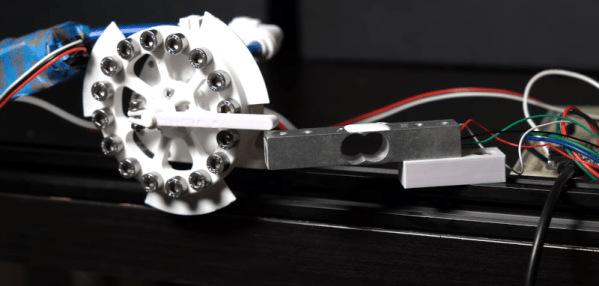
The first video from [3DPrintedLife] attempting to make a liquid piston engine was… well… the operative word is attempting. The latest video, though, which you can see below gets it right, at least eventually.. He has a good explanation of the changes that made the design better. Turns out, one change that made a difference was to turn a key part of the engine inside out. You can see the video below.

The first version would quickly break during operation and while the first new version didn’t work very well, it did stay in one piece which is a definite improvement.

Continue reading “Liquid Piston Engine Finally Works”

A Linux Business Card You Can Build

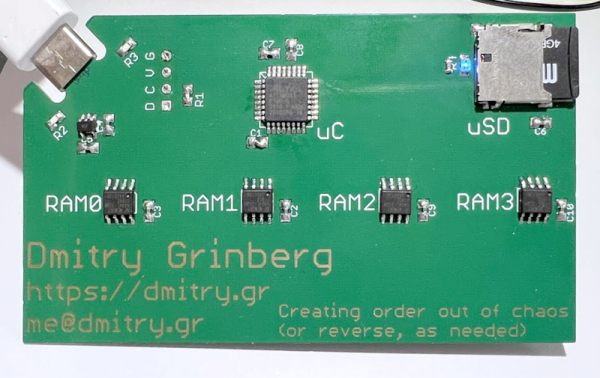
It is a sign of the times that one of [Dmitry’s] design criteria for his new Linux on a business card is to use parts you can actually find during the current component shortage. The resulting board uses a ATSAMD21 chip and emulates a MIPS machine in order to boot Linux.

We like that in addition to the build details, [Dmitry] outlines a lot of the reasons for his decisions. There’s also a a fair amount of detail about how the whole system actually works. For example, by using a 0.8 mm PCB, the board can accept a USB-C cable with no additional connector. There is also a great explanation of the MIPS MMU and don’t forget that MIPS begat RISC-V, so many of the MIPS core details will apply to RISC-V as well (but not the MMU).  You’ll also find some critiques of the ATSAMD21’s DMA system. It seems to save chip real estate, the DMA system stores configuration data in user memory which it has to load and unload every time you switch channels.

By the end of the post you get the feeling this may be [Dimitry]’s last ATSAMD21 project. But we have to admit, it seems to have come out great. This isn’t the first business card Linux build we’ve seen. This one sure reminded us of a MIDI controller card we once saw.

Tio Is A Serial Terminal For Us

With Linux and the serial port there is good news and there is bad news. The good news is that Linux has great support for serial hardware of all sorts and a host of tools for accessing the serial port. That’s important when you use a lot of serial-like devices like Arduinos with USB ports and the like. The bad news is that most of the terminal software is made to accommodate the days when a computer had real serial terminals and modems with people interacting with them. We bet that’s why [lundmar] developed tio, a serial device I/O tool for people like us.

Honestly, how many times have you needed Zmodem file transfers and recognition of the DCD signal to detect an incoming connection? Sure there are many other programs that will do the job, but tio brings a clean simplicity along with functionality that embedded developers need.

The software will support arbitrary devices, show statistics, and give you control of the RS232 lines. There’s support for delayed characters and lines, useful if you are dealing with a super simple device with no handshaking. There’s also hex support and many ways to log data and statistics. We especially like that it can automatically reconnect which is a great feature.

Of course, you want some terminal features and tio includes those. For example, you can elect to have local echo turned on or map characters so that, for example, a carriage return turns into a carriage return and a line feed. You can use command line options to set up most items including features like redirecting to a network socket. Other commands inside the program — by default, triggered by Control+T — let you do things like send a break, toggle handshaking lines, and more.

You might think the serial port is dead, but it really just transformed into a USB port.  Of course, like everything else these days, you can also get your terminal in the browser.

Build Your Own… Whatever

You can read all about making, say, a bookshelf or bowling, but unless you’ve actually done it, you don’t really know how it works. That’s the idea behind [codecrafters-io] Build-Your-Own-X GitHub repository. It is a collection of software projects from around the Web that offer “step-by-step guides for recreating our favorite technologies from scratch.”

What can you find there? Well, how about writing your own version of Git itself? Or maybe you’d like to dive into a physics engine, blockchain code, or a text editor. Then there’s our favorite: an operating system.

Continue reading “Build Your Own… Whatever”

Automate Internet Life With Python

Most of us are adept enough with computers that you know what they can easily do and what they can’t. Invent a new flavor of ice cream? Not easy. Grab the news headlines related to Arduinos from your favorite news feed? Relatively easy. But, of course, the devil is in the details. FreeCodeCamp has a 3-hour course from [Frank Andrade] that dives into the gory details of automating web tasks using Python and a variety of libraries like Path, Xpath, and Selenium. You can watch the course, below.

Topics start off with grabbing tables from websites and PDFs. But it quickly graduates to general-purpose web scraping and even web automation. These techniques can be very useful for testing browser-based applications, too.

By the end, you’ve created an executable that grabs news every day and automatically generates an Excel report. There’s also a little wind down about WhatApp automation. A little something for everyone. We also greatly approved of [Frank]’s workspace which appears in the background. Looks like he would enjoy reading Hackaday.

Honestly, while we’ve seen easier methods of automating the browser, there’s something appealing about having the control something like Python affords. Sure beats building hardware to simulate a human-in-the-loop.

Continue reading “Automate Internet Life With Python”

Where Are Our Video Phones?

Videoconferencing has been around in one form or another for quite a while, but it took the pandemic to thrust into prominence with just about everyone. In a way, it has been the delivery of something long-promised by phone companies, futurists, and science fiction writers: the picture phone. But very few people imagined how the picture phone would actually manifest itself. We thought it might be interesting to look at some of the historical predictions and attempts to bring this technology to the mass market.

The reality is, we don’t have true picture phones. We have computers with sufficient bandwidth to carry live video and audio. Your FaceTime call is going over the data network. Contrast that with, say, sending a fax which really is a document literally over the phone lines.

Continue reading “Where Are Our Video Phones?”