Harp Uses Frikin’ Lasers

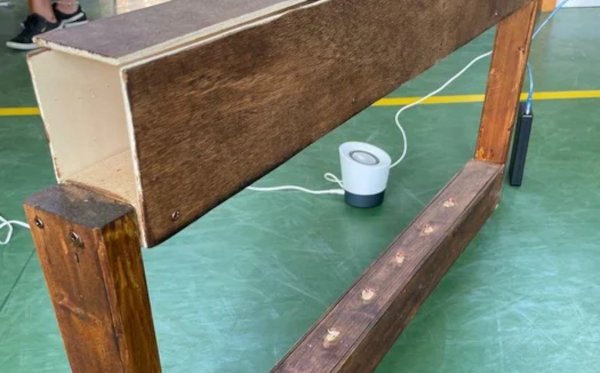
We aren’t sure if you really need lasers to build [HoPE’s] laser harp. It is little more than some photocells and has an Arduino generate tones based on the signals. Still, you need to excite the photocells somehow, and lasers are cheap enough these days.

Mechanically, the device is a pretty large wooden structure. There are six lasers aligned to six light sensors. Each sensor is read by an analog input pin on an Arduino armed with a music-generation shield. We’ve seen plenty of these in the past, but the simplicity of this one is engaging.

Continue reading “Harp Uses Frikin’ Lasers”

3D Objects Without Scanning

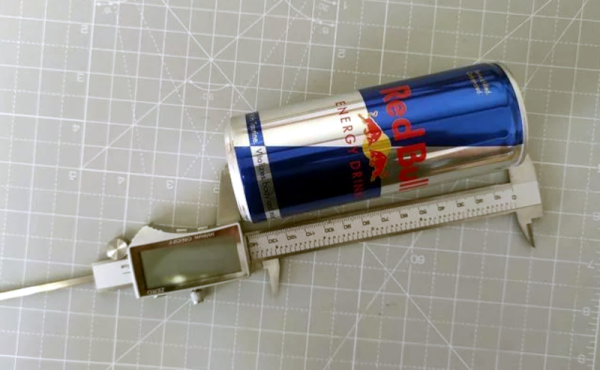
There are many scanners — both commercial and homemade — that can take a variety of scans or images of a 3D object and convert it into something like a 3D printable file. When the process works, it works well, but the results can be finicky at best and will require a lot of manual tuning. According to [Samuel Garbett], you might as well just draw your own model using Blender. He shows you how using a Red Bull can which, granted, isn’t exactly the most complicated thing ever, but it isn’t the simplest either.

He does take one photo of the can, so there is a camera involved at some point. He also takes measurements using calipers, something you probably already have laying around.

Since it is just a can, there aren’t many required pictures or measurements as, say, a starship model. Once you have the measurements, of course, you could use the tool of your choice and since we aren’t very adept with Blender, we might have used something we think is easier like FreeCAD or OpenSCAD. However, Blender has a lot of power, so we suspect making the jump from can to the USS Enterprise might be more realistic for a Blender user.

Besides, it is good to see how other tools work and we were surprised that Blender could be relatively simple to use. Every time we see [Jared’s] channel, we think we should learn more about Blender. But if you have your heart set on a real scanner, there are plenty of open source designs you can print.

Ray Casting 101 Makes Things Simple

[SSZCZEP] had a tough time understanding ray tracing to create 3D-like objects on a 2D map. So once he figured it out, he wrote a tutorial he hopes will be more accessible for those who may be struggling themselves.

If you’ve ever played Wolfenstein 3D you’ll have seen the technique, although it crops up all over the place. The tutorial borrows an animated graphic from [Lucas Vieira] that really shows off how it works in a simplified way. The explanation is pretty simple. From a point of view — that is a camera or the eyeball of a player — you draw rays out until they strike something. The distance and angle tell you how to render the scene. Instead of a camera, you can also figure out how a ray of light will fall from a light source.

There is a bit of math, but also some cool interactive demos to drive home the points. We wondered if Demos 3 and 4 reminded anyone else of an obscure vector graphics video game from the 1970s? Most of the tutorial is pretty brute force, calculating points that you can know ahead of time won’t be useful. But if you stick with it, there are some concessions to optimization and pointers to more information.

Overall, a lot of good info and cool demos if this is your sort of thing. While it might not be the speediest, you can do ray tracing on our old friend the Arduino. Or, if you prefer, Excel.

GNU Radio Decodes Voyager Data

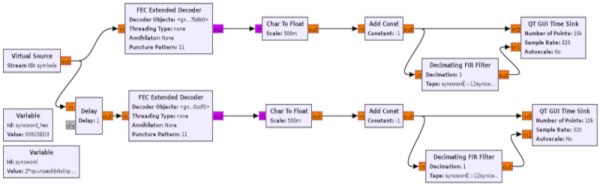
With the 44th anniversary of the launch of Voyager I, [Daniel] decided to use GNU Radio to decode Voyager data. The data isn’t live, but a recording from the Green Bank Telescope. The 16 GB file is in GUPPI format which stores raw IQ samples.

The file contains 64 frequency channels of just under 3MHz each. The signal of interest is in one channel, so it is easy to just throw away the rest of the data.

Continue reading “GNU Radio Decodes Voyager Data”

Historical Hackers: The Hacker Of Cragside, Circa 1870

Imagine visiting a home that was off the grid, using hydroelectric power to run lights, a dishwasher, a vacuum cleaner, and a washing machine. There’s a system for watering the plants and an intercom between rooms. Not really a big deal, right? This is the twenty first century, after all.

Armstrong with a 7 inch gun of his design
Image of Armstrong and his 7-inch gun from an 1887 edition of Illustrated London News

But then imagine you’ve exited your time machine to find this house not in the present day, but in the year 1870. Suddenly things become quite a bit more impressive, and it is all thanks to a British electrical hacker named William Armstrong who built a house known as Cragside. Even if you’ve never been to Northumberland, Cragside might look familiar. It’s appeared in several TV shows, but — perhaps most notably — played the part of Lockwood Manor in the movie Jurassic World: Fallen Kingdom.

Armstrong was a lawyer by training but dabbled in science including hydraulics and electricity — a hot topic in the early 1800s. He finally abandoned his law practice to form W. G. Armstrong and Company, known for producing Armstrong guns, which were breech-loading artillery pieces ranging from 2.5 inch bores up to 7 inches. By 1859, he was knighted and became the principal supplier of armaments to both the Army and the Navy.

Continue reading “Historical Hackers: The Hacker Of Cragside, Circa 1870”

Brain electrodes

Brain Interface Uses Tiny Needles

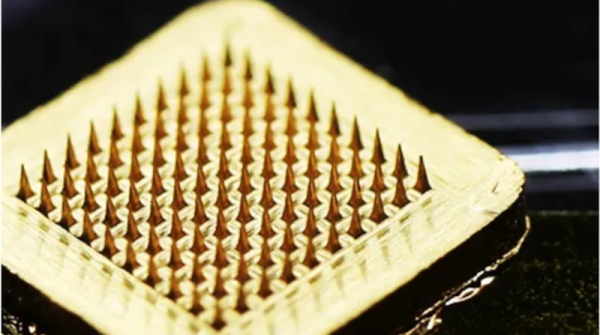
We often look at news out of the research community and think, “we could build that.” But the latest brain-machine interface from an international team including the Georgia Institute of Technology actually scares us. It uses an array of tiny needles that penetrate the skin but remain too small for your nerves to detect. Right. We assume they need to be sterile but either way, we don’t really want to build a pin grid array to attach to your brain.

It seems the soft device is comfortable and since it is very lightweight it doesn’t suffer from noise if the user blinks or otherwise moves. Looking at the picture of the electrodes, they look awfully pointy, but we assume that’s magnified quite a few times, since the post mentions they are not visible to the naked eye.

Continue reading “Brain Interface Uses Tiny Needles”

Original Commodore 64 ad

Love Letter To Commodore 64 Ads Takes Us Down Memory Lane

If you shop, you can get a pretty nice laptop for around $595. Maybe not the top of the line, but still pretty nice with multiple cores, a large hard drive, and a big color screen. But in the 1980s, the Commodore 64 bragged that for $595, they’d give you more than anyone else at twice the price. After all, 64K of RAM! Graphics with 16 whole colors! [Lunduke] dug up a bunch of these ads and has some thoughts on them and we really enjoyed the trip down memory lane.

If you look at other contemporary computers, they did cost more although sometimes it wasn’t a fair comparison. The TRS80 III, for example, cost $999 with 16K of RAM but it also had its own monitor — not color, though.

It is amazing to think that we’ve gone from where 16K was a reasonable amount of RAM in a personal computer to where it isn’t even worth having a flash drive with that capacity. We also can’t help but note that while computing power per dollar is through the roof now, computers aren’t actually that much more fun. We enjoyed interfacing a teletype to our 1802 ELF and working out a 300 baud modem for our TRS-80. Sure, we didn’t have Skyrim or HD movies, but we still have fun.

If you want to relive these exciting days, it is easy enough to build your own C64 with varying degrees of fidelity. It is trivial to emulate the thing on any kind of modern hardware, too.