Resistors Sorter Measures Values

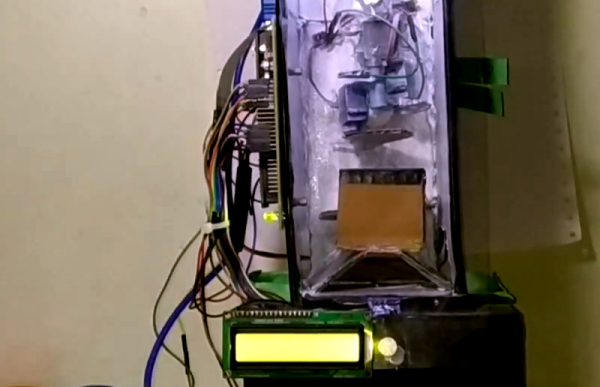
We’ve all been there. A big bag of resistors all mixed up. Maybe you bought them cheap. Maybe your neatly organized drawers spilled. Of course, you can excruciatingly read the color codes one by one. Or use a meter. But either way, it is a tedious job. [Ishann’s] solution was to build an automatic sorter that directly measures the value using a voltage divider, rather than rely on machine vision as is often the case in these projects. That means it could be modified to do matching for precise circuits (e.g., sort out resistors all marked 1K that are more than a half-percent away from one nominal value).

There is a funnel that admits one resistor at a time into a test area where it is measured. A plate at the bottom rotates depending on the measured value. In the current implementation, the resistor either falls to the left or the right. It wouldn’t be hard to make a rotating tray with compartments for different values of resistance. It looks like you have to feed the machine one resistor at a time, and automating that sounds like a trick considering how jumbled loose axial components can be. Still, its a fun project that you probably have all the parts to make.

An Arduino powers the thing. An LCD screen and display control the action. If you want some practice handling material robotically, this is a great use of servos and gravity and it does serve a practical purpose.

We have seen many variations on this, including ones that read the color code. If you ever wanted to know where the color code for resistors came from, we took a trip to the past to find out earlier this year.

Continue reading “Resistors Sorter Measures Values”

Microsoft Releases The Source Code You Wanted Almost 30 Years Ago

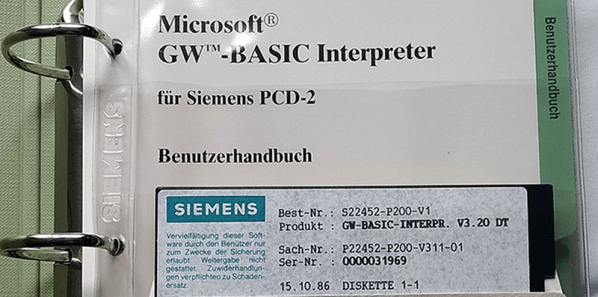
In the late 1970s and early 1980s, if you had a personal computer there was a fair chance it either booted into some version of Microsoft Basic or you could load and run Basic. There were other versions, of course, especially for very small computers, but the gold standard for home computer Basic was Microsoft’s version, known then as GW-Basic. Now you can get the once-coveted Microsoft Basic source code for the 8086/8088 directly from Microsoft in the state you would have found it in 1983. They put up a read only GW-BASIC repository, presumably to stop a flood of feature requests for GPU acceleration.

You might wonder why they would do this? It is certainly educational, especially if you are interested in assembly language. For historical reasons, you might want to get a copy you could modify, too, for your latest retrocomputer project.

There are a few tidbits of interest. Some of the source is marked that it was translated. Apparently, Microsoft had a master implementation for some processor — real or imagined — and could translate from that code to 8088, Z-80, 6502, or any other processor they wanted to target.

From what we understand, GW-Basic was identical to IBM’s BASICA, but didn’t require certain IBM PC ROMs to operate. Of course, BASICA, itself, came from MBASIC, Microsoft’s CP/M language that originated with Altair Basic. A long lineage that influenced personal computers for many years. On a side note, there’s debate on what the GW stands for. Gee-Whiz is a popular vote, but it could stand for ‘Gates, William’, Greg Whitten (an early Microsoft employee), or Gates-Whitten. The source code doesn’t appear to answer that question.

We did enjoy the 1975 copyright message, though:

ORIGINALLY WRITTEN ON THE PDP-10 FROM
FEBRUARY 9 TO APRIL 9 1975

BILL GATES WROTE A LOT OF STUFF.
PAUL ALLEN WROTE A LOT OF OTHER STUFF AND FAST CODE.
MONTE DAVIDOFF WROTE THE MATH PACKAGE (F4I.MAC).

It wasn’t long ago that Microsoft released some old versions of MSDOS. If you have the urge to write some Basic, you might pass on GW-Basic and try QB64, instead.

GW-Basic Disk and Manual photo by [Palatinatian] CC-SA-4.0.

Is That An ESP32 On Your Wrist?

What could you do with a dual-core 240 MHz ESP32 that supports Arduino-style programming, with 16 MB of flash, 8 MB of PSRAM, and 520 k of RAM? Oh, let’s throw in a touchscreen, an accelerometer, Wifi, and Bluetooth. Besides that, it fits on your wrist and can show the time? That’s the proposition behind Lilygo T Watch 2020. If it sounds like a smartwatch, it is. At around $25 –and you can snag the hardware from a few different places — it is not only cheaper than the latest flagship smartwatch, but it is also infinitely more hackable.

OK, so the screen is only 1.54″, but then again, it is a watch. If Arduino isn’t your thing, you can use anything else that supports the ESP32 like Micropython or even Scratch. There are variants that have LoRA and GPS, at slightly higher prices. You can also find ones with heart rate monitors and other features.

Continue reading “Is That An ESP32 On Your Wrist?”

3D Printed Switch Uses Paperclip

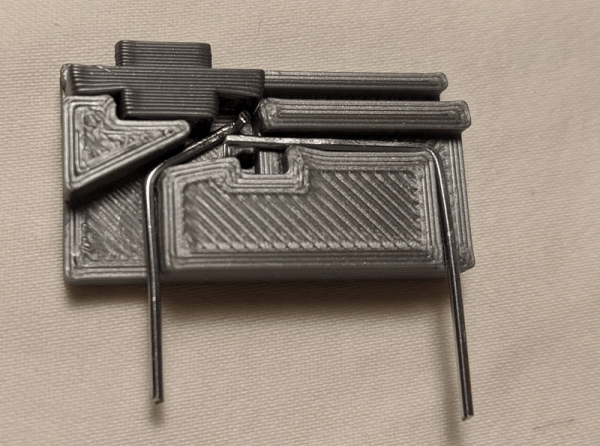
We live in a time when all manner of electronic components are practically a mouse click away. Still, we like to see people creating their own components. Maybe a stock part won’t fit or isn’t immediately available. Or maybe you just want to build it yourself, we get that. [Aptimex] shows off a design for a 3D printed slide switch that uses a paperclip for the contact material.

Of course, it had better be a metal paperclip and we’d make sure the shiny metal was pretty conductive. Of course, you could probably use thick wire to get the same effect. It sounds like [Aptimex] was inspired by an earlier Hackaday.io project that created a few different kinds of switches using similar techniques.

Continue reading “3D Printed Switch Uses Paperclip”

Linux Fu: Alternative Shells

On Unix — the progenitor of Linux — there was /bin/sh. It was simple, by comparison to today’s shells, but it allowed you to enter commands and — most importantly — execute lists of commands. In fact, it was a simple programming language that could make decisions, loop, and do other things to allow you to write scripts that were more than just a list of programs to run. However, it wasn’t always the easiest thing to use, so in true Unix fashion, people started writing new shells. In this post, I want to point out a few shells other than the ubiquitous bash, which is one of the successors to the old sh program.

Since the 7th Edition of Unix, sh was actually the Bourne shell, named after its author, Stephen Bourne. It replaced the older Thompson shell written in 1971. That shell had some resemblance to a modern shell, but wasn’t really set up for scripting. It did have the standard syntax for redirection and piping, though. The PWB shell was also an early contender to replace Thompson, but all of those shells have pretty much disappeared.

You probably use bash and, honestly, you’ll probably continue to use bash after reading this post. But there are a few alternatives and for some people, they are worth considering. Also, there are a few special-purpose shells you may very well encounter even if your primary shell is bash.

Continue reading “Linux Fu: Alternative Shells”

Radio Shack Shortwave Goes Digital

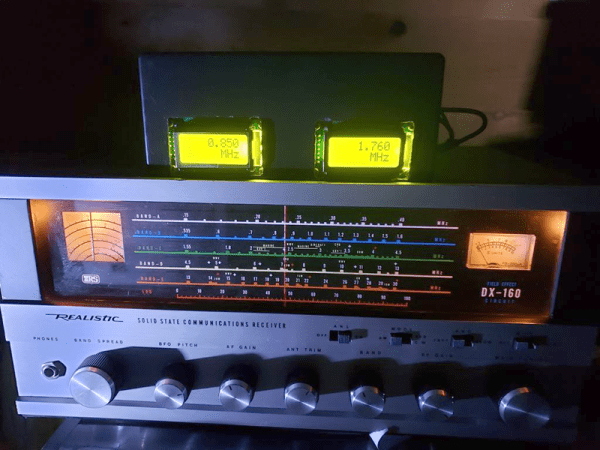
If you spent the 1970s obsessively browsing through the Radio Shack catalog, you probably remember the DX-160 shortwave receiver. You might have even had one. The radio looked suspiciously like the less expensive Eico of the same era, but it had that amazing-looking bandspread dial, instead of the Eico’s uncalibrated single turn knob number 1 to 10. Finding an exact frequency was an artful process of using both knobs, but [Frank] decided to refit his with a digital frequency display.

Even if you don’t have a DX-160, the techniques [Frank]  uses are pretty applicable to old receivers like this. In this case, the radio is a single conversion superhet with a variable frequency oscillator (VFO), so you need only read that frequency and then add or subtract the IF before display. If you can find a place to tap the VFO without perturbing it too much, you should be able to pull the same stunt.

Continue reading “Radio Shack Shortwave Goes Digital”

ZRAM Boosts Raspberry Pi Performance

Linux is a two-edged sword. On the one hand, there’s so much you can configure. On the other hand, there’s so much you can configure. It is sometimes hard to know just what you should do to get the best performance, especially on a small platform like the Raspberry Pi. [Hayden James] has a suggestion: enable ZRAM and tweak the kernel to match.

Although the post focuses on the Raspberry Pi 4, it applies to any Linux system that has limited memory including older Pi boards. The idea is to use a portion of main memory as a swap file. At first, that might seem like a waste since you could use that memory to, you know, actually run programs. However, the swap devices are compressed, so you get more swap space and transfers from these compressed swap devices and main memory are lightning-fast compared to a hard drive or solid state disk drive.

Continue reading “ZRAM Boosts Raspberry Pi Performance”