Play Dough Simplifies Interferometer Build

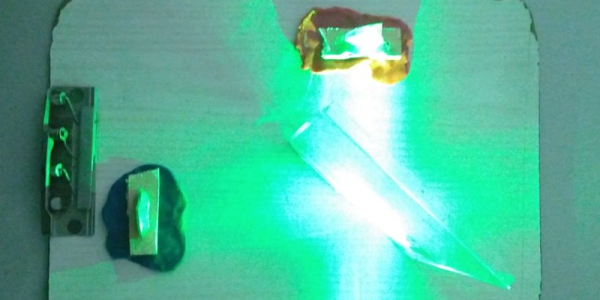
An interferometer sounds like something complicated, and in a way, it is. But it is also pretty easy to build one with some common materials. [Let’s Innovate] has instructions for how to make an interferometer using a green laser pointer, some mirrors, and a CD case. one of the most mundane parts, though, might be the most important: Play Dough.

The very sensitive device needs very precise alignment of the mirrors that reflect the beam. Using Play Dough it is easy to adjust the mirrors to the spot that is just right and then have it stay there.

For the best result, the mirrors really need to be first surface mirrors and not the more common kind with the reflective part on the back. Apparently, a green laser gives better results than a red one, too. If you don’t want to hack up a CD jewel case, a DVD player may give up a beam splitter.

So what do you use it for? Well, most of us use it to see the pretty patterns. But the instrument actually has wide-ranging applications to measure very small distances in fields as diverse as astronomy, optics, and photomicroscopy. To do anything really practical, you might need to add a detector of some sort.

If you want a more robust build, this one is similar. If you have a well-stocked test bench, you might be able to get by with even less.
Gigapixel Microscope Reveals Tiny Parts Of The Big Picture

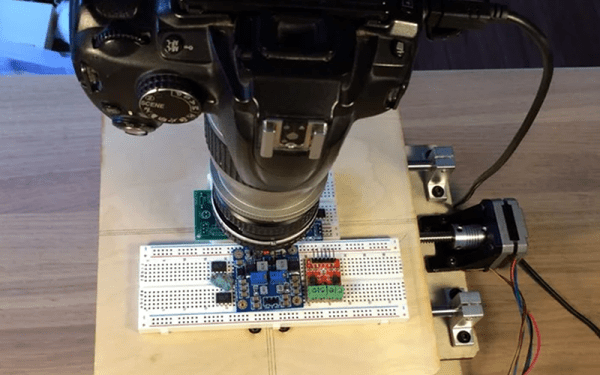
[JBumstead] didn’t want an ordinary microscope. He wanted one that would show the big picture, and not just in a euphemistic sense, either. The problem though is one of resolution. The higher the resolution in an image — typically — the narrower the field of view given the same optics, which makes sense, right? The more you zoom in, the less area you can see. His solution was to create a microscope using a conventional camera and building a motion stage that would capture multiple high-resolution photographs. Then the multiple photos are stitched together into a single image. This allows his microscope to take a picture of a 90x60mm area with a resolution of about 15 μm. In theory, the resolution might be as good as 2 μm, but it is hard to measure the resolution accurately at that scale.

As an Arduino project, this isn’t that difficult. It’s akin to a plotter or an XY table for a 3D printer — just some stepper motors and linear motion hardware. However, the base needs to be very stable. We learned a lot about the optics side, though.

Continue reading “Gigapixel Microscope Reveals Tiny Parts Of The Big Picture”

Hyperlinking Comes To GitHub Via Extension

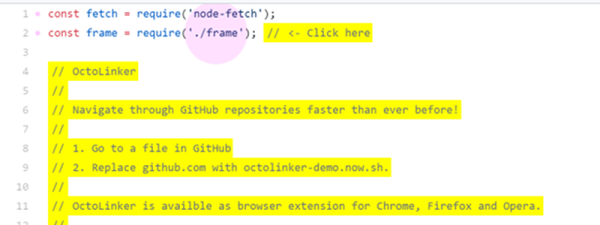
If you are browsing GitHub it is very tempting to open up the source code to some project and peek at how it works. The code view is easy to read, but the viewer lacks one important feature: the ability to click on an included file and find it. The Octolinker extension fixes that oversight.

If you want to try it without installing the extension, there is a mock-up demo available. Even though the demo wants you to click on specific things, if you don’t play by the rules it will still do the right thing and take you to either the code on GitHub or an appropriate page. You can even substitute the demo URL for github.com and try it out on any GitHub page without the extension.

Continue reading “Hyperlinking Comes To GitHub Via Extension”

A Tetris Clock

We have had no shortage of clock projects over the years, and this one is entertaining because it spells the time out using Tetris-style blocks. The project looks good and is adaptable to different displays. The code is on GitHub and it relies on a Tetris library that has been updated to handle different displays and even ASCII text.

[Brian] wanted to use an ESP8266 development board for the clock, but the library has a bug that prevents it from working, so he used an ESP32 board instead. The board, a TinyPICO, has a breakout board that works well with the display.

Continue reading “A Tetris Clock”

He Comes To Bury Sensors, Not To Praise Them

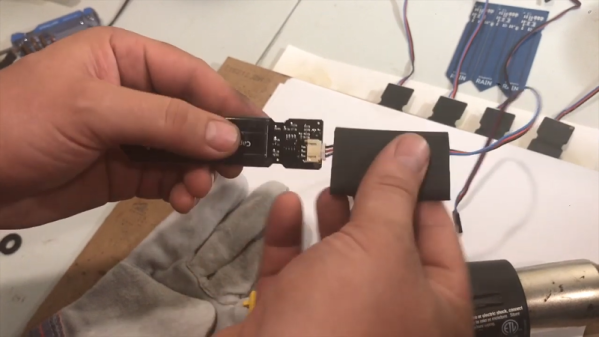
[Adosia] has some interesting videos about their IoT platform controlling self-watering plant pots. However, the video that really caught our eye was the experience in sealing up sensors that are going to be out in the field. Even if you aren’t using the exact sensors, the techniques are useful.

We would have expected to see potting compound, but that’s messy and hard to use so their process is simpler. First, a few coats of clear urethane sealant goes over the electronics. Next, heat shrink goes over the assembly. It isn’t ordinary heat shrink though, instead it’s the kind that has heat-activated adhesive inside.

Continue reading “He Comes To Bury Sensors, Not To Praise Them”

Schrodinger’s Cat Lives

If quantum physics always sounded a little squirrelly to you, take heart. Yale researchers have announced that they can do what quantum physics claimed to be impossible: they can determine the state a quantum system will collapse to before it happens. This contradicts Schrodinger’s famous hypothetical cat that is superimposed as 50% alive and 50% dead at the same time. The research appears in Nature.

Schrodinger argued that until you open the box, the cat is half alive and half dead in the same way that a qubit can be in 50% of one state or another. When you observe it, you force the system to one state. Researchers at Yale, however, have found a way to use microwaves to indirectly monitor qubits to determine their state prior to the system making a jump. Unlike a normal observation which occurs too late, the Yale technique allows researchers to change the future state to their choice.

Continue reading “Schrodinger’s Cat Lives”

Windows 10 Goes To Shell

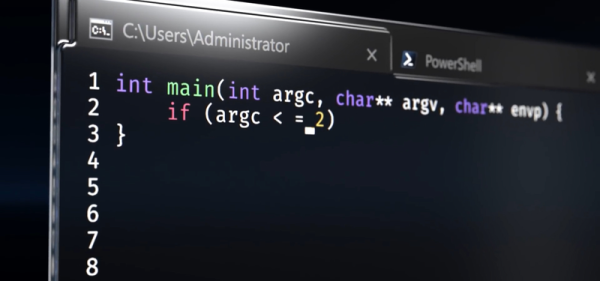
Windows 10 — the operating system people love to hate or hate to love. Even if you’re a Linux die-hard, it is a fair bet that your workplace uses it and that you have friends and family members that need help forcing you to use Windows at least some times. If you prefer a command line — or even just find a place where you have to use the command line, you might find the classic Windows shell a bit anemic. Some of that’s the shell’s fault, but some of it is the Windows console which is — sort of — the terminal program that runs various Windows text-based programs. If you have the creator update channel on Windows 10, though, there have been some recent improvements to the console and the Linux system that will eventually trickle down to the mainstream users.

What’s New?

So what’s new? According to Microsoft, they’ve improved the call interface to make the following things work correctly (along with “many others”):

  • Core tools: apt, sed, grep, awk, top, tmux, ssh, scp, etc.
  • Shells: Bash, zsh, fish, etc.
  • Dev tools: vim, emacs, nano, git, gdb, etc.
  • Languages & platforms: Node.js & npm, Ruby & Gems, Java & Maven, Python & Pip, C/C++, C# &
  • .NET Core & Nuget, Go, Rust, Haskell, Elixir/Erlang, etc.
  • Systems & Services: sshd, Apache, lighttpd, nginx, MySQL, PostgreSQL

The changes to the console are mostly surrounding escape sequences, colors, and mouse support. The API changes included things like allowing certain non-administrative users to create symlinks. We’ve made X Windows work with Windows (using a third-party X server) and Microsoft acknowledges that it has been done. However, they still don’t support it officially.

Continue reading “Windows 10 Goes To Shell”