Autonomous RiverBot Goes 15 Meters Deep

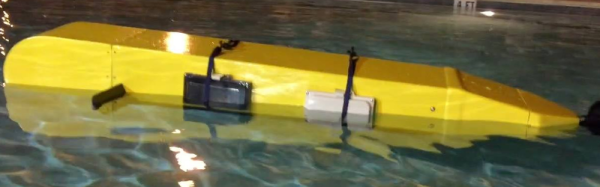
If you want to make a submersible robot (or, really, any robot) you can either design it for a specific mission, or you can try to make it general purpose. The researchers at the Cura Oceanus Foundation opted for the latter approach with RiverBot, a community-designed unmanned submersible.

Comparing it to the Space Shuttle, the RiverBot has payload bays that accept sensor kits or custom-made payloads. The builders hope to provide a platform for students and others and want to have students start with RiverBot in middle school, and keep working with the program all the way up to the PhD level.

Continue reading “Autonomous RiverBot Goes 15 Meters Deep”

Processing For Raspberry Pi

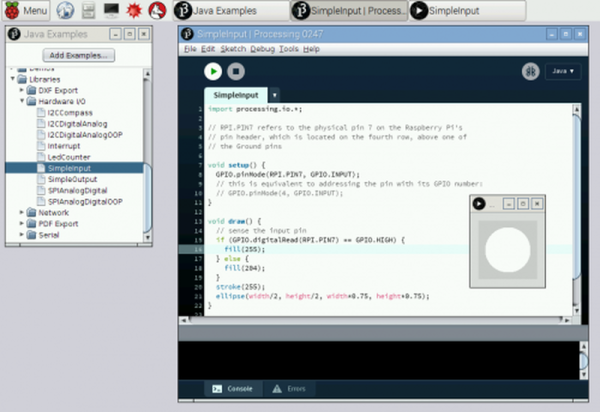
You know Processing? It is the programming language and IDE aimed at the electronic arts, new media art, and visual design communities. [Gottfried Haider] recently got Processing working on the Raspberry Pi and included a hardware input/output library to manipulate the Pi’s I/O pins.

If you want to experiment with Processing, you can download it right on your Pi with the following command:

curl https://processing.org/download/install-arm.sh | sudo sh

You can also download it from the download page. There’s a specific tutorial available or you can watch some general videos on Processing (see below).

Continue reading “Processing For Raspberry Pi”

Low Parts Count ARM SDR

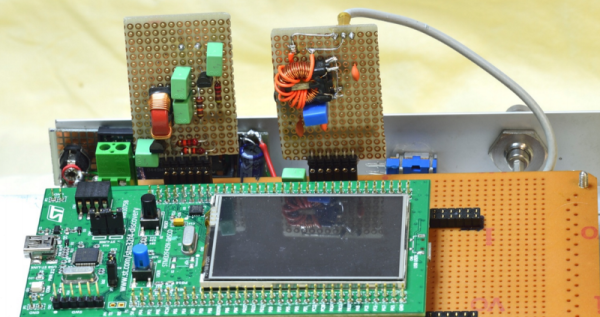
[Alberto di Bene] wanted to build an SDR for relatively low frequencies. Usually, you’d start with some front end to get the radio frequency signal down where you can work with it. But [Alberto] practically just fed an antenna into an STM32F429 Discovery board and did all the radio processing in the onboard ARM chip.

There is a little more to it than that, but only a little. If you open the PDF file on [Alberto’s] site, you’ll see there is a simple front end filter (a transformer, along with a few capacitors and inductors). This low pass filter prevents high frequencies from reaching the ARM processor’s analog to digital converter. In addition, a capacitor and a couple of resistors ensure the converter only sees positive voltages.

The CPU digitizes the incoming signal and processes it, demodulating several different types of radio transmission. The recovered audio is sent through the onboard digital to analog converter.

In addition to an input filter, the output also needs a filter to prevent high frequencies from reaching the speaker. Unlike the input filter, this one is a bit more complicated. The inductors needed for a passive filter were too large to be practical, so the output filter is an active one with a few transistors. The only other external circuitry is the power supply for the Discovery board.

The document does a great job of explaining the rationale behind the design choices and how the whole system works. It also includes simulations of both analog and digital filters used in the design.

This is really bare metal SDR and reading the code is educational. However, if you want to start with something simpler, consider GNU Radio and either an SDRPlay or a cheap RTL-SDR dongle.

 

Object Oriented State Machine Operating System Goes Open Source

On a desktop computer, you think of an operating system as a big piece of complex software. For small systems (like an Arduino) you might want something a lot simpler. Object Oriented State Machine Operating System (OOSMOS) is a single-file and highly portable operating system, and it recently went open source.

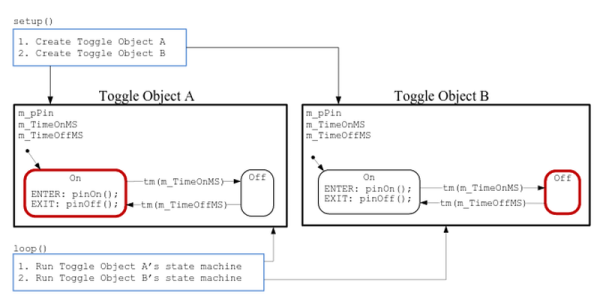
OOSMOS has a unique approach because it is threadless, which makes it easy to use in memory constrained systems because there is no stack required for threads that don’t exist. The unit of execution is a C++ object (although you can use C) that contains a state machine.

You can read the API documentation online. Just remember that this is not an end user OS like Windows or Linux, but an operating environment for managing multiple tasks. You can, though, use OOSMOS under Windows or Linux as well as many other host systems.

Continue reading “Object Oriented State Machine Operating System Goes Open Source”

Self Folding Graphene Paper

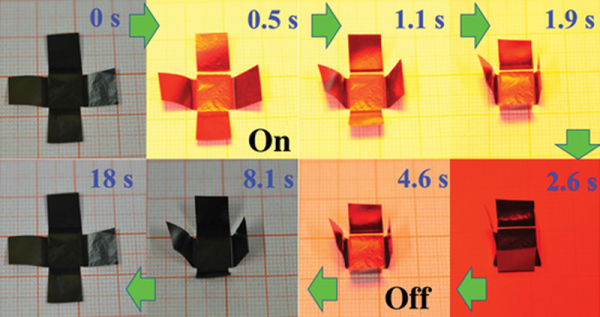
Origami, the art of folding paper into shapes, is the latest craft to fall to automation. Researchers in China have published a paper in Science Advances describing how they created graphene-based paper that can fold itself. According to their paper (that is, the paper they wrote, not their graphene paper), the new material can adopt a predefined shape, walk, or even turn a corner.

Active materials like shape memory polymers, aren’t new. But there are many practical problems with using such materials. Using MGMs (Macroscopic Graphene Materials), the researchers created paper that can change shape based on light. temperature, or humidity.

The video below shows a few uses including a self-folding box, a worm-like motion device, and a hand-like piece of paper making a grasping motion. The creators mention that there are a wide range of applications including robotics, artificial muscles, and sensing devices. After watching the video, we couldn’t help but wonder how cool a paper flower that opened in the sunlight would be.

We’ve covered how to make your own graphene in a home lab and even inside a DVD burner. We’ll be interested to see who is the first to hack some graphene paper and what you’ll use it for.

Continue reading “Self Folding Graphene Paper”

Retrotechtacular: A Mechanical UART

We’ve heard it said that no one invented the old mechanical Teletype. One fell from the sky near Skokie, Illinois and people just duplicated them. It is true these old machines were similar to a modern terminal. They sent and received serial data using a printer instead of a screen. But inside, they were mechanical Rube Goldbergs, not full of the electronic circuits you’d think of today.

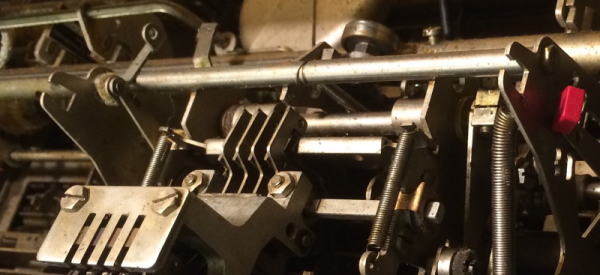
Teletype was the best-known name, but there were other mechanical monster terminals out there. [Carsten] recently took some pictures of his 99 pound Olivetti mechanical terminal. According to him, there’s only one electronic component within: a bistable solenoid that reads the data. Everything else is mechanical and driven with a motor that keeps everything at the right baud rate (110 baud).

Like the Teletype, it is a miracle these things were able to work as well as they did. Lacking a microcontroller, the terminals could respond to an identity request by spinning a little wheel that had teeth removed to indicate which letters to send (TeleType used a similar scheme). Things that are simple using today’s electronics (like preventing two keys pressed at once from being a problem) turned out to be massive design challenges for these old metal monsters.

Turns out that when [Carsten] last fired the terminal up, a capacitor finally gave up its magic smoke. He plans to fix it, though, and as long as it isn’t a mechanical problem, we bet he will.

We’ve talked about Teletypes a few times in the past, including using them for text messaging and even Twitter.

Avoid Procrastination With This Phone Lock Box

Smart phones are great. So great that you may find yourself distracted from working, eating, conversing with other human beings in person, or even sleeping. [Digitaljunky] has this problem (not surprising, really, considering his name) so he built an anti-procrastination box. The box is big enough to hold a smart phone and has an Arduino-based time lock.

The real trick is making the box so that the Arduino can lock and unlock it with a solenoid. [Digitaljunky] doesn’t have a 3D printer, so he used Fimo clay to mold a custom latch piece. A digital display, a FET to drive the solenoid, and a handful of common components round out the design.

Continue reading “Avoid Procrastination With This Phone Lock Box”