Who Is Thinking About Open Source Firmware?

Yesterday, we ran a post on NVIDIA’s announcement of open-source drivers for some of its most recent video cards. And Hackaday being huge proponents of open-source software and hardware, you’d think we’d be pouring the champagne. But it’s trickier than that.

Part of the reason that they are able to publish a completely new, open-source driver is that the secrets that they’d like to keep have moved into the firmware. So is the system as a whole more or less open? Yeah, maybe both.

With a more open interface between the hardware and the operating system, the jobs of people porting the drivers to different architectures are going to be easier. Bugs that are in what is now the driver layer should get found and fixed faster. All of the usual open-source arguments apply. But at the same time, the system as a whole isn’t all that much more transparent. The irony about the new NVIDIA drivers is that we’ve been pushing them to be more open for decades, and they’ve responded by pushing their secrets off into firmware.

Secrets that move from software to firmware are still secrets, and even those among us who are the most staunch proponents of open source have closed hardware and firmware paths in our computers. Take the Intel Management Engine, a small computer inside your computer that’s running all the time — even while the computer is “off”. You’d like to audit the code for that? Sorry. And it’s not like it hasn’t had its fair share of security relevant bugs.

And the rabbit hole goes deeper, of course. No modern X86 chips actually run the X86 machine language instructions — instead they have a microcode interpreter that reads the machine language and interprets it to what the chip really speaks. This is tremendously handy because it means that chip vendors can work around silicon bugs by simple pushing out a firmware update. But this also means that your CPU is running a secret firmware layer at core. This layer is of course not without bugs, some of which can have security relevant implications.

This goes double for your smartphone, which is chock-full of multiple processors that work more or less together to get the job done. So while Android users live in a more open environment than their iOS brethren, when you start to look down at the firmware layer, everything is the same. The top layer of the OS is open, but it’s swimming on top of an ocean of binary blobs.

How relevant any of this is to you might depend on what you intend to do with the device. If you’re into open source because you like to hack on software, having open drivers is a fantastic resource. If you’re looking toward openness for the security guarantees it offers, well, you’re out of luck because you still have to trust the firmware blindly. And if you’re into open source because the bugs tend to be found quicker, it’s a mix — while the top level drivers are made more inspectable, other parts of the code are pushed deeper into obscurity. Maybe it’s time to start paying attention to open source firmware?

An ATTiny board that one of the students developed for this project, etched on single-sided FR4.

Electronics And C++ Education With An ATTiny13

When [Adam, HA8KDA] is not busy with his PhD studies, he mentors a group of students interested in engineering. To teach them a wide range of topics, he set out to build a small and entertaining embedded project as they watch and participate along the way. With this LED-adorned ATTiny13A project, [Adam] demonstrated schematic and PCB design, then taught C++ basics and intricacies – especially when it comes to building low-footprint software – and tied it all together into a real-world device students could take home after the project. His course went way beyond the “Hello world”s we typically expect, and some of us can only wish for a university experience like this.

He shares the PCB files and software with us, but also talks about the C++20 framework he’s developed for this ATTiny. The ATTiny13A is very cheap, and also very limited – you get 1K of ROM and 64 bytes of RAM. This framework lets you make good use of it, providing the basics like GPIO wiggling, but also things like low-power operation hooks, soft PWM with optional multi-phase operation support and EEPROM access. Students could write their own animations for this device, and he includes them in the repo, too!

In educational projects, it pays to keep code direct and clean, cruft-less and accessible to students. These are the things you can only achieve when you truly understand the tools you’re working with, which is the perfect position for teaching about them! [Adam] intends to show that C++ is more than suitable for low-resource devices, and tells us about the EEPROM class code he wrote – compiling into the same amount of instructions as an Assembly implementation and consuming the same amount of RAM, while providing compile-time checks and fail-safe syntax.

We’ve talked about using C++ on microcontrollers before, getting extra compile-time features without overhead, and this project illustrates the concept well. [Adam] asks us all, and especially our fellow C++ wizards, for our opinions on the framework he designed. Could you achieve even more with this simple hardware – make the code more robust, clean, have it do more within the limited resources?

What could you build with an ATTiny13, especially with such a framework? A flashy hairclip wearable, perhaps, or a code-learning RF-remote-controlled outlet. We’ve also seen a tiny camera trigger for endurance races,, a handheld Flappy Bird-like console, and many more!

Printable Fix For Time Card Clock Has Owner Seeing Red Again

When [Morley Kert] laid eyes on a working time card-punching clock, he knew he had to have it for a still-secret upcoming project. The clock seemed to work fine, except that after a dozen or so test punches, the ink was rapidly fading away into illegibility. After a brief teardown and inspection, [Morley] determined that the ribbon simply wasn’t advancing as it should.

This clock uses a ribbon cassette akin to a modern typewriter, except that instead of a feed spool and a take-up spool, it has a short length of ribbon that goes around and around, getting re-inked once per revolution.

When a card is inserted, a number of things happen: a new hole is punched on the left side, and an arm pushes the card against the ribbon, which is in turn pushed against the mechanical digit dials of the clock to stamp the card.

Finally, the ribbon gets advanced. Or it’s supposed to, anyway. [Morley] could easily see the shadow of a piece that was no longer there, a round piece with teeth with a protrusion on both faces for engaging both the time clock itself and the ribbon cassette. A simple little gear.

After emailing the company, it turns out they want $95 + tax to replace the part. [Morley] just laughed and fired up Fusion 360, having only caliper measurements and three seconds of a teardown video showing the missing part to go on. But he pulled it off, and pretty quickly, too. Version one had its problems, but 2.0 was a perfect fit, and the clock is punching evenly again. Be sure to check it out after the break.

Okay, so maybe you don’t have a time card clock to fix. But surely you’ve had to throw out an otherwise perfectly good coat because the zipper broke?

Continue reading “Printable Fix For Time Card Clock Has Owner Seeing Red Again”

What’s In A Wattmeter?

The idea behind watts seems deceptively simple. By definition, a watt is the amount of work done when one ampere of current flows between a potential of one volt. If you think about it, a watt is basically how much work is done by a 1V source across a 1Ω resistor. That’s easy to say, but how do you measure it in the real world? [DiodeGoneWild] has the answer in a recent video where he tears a few wattmeters open.

There are plenty of practical concerns.  With AC, for example, the phase of the components matters. The first 11 minutes of the video are somewhat of a theory review, but then the cat intervenes and we get to see some actual hardware.

Continue reading “What’s In A Wattmeter?”

Retrotechtacular: The IBM System/360 Remembered

Before IBM was synonymous with personal computers, they were synonymous with large computers. If you didn’t live it, it was hard to realize just how ubiquitous IBM computers were in most industries. And the flagship of the mainframe world was the IBM System/360. For a whole generation that grew up in the late 1960s and early 1970s, a 360 was probably what you thought of when someone said computer. [Computer History Archive Project] has a loving recollection of the machine with a lot of beautiful footage from places like NASA and IBM itself. You can see the video below.

Not only was the 360 physically imposing, but it had lots of lights, switches, and dials that appealed to the nerdiest of us. The machines were usually loud, too, with a Selectric terminal, card punches and readers, noisy 9-track tape drives, and a line printer or two.

Continue reading “Retrotechtacular: The IBM System/360 Remembered”

Big Audio Visualizer Pumps With The Music

A spectrum analyzer is a great way to create exciting visuals that pulse in time with music. [pyrograf] wanted a big one as a display piece, so set about whipping up something of their very own.

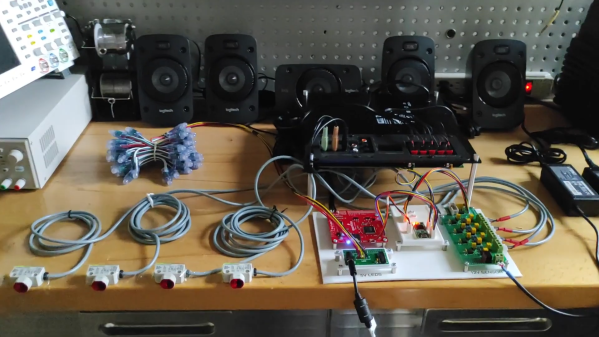
An ESP32 microcontroller serves as the heart of the build, with its high clock rate and dual cores making it a highly capable choice for the job. Audio from a microphone is amplified and pumped into the ESP32’s analog input. Core 0 on the ESP32 then runs a Fast Fourier Transform on the input audio in order to determine the energy in each frequency band. The results of this FFT are then passed to Core 1, which is used to calculate the required animations and pipe them out to a series of WS2812B LEDs.

Where this build really shines, though, is in the actual construction. Big chunks of acrylic serve as diffusers for the LEDs which light up each segment of the spectrum display. Combine the big pixel size with a nice smooth 30 Hz refresh rate on the LEDs, and the result is a rather large spectrum analyzer that really does look the business.

We’ve seen some similar builds over the years, too. Video after the break.

Continue reading “Big Audio Visualizer Pumps With The Music”

Round LCDs Put To Work In Rack Mount Gauge Cluster

Like many of you, we’re intrigued by the possibilities offered by the availability of affordable round LCD panels. But beyond the smartwatches they were designed for, it’s not always easy to come up with an appropriate application for such non-traditional displays. Digital “steam gauges” are one of the first ideas that come to mind, so it’s perhaps no surprise that’s the direction [Tom Dowad] took his project. But rather than just one or two gauges, he decided to go all out and put eight of them in a 1U rack mountable unit.

What do you need eight faux-analog gauges for? Beats us, but that’s not our department. Now [Tom] has a whole row of indicators that can be used to show whatever it is he likes to keep an eye on. The fact that the device is actually controlled via MIDI may provide us a clue that there’s a musical component at play (no pun intended), but then, it wouldn’t be the first time we’d seen MIDI used simply as a convenient and well supported way of synchronizing gadgets. Continue reading “Round LCDs Put To Work In Rack Mount Gauge Cluster”