Solving Buyer’s Remorse With A Rotary Tool And Soldering Iron

At this point, it’s pretty clear that USB-C has become the new standard connector for an increasing amount of applications, but predominantly charging. Even Apple is on board this time, and thanks to backwards compatibility, you don’t have to abandon devices using the older standards you may prefer for their simplicity or superior lint-resilience either. For [Mat] on the other hand, it’s USB-C all the way nowadays. Yet back in the day when he bought his laptop, he had the price tag convince him otherwise, and has come to regret it, as all the convenience of a slim design is cancelled out by dragging a bulky charger for the laptop’s proprietary charging port along.

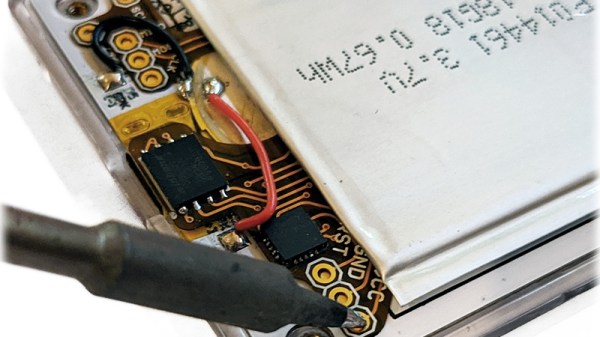
Well, as the saying goes for situations like this: love it, leave it, or get out the tools and rework that sucker. Lucky enough, the original charger provides 20 V, which matches nicely the USB power delivery (PD) specification, and after opening up the laptop, [Mat] was happy to see that the interior provided enough room to fit the USB-C module he was planning to use. Even better, the charging port itself was a standalone component attached to a cable, so no modifications to the mainboard were necessary. Once the USB-C module was soldered to that same cable, the only thing left to do was carving a bigger hole on the laptop case, and saying good bye to the obsoleted charger.

The downside is of course the lack of actual USB functionality with that shiny new charging port, but that was never the goal here anyway. With more and more USB-C devices popping up, it’s also no surprise that we’ve seen modifications like this before, and not only with laptops. In case you’re thinking of upgrading one of your own devices to USB-C, and do wish for actual USB functionality, don’t worry, we got you covered as well.

Continue reading “Solving Buyer’s Remorse With A Rotary Tool And Soldering Iron”

Unique Strandbeest Stands Tall With Line Of Legs

Multiple rows of intricately articulated legs are the defining characteristic of the Strandbeest, but [James Bruton] wondered if he could reduce that down to a single row using the same principles at work in a self-balancing two wheeled robot. While it’s perhaps a bit early to call his experiments a complete success, the first tentative steps taken by his (relatively) svelte Strandbeest certainly look promising.

Initially the robot only had two pairs of legs, but in testing [James] found this arrangement to be a bit unstable. By bringing the total count to four legs per side and improving the counterweight arrangement, the bot has been able to walk the length of the workshop. Unfortunately, an issue with the leg design seems to be preventing the Strandbeest from taking any backward steps.

Normally this wouldn’t be that big of a problem, but in this case it’s keeping the Strandbeest from being able to self-balance while standing still. In other words, the robot needs to keep moving forward or it will fall over. Still, [James] thinks the idea has promise and wants to continue experimenting with the bot in a larger area.

Specifically, he wants to see if the dual-motor robot can turn by varying the speed the two sets of legs are running at. If it can walk in a tight enough circle, it could keep right on marching until the power runs down. Sounds more than a little nightmarish to us, but we’d still like to see it.

Reader’s may recall [James] from this other another robotic projects, such as the phenomenal OpenDog. We don’t know where his obsession of legged robots comes from, but we certainly aren’t complaining.

Continue reading “Unique Strandbeest Stands Tall With Line Of Legs”

Displaying HTML Interfaces And Managing Network Nodes… In Space!

The touchscreen interface aboard SpaceX Crew Dragon is just one of its many differences from past space vehicles, but those big screens make an outsized visual impact. Gone are panels filled with indicator needles in gauges, or endless rows of toggle switches. It looked much like web interaction on everyday tablets for good reason: what we see is HTML and JavaScript rendered by the same software core underlying Google’s Chrome browser. This and many other details were covered in a Reddit Ask Me Anything with members of the SpaceX software team.

Various outlets have mentioned Chromium in this context, but without answering the obvious follow-up question: how deep does Chromium go? In this AMA we learn it does not go very deep at all. Chromium is only the UI rendering engine, their fault tolerant flight software interaction is elsewhere. Components such as Chromium are isolated to help keep system behavior predictable, so a frozen tab won’t crash the capsule. Somewhat surprisingly they don’t use a specialized real-time operating system, but instead a lightly customized Linux built with PREEMPT_RT patches for better real-time behavior.

In addition to Falcon rocket and Dragon capsule, this AMA also covered software work for Starlink which offered interesting contrasts in design tradeoffs. Because there are so many satellites (and even more being launched) loss of individual spacecraft is not a mission failure. This gives them elbow room for rapid iteration, treating the constellation more like racks of servers in a datacenter instead of typical satellite operations. Where the Crew Dragon code has been frozen for several months, Starlink code is updated rapidly. Quickly enough that by the time newly launched Starlink satellites reach orbit, their code has usually fallen behind the rest of the constellation.

Finally there are a few scattered answers outside of space bound code. Their ground support displays (visible in Hawthorne mission control room) are built with LabVIEW. They also confirmed that contrary to some claims, the SpaceX ISS docking simulator isn’t actually running the same code as Crew Dragon. Ah well.

Anyone interested in what it takes to write software for space would enjoy reading through these and other details in the AMA. And since it had a convenient side effect of serving as a recruiting event, there are plenty of invitations to apply if anyone has ambitions to join the team. We certainly can’t deny the attraction of helping to write the next chapter in human spaceflight.

[Photo credit: SpaceX]

Circuit Sculpture Clock Goes Pew Pew

Freeform circuit sculptures are a perfect example of the realm where electronic meets art. While many of these objects only serve aesthetic purposes, [Zachary Goode]’s X-Wing clock satisfies both form and function.

He makes no secret of the fact that his project was inspired by the works of Mohit Bhoite, one of our favorite freeform circuit artists. In particular, he wanted to make an X-Wing version of Mohit’s Tie Fighter Clock.

After sketching out the design in Fusion360, he printed out a paper stencil for each part to help him bend the pieces into the right shape. Next, he assembled the wireframe by soldering before mounting the electronics, an Arduino Nano, DS3231 RTC module, and OLED display. For special effects, he added a speaker that randomly plays engine and laser sounds and some Blinkenlights.

He also decided to include some woodworking in his project by making a walnut base which includes the USB cable for power supply and two slide switches. The latter enable him to disable the sound effects and switch to daylight saving time.

Considering that this is his first foray into freeform circuits the result is astonishingly beautiful. If you share our love for these intricate objects be sure to check out our compilation of equally appealing circuit sculptures.


UV Phone Sanitizer Shows The Power Of Modern DIY

Editor’s Update: According to the schematic for this project, SST-10-UV-A130-F405-00 (PDF) LEDs are used which produce 405nm UV-A light. The manufacturer, Luminus, does not recommend that part for disinfection or sterilization. Luminus sells UV-C LEDs for that purpose, generating 275-285nm. After publication the part number used was changed to and American Opto L933-UV265-2-20 which is a UV-C LED producing 265-278nm.

The global COVID-19 pandemic has had a serious impact on the hacking and making scene, though it hasn’t been all bad. Sure, shipping on average is taking a lot longer than we’d like when ordering parts, but otherwise being stuck at home has given many people far more time to work on their projects than they would have had otherwise. In some cases, it’s also been a reminder of just how far we’ve come in terms of what the dedicated individual is capable of producing within the confines of their own home.

As a perfect example, take a look at this UV sanitizer box built by [Md Raz]. Looking for a way to quickly and easily kill germs on smartphones and other small devices, he used the considerable capabilities afforded to the modern hacker to produce a professional-looking device in far less time than it would have if he had to outsource things like PCB manufacturing or injection molding.

Inside the 3D printed enclosure is an array of SMD UV-C LEDs that, according to the manufacturer’s specs, will destroy viruses and bacteria in 5 minutes. To make sure the LEDs are given enough time to do their job, [Md] is using an ATtiny85 to control the countdown and a seven segment display to let the user know how much longer they have to wait. All the electronics are held on PCBs produced with a BotFactory SV2 desktop PCB printer, but for those of us with somewhat more limited budgets, a mill or even a modified laser engraver could be used to produce similar boards.

With everything going on, there’s understandably been increased demand for germicidal lights. But unfortunately, some unscrupulous manufacturers are trying to take advantage of the situation. Being able to select the LEDs for this device based on their specifications is arguably just as important as how quickly it was produced. Though we’d still advise a position of “trust, but verify” when it comes to UV-C.

Wireless Tin Can Telephone

For many kids, the tin-can telephone is a fun science experiment that doesn’t last much longer than it takes to tangle the string around a nearby tree. [Geoff] decided to go a different however, building a tin-can telephone that’s completely wireless.

The build starts with a hacker favorite, the Arduino Uno. It’s hooked up to an microphone input board which uses the Arduino’s analog input to pick up audio. The Arduino then sends this data out over an NRF24L01+ wireless transceiver, to be picked up by the corresponding tin can receiver at the other end. An LM386 is given amplifier duties, hooked up to a small speaker so the user can hear the incoming audio.

The Arduino Uno is in no way a high-fidelity digital audio platform, but the project does deliver some legible, if scratchy, voice transmission. It also serves as a great way to learn about radio communications and working with digital audio signals. The NRF24L01+ is a great way to add wireless communication to a project, and if you’re looking for more range, we’ve got that covered, too. Video after the break.

Continue reading “Wireless Tin Can Telephone”

Vernier Calipers And Micrometer Screw Gauges, Measuring Without Compromise

I needed a temperature controller module recently, so off I went to Banggood to order one. As one does I found myself browsing, one thing led to another, and I bought a micrometer screw gauge. While micrometers are pretty expensive devices, reflecting their high precision engineering and construction, this micrometer cost me only about £8, or just under $10, definitely in the spirit of our long-running series of reviewing very cheap tools in search of a diamond in the rough. But perhaps more importantly, this is also the cue for an examination of high precision dimensional measurement. So I’ve assembled a collection of micrometers and vernier calipers of varying quality, and it’s time to dive in and measure some very small things.

Some of you will be metrology enthusiasts with an array of the finest devices available, but I am guessing that many of you will not. The ubiquitous precision measurement device in our community appears to be the digital caliper, a sliding clamp with an LCD display, an instrument that can be had in its most basic form for a very small outlay indeed. For the purposes of this piece though we’re not looking at digital devices but their analogue precursors. If you want a feel for metrology and you’d like some of those heritage tools that parents pass onto their kids then it’s time to learn something about the vernier caliper and the micrometer. Continue reading “Vernier Calipers And Micrometer Screw Gauges, Measuring Without Compromise”