Time Frog Color Is A Game Boy Color On Your Wrist

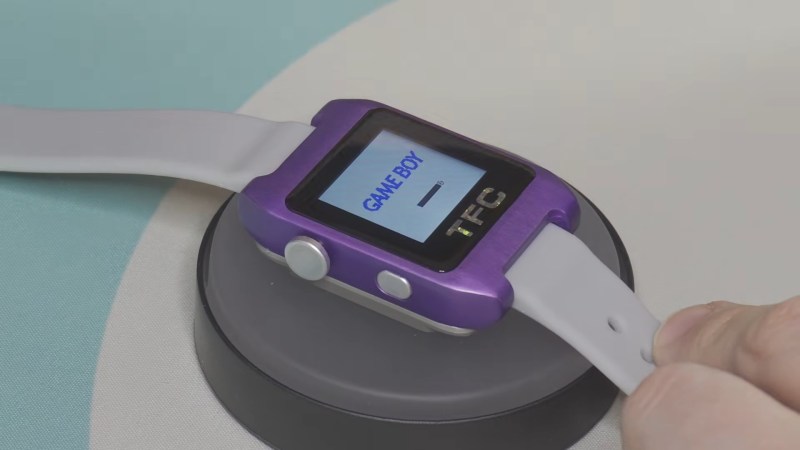
Handheld consoles are great for gaming on the go, but who wants to hold onto things all the time? Would it not be easier to strap the game to your wrist? Well, not in its current form factor, but [LeggoMyFroggo], aka [
Chris Hackmann] has you covered, because he turned the Gameboy Color into a (relatively smart) watch.

Why “relatively” smart? Well, we say that because he’s using the original Game Boy Color CPU, a Sharp SOC based on the Z80 that is far less powerful than modern smartwatch platforms. That SOC is helped out by an RP2040 that translates the chip’s parallel RGB output into something a modern watch-sized display can comprehend via its PIOs. [Chris] refers to it as a “poor man’s FPGA” which isn’t a bad way of thinking about it in this context. Yes, he could have just stuck an emulator on that chip, but what’s the fun in that?

The controls are squeezed into the sides of the watch — the four face buttons on one side, and a tiny D-pad on the other — but that’s easy enough because this thing is 15 mm thick. Since [LeggoMyFroggo] is a purist, he insists on loading the games via cartridge, which does not help thin it out. Game Boy carts are not not watch-friendly, so the cartridges are custom PCBs that plug into an M.2 slot, but with the original (or at least compatible) ROM.

If it wasn’t for the cartridge slot, maybe a battery would have fit. But it doesn’t, which leads to our favorite part of the hack: the battery is in the watch strap. This is both kind of crazy, but also brilliant. The band is cast in silicone, so he’s able to embed a flexi-PCB inside. As for the watch body, that’s CNC’d out of 6061 aluminum before being anodized to a very Nintendo-esque purple.

[Chris] evidently has a soft spot for the Game Boy Color — we featured his FrogBoy re-imagining of the handheld a few years back. The project is just up on YouTube as of this writing, but the watch will join the FrogBoy on [Chris]’s GitHub so we can all get in on the fun once he’s finished the documentation.

Continue reading “Time Frog Color Is A Game Boy Color On Your Wrist”
Rescuing The Data On A 1960s LGP-21 Computer’s Disk Memory

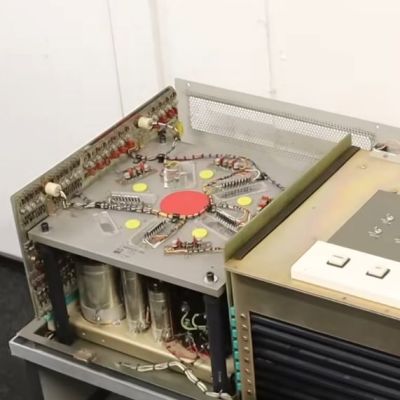
One of the nice things about magnetic storage is that as long as the magnetic layer remains intact, the data it contains should stay readable pretty much indefinitely. That raises the prospect of recovering data from really old computer systems featuring magnetic memory, such as the 63-year old LGP-21 that [David Lovett] of Usagi Electric is currently restoring. Its magnetic memory disk is nothing amazing by modern standards, but after initial testing it seems to spin up and read data just fine, raising the question of what was left on the drive when it was last used, meaning what was in memory at the time.

The read/write head side of the LGP-21's magnetic memory. (Credit: Usagi Electric, YouTube)
The read/write head side of the LGP-21’s magnetic memory. (Credit: Usagi Electric, YouTube)

Non-invasive data recovery here involves writing a program that will simply read the entire disk from beginning to end. Tracks 0 and 1 were found to be unreadable due to some kind of hardware issue, but track 2 could be backed up by looking at the output on the CRT, thus providing a track to use. Fascinatingly the LGP-21’s memory disks uses interleaved tracks to reduce the number of read/write heads as part of the overall cost-saving measures relative to the more expensive LGP-30. As you might expect, this slows down memory access a lot over its big brother.

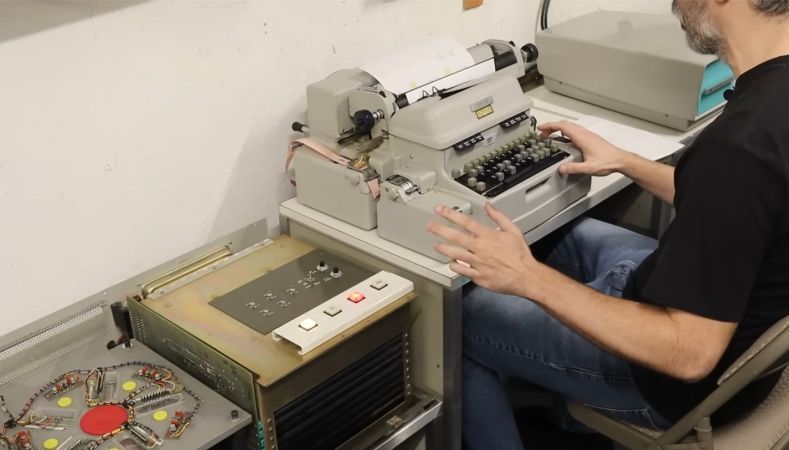
Before any recovery attempt could begin, the Flexowriter typewriter that forms the user interface to the computer had to be given some serious maintenance, along with a few other components like a switch and the paper tape reader. This restored the ability to even properly enter data and receive output instructions.

The subsequent effort to recover the stored data involved a bootstrap program that got loaded into memory, after which the remainder of the program was loaded from paper tape. Following this everything worked swimmingly, though with the caveat that with not even a floppy drive to use, the raw hexadecimal data was hammered out on paper with the Flexowriter over the course of 1.5 hours.

This data will now be scanned in and OCR-ed into something that can hopefully be easily analyzed. Hopefully we’ll know before long what this system was last used for.

Continue reading “Rescuing The Data On A 1960s LGP-21 Computer’s Disk Memory”

3D Print This Retro Desktop Case

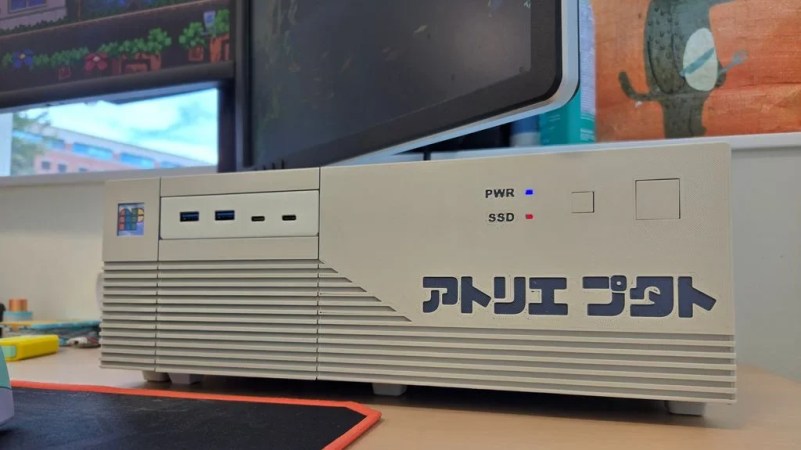
Once upon a time, not every computer lived in a vertical “tower” case. Many decades back a horizontal arrangement was a popular choice, sometimes just referred to as the “desktop” style. [PuTaTuo] is helping to bring it back, with this amazing 3D printed case design.

The case is designed to suit mini-ITX motherboards, while supporting standard ATX-size power supplies. The printed components are all designed to measure less than 220 mm in any dimension to ensure they can easily be produced on smaller printers. The case has a 3.5″ drive bay cutout up front, which you can use for the front panel I/O or a floppy drive if you’re super-retro like that. The front panel is otherwise relatively simple, with buttons for power and reset as well as power and SSD status LEDs.

Assembly is via M3 hardware and heat set inserts. If you’d like to print your own, you can grab the files from Thingiverse or Printables depending on your taste.

We’ve featured some great 3D printed cases over the years, like this colorful build that focuses on ease of access and servicing. The cool thing about designing your own case is you can optimize it to suit your own desires, and customize it to look as cool as you need it to be.

Continue reading “3D Print This Retro Desktop Case”

How To Install Haiku On A UEFI-Only Modern System

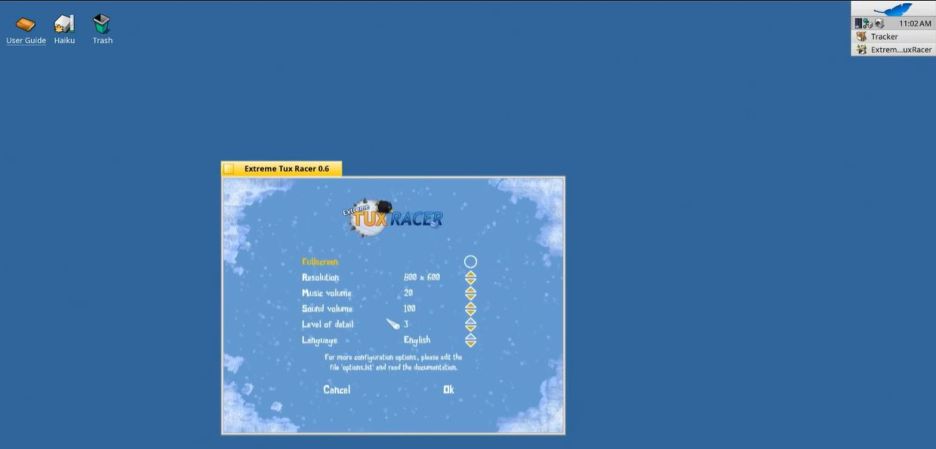
Recently Haiku has become a bit of a popular subject of articles and videos, owing perhaps to how close it currently is to be a daily-driver OS and fulfilling the dream that BeOS set out with. That said, there are still quite a few hurdles before that glorious era can fully commence, with a video by [Ex-IT guy] on YouTube demonstrating some of the major hurdles by installing Haiku on Ryzen 3-based MiniPC that only supports UEFI boot.

Installing the UEFI bootloader is still a very much manual process with the user required to create UEFI boot and OS partitions before copying the bootloader into UEFI boot partition. After this Haiku can be installed as normal. The other variation of multi-boot is demonstrated in the video, with Haiku installed alongside Windows and Linux. This requires a more complex directory layout in the UEFI boot partition.

The other major hurdle with Haiku comes after the system boots into the OS following installation, with no driver available for the Vega-based iGPU as AMD GPU support peters out around the GCN 2 era for now. Without accelerated graphics the utility of an OS is quite diminished, but fortunately this seems to be a fixable issue considering that Linux has the appropriate GPU support.

Meanwhile features like sound worked out of the box, which makes it arguably a more pleasant experience than installing Haiku on a 2009 Mac Mini. It’s also very easy to port software from Linux to Haiku, often with very few changes since it has all the typical POSIX things.

Continue reading “How To Install Haiku On A UEFI-Only Modern System”

Muon Magnetic Moment Matches Model, Making Major Malaise

Sometimes, a major discovery is exactly what you were hoping not to find. That’s the case with a team at Penn State who seem to have recently closed the door on any new physics stemming from a longstanding discrepency in the magnetic moment of the muon. It turns out, the model was fine, and we just needed better calculations.

The Muon is a heavier cousin to the electron. Like the electron, it has an intrinsic magnetic moment, but the traditional methods to calculate it did not quite match experiments, which was very exciting because it made us hope our models could be improved. Rather than try the traditional approximation methods for the unsolvable equations, the group at Penn State set up what you can think of as the Quantum Chromodynamic equivalent of a Finite Element Model (FEM) simulation–a grid of discrete steps in space and time. Tiny ones, of course, because the muon, like the electron, is a point-like particle with no lower size limit. In any case, according to their paper in Nature, after a decade of refinement and increasingly expensive supercomputer runs, the mystery can be put to bed. Instead of the discrepancy that so exited physicists 25 years ago when it was first found, theory and experiment now match to 11 digits, or a 0.5 sigma discrepancy, if you prefer.

Statistically, the Standard Model works– and that kind of sucks. It sucks, because it’s the gaps in the model where new physics are possible, and everyone has been pushing at those few gaps for the last 50 years to try and find what might be behind the standard model. Even [Zoltan Fodor], the principle investigator behind this project, is sad to see it work out. Sure, it’s a feather in his cap to get the calculations right at last–but ask anybody in the field, and they’d rather keep the door open to new physics than be right. We were certainly hoping it was something novel, last time the topic came up.

You might think muons are the last thing a hacker would ever encounter, but since there’s a steady rain of them from the sky in the form of cosmic rays, it’s not only easy to interact with them, you can actually put them to practical use– like muon tomography, or navigation indoors and underground.

Header Image Credit: Dani Zemba / Penn State

Audio-Forward Case Mod Of Classic 90s Portable TV

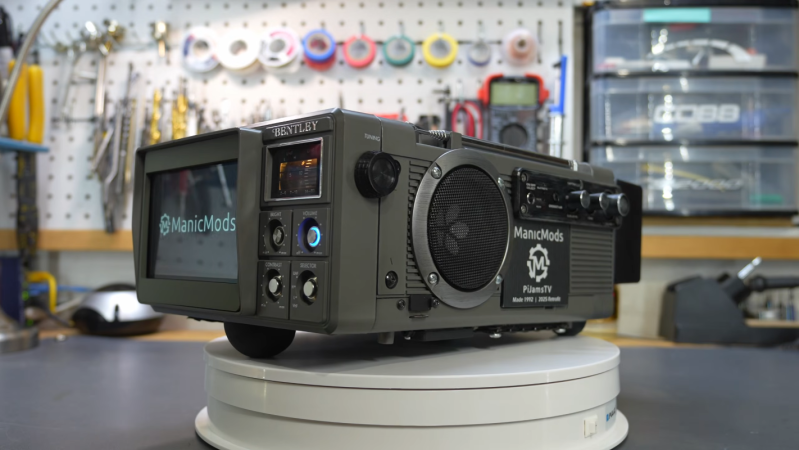
The humble cathode ray tube (CRT) was once the technology behind almost all of our televisions and computer displays. Its replacements, from LCD screens to OLED and others, are generally cheaper to make and better to look at. Old televisions were comparatively large as well, but their size can be an advantage for people like [ManicMods] aka [Jeff]. His latest build ditches the CRT from an old Bently portable TV and uses the huge space available in the case for a hi-fi audio system and some other parts that turn it into an impressive portable home theater system.

After removing most of the internals of the TV, the first part to go in is the stereo and subwoofer combo as it takes up the most amount of space. The subwoofer section points downward and the two stereo speakers are mounted to the sides. To free up the most space inside, the new display is mounted forward of the original bezel, with a new 3D printed one helping to hold it in place. Behind it goes a Raspberry Pi, loaded with the moOde audio player, a high quality DAC for audio output, and a 1 TB SSD with [Jeff]’s uncompressed audio library. Most of the ports are extended out to the case including the SD card slot so other operating systems can be loaded on the Pi, and there are a ton of options for hooking up external speakers and displays as well, making it an extremely modular and expandable portable media center.

Also added to the finished product are a few small game controllers, since the Pi is perfectly capable of playing retro games, as well as a small wireless keyboard and trackpad combo. Although the CRT’s demise will be felt harder by some than by others, the original look of the case is preserved somewhat by keeping the original tuning display and locations of the original control buttons and knobs. If preserving the CRTs are of upmost importance, though, this build used a pair of them in a VR headset.

Continue reading “Audio-Forward Case Mod Of Classic 90s Portable TV”

A Smart Thermostat For 120V Fan Coil Systems

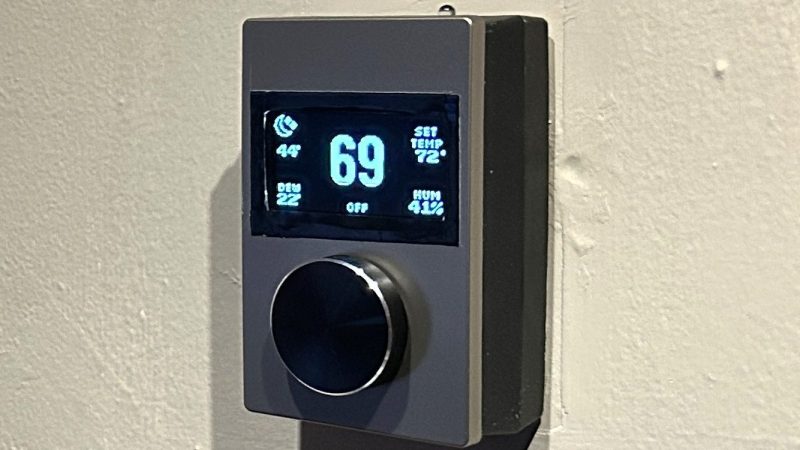
Many HVAC systems in North America operate off 24V systems, which can be readily upgraded with off-the-shelf  smart thermostats quite easily. However, there are many people living in buildings with 120-volt fan coil units who aren’t so lucky. [mackswan] is one such individual, who set about building a smart thermostat to work in these situations.

The build is based around an ESP32 running ESPHome firmware. It rocks a 2.42″ OLED screen with automatic brightness adjustment for showing temperature and control parameters. There’s a rotary encoder on the front with an integrated button for control, with [mackswan] building the physical device to look as clean and neat as possible. The device uses a relay to switch the fan coil system on and off to heat or cool as needed, with an SHTC3 temperature and humidity sensor used to monitor current conditions in the home.

If you’re in an apartment building or live in a condo with this kind of setup, [mackswan’s] build might be just what you’re after to improve your HVAC control. We’ve featured plenty of other DIY thermostat hacks over the years, too. Meanwhile, if you’re finding creative ways to better heat and cool your living space, we’d love to hear about it on the tipsline!