Hacking A €15 8051-Based Portable Soldering Iron With Custom Firmware

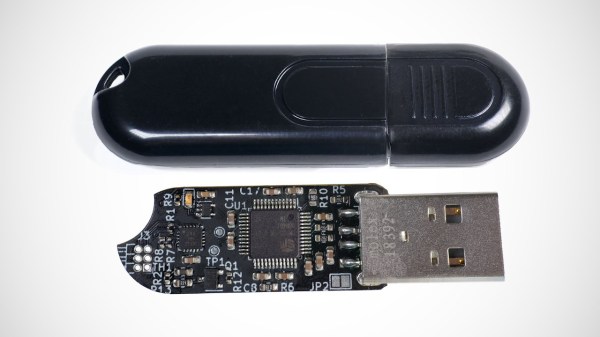
With soldering irons being so incredibly useful, and coming on the heels of the success of a range of portable, all-in-one soldering irons from the likes of Waveshare and Pine64, it’s little wonder that you can get such devices for as little as 10 – 15 Euro from websites like AliExpress. Making for both a great impulse buy and reverse-engineering target, [Aaron Christophel] got his mittens on one and set to work on figuring out its secrets.

The results are covered in a brief video, as well as a Twitter thread, where this T12 soldering iron’s guts are splayed around and reprogrammed in all their glory. Despite the MCU on the PCB having had its markings removed, some prodding and poking around revealed it to be an STC8H3K62S2, an 8051-based MCU running at a blistering 11 MHz. As a supported PlaformIO target, reprogramming the MCU wasn’t too complicated after wiring up a USB-TTL serial adapter.

Completing this initial foray into these cheap T12 soldering irons is the GitHub repository, which contains the pin-outs, wiring diagrams and further information. Although [Aaron] indicates that he’ll likely not pursuing further development, the mixed responses by people to the overall quality of the firmware on the as-purchased T12 may inspire others to give it a shake.

Continue reading “Hacking A €15 8051-Based Portable Soldering Iron With Custom Firmware”

Probably The World’s Most Expensive Bar Bot

Bar bots, or robotized bartenders, are a fun feature of events in our community, because there’s nothing like a cocktail untouched by human hand. Usually they have a row of bottles and a slide on which you put the glass, but [SecurityWriter] relates a tale of an altogether much grander affair. Given a weekend with a group of friends and an enterprise-grade IBM tape library robot, they did what any sensible engineer would do. They turned it into a bar bot.

Most readers probably won’t have seen a consumer grade data tape for decades, but in the enterprise space they’re very much the most cost effective backup solution. Large corporations have vast numbers of them, and IBM sells robots which retrieve them automatically from huge storage racks. When a group of young techs were given the tedious task of cataloging the whole thing and found themselves stuck in an empty data center for a weekend, of course they produced what was probably the world’s most expensive automated drinking game. Stocking the shelving system with booze and using the command line control for the robot they were able to have it deliver their beverages, and shockingly they managed to do so without the whole thing breaking.

It’s a hack, even if it’s one of which by necessity no evidence remains. Sadly Hackaday doesn’t have a tape library, or you can bet we’d be tempted to give it a try ourselves. Never mind, we can continue to sample more conventional bar bots from time to time.

Hackaday Berlin: First Round Of Talks

We’re super excited to announce the first round of speakers for Hackaday Berlin!  We’re set to convene on Friday night, March 24th for an evening warm up before the main show on Saturday, March 25. Featuring the triumphant return of Voja’s 4-bit badge, a crew of awesome speakers, lightning talks, workshops, music, food, badge hacking, and all the best of the Hackaday community, this will be a day to remember. And then we’ll chill out Sunday morning with a Bring-a-Hack brunch.

So without further ado: the first round of speakers!

Jiska Classen
Hacking Closed-Source: Reverse Engineering Real-World Products

Closed-source software is prevalent in our everyday lives, limiting our ability to understand how it works, which privacy implication it poses to the processed data, and addressing potential issues in time. Despite the growth of open-source movements, users often have no choice but to rely on closed-source solutions, e.g., for medical devices and IoT products. We’ll discuss key techniques to help you get started with reverse engineering. Hacking your own devices can be challenging, bricking a device is not uncommon, but so is celebrating the moments of a revived and modified device.

James Bruton
Being a Full-Time YouTuber


YouTube is my full-time job and has been for four years. I create STEM education content using everything from 3D printing, CNC, Welding, to Microcontrollers and Coding. Find out how I got started, how I make money, what goes on in the background, and what my future plans are. I’ll tell you how you can do it too!

Trammell Hudson
Hacking your dishwasher for cloudless appliances

Why does your dishwasher, laundry or coffee-pot need to talk to the cloud? In this presentation, Trammell Hudson shows how he reverse engineered the encrypted connections between Home Connect appliances and the Bosch-Siemens Cloud servers, and how you can control your own appliances with your self-hosted MQTT home automation system by extracting the devices’ authentication keys and connecting to their local websocket ports. No cloud required!

Bleeptrack
Oops, my project ended up in a museum

Parameterized design allows for the adaption of projects to different needs but can also change the aesthetic to a persons liking. Bleeptrack will walk you through the creation process and tools of her generative projects, talk about her experience manufacturing unique pieces and explains how to cope when your freshly finished project gets locked up in an art exhibition for a few months.

Ali Shtarbanov
Creating Hardware Development Platforms for Real-World Impact: FlowIO Platform

What does it really take do create and deploy a development platform for real-world impact? Why do we need development platforms and how can they democratize emerging fields and accelerate innovation? Why do most platform attempts fail and only very few succeed in terms of impact? I will discuss the key characteristics that any platform technology must have in order for it to be able to useful for diverse users. FlowIO was the winner of the 2021 Hackaday Grand Prize as well as over a dozen other engineering, research, and design awards.

Come join us!

You!

Whatever you’re up to.

We want you to bring your current project, world-changing ideas, or simply fun hacks for a 7-minute lightning talk!


This Retro Game Console Puts Vacuum Fluorescent Display To Good Use

Small in size, low-resolution, blocky segments, and a limited color palette — all characteristics of the typical vacuum fluorescent display, any of which would seem to disqualify them as the display of choice for a lot of applications. But this is Hackaday, and we don’t really pay much attention to what we’re supposed to do, but rather to what’s fun and cool to do. So when we see something like a VFD game console, we just have to sit up and take notice.

In a lot of ways, the design of [Simon Boak]’s Arduino-based VFD console is driven by his choice of display. The Noritake Itron GU20X8-301 VFD is a “tricolor” display with eight rows of 20 rectangular pixels. Each pixel is composed of six short linear segments, with alternating red and blue colors. Turning on either set of segments yields one of the two base colors, while turning on both yields a sorta-kinda whitish color, if you squint a bit.

[Simon] chose a two-piece design for his console, with a separate controller and display. The controller holds the Arduino Nano and all the controls, plus a piezo buzzer for fun. The display case connects to the controller with a ribbon cable and holds the VFD power supply and driver. To celebrate the retro look of the VFD, both cases are decked out with woodgrain side panels. [Simon] chose appropriately blocky games for the console, like Snake, Conway’s Game of Life, and the venerable snow demo. We’d imagine Pong would be a good choice too, as well as perhaps Tetris if the display were flipped on its side.

We really like the look of this console, and we appreciate putting an otherwise obsolete display to use in a creative way. If you want to learn a little more about these displays, check out this love letter to the VFD.

Continue reading “This Retro Game Console Puts Vacuum Fluorescent Display To Good Use”

Laptop Motherboard? Let’s Boot And Tinker

Last time, I’ve shared my experience on why you might want to consider a laptop motherboard for a project of yours, and noted some things you might want to keep in mind if buying one for a project. Now, let’s go through the practical considerations!

Making It Boot

Usually, when you plug some RAM and a charger into a board, then press the power button, your board should boot up and eventually show the BIOS on the screen. However, there will be some caveats – it’s very firmware-dependent. Let me walk you through some confusing situations you might encounter.

If the board was unpowered for a while, first boot might take longer – or it might power on immediately after a charger has been plugged in, and then, possibly, power off. A bit of erratic behaviour is okay, since boards might need to do memory training, or recover after having lost some CMOS settings. Speaking of those, some boards will not boot without a CMOS battery attached, and some will go through the usual ‘settings lost’ sequence. Sometimes, the battery will be on a daughterboard, other times, especially with new boards, there will be no CR2032 in sight and the board will rely on the main battery to provide CMOS settings saving functions – in such case, if you don’t use the battery, expect the first boot to take longer, at least. Overall, however, pressing the power switch will cause the board to boot. Continue reading “Laptop Motherboard? Let’s Boot And Tinker”

Probably The Most Over-Specified Calculator To Ever Be Manufactured

It’s possible quite a few of our older readers will remember the period from the 1960s into the ’70s when an electronic calculator was the cutting edge of consumer-grade digital technology. By the 1980s though, they were old hat and could be bought for only a few dollars, a situation that remains to this day. But does that mean calculator development dead?

Perhaps not, as [Li Zexi] writes for CNX Software, when he reviews a simple non-scientific calculator that packs an Alwinner A50 tablet SoC and the Android operating system. As shipped they lack the Android launcher, so they aren’t designed to run much more than the calculator app. Of course that won’t stop somebody who knows their way around Google’s mobile operating system for very long — at the end of the review, there’s some shots of the gadget running Minecraft and playing streaming video.

These devices can be had for not a lot on the Chinese second-hand electronics market, and after an extensive teardown he comes to the conclusion that besides their novelty they’re an older specification so not really worth buying.

But it does beg the question as to why such a product was put into production when the same task could have been performed using very cheap microcontroller. Further, having done so they make it a non-scientific machine, not even bestowing it with anything that could possibly justify the hardware. Is there a use case he, and us, have missed? We’d love to know.

We cover a lot of calculator stories here at Hackaday. Sometimes they’re classic machines, but more often they’re modern takes on an old idea.


Displaying The Time Is Elemental With This Periodic Table Clock

We see a lot of clocks here at Hackaday, so many now that it’s hard to surprise us. After all, there are only so many ways to divide the day into intervals, as well as a finite supply of geeky and quirky ways to display the results, right?

That’s why this periodic table clock really caught our eye. [gocivici]’s idea is a simple one: light up three different elements with three different colors for hours, minutes, and seconds, and read off the time using the atomic number of the elements. So, if it’s 13:03:23, that would light up aluminum in blue, lithium in green, and vanadium in red. The periodic table was designed in Adobe Illustrator and UV printed on a sheet of translucent plastic by an advertising company that specializes in such things, but we’d imagine other methods could be used. The display is backed by light guides and a baseplate to hold the WS2812D addressable LEDs, and a DS1307 RTC module gives the Arduino Nano a sense of time. The 3D printed frame of the clock has buttons for setting the time and controlling the clock; the brief video below shows it going through its paces.

We really like the attention to detail [gocivici] showed here; that UV printing really gave some great results. And what’s not to like about the geekiness of this clock? Sure, it may not be as action-packed as a game of periodic table Battleship, but it would make a great conversation starter.

Continue reading “Displaying The Time Is Elemental With This Periodic Table Clock”