Illustrated Kristina with an IBM Model M keyboard floating between her hands.

Keebin’ With Kristina: The One With The Funny Keyboard

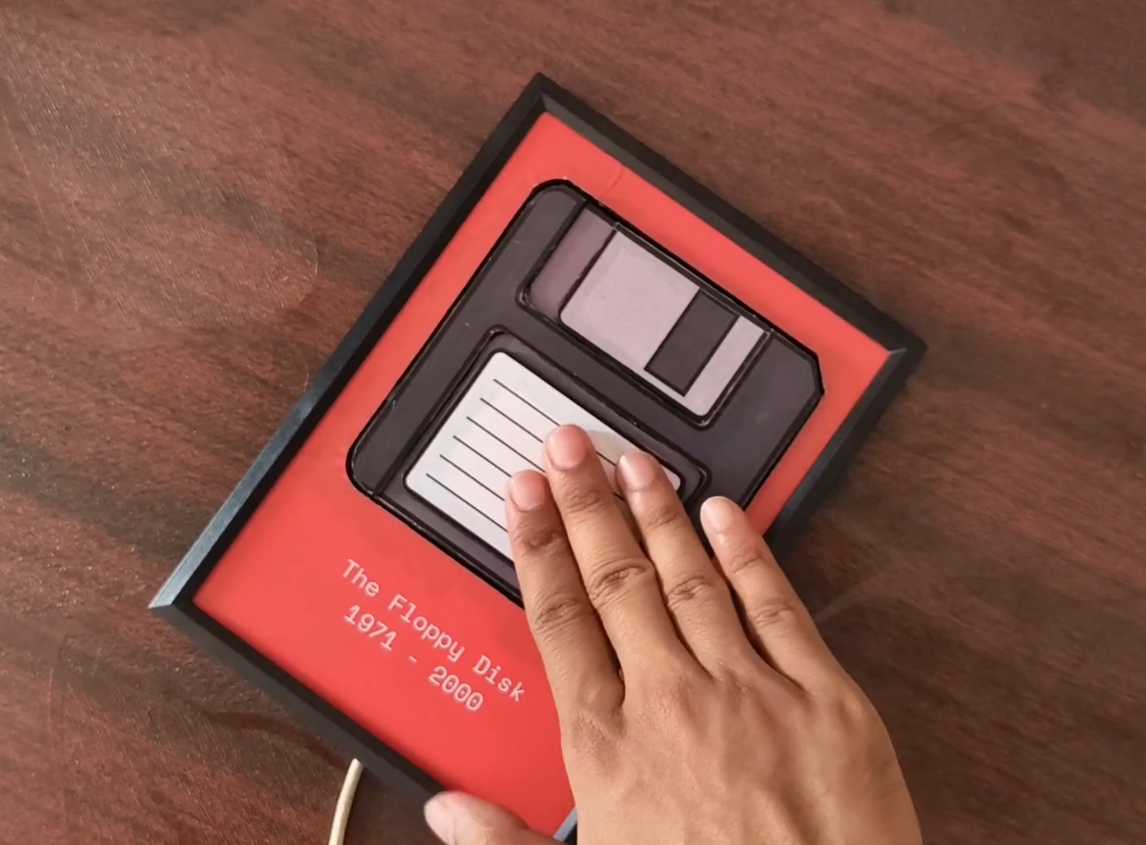
What’s the most important keyboard macro you know? Honestly, it’s probably Ctrl-S. But do you use that one often enough? Chances are, you do not. What you need is a giant, dedicated Save keyboard that looks like a floppy disk.

A physical Save button that looks like a floppy disk and sends Ctrl-S over USB-C.
Image by [Makestreme] via Hackaday.IO
[Makestreme] recently started creating YouTube videos, but wasn’t pressing Save often enough. Couple that with editing software that crashes, and the result is hours of lost work.

Just like you’d expect, pressing the floppy icon triggers Ctrl-S when connected over USB-C. Internally, it’s a Seeeduino Xiao, a push button, and some wires.

The floppy disk itself is made of foam board, and everything is encased in a picture frame. If you want to make one for yourself, [Makestreme] has some great instructions over on IO.

Continue reading “Keebin’ With Kristina: The One With The Funny Keyboard”

Pixel mashup with Wasm-4 logo and retro graphics

WASM-4: Retro Game Dev Right In Your Browser

Have you ever dreamt of developing games that run on practically anything, from a modern browser to a microcontroller? Enter WASM-4, a minimalist fantasy console where constraints spark creativity. Unlike intimidating behemoths like Unity, WASM-4’s stripped-back specs challenge you to craft games within its 160×160 pixel display, four color palette, and 64 KB memory. Yes, you’ll curse at times, but as every tinkerer knows, limitations are the ultimate muse.

Born from the WebAssembly ecosystem, this console accepts “cartridges” in .wasm format. Any language that compiles to WebAssembly—be it Rust, Go, or AssemblyScript—can build games for it. The console’s emphasis on portability, with plans for microcontroller support, positions it as a playground for minimalist game developers. Multiplayer support? Check. Retro vibes? Double-check.

Entries from a 2022’s WASM-4 Game Jam showcase this quirky console’s charm. From pixel-perfect platformers to byte-sized RPGs, the creativity is staggering. One standout, “WasmAsteroids,” demonstrated real-time online multiplayer within these confines—proof that you don’t need sprawling engines to achieve cutting-edge design. This isn’t just about coding—it’s about coding smart. WASM-4 forces you to think like a retro engineer while indulging in modern convenience.

WASM-4 is a playground for anyone craving pure, unadulterated experimentation. Whether you’re a seasoned programmer or curious hobbyist, this console has the tools to spark something great.

Did You Know YoSys Knows VHDL Too?

We’ve been fans of the Yosys / Nextpnr open-source FPGA toolchain for a long while now, and like [Michael] we had no idea that their oss-cad-suite installer sets up everything so that you can write in Verilog or VHDL, your choice. Very cool!

Verilog and VHDL are kind of like the C and ADA of the FPGA world. Verilog will seem familiar to you if you’re used to writing code for computers. For instance, it will turn integer variables into wires that carry the binary values for you. VHDL code looks odd from a software programmer’s perspective because it’s closer to the hardware and strongly typed: an 8-bit integer isn’t the same as eight wires in VHDL. VHDL is a bigger jump if you have software in your brain, but it’s also a lot closer to describing how the hardware actually works.

We learned Verilog, because it’s what Yosys supported. But thanks to GHDL, a VHDL analyzer and synthesizer, and the yosys-ghdl-plugin, you can write your logic in VHDL too. Does this put an end to the FPGA-language holy wars? Thanks, Yosys.

[Michael] points out that this isn’t really news, because the oss-cad-suite install has been doing this for a while now, but like him, it was news to us, and we thought we’d share it with you all.

Want to get started with FPGAs and the open-source toolchain? Our own [Al Williams] wrote up a nice FPGA Boot Camp series that’ll take you from bits to blinking in no time.

The Badge Hacks Of Supercon

We just got home from Supercon and well, it was super. It was great to see everyone, and meet a whole bunch of new folks to boot! The talks were great, and you can see a good half of them already on the Hackaday YouTube channel, so for that you didn’t even have to be there.

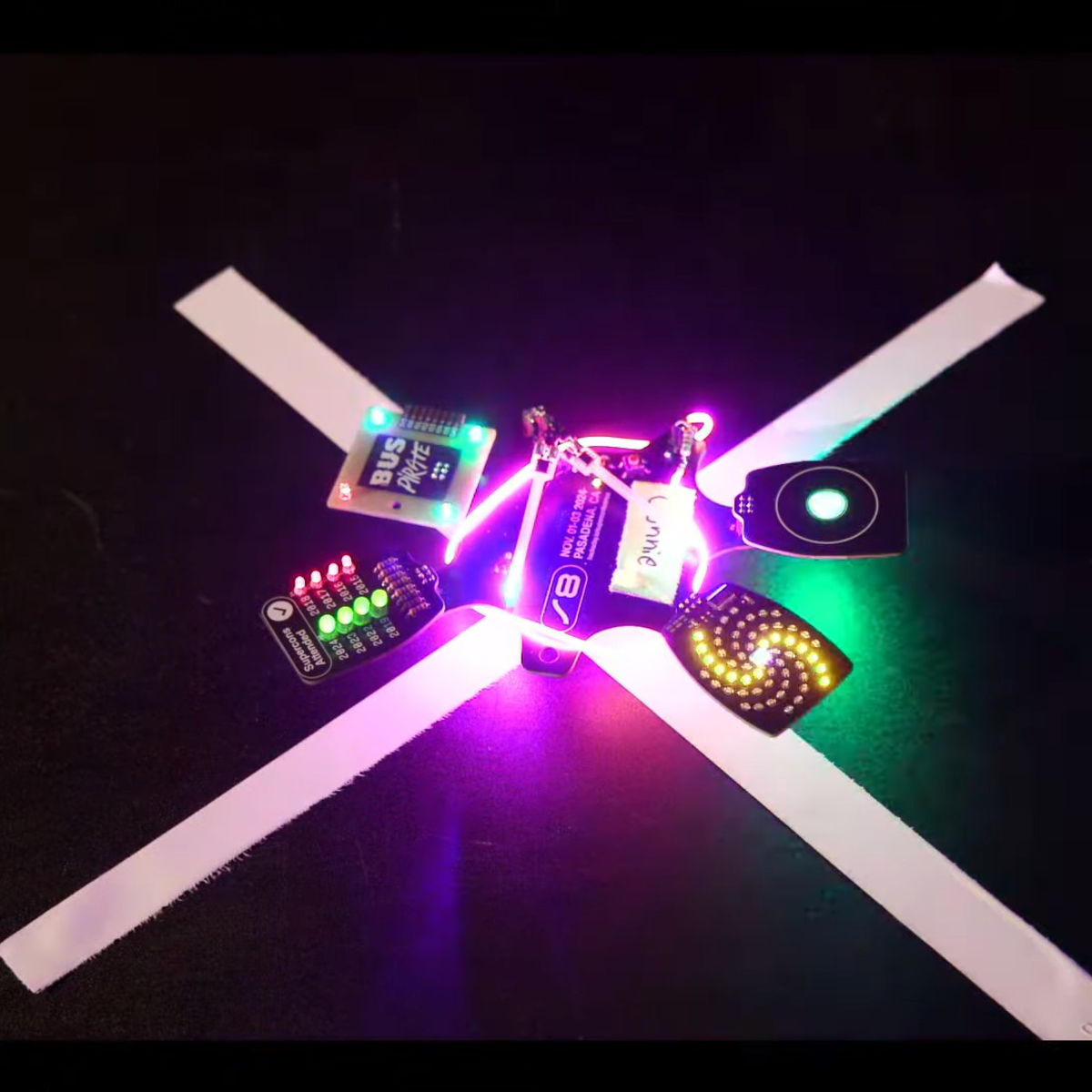
The badge hacks were, as with most years, out of this world. I’ll admit that my cheeks were sore from laughing so much after emceeing it this year, due in no small part to two hilarious AI projects, both of which were also righteous hacks in addition to full-on comedy routines. A group of six programmers got all of their hacks working together, and the I2C-to-MQTT bridge had badges blinking in sync even in the audience. You want blinkies? We had blinkies.
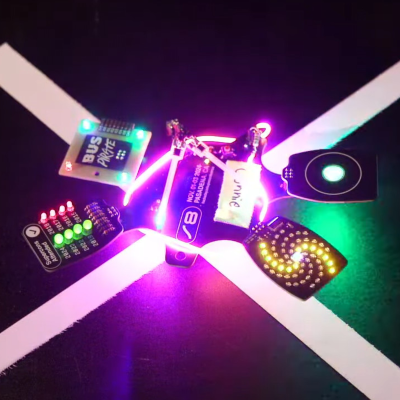
But the hack that warmed everyones’ hearts was “I figured it out” by [Connie]. Before this weekend, she had never coded MicroPython and didn’t know anything about I2C. But yet by Sunday afternoon, she made a sweet spiral animation on the LED wheel, and blinked the RGBs in the touchwheel.

What I love about the Hackaday audience is that, when the chips are down, someone doing something new for the first time is valued as much as some of the more showy work done by more experienced programmers. Hacking is also about learning and pushing out boundaries after all. The shouts for “I figured it out” were louder than any others in the graphics hacks category, it took home a prize, and I was smiling from ear to ear.

Hackaday can learn from this too. [Connie]’s hack definitely shows the need for another badge-hack category, first timers, because we absolutely should recognize first tries. There was also a strong petition / protest from people who had worked new hacks onto previous year’s badges – like [Andy] and [koppanyh]’s addition of bit-banged I2C to the Voja 4 badge from two years ago, and [Instant Arcade]’s Polar Pacman, which he named “Ineligible for this Competition” in protest. Touche.

We’re stoked to learn new things, see new hacks, and basically just catch up with everything folks did over the weekend. We can’t wait to see what you’re up to next year!


PicoROM, A DIP-32 8-Bit ROM Emulator

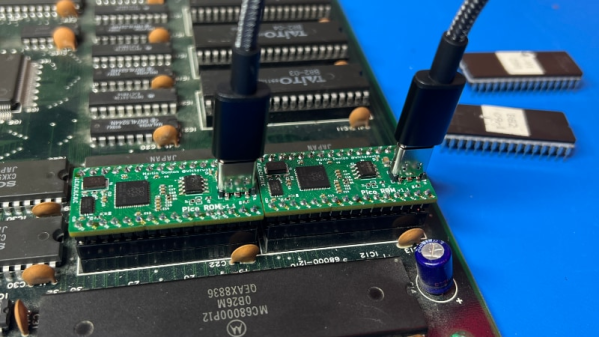
As we all know, when developing software for any platform or simply hacking a bit of code to probe how something works, the ability to deploy code rapidly is a huge help. [Martin Donlon], aka [wickerwaka], is well known in retro gaming and arcade hardware reverse engineering circles and had the usual issues figuring out how an arcade CPU board worked while developing a MiSTer core. Some interesting ASICs needed quite a bit of poking, and changing the contents of socketed ERPOMs is a labour-intensive process. The solution was PicoROM, a nicely designed ROM emulator in a handy DIP-32 form factor.

As the title suggests, PicoROM is based on the Raspberry Pi RP2040. It emulates an 8-bit ROM up to 2MBits in size with speeds up to 100ns. Since it uses the RP2040, USB connectivity is simple, enabling rapid uploading of new images to one (or more) PicoROMs in mere seconds. A vertically orientated USB-C connector allows multiple PicoROMs to be cabled to the host without interfering with neighbouring hardware. The firmware running on core 1 passes data from the internal 264K SRAM, using the PIO block as a bus interface to the target. A neat firmware feature is the addition of a mechanism to use a ROM region as a bidirectional control channel, which the software running on the target can use to communicate back to the host computer. This allows remote triggering of actions and the reporting of responses. Responses which may not be physically observable externally. [Martin] is using this feature extensively to help probe the functionality of some special function chips on the target boards, which is still a slow process but helped massively by reducing that critical software iteration time. The PCB was designed with KiCAD. The project files for which can be found here.

This isn’t the first time we’ve seen the RP2040 used for ROM emulation; here’s a pile of wires that does the same job. It just isn’t as pretty. Of course, if you really must use EPROMs, then you could give this sweet programmer a look over.

Continue reading “PicoROM, A DIP-32 8-Bit ROM Emulator”

AI Not Needed For Hackaday Projects

It was Supercon this weekend, and Hackaday staffers made their way to Pasadena for what was by all accounts an excellent event. Now they’re all on their way home on red-eye flights and far from their benches, so spare a thought for the lonely editor holding the fort while they’ve been having fun. The supply of cool hacks for your entertainment must continue, so what’s to be done? Fortunately Hackaday writer [Anne Ogborn] has the answer, in the form of an automated Hackaday article generator.

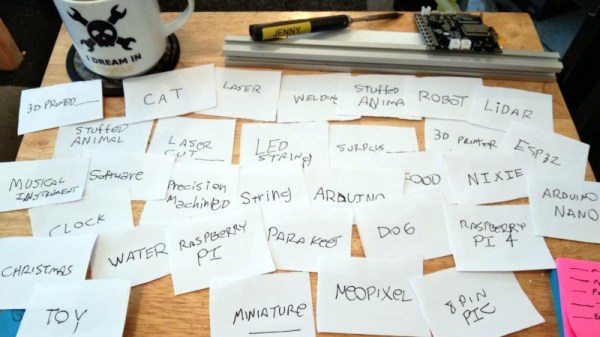
We once had a commenter make a withering insult that one of our contributors’ writing styles looked like the work of an AI driven bot, a sentence that the writer in question treasures enough to have incorporated in their Hackaday email signature. [Anne] is a data scientist and Prolog programmer by trade so knows a bit about AI, and she has no need for such frippery. Instead she’s made a deck of cards each marked with a common theme among the work featured here, and generating new article titles is a simple case of drawing cards from the pack and assembling the resulting sentence.

The result is both amusing and we think, uncannily on the mark. Who wouldn’t want an ESP8266 powered cardboard drone? We think it will make a valuable addition to the Hackaday armoury, to be brought out on days such as the first of April, when there’s always an unexpected shortage of hacks. Video below the break.

Continue reading “AI Not Needed For Hackaday Projects”

The Tsushin Booster – A PC Engine Modem Add-on With A Twist

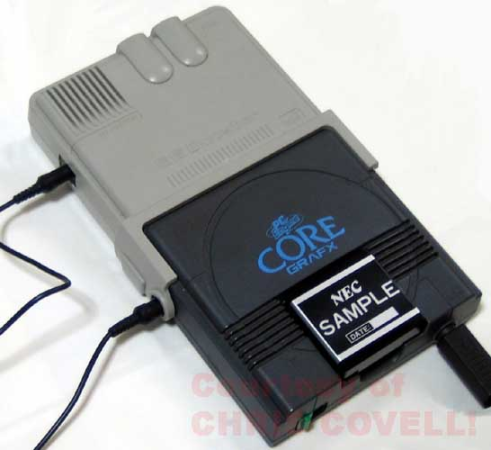
Sometimes, hardware projects get cancelled before they have a chance to make an impact, often due to politics or poor economic judgment. The Tsushin Booster for the PC Engine is one such project, possibly the victim of vicious commercial games between the leading Japanese console manufacturers at the tail end of the 1980s. It seems like a rather unlikely product: a modem attachment for a games console with an added 32 KB of battery-backed SRAM. In addition to the bolt-on unit, a dedicated software suite was provided on an EPROM-based removable cartridge, complete with a BASIC interpreter and a collection of graphical editor tools for game creation.
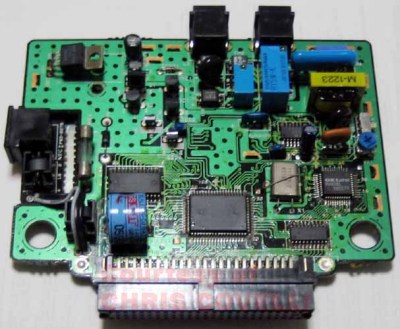
Internally, the Tsushin booster holds no surprises, with the expected POTS interfacing components tied to an OKI M6826L modem chip, the SRAM device, and what looks like a custom ASIC for the bus interfacing.

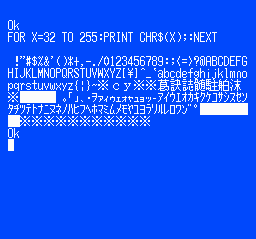
It was, however, very slow, topping out at only 1200 Baud, which, even for the period, coupled with pay-by-minute telephone charges, would be a hard sell. The provided software was clearly intended to inspire would-be games programmers, with a complete-looking BASIC dialect, a comms program, a basic sprite editor with support for animation and even a map editor. We think inputting BASIC code via a gamepad would get old fast, but it would work a little better for graphical editing.



PC Engine hacks are thin pickings around these parts, but to understand a little more about the ‘console wars’ of the early 1990s, look no further than this in-depth architectural study. If you’d like to get into the modem scene but lack original hardware, your needs could be satisfied with openmodem. Of course, once you’ve got the hardware sorted, you need some to connect to. How about creating your very own dial-up ISP?