Ultimate Power: Lithium-Ion Packs Need Some Extra Circuitry

A LiIon pack might just be exactly what you need for powering a device of yours. Whether it’s a laptop, or a robot, or a custom e-scooter, a CPAP machine, there’s likely a LiIon cell configuration that would work perfectly for your needs. Last time, we talked quite a bit about the parameters you should know about when working with existing LiIon packs or building a new one – configurations, voltage notations, capacity and internal resistance, and things to watch out for if you’re just itching to put some cells together.

Now, you might be at the edge your seat, wondering what kind of configuration do you need? What target voltage would be best for your task? What’s the physical arrangement of the pack that you can afford? What are the safety considerations? And, given those, what kind of electronics do you need?

Picking The Pack Configuration

Pack configurations are well described by XsYp:X serial stages, each stage having Y cells in parallel. It’s important that every stage is the same as all the others in as many parameters as possible – unbalanced stages will bring you trouble.
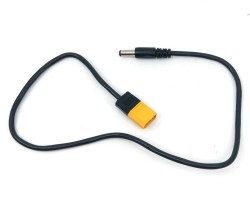
To get the pack’s nominal voltage, you multiply X (number of stages) by 3.7 V, because this is where your pack will spend most of its time. For example, a 3s pack will have 11.1 V nominal voltage. Check your cell’s datasheet – it tends to have all sorts of nice graphs, so you can calculate the nominal voltage more exactly for the kind of current you’d expect to draw. For instance, the specific cells I use in a device of mine, will spend most of their time at 3.5 V, so I need to adjust my voltage expectations to 10.5 V accordingly if I’m to stack a few of them together.

Now, where do you want to fit your pack? This will determine the voltage. If you want to quickly power a device that expects 12 V, the 10.5 V to 11.1 V of a 3s config should work wonders. If your device detects undervoltage at 10.5V, however, you might want to consider adding one more stage.

How much current do you want to draw? For the cells you are using, open their spec sheet yet again, take the max current draw per cell, derate it by like 50%, and see how many cells you need to add to match your current draw. Then, add parallel cells as needed to get the capacity you desire and fit the physical footprint you’re aiming for. Continue reading “Ultimate Power: Lithium-Ion Packs Need Some Extra Circuitry”

Rosie The Robot Runs For Real

On the recent 256th episode of the Hackaday podcast, [Kristina] mentioned her favorite fictional robot was Rosie from The Jetsons. [Robert Zollna] must agree since he built a reimagined Rosie and it even caught the notice of mainstream outlet People magazine.

We didn’t find much information outside of the TikTok video (see below; you can use the Guest button if you don’t have an account). However, there were a few clever ideas here. First, the robot mechanism is actually Rosie’s vacuum cleaner. Like a tail wagging a dog, an off-the-shelf floor vac tows the robot body.

Rosie herself is clearly an office chair base with an artistic body. The head rotates, and the mouth appears to open and close, so there’s apparently a little more electronics inside, but that’s nothing you couldn’t throw together with some RC servos and an ESP32.

Some videos cover the build so you might be able to glean more details, but the bite-sized videos aren’t very descriptive even though they are fun to watch. If you thought folks documenting their projects on YouTube was bad, you’re really gonna love the TikTok generation.

We like the look of Rosie, but as a practical matter, we need our robot vac to be smaller, not larger. However, using these off-the-shelf robots as a quick start for a robotics project is reasonable. Especially if you can pick up one cheap. Not that that’s a new idea. They even make stripped-down units with the intent that you don’t want to use them as cleaners.

Continue reading “Rosie The Robot Runs For Real”

The $16 PCB Robot

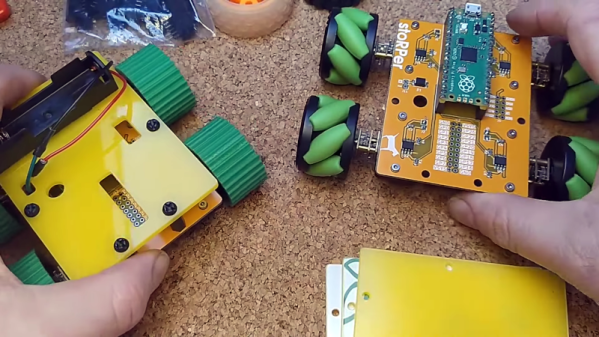
It is a fun project to build a simple robot but, often, the hardest part these days is creating the mechanical base. [Concrete Dog] has a new open source design for stoRPer that uses a PC board as the base. The board has a Raspberry Pi Pico and motor drivers. The modular design allows you to add to it easily and use custom wheels. The video below shows some treaded wheels and some mechanum wheels with gears.

There are mounting holes for sensors and also a way to put another deck above to hold other circuits, power, or whatever you like. There’s lots you could do with this as a starting point.

Continue reading “The $16 PCB Robot”

DOOM Runs On Husqvarna’s Robot Lawnmower

DOOM has been ported to a lot of platforms — to the point where the joke is kind of getting old now. Evidence of that is available in the fact that brands are now getting in on the action. Yes, as reported by The Register, you can now officially play DOOM on your Husqvarna’s Automower.

Nice, right? Speedrun it on this interface.

We had to check if this was some kind of joke; indeed, the April release date had us looking at the calendar. However, it seems to be legit. You’ll be able to download a version of DOOM via the Husqvarna Automower Connect App, and play it on the tiny screen of your robot lawnmower. Hilariously, due to the size of the game, Husqvarna notes it “may take up to a week before the game is playable” due to the time it takes the mower to download it, along with a necessary software update.

Controls are simple. The knob on the robot is used for turning left and right, while pressing start lets you run forward. Firing weapons is done by pressing the control knob.

We’ve seen some quality ports before, including an arcade port that was particularly cool. Really, though, at this stage, you have to work harder to impress. Show us DOOM running on a Minuteman launch console or something. Continue reading DOOM Runs On Husqvarna’s Robot Lawnmower”

Sketchy Logg Dogg Logging Robot Remote Control Hacking

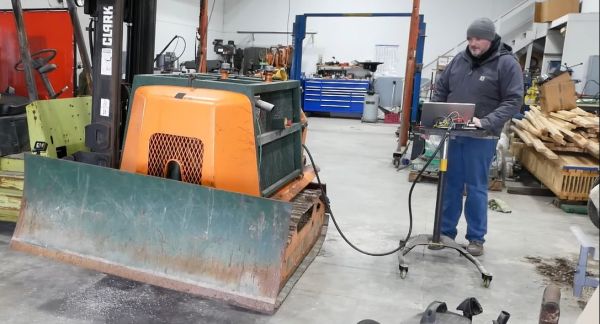
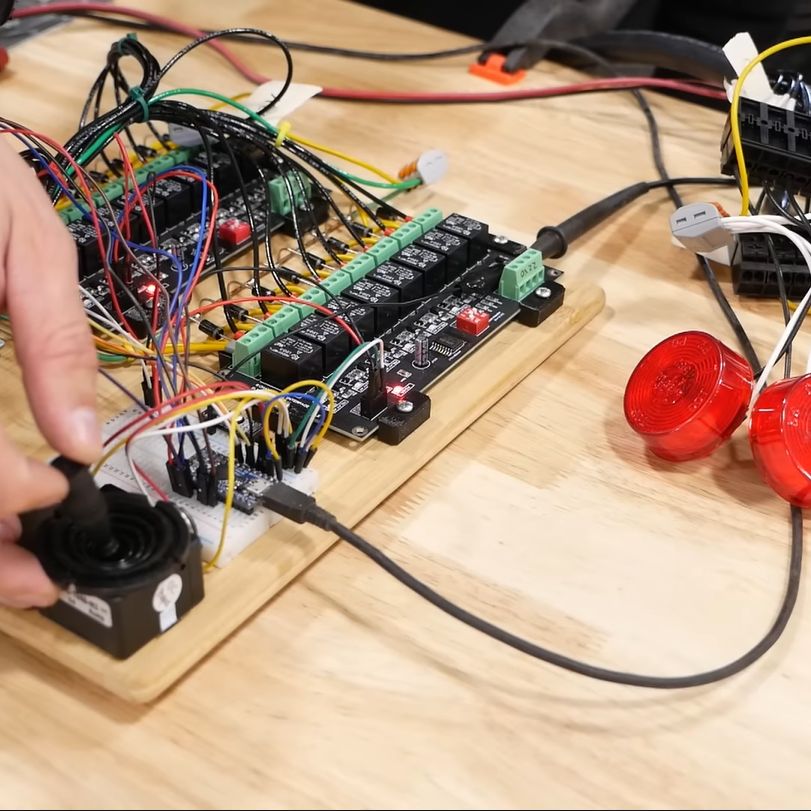
When we last left [Wes] amidst the torn-open guts of his Logg Dogg logging robot, he had managed to revitalize the engine and dug into the hydraulics, but one big obstacle remained: the lack of the remote control unit. In today’s installment of the Logg Dogg series, [Wes] summarizes weeks of agony over creating a custom circuit based around a microcontroller, a joystick and a lot of relays and other bits and pieces to drive the solenoids inside the logging machine that control the hydraulics.

Giving the remote controller a bench test before connecting to the logging robot (Credit: Watch Wes Work)

Most of the struggle was actually with the firmware, as it had to not only control the usual on/off solenoids, but also a number of proportional solenoid valves which control things like the track speed by varying the hydraulic flow to the final drives.

This requires a PWM signal, which [Wes] generated using two MOSFETs in a closed-feedback system, probably because open loop controls with multi-ton hydraulic machinery are not the kind of excitement most people look forward to.

Ultimately he did get it sorted, and was able to take the Logg Dogg for its first walk since being rescued from a barn, which both parties seemed to rather enjoy. The background details of this machine and the project can be found in our first coverage.

We’re looking anxiously forward to the next episode, where the controller goes wireless and the sketchiness gets dialed down some more.

Continue reading “Sketchy Logg Dogg Logging Robot Remote Control Hacking”

Friendly Flexible Circuits: The Cables

Flexible cables and flex PCBs are wonderful. You could choose to carefully make a cable bundle out of ten wires and try to squish them to have a thin footprint – or you could put an FFC connector onto your board and save yourself a world of trouble. If you want to have a lot of components within a cramped non-flat area, you could carefully design a multitude of stuff FR4 boards and connect them together – or you could make an FPC.

Flexible cables in particular can be pretty wonderful for all sorts of moving parts. They transfer power and data to the scanner head in your flat-bed scanner, for instance.  But they’re in fixed parts too.  If you have a laptop or a widescreen TV, chances are, there’s an flexible cable connecting the motherboard with one or multiple daughterboards – or even a custom-made flexible PCB. Remember all the cool keypad and phones we used to have, the ones that would have the keyboard fold out or slide out, or even folding Nokia phones that had two screens and did cool things with those? All thanks to flexible circuits! Let’s learn a little more about what we’re working with here.

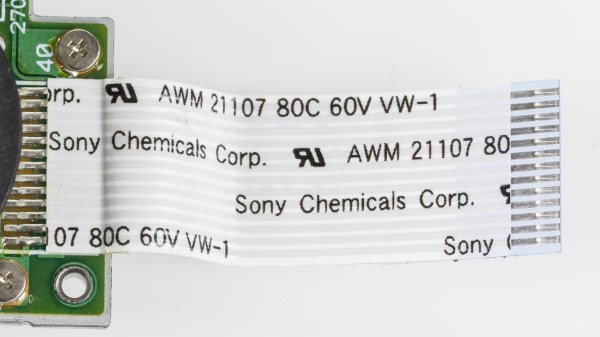
FFC and FPC, how are these two different? FFC (Flexible Flat Cable) is a pre-made cable. You’ve typically seen them as white plastic cables with blue pieces on both ends, they’re found in a large number of devices that you could disassemble, and many things use them, like the Raspberry Pi Camera. They are pretty simple to produce – all in all, they’re just flat straight conductors packaged nicely into a very thin cable, and that’s why you can buy them pre-made in tons of different pin pitches and sizes. If you need one board to interface with another board, putting an FFC connector on your board is a pretty good idea.

Continue reading “Friendly Flexible Circuits: The Cables”

Building Robots With A 20×20 Grid

On autonomous robots, the most difficult challenges usually lie in the software and electronic realms, but the mechanics can also be very time consuming. To help address this challenge, [Nikodem Bartnik] is working on the Open Robotic Platform (ORP), a modular robotics chassis system designed to make prototyping as easy and affordable as possible. Video after the break.

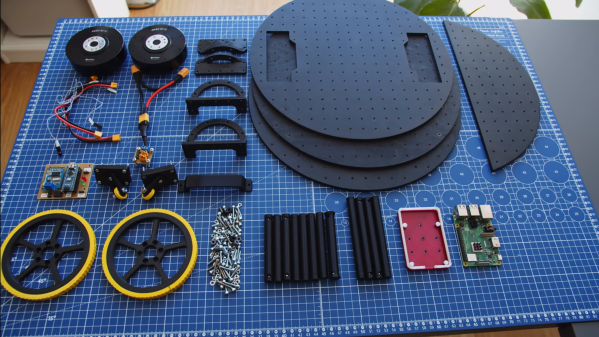
The ORP is governed by a set of design rules to maintain interchangeability. Most of the design rules are very open, but the cornerstone of ORP is its standardized mounting plates featuring a 20 mm grid pattern of 3.5 mm mounting holes. These plates can be stacked using connecting rods, creating a versatile foundation upon which various components can be mounted.

[Nikodem] is on a mission to create and collect an entire library of these modular components. From custom 3D-printed holders that accommodate sensors, motors, wheels and dev boards to homemade PCBs that snap directly onto the chassis, everything to get your robot rolling as soon as possible. While manufacturing methods and materials are not limited, 3D printing and laser cutting will likely be the most popular manufacturing technologies for making your own parts.

Continue reading “Building Robots With A 20×20 Grid”