“Artificial Sun” Lighting Via Old Satellite Dishes

Real sunlight is a beautiful thing, but due to the vagaries of Earth’s orbit and local weather systems, it’s not available all the time. [Matt] decided this wasn’t good enough, and set about building a rig to replicate the sun’s rays as closely as possible.

Rayleigh scattering is emulated by passing the light through a glass chamber filled with soapy water – taking advantage of the Tyndall effect.

The great distance between the Sun and the Earth means that the sun’s rays are essentially parallel from our local vantage point. Replicating this, and the soothing nature of a blue sky, were [Matt]’s primary goals with the project. To achieve this, an old satellite dish was pressed into service as a parabolic reflector, coated with mirror-finish vinyl strips. A 500W white LED with a good color rendering index was fitted at the focal point, outfitted with a water cooling system to shed heat. With a point source at its focal point, the parabolic reflector bounces the light such that it the rays are parallel, giving the sense that the light source is coming from an effectivelyl infinite distance away. To then achieve the blue sky effect, the light was then passed through a glass chamber filled with soapy water, which scatters the light using the Tyndall effect. This mimics the Rayleigh scattering in Earth’s atmosphere.

The final result is amazing, with [Matt] shooting footage that appears to be filmed in genuine daylight – despite being shot at night or on rainy days. He also features a cutdown build that can be achieved in a far cheaper and compact form, using Fresnel lenses and blue film. We’ve featured [Matt]’s daylight experiments before, though we’re amazed at the new level reached. Video after the break.

Continue reading ““Artificial Sun” Lighting Via Old Satellite Dishes”

Fran Finds Four Foot Alphanumeric Displays From 1910

Video blogger and display technology guru [Fran Blanche] has discovered a splendid retro-tech alphanumeric display from 1910. (Video, embedded below.)

We have always enjoyed her forays into old and unusual displays, including her project researching and reverse engineering an Apollo DSKY unit. This time [Fran] has dug up an amazing billboard from the early 20th century. It was built by the Rice Electric Display Company of Dayton Ohio, and operated in Herald Square for about two years. Requiring $400,000 in 1910-US-dollars to build, this was clearly an Herculean effort for its day and no doubt is the first example of selling advertising time on a computer-controller billboard. It boasts characters that are about 1.3 m tall and 1 m wide which can display letters, numbers, and various punctuation and symbols. These are arrayed into a 3-line 18-character matrix that is about 27 x 4 meters, and that’s up only a third of the total billboard, itself an illuminated and dynamic work of art.

Diagram Depicting the 3×18 Character Display

There are quite a few tantalizing details in the video, but a few that jumped out at us are the 20,000 light bulbs, the 40 Hz display update rate, the 150 km of wire used and the three month long installation time. We would really like to learn more about these two 7.5 kW motorized switch controllers, how were they programmed, how were the character segments arranged, what were their shapes?

In the video, you can see triangles arranged in some pattern not unlike more modern sixteen segment displays, although as [Fran] points out, Mr Rice’s characters are more pleasing. We hope [Fran] can tease out more details for a future video. If you have any ideas or knowledge about this display, please put them in the comments section below. Spoiler alert after the video…

Continue reading “Fran Finds Four Foot Alphanumeric Displays From 1910”

DSP Spreadsheet: The Goertzel Algorithm Is Fourier’s Simpler Cousin

You probably have at least a nodding familiarity with the Fourier transform, a mathematical process for transforming a time-domain signal into a frequency domain signal. In particular, for computers, we don’t really have a nice equation so we use the discrete version of the transform which takes a series of measurements at regular intervals. If you need to understand the entire frequency spectrum of a signal or you want to filter portions of the signal, this is definitely the tool for the job. However, sometimes it is more than you need.

For example, consider tuning a guitar string. You only need to know if one frequency is present or if it isn’t. If you are decoding TouchTones, you only need to know if two of eight frequencies are present. You don’t care about anything else.

A Fourier transform can do either of those jobs. But if you go that route you are going to do a lot of math to compute things you don’t care about just so you can pick out the one or two pieces you do care about. That’s the idea behind the Goertzel. It is essentially a fast Fourier transform algorithm stripped down to compute just one frequency band of interest.  The math is much easier and you can usually implement it faster and smaller than a full transform, even on small CPUs.

Continue reading “DSP Spreadsheet: The Goertzel Algorithm Is Fourier’s Simpler Cousin”

Hackaday Podcast 093: Hot And Fast Raspberry Pi, Dr. Seuss Drone, M&M Mass Meter, And FPGA Tape Backup

Hackaday editors Mike Szczys and Elliot Williams wrangle the epic hacks that crossed our screens this week. Elliot ran deep on overclocking all three flavors of the Raspberry Pi 4 this week and discovered that heat sinks rule the day. Mike exposes his deep love of candy-coated chocolates while drooling over a machine that can detect when the legume is missing from a peanut M&M. Core memory is so much more fun when LEDs come to play, one tiny wheel is the power-saving secret for a very strange multirotor drone, and there’s more value in audio cassette data transfer than you might think — let this FPGA show you how it’s done.

Take a look at the links below if you want to follow along, and as always, tell us what you think about this episode in the comments!

Direct download (~70 MB)

Places to follow Hackaday podcasts:

Continue reading “Hackaday Podcast 093: Hot And Fast Raspberry Pi, Dr. Seuss Drone, M&M Mass Meter, And FPGA Tape Backup”

Zoom Control Box Helps Keep Meetings On Track

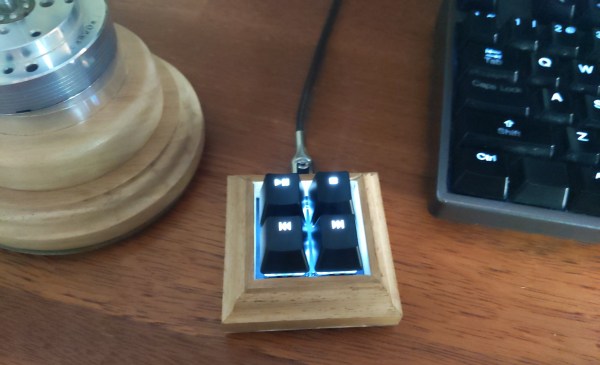
For many people, the biggest change of 2020 has been adjusting to a glut of online teleconferences as a part of daily working life. [p_leriche] has had to adjust the way church services are conducted, and found managing a complicated streaming meeting setup to be complicated at best. To ease the workload on the presenter, he created a simple Zoom control box.

At its heart, the box is little more than a fancy keyboard. An Arduino Pro Micro is hooked up to a series of brightly colored pushbuttons, each labelled with regularly used Zoom functions. The Pro Micro is programmed to fire off the corresponding keyboard shortcuts when the buttons are pressed, activating the relevant function.

It might be a simple build, but it greatly reduces the hand gymnastics required mid-presentation, and we’re sure the users greatly appreciate the new hardware. While this is a quick-and-dirty build thrown together in a basic enclosure, macro keyboards can be both useful and attractive if you so desire. If you’ve built your own time-saving control console, be sure to let us know!

This Week In Security: Platypus, Git.bat, TCL TVs, And Lessons From Online Gaming

Git’s Large File System is a reasonable solution to a bit of a niche problem. How do you handle large binary files that need to go into a git repository? It might be pictures or video that is part of a project’s documentation, or even a demonstration dataset. Git-lfs’s solution is to replace the binary files with a text-based pointer to where the real file is hosted. That’s not important to understanding this vulnerability, though. The problem is that git-lfs will call the main git binary as part of its operation, and when it does so, the full path is not used. On a Unix system, that’s not a problem. The $PATH variable is used to determine where to look for binaries. When git is run, /usr/bin/git is automagically run. On a Windows system, however, executing a binary name without a path will first look in the current directory, and if a matching executable file is not found, only then will the standard locations be checked.

You may already see the problem. If a repository contains a git.exe, git.bat, or another git.* file that Windows thinks is executable, git-lfs will execute that file instead of the intended git binary. This means simply checking out a malicious repository gets you immediate code execution. A standard install of git for Windows, prior to 2.29.2.2, contains the vulnerable plugin by default, so go check that you’re updated!

Then remember that there’s one more wrinkle to this vulnerability. How closely do you check the contents of a git download before you run the next git command? Even with a patched git-lfs version, if you clone a malicious repository, then run any other git command, you still run the local git.* file. The real solution is pushing the local directory higher up the path chain. Continue reading “This Week In Security: Platypus, Git.bat, TCL TVs, And Lessons From Online Gaming”

Easy Carrier Board For The Compute Module 4 Shows You Can Do It, Too

The Raspberry Pi Compute Module 4 has got many excited, with a raft of new features bringing exciting possibilities. However, for those used to the standard Raspberry Pi line, switching over to the Compute Module form factor can be daunting. To show just how easy it is to get started, [timonsku] set about producing a quick and dirty carrier board for the module at home.

The Twitter thread goes into further detail on the design of the board. The carrier features HDMI, USB-A and USB-C ports, as well as a microSD slot. It’s all put together on a single-sided copper PCB that [timonsku] routed at home. The board was built as an exercise to show that high-speed signals and many-pin connectors can be dealt with by the home gamer, with [timonsku] sharing tips on how to get the job done with cheap, accessible tools.

The board may look rough around the edges, but that’s the point. [timonsku] doesn’t recommend producing PCBs at home when multi-layer designs can be had cheaply from overseas. Instead, it serves to show how little is really required to design a carrier board that works. Even four-layer boards can be had for under $10 apiece now, so there’s never been a better time to up your game and get designing.

For those eager to learn more about the CM4, we’ve got a full breakdown to get you up to speed!