The ISS Is Getting A New WC

Every home needs renovations after a few decades, and the International Space Station is no different. This fall, they’ll be getting a new Universal Waste Management System (UWMS), aka a new toilet.

Though the news coincides with increased traffic to the ISS, this move stems from a more serious issue with bacterial contamination during longer-term space travel. Today’s ISS toilets already recycle urine back into potable water and scrub the air reclaimed from solid waste as it gets compacted and stored. The new UWMS will act more like a food dehydrator, reducing the water content as much as possible to save on space, and petrifying the poo to inactivate the bacteria.

The current commode on the American side of the ISS was designed in the 1990s and is based on the Space Shuttle’s facilities. It has a funnel with a hose for urine and a bag-lined canister with a seat for solid waste, both of which are heavily vacuum-assisted.

Though the current toilet still does everything it’s supposed to do, there is room for improvement. For instance, women find it difficult to engage both parts of the system at the same time, and almost everyone prefers the toe bars on the Russian toilet to the more encumbering thigh bars on the American throne. Also, the current commode’s interface is more complicated than it needs to be, which takes up valuable crew time. Continue reading “The ISS Is Getting A New WC”

Adding PCIe To Your Raspberry Pi 4, The Easier Way

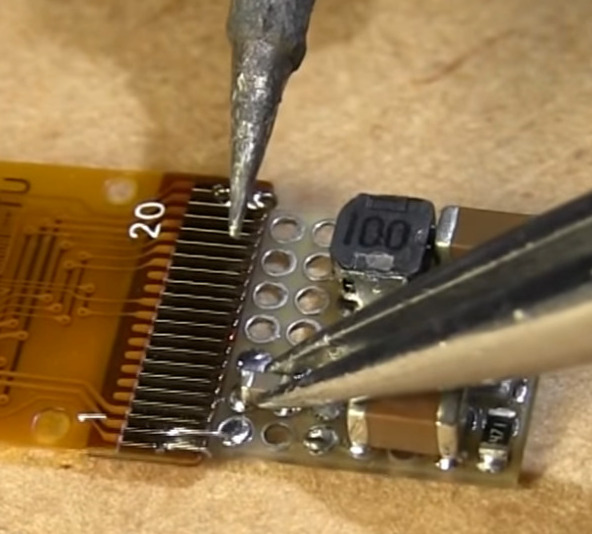
Ever since people figured out that the Raspberry Pi 4 has a PCIe bus, the race was on to be the first to connect a regular PCIe expansion card to a Raspberry Pi 4 SBC. Now [Zak Kemble] has created a new approach, using a bridge PCB that replaces the VL805 USB 3 controller IC. This was also how the original modification by [Tomasz Mloduchowski] worked, only now it comes in a handy (OSHPark) PCB format.

After removing the VL805 QFN package and soldering in the bridge PCB, [Zak] confirmed that everything was hooked up properly and attempted to use the Raspberry Pi 4 with a PCIe extender. This showed that the Raspberry Pi would happily talk with a VL805-based USB 3.0 PCIe expansion card, as well as a Realtek RTL8111-based Ethernet card, but not a number of other PCIe cards. Exactly why this is is still unclear at this point.

As a bonus, [Zak] also found that despite the removal of the VL805 IC from the Raspberry Pi rendering its USB 3 ports useless, one can still use the USB-C ‘power input’ on the SBC as a host controller. This way one can have both PCIe x1 and USB on a Raspberry Pi 4.

This is the third iteration we’ve seen for using PCIe with the Pi. If you’re building on the work of [Thomasz Mloduchowski], which inspired [Colin Riley] to add expanders, and now this excellent hack by [Zak], we want to hear about it!

(Thanks to Itay for the tip)

Unrolling The Mystery Inside An Aluminum Electrolytic Capacitor

When we remove the enclosure of modern electronics, we see a lot of little silvery cylinders wrapped with heat shrink plastic. These aluminum electrolytic capacitors are common residents on circuit boards. We may have cut one open to satisfy our curiosity of what’s inside, but that doesn’t necessarily mean we understood everything we saw. For a more detailed guided tour, follow [TubeTime]’s informative illustrated Twitter thread.

Electronics beginners are taught the basic canonical capacitor: two metal plates and an insulator separating them. This is enough to understand the theory of capacitor operation, but there were hints the real world is not quite that simple. We don’t even need to disassemble an electrolytic capacitor to get our first hint: these cylinders have markings to indicate polarity, differentiating them from the basic capacitor which is symmetric and indifferent to polarity. Once taken apart and unrolled, we would find two thin aluminum foils separated by a sheet of paper. It would be tempting to decide the foil were our two plates and the paper is our insulator, except for the fact those two metal plates are different sizes further deviating from the basic capacitor.

Electronics veterans know the conductor–insulator–conductor pattern is not foil–paper–foil, but actually foil–oxide–electrolyte. But there is more to [TubeTime]’s tour than this answer, which includes pictures of industrial machinery, a side adventure in electrolytic chemistry using a tiny glass beaker, concluding with links to more information. And once armed with knowledge, we can better understand why electrolytic capacitors don’t necessarily need to be replaced in old equipment and appreciate them within the larger history of capacitors context.

Commodore SX-64 Keyboard Upgraded From Trash To Treasure

Released in 1984, the Commodore SX-64 Executive Computer was one of the first portable luggable color computers. It cost twice as much as a Commodore 64, had a tiny 5″ diagonal screen, and couldn’t actually support both 5¼” drives as advertised. On the upside, people say it had a slightly better keyboard than its classic cousin.

[Drygol] agreed to restore the keyboard from a friend’s Commodore SX-64 sight-unseen, and boy was this thing in bad shape. Most people would probably consider the condition a shame and write it off as a lost cause, since two of the corners were missing most of their plastic. But [Drygol] isn’t most people. [Drygol] had mad restoration skills to begin with, and this project honed them to a razor’s edge.

Plenty of the other vintage computer restorations [Drygol] has done required plastic welding, which uses heat or a lot of friction to smooth over cracks. Some of those have not stood the test of time, so he’s now in the habit of stabilizing cracks with brass mesh before filling them with fiberglass putty.

The best part is how [Drygol] managed to rebuild the corners using the same methods, soldering the brass mesh at the 90° joins, and reinforcing them with thick copper wire before beginning the painstaking putty/sand/putty process. The use of blank copper clad boards as straight edges and thickness gauges is genius.

There’s a whole lot to learn here, and the adventure beings with something that probably keeps a lot of people from trying stuff like this in the first place: how do you safely remove the badges?

You’re right, plastic welding is awesome. There even used to be a toy plastic welder. But there’s no need to troll the electronic auction bay to give it a try — just use a cheap soldering iron.

FreeDVDBoot Opens Up The PlayStation 2 Like Never Before

For many generations, home consoles have featured copy protection. Aiming to stop users from playing pirated games as well as running homebrew code, hackers often race to find vulnerabilities shortly after each new launch. Of course, finding workarounds can sometimes be more of a marathon than a sprint. [CTurt]’s new hack may come many years after the PlayStation 2 has since faded from store shelves, but remains impressive nonetheless.

The goal was to find a way to run unsigned code on the PlayStation 2 without using any complex external hardware. Hacked memory cards, network interfaces, and other trickery were ruled out. Instead, sights were set on using the only other way in to the console – through the DVD drive.

The only burnable media the PS2 DVD drive will normally read comes in the form of DVD video discs. Thus, [CTurt]’s search began in the code of the on-board DVD player software. After finding potential overflow targets in the code, it was possible to exploit these to run unsigned code.

It’s not yet a fully-polished piece of code, and [CTurt] notes that additional work may be required to get the exploit working on all firmware versions of the console. Regardless, it’s as simple a hack as you could possibly ask for – burn the disc, and away you go! It reminds us fondly of the Sega Saturn hack exploiting the MJPEG interface. Video after the break. Continue reading “FreeDVDBoot Opens Up The PlayStation 2 Like Never Before”

Automating The Disinfection Of Large Spaces With Robots

What do you do when you have to disinfect an entire warehouse? You could send a group of people through the place with UV-C lamps, but that would take a long time as said humans cannot be in the same area as the UV-C radiation, as much as they may like the smell of BBQ chicken. Constantly repositioning the lamps or installing countless lamps would get in the way during normal operation. The answer is to strap UV-C lights to a robot according to MIT’s CSAIL, and have it ride around the space.

As can be seen in the video (also embedded after the break), a CSAIL group has been working with telepresence robotics company Ava Robotics and the Greater Boston Food Bank (GBFB). Their goal was to create a robotic system that could autonomously disinfect a GBFB warehouse using UV-C without exposing any humans to the harmful radiation. While the robotics can be controlled remotely, they can also map the space and navigate between waypoints.

While testing the system, the team used a UV-C dosimeter to confirm the effectiveness of this setup. With the robot driving along at a leisurely 0.22 miles per hour (~0.35 kilometer per hour), it was able to cover approximately 4,000 square feet (~372 square meter) in about half an hour. They estimated that about 90% of viruses like SARS-CoV-2 could be neutralized this way.

During trial runs, they discovered the need to have the robot adapt to the constantly changing layout of the warehouse, including which aisles require which UV-C depending on how full they are. Having multiple of these robots in the same space coordinate with each other would also be a useful feature addition.

Continue reading “Automating The Disinfection Of Large Spaces With Robots”

Experimenting With Vibratory Wind Generators

We’ve all got a pretty good mental image of the traditional wind-powered generator: essentially a big propeller on a stick. Some might also be familiar with vertical wind turbines, which can operate no matter which way the wind is blowing. In either case, they use some form of rotating structure to harness the wind’s energy.

But as demonstrated by [Robert Murray-Smith], it’s possible to generate electrical power from wind without any moving parts. With simple components, he shows how you can build a device capable of harnessing the wind with nothing more than vibrations. Alright, so we suppose that means the parts are technically moving, but you get the idea.

In the video after the break, [Robert] shows two different devices that operate under the same basic principle. For the first, he cuts the cone out of a standard speaker and glues a flat stick to the voice coil. As the stick moves back and forth in the wind, the coil inside of the magnet’s field and produces a measurable voltage. This proves the idea has merit and can be thrown together easily, but isn’t terribly elegant.

For the revised version, he glues a coil to a small piece of neoprene rubber, which in turn is glued to a slat taken from a Venetian blind. On the opposite side of the coil, he glues a magnet. When the blind slat starts vibrating in the wind, the oscillation of the magnet relative to the coil is enough to produce a current. It’s tiny, of course. But if you had hundreds or even thousands of these electric “blades of grass”, you could potentially build up quite a bit of energy.

If this all sounds a bit too theoretical for your tastes, you can always 3D print yourself a more traditional wind turbine. We’ve even seen them in vertical form, if you want to get fancy.

Continue reading “Experimenting With Vibratory Wind Generators”