A Ruined Saw Blade Becomes A Bowl

Every workshop generates waste, whether it be wood shavings, scrap metal, or fabric scraps, and sometimes that waste seems too good to throw away. [Igor Nikolic]’s hackerspace had a ruined circular saw blade in the trash, and rather than let it go to waste he took it to the forge and fashioned a bowl from it. Then because another blade came his way and he wasn’t quite happy with the first one, he made another.

The second of the two bowls, in its finished state.

Saw blades are not promising material for forge work, being made of a very high-quality hardened steel they do not take well to hammering even when hot. So his first task was to anneal his blade in a kiln, heating it up and then letting it cool slowly to soften it.

Working the blade into a bowl shape was done on a home-made ball anvil. The blade was marked to provide guide rings as an aid to forming, and the bowl shape was progressively built out from the center. The first bowl was a little irregular, in his second try he’d got into his stride. Both bowls were mounted, one on a cut acrylic base, the other on a set of feet.

A project such as this can only be done with a huge amount of work, for which owners of larger forges will typically use a power hammer. [Igor] admits that a swage block (a specialized anvil for forming such curved shapes) would have made his life easier, but we think he’s done a pretty good job.

If you’ve been paying attention to recent Hackaday articles you may have noticed the start of our series on blacksmithing. We’re indebted to [Igor] for the genesis of that piece, for he was operating the portable forge that features in it.


Grabbing The Thread: Spinlocks Vs Mutexes

Getting into the weeds of operating systems is daunting work. Especially when the operating system involved is a fully featured modern PC operating system with millions of lines of code all working together to integrate hardware and software seamlessly. One such operating system “weed” is figuring out how to handle simultaneous tasks when the processor can only really handle one thing at time. For that, you’ll be looking at the difference between spinlocks and mutexes.

Both of these are methods of making sure that the processor completes a task sufficiently before moving on to the next task. Modern computers are so fast (even ignoring multiple cores) that it seems as if they are doing many things at once. In order to maintain this illusion, tasks need ways of locking the processor to that specific task for a certain amount of time. Of course the queue for performing the next task can get complicated as there are often many tasks waiting to use processor time. Spinlocks are a simple way of holding the processor and mutexes are a slightly more complicated way, but which one is the most efficient use of system resources isn’t that straightforward.

If you’ve ever been interested in operating system details, this one goes deep into the intricacies of features most of us have never even considered the existence of. It’s definitely worth a read, though, and is very well written by someone who is clearly an expert. If you want an operating system challenge, you can build your own operating system as well.

Air-Breathing Rocket Engine Promises Future Space Planes

If you are a certain age, you probably remember the promise of supersonic transports. The Concorde took less than 4 hours to go across the Atlantic, but it stopped flying in 2003 and ended commercial supersonic passenger flights  But back in the 1970s, we thought the Concorde would give way not to older technology, but to newer. After all, man had just walked on the moon and suborbital transports could make the same trip in 30 minutes and — according to Elon Musk — go between any two points on the Earth in an hour or less. A key component to making suborbital flights as common as normal jet travel is a reasonable engine that can carry a plane to the edge of space. That’s where the UK’s Sabre engine comes into play. Part jet and part rocket, the engine uses novel new technology and two different operating modes to power the next generation of spaceplane. The BBC reports that parts of the new engine will undergo a new phase of testing next month.

The company behind the technology, Reaction Engines, Ltd, uses the engine in an air-breathing jet mode until it hits 5.5 times the speed of sound. Then the same engine becomes a rocket and can propel the vehicle at up to 25 times the speed of sound.

Continue reading “Air-Breathing Rocket Engine Promises Future Space Planes”

Reverse Engineering A Telephonic Relay Device

The Plain Old Telephone Service, or POTS, doesn’t get a lot of love from the average person anymore. Perhaps once in a while a payphone will be of use when a phone battery has died, but by and large many people simply don’t have hardwired phones anymore. However, that doesn’t mean that the old landline can’t be put to good use. As [Felix Vollmer] shows us, it’s still possible to get useful hardware running over the phone line.

The YC-KZ02DN is a simple device which hooks up to a standard phone line. It’s capable of answering calls and responding to commands by switching its various relays on or off. [Felix] wasn’t quite happy with the stock functionality, however. Investigation showed the onboard STC15W202S microcontroller can be repogrammed over serial via an unpopulated header. Thus opened the door to hacking the device.

[Felix]’s alternative firmware has a couple of key features that make it valuable. Longer PINs are supported, decreasing the likelihood that malicious actors can gain access to the system. Additionally, the device is set to restore the last relay state after a power loss event. This makes the device far more useful for situations where it’s important to ensure consistent operation. It’s no use if an intermittent power loss stops your livestock’s water trough from filling, for example.

In this day and age of the Internet of Things, an old school telephony hack warms the cockles of our hearts. We’re suckers for anything that recalls the days of rotary dialing and speaking with the operator, after all.

Get Moving With New Software From OpenBuilds

If you’re reading Hackaday, you’ve probably heard of OpenBuilds. Even if the name doesn’t sound familiar, you’ve absolutely seen something on these pages that was built with their components. Not only is OpenBuilds a fantastic place to get steppers, linear rails, lead screws, pulleys, wheels, and whatever else you need to make your project go, they’re also home to an active forum of people who are passionate about developing open source machines.

As if that wasn’t enough reason to head over to the OpenBuilds website, [Peter Van Der Walt] recently wrote in to tell us about some new free and open source software he and the team have been working on that’s designed to make it easier than ever to get your creations cutting, lasing, milling, and whatever else you could possibly imagine. If you’ve got a machine that moves, they’ve got some tools you’ll probably want to check out.

BlackBox CNC controller

“OpenBuilds CAM” is a web-based tool which imports SVG and DXF files and creates toolpaths for all sorts of cutting, whether your machine does the business using a beam of angry photons or a simple drag knife. The resulting GCode can then be plugged into “OpenBuilds CONTROL”, which as you may have guessed, does the actual controlling of the piece of hardware connected to your computer. There’s no worries about vendor lock in here either, CONTROL will talk to any Grbl-compatible board.

But what if you don’t have a board? Well, it just so happens that OpenBuilds offers a very slick new piece of gear they’re calling the BlackBox. This beefy CNC controller includes a laundry list of features that [Peter] says the team is very excited about, including stepper drivers powerful enough to run NEMA 23 motors. As an interesting note, they’ve actually made the enclosure for the BlackBox out of cleverly solder masked PCBs; a fantastic trick we don’t see often enough.

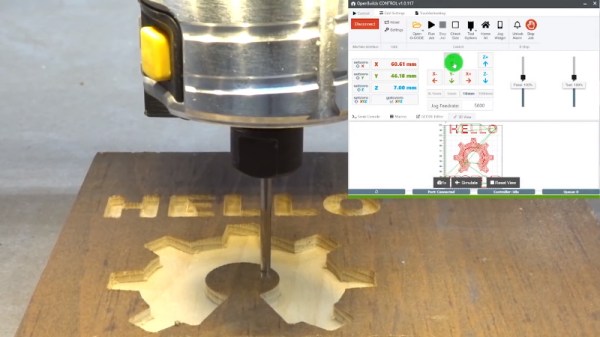
The video after the break shows the CNC router version of “Hello World” using CAM and CONTROL, and should give you a pretty good idea of the typical workflow. If it looks familiar to you, it might be from our previous coverage of LaserWeb, a similar web-based project spearheaded by [Peter Van Der Walt] a few years back. Continue reading “Get Moving With New Software From OpenBuilds”

Make Your Commodore 16 64k, But Not A Commodore 64

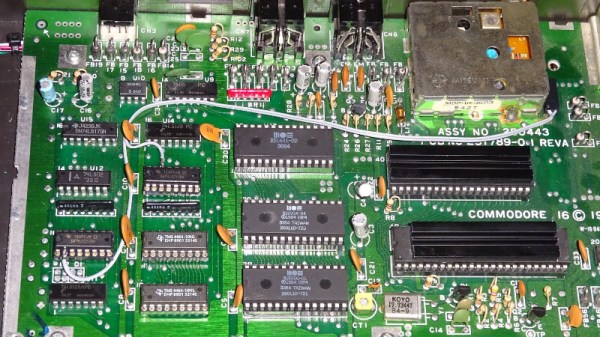
The Commodore 16 was a budget home computer from the mid 1980s, the entry-level model in a wider range of machines. As its name suggests it only has 16k of memory in keeping with its budget status, and while it has the rest of the hardware necessary to run software intended for its 64k stablemates, that 16k is impossible to expand without modifying the machine. Should you have a ’16 in your collection this is not a particularly arduous process, and Tynemouth Software have gone into great detail over how it can be achieved.

As was quite common in machines of the period, the address lines for the RAM area above the fitted 16k are not wired to disable it when those addresses are selected, so the same 16k appears mirrored three times in the space between it and the 64k limit. Thus simply plugging in a 64k cartridge would result in the top 48k being unusable, and some means of disabling or supplanting the internal chips was called for. Contemporary upgrades required pin or track snipping, but as they go on to show us there are some less ugly alternatives both permanent and reversible. Whichever you might favor they all at least don’t carry the huge cost hurdle in 2019 that they might have been when the machine was new. Sadly even though their cases may be similar the resulting machine will not be a Commodore 64, not even a new one.

Long-time Hackaday readers will know that the hardware designer for these machines was our Hackaday colleague [Bil Herd], and all followers of Commodore and his work should read his account of the CES trade show at the heady height of Commodore’s  fame.

Game Boy Recreated In Verilog

With the wide availability of Raspberry Pi hardware and pre-baked Linux distros with emulators ready to go, making a retro handheld is easier than ever. Emulation isn’t the only way to go about playing old games however. [Wenting Zhang] decided to instead recreate the Nintendo Game Boy in Verilog, and has documented the effort.

The project runs on a Spartan 6 FPGA. [Wenting] first developed the hardware to use a DualShock controller for input, and output video to a regular LCD monitor. However, work is now underway to produce a handheld VerilogBoy. This will feature a 320×320 LCD screen, with pixels being quadrupled from the original Game Boy 160×144 resolution, with some pixels to spare. [Wenting] is also looking at porting the code to some Pano Logic units, which we’ve discussed before. The thin clients pack FPGA hardware and lots of IO ports that make them perfect for such a project.

Code is available on Github for the curious tinkerers out there. While there are easier ways to play old handheld games, the amount of learning value of such a project should not be underestimated. We’ve seen FPGAs used for other Nintendo hijinx, too – like this NES cart that packs some serious muscle. Video after the break.

Continue reading “Game Boy Recreated In Verilog”