Joykill: Previously Undisclosed Vulnerability Endangers User Data

Researchers have recently announced a vulnerability in PC hardware enabling attackers to wipe the disk of a victim’s computer. This vulnerability, going by the name Joykill, stems from the lack of proper validation when enabling manufacturing system tests.

Joykill affects the IBM PCjr and allows local and remote attackers to destroy the contents of the floppy diskette using minimal interaction. The attack is performed by plugging two joysticks into the PCjr, booting the computer, entering the PCjr’s diagnostic mode, and immediately pressing button ‘B’ on joystick one, and buttons ‘A’ and ‘B’ on joystick two. This will enable the manufacturing system test mode, where all internal tests are performed without user interaction. The first of these tests is the diskette test, which destroys all user data on any inserted diskette. There is no visual indication of what is happening, and the data is destroyed when the test is run.

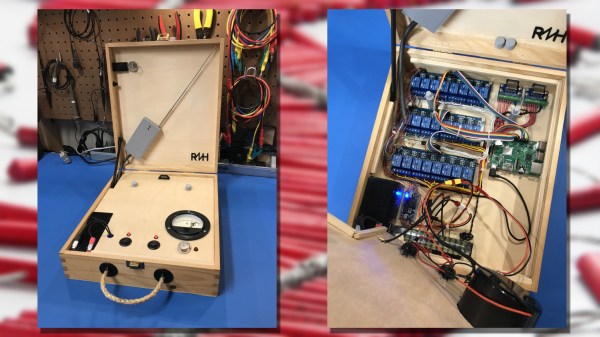
A local exploit destroying user data is scary enough, but after much work, the researchers behind Joykill have also managed to craft a remote exploit based on Joykill. To accomplish this, the researchers built two IBM PCjr joysticks with 50-meter long cables.

Researchers believe this exploit is due to undocumented code in the PCjr’s ROM. This code contains diagnostics code for manufacturing burn-in, system test code, and service test code. This code is not meant to be run by the end user, but is still exploitable by an attacker. Researchers have disassembled this code and made their work available to anyone.

As of the time of this writing, we were not able to contact anyone at the IBM PCjr Information Center for comment. We did, however, receive an exciting offer for a Carribean cruise.

Custom Alexa Skill In A Few Minutes Using Glitch

As hackers, we like to think of ourselves as a logical bunch. But the truth is, we are as subject to fads as the general public. There was a time when the cool projects swapped green LEDs out for blue ones or added WiFi connectivity where nobody else had it. Now all the rage is to connect your project to a personal assistant. The problem is, this requires software. Software that lives on a publicly accessible network somewhere, and who wants to deal with that when you’re just playing with custom Alexa skills for the first time?

If you have a computer that faces the Internet, that’s fine. If you don’t, you can borrow one of Amazon’s, but then you need to understand their infrastructure which is a job all by itself. However, there is a very simple way to jump start an Alexa skill. I got one up and running in virtually no time using a website called Glitch. Glitch is a little bit of everything. It is a web hosting service, a programming IDE for Node.js, a code repository, and a few other things. The site is from the company that brought us Trello and helped to start Stack Overflow.

Glitch isn’t about making Alexa skills. It is about creating web applications and services easily. However, that’s about 90% of the work involved in making an Alexa skill. You’ll need an account on Glitch and an Amazon developer’s account. Both are free, at least for what we want to accomplish. Glitch has some templates for Google Home, as well. I have both but decided to focus on Alexa, for no particular reason.

Continue reading “Custom Alexa Skill In A Few Minutes Using Glitch”

Four Pi Zeros, Four Cameras, One Really Neat 3D Scanner

Sometimes when you walk into a hackerspace you will see somebody’s project on the table that stands so far above the norm of a run-of-the-mill open night on a damp winter’s evening, that you have to know more. If you are a Hackaday scribe you have to know more, and you ask the person behind it if they have something online about it to share with the readership.

[Jolar] was working on his 3D scanner project on just such an evening in Oxford Hackspace. It’s a neatly self-contained unit in the form of a triangular frame made of aluminium extrusions, into which are placed a stack of Raspberry Pi Zeros with attached cameras, and a very small projector which needed an extra lens from a pair of reading glasses to help it project so closely.

The cameras are arranged to have differing views of the object to be scanned, and the projector casts an array of randomly created dots onto it to aid triangulation from the images. A press of a button, and the four images are taken and, uploaded to a cloud drive in this case, and then picked up by his laptop for processing.

A Multi-view Stereo (MVS) algorithm does the processing work, and creates a 3D model. Doing the processing is VisualSFM, and the resulting files can then be viewed in MeshLab or imported into a CAD package. Seeing it in action the whole process is quick and seamless, and could easily be something you’d see on a commercial product. There is more to come from this project, so it is definitely one to watch.

Four Pi boards may seem a lot, but it is nothing to this scanner with 39 of them.

Intel Forms New Security Group To Avoid Future Meltdowns

Intel just moved some high level people around to form a dedicated security group.

When news of Meltdown and Spectre broke, Intel’s public relations department applied maximum power to their damage control press release generators. The initial message was one of defiance, downplaying the impact and implying people are over reacting. This did not go over well. Since then, we’ve started seeing a trickle of information from engineering and even direct microcode updates for people who dare to live on the bleeding edge.

All the technical work to put out the immediate fire is great, but for the sake of Intel’s future they need to figure out how to avoid future fires. The leadership needs to change the company culture away from an attitude where speed is valued over all else. Will the new security group have the necessary impact? We won’t know for quite some time. For now, it is encouraging to see work underway. Fundamental problems in corporate culture require a methodical fix and not a hack.

Editor’s note: We’ve changed the title of this article to better reflect its content: that Intel is making changes to its corporate structure to allow a larger voice for security in the inevitable security versus velocity tradeoff.

Wrecked Civic Rides Again As Cozy Camp Trailer

It may not be the typical fare that we like to feature, but you can’t say this one isn’t a hack. It’s a camp trailer fashioned from the back half of a wrecked Honda Civic, and it’s a pretty unique project.

We don’t know about other parts of the world, but a common “rural American engineering” project is to turn the bed and rear axle of an old pickup truck into a trailer. [monickingbird]’s hacked Civic is similar to these builds, but with much more refinement. Taking advantage of the intact and already appointed passenger compartment of a 1997 Civic that had a really bad day, [monickingbird] started by lopping off as much of the front end as possible. Front fenders, the engine, transmission, and the remains of the front suspension and axle all fell victim to grinder, drill, and air chisel. Once everything in front of the firewall was amputated, the problem of making the trailer safely towable was tackled. Unlike the aforementioned pickup trailers, the Civic lacks a separate frame, so [monickingbird] had to devise a way to persuade the original unibody frame members to accept his custom trailer tongue assembly. Once roadworthy, the aesthetics were tackled — replacing the original interior with a sleeping area, installing electrics and sound, and a nice paint job. Other drivers may think the towing vehicle is being seriously tailgated, but it seems like a comfy and classy way to camp.

Now that the trailer is on the road, what to do with all those spare Civic parts? Sure, there’s eBay, but how about a nice PC case featuring a dashboard gauge cluster?

Overclock Your Raspberry Pi The Right Way

The Raspberry Pi came upon us as an educational platform. A credit card sized computer capable of running Linux from a micro SD card, the Raspberry Pi has proven useful for far more than just education. It has made its way into every nook and cranny of the hacker world. There are some cases, however, where it might be a bit slow or seem a bit under powered. One way of speeding the Raspi up is to overclock it.

[Dmitry] has written up an excellent overclocking guide based upon Eltech’s write up on the subject. He takes it a bit further and applies the algorithm to both Raspi 2 and Raspi 3. You’ll need a beefier power supply, some heat sinks and fans – all stuff you probably have lying around on your workbench. Now there’s no excuse stopping you from ratcheting up the MHz and pushing your Pi to the limit!

We’ve seen several guides to overclocking the Raspi here on Hackaday, including the current record holder. Be sure to check out [dmitry’s] IO page for the overclocking details, and let us know of any new uses you’ve found by overclocking your Raspi in the comment below.

Smartphone Controlled Periodic Table Of Elements

It wouldn’t be much of a stretch to say that here at Hackaday, we’re about as geeky as they come. Having said that, even we were surprised to hear that there are people out there who collect elements. Far be it from us to knock how anyone else wishes to fill their days, but telling somebody at a party that you collect chemical elements is like one step up from saying you’ve got a mold and fungus collection at home. Even then, at least a completed mold and fungus collection won’t be radioactive.

But if you’re going to spend your spare time working on a nerdy and potentially deadly collection, you might as well put it into an appropriate display case. You can’t just leave your Polonium sitting around on the kitchen counter. That’s the idea behind the interactive periodic table built by [Maclsk], and we’ve got to admit, if we get to put it in a case this awesome we might have to start our own collection.

A large portion of this project is building the wooden display case itself as, strangely enough, IKEA doesn’t currently stock a shelving unit that’s in the shape of the periodic table. The individual cells and edge molding are made of pine, the back panel is MDF, and the front of the display is faced off with thin strips of balsa to cover up all the joints. Holes were then drilled into the back of each cell for the LED wiring, and finally the entire frame was painted white.

Each cell contains an WS2812B RGB LED, which at maximum brightness draws 60mA. Given the 90 cells of the display case, [Maclsk] calculated a 5.4A power supply would be needed to keep everything lit up. However, he found a 4A power supply that made his budget happier, which he reasons will be fine as long as he doesn’t try to crank every cell up to maximum at the same time. Control for the display is provided by an Arduino Nano and HC05 Bluetooth module.

The final piece of the project was the Android application that allows the user to control the lighting. But it doesn’t just change colors and brightness, it’s actually a way to visualize information about the elements themselves. The user can do things like highlight certain groups of elements (say, only the radioactive ones), or light up individual cells in order of the year each element was discovered. Some of the information visualizations are demonstrated in the video below, and honestly, we’ve seen museum displays that weren’t this well done.

We last caught up with [Maclsk] when he created a very slick robotic wire cutting machine, which we can only assume was put to work for this particular project. Too bad he didn’t have a robot to handle the nearly 540 soldering joints it took to wire up all these LEDs.

[via /r/DIY]

Continue reading “Smartphone Controlled Periodic Table Of Elements”