How To Build Anything With Delrin And A Laser Cutter — Advanced Tricks

Everyone wants their prototypes to look polished, as opposed to looking like 3D-squirted weekend afterthoughts. The combination of Delrin and a Laser Cutter make this easy, especially if you learn a few tricks-of-the-trade that will make your assemply pop, both functionally and aesthetically.

Last time, we took a deep dive into fabbing parts with Delrin and a typical 40-watt laser cutter, and we discussed some of the constraints of the material. More recently, [Gerrit] gave us a close look at the material itself. It’s been about a year since our first post, but the list of tricks is far from complete.

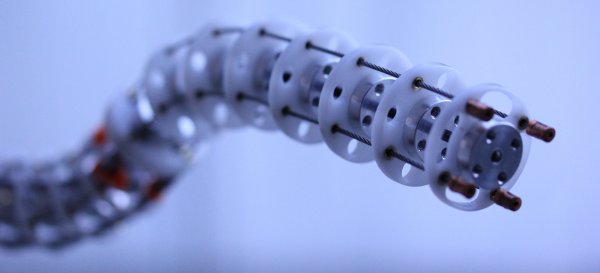
If you’re just getting started in this domain, let me introduce you to two classic techniques for laser-cut prototypes: puzzle-piecing and the T-nut-slotting. While these techniques are tried-and-true, I hope, fearless reader, that they’ll leave you hungry for something cleaner, something more refined. If that’s the case, read on!

Continue reading “How To Build Anything With Delrin And A Laser Cutter — Advanced Tricks”

When You Need A Scope, You Need A Scope

Sometimes there’s just no substitute for the right diagnostic tool. [Ankit] was trying to port some I2C code from an Arduino platform to an ARM chip. When the latter code wasn’t working, he got clever and wrote a small sketch for the Arduino which would echo each byte that came across I2C out to the serial line. The bytes all looked right, yet the OLED still wasn’t working.

Time to bring out the right tool for the job: a logic analyzer or oscilloscope. Once he did that, the problem was obvious (see banner image — Arduino on top, ARM on bottom): he misunderstood what the ARM code was doing and was accidentally sending an I2C stop/start signal between two bytes. With that figured, he was on the right track in no time.

We just ran an epic post on troubleshooting I2C, and we’ll absolutely attest to the utility of having a scope or logic analyzer on hand when debugging communications. If you suspect that the bits aren’t going where they’re supposed to, there’s one way to find out. It’s conceivable that [Ankit] could have dug his way through the AVR’s hardware I2C peripheral documentation and managed to find the status codes that would have also given him the same insight, but it’s often the case that putting a scope on it is the quick and easy way out.

Root Mean Square

The first time I was in school for electrical engineering (long story), I had a professor who had never worked in the industry. I was in her class and the topic of the day was measuring AC waveforms. We got to see some sine waves centered on zero volts and were taught that the peak voltage was the magnitude of the voltage above zero. The peak to peak was the voltage from–surprise–the top peak to the bottom peak, which was double the peak voltage. Then there was root-mean-square (RMS) voltage. For those nice sine waves, you took the peak voltage and divided by the square root of two, 1.414 or so.

You know that kid in the front of the class? They were in your class, too. Always raising their hand with some question. That kid raised his hand and asked the simple question: why do we care about RMS voltage? I was stunned when I heard the professor answer, “I think it is because it is so easy to divide by the square root of two.”

Continue reading “Root Mean Square”

Keytar Made Out Of A Scanner To Make Even The 80s Jealous

Do any of you stay awake at night agonizing over how the keytar could get even cooler? The 80s are over, so we know none of us do. Yet here we are, [James Cochrane] has gone out and turned a HP ScanJet Keytar for no apparent reason other than he thought it’d be cool. Don’t bring the 80’s back [James], the world is still recovering from the last time.

Kidding aside (except for the part of not bringing the 80s back), the keytar build is simple, but pretty cool. [James] took an Arduino, a MIDI interface, and a stepper motor driver and integrated it into some of the scanner’s original features. The travel that used to run the optics back and forth now produce the sound; the case of the scanner provides the resonance. He uses a sensor to detect when he’s at the end of the scanner’s travel and it instantly reverses to avoid collision.

A off-the-shelf MIDI keyboard acts as the input for the instrument. As you can hear in the video after the break; it’s not the worst sounding instrument in this age of digital music. As a bonus, he has an additional tutorial on making any stepper motor a MIDI device at the end of the video.

If you don’t have an HP ScanJet lying around, but you are up to your ears in surplus Commodore 64s, we’ve got another build you should check out.

Creo Arm Might Be The SCARA You’re Looking For

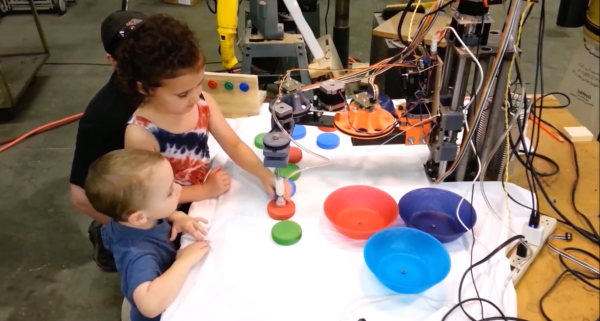
A SCARA (Selective Compliance Assembly Robot Arm) is a type of articulated robot arm first developed in the early ’80s for use in industrial assembly and production applications. All robotics designs have their strengths and their weaknesses, and the SCARA layout was designed to be rigid in the Z axis, while allowing for flexibility in the X and Y axes. This design lends itself well to tasks where quick and flexible horizontal movement is needed, but vertical strength and rigidity is also necessary.

This is in contrast to other designs, such as fully articulated arms (which need to rotate to reach into tight spots) and cartesian overhead-gantry types (like in a CNC mill), which require a lot of rigidity in every axis. SCARA robots are particularly useful for pick-and-place tasks, as well as a wide range of fabrication jobs that aren’t subjected to the stress of side-loading, like plasma cutting or welding. Unfortunately, industrial-quality SCARA arms aren’t exactly cheap or readily available to the hobbyist; but, that might just be changing soon with the Creo Arm.
Continue reading “Creo Arm Might Be The SCARA You’re Looking For”

Hackaday Prize Entry: Low Cost, DIY Thermal Imaging

A few years ago, thermal imaging sensors – cameras that could see heat – became very cheap. FLIR was going all-in with their Lepton module, and there were a number of clip-on cellphone accessories that gave the computer in your pocket the ability to see infrared.

Fast forward a few years, and you can still buy a thermal imaging sensor for your cellphone, and it still costs about the same as it did in 2013. For his Hackaday Prize project, [Josh] is building a more modern lower cost thermal imaging camera. It won’t have the resolution of the fancy $1000 FLIR unit, but it will be very inexpensive with a BOM cost of about $50.

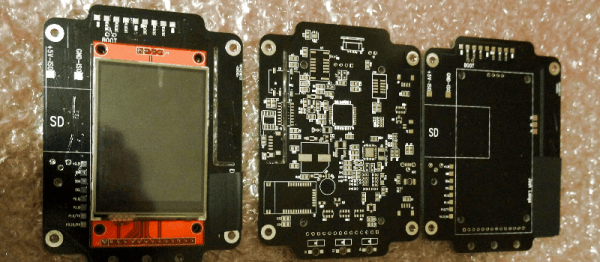
[Josh] is building his low-cost thermal camera around Panasonic’s Grid-EYE module. This thermopile array contains 64 individual infrared sensors, giving this ‘camera’ a resolution of 8×8 pixels. That’s nothing compared to the thousands of pixels found in devices using the FLIR Lepton, but the Grid-EYE is very cheap.

Right now, [Josh]’s build is using an ARM Cortex M0+ and a cheap touch screen LCD he picked up from AliExpress. There’s an optional component to this build in the form of a visible light camera, giving [Josh] the ability to overlay thermal sensor data over a visible light image, just like the fancier, more expensive units.

With a total BOM cost of $44.50, [Josh]’s build is easy on the pocketbook, but still good enough to get some useful information. It’s a great build, and a great entry for The Hackaday Prize.

Impressive Custom Built Blacksmith’s Forge

[EssentialCraftsman] is relatively new to YouTube, but he’s already put out some impressive videos. We really enjoyed an episode dedicated to a fixture in his shop, his large custom blacksmith’s forge.

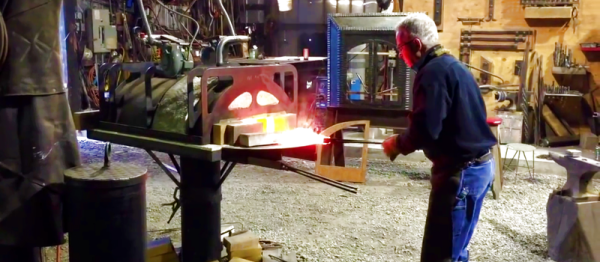
The forge is a custom cast vault of refractory that sits on a platter of fire bricks suspended on a heavy-duty rotating frame. Two forced air natural gas burner provide the heat.  The frame is plasma CNC cut steel welded together.

A lot of technical challenges had to be solved. How does one hold a couple hundred pound piece of refractory in such a way that it can be lifted, especially when any steel parts exposed to the heat of the forge would become plastic and fail? When the forge turns off, how do you keep the hot air in the forge from rising into the blowers and melting them? There were many more.

We were really impressed by the polished final appearance of the forge, and the cleverness of its design. Everything is well thought out, and you can even increase the height of the forge by propping it up on more fire bricks. We hope [EssentialCraftsman] will continue to produce such high quality videos. We also enjoyed his episode on Anvils as well as a weirdly informative tirade on which shape of stake (round or square) to use when laying out concrete jobs. Videos after the break.

Continue reading “Impressive Custom Built Blacksmith’s Forge”