Sim Panel Proves You Can Always Use More Buttons

Many people enjoy playing flight simulators or making the occasional orbit in Kerbal Space Program, but most are stuck controlling the onscreen action with nothing more exotic than a keyboard and mouse. A nice compromise for those that don’t have the space (or NASA-sized budget) to build a full simulator cockpit is a USB “button box” that you can plug in whenever you need a couple dozen extra knobs, switches, and lights.
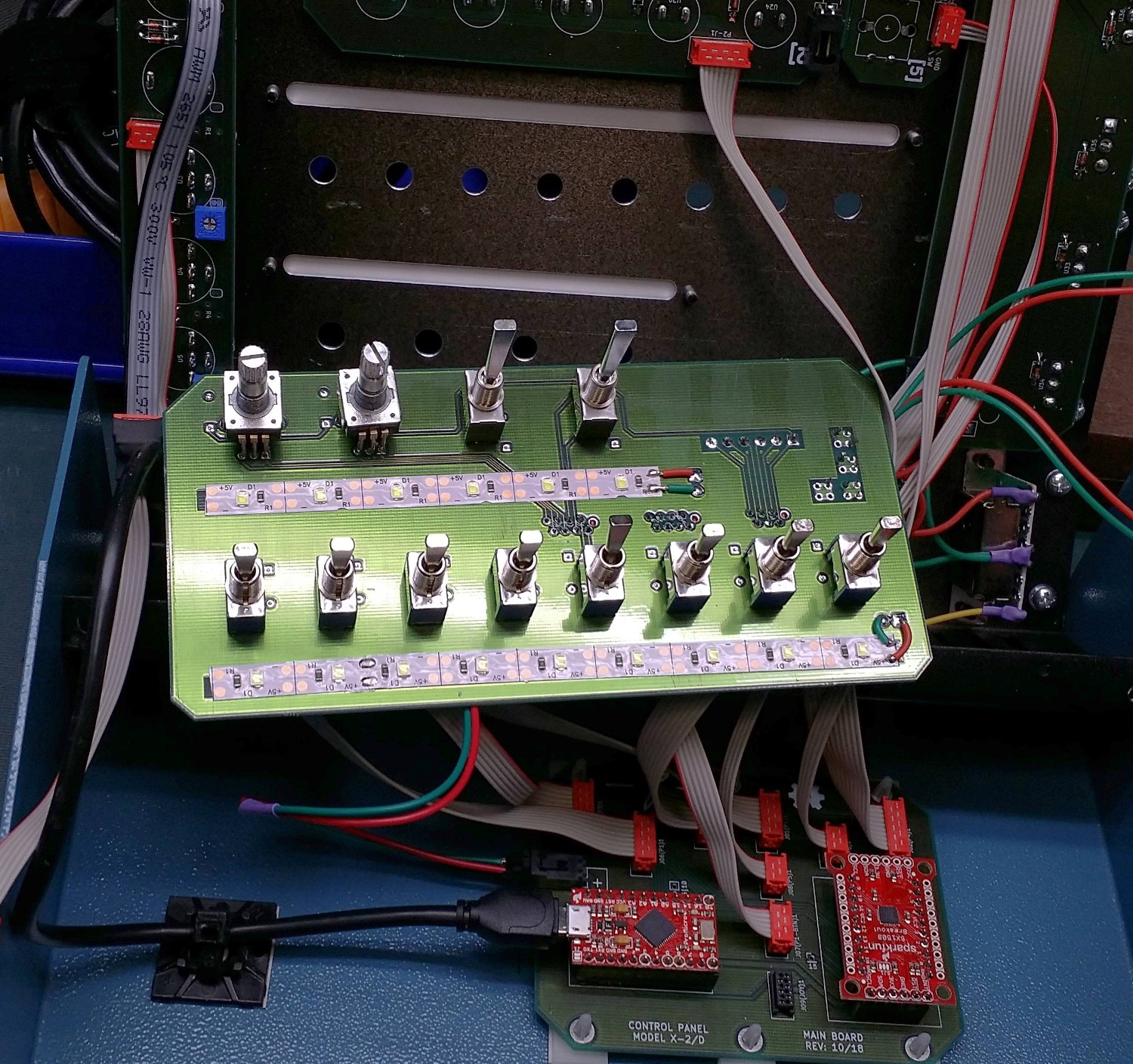
If you’ve been considering building one for yourself, this incredible build by [nexprime] should prove quite inspirational. Now at this point, a box of buttons hooked up to a microcontroller isn’t exactly newsworthy. But there are a few features that [nexprime] packed in which we think make this particular build worth taking a closer look at.

For one, the powder coated 8.5” x 10” enclosure is absolutely gorgeous. The console itself was purchased from a company called Hammond Manufacturing, but of course it still took some work to turn it into the object you’re currently drooling over. A CNC machine was used to accurately cut out all the necessary openings, and the labels were laser etched into the powder coat.

But not all the labels. One of the things we like best about this build is that [nexprime] thought ahead and didn’t just design it for one game. Many of the labels are printed on strips of paper which slide into translucent plastic channels built into the front of the box. Not only does this allow you to change out the overlays for different games, but the paper labels look fantastic when lit with the LED strips placed behind the channels.

Internally, [nexprime] used a SparkFun Pro Micro paired with a SX1509 I/O expander. The electronics are all housed on professionally manufactured PCBs, which gives the final build an incredibly neat look despite packing in 68 separate inputs for your gaming pleasure. On the software side this box appears as a normal USB game controller, albeit one with a crazy number of buttons.

If this build doesn’t have enough switches and buttons for you, don’t worry. This Kerbal Space Program cockpit has banks of switches below and above the player, so one can more realistically scramble for the correct onet to flip when things start going sideways. On the other hand, we’ve seen slightly less intense builds if you’re not quite ready to take out a loan just to get into orbit.

Death Generator Makes Game Over More Personal

“Game over”. In this day and age of complex games with storylines and career modes that last for tens of hours, it’s not really a concept that has a lot of relevance. However, in the golden age of the arcade, those two words made it very clear that your time was up and it was time to find another quarter. Home games of this era were similarly blunt, and if you couldn’t rise to the challenge, you’d be seeing the death screen more often than not.

[foone] was a fan of Sierra’s classic adventure games, and decided to create a tool to generate custom versions of these Game Over/YOU DIED screens. Aptly named Death Generator, the tool is programmed in JavaScript and quickly expanded to cover a wide realm of classic titles. There are King’s Quest IV and V, Gold Rush!, and even modern titles like Cave Story+ and Undertale. There’s plenty of fun to be had typing in completely ridiculous quotes for various screens; our personal favourite is Skate or Die, though Police Quest comes a close second.

[foone] continues to maintain the site, and adds new games from time to time. Animated GIF support has been a recent addition for screens like Metroid and Bad Dudes, and there are even character choices for Super Mario Bros. The code is available on Github if you feel the need to tinker yourself.

Be Ready To Roll With Universal Electronic Dice

There are applications you can download for your smartphone that can “roll” an arbitrary number of dice with whatever number of sides you could possibly want. It’s faster and easier than throwing physical dice around, and you don’t have to worry about any of them rolling under the couch. No matter how you look at it, it’s really a task better performed by software than hardware. All that being said, there’s something undeniably appealing about the physical aspect of die rolling when playing a game.

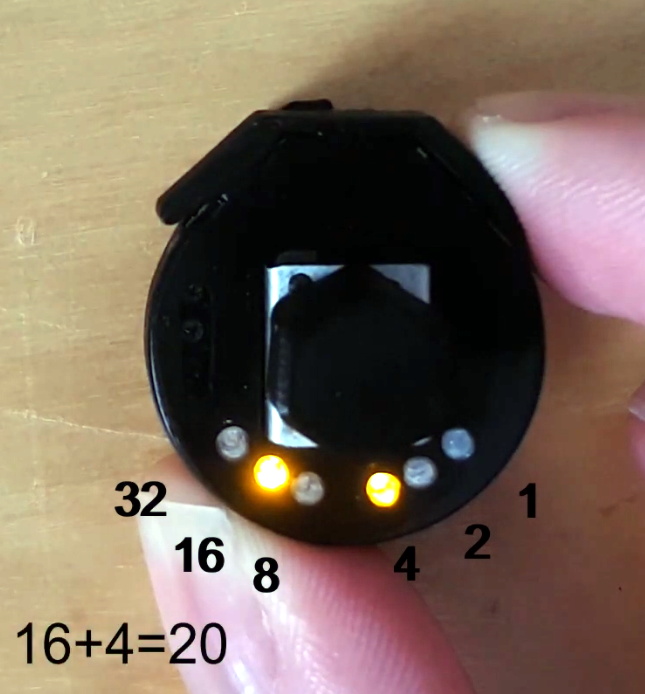
Luckily, [Paul Klinger] thinks he has the solution to the problem. His design combines the flexibility of software number generation with the small form factor of a physical die. The end result is a tiny gadget that can emulate anything from a 2 to 64 sided die with just 6 LEDs while remaining as easy to operate as possible. No need to tap on your smartphone screen with Cheetos-stained hands when you’ve got to make an intelligence check, just squeeze the Universal Electronic Die and off you go. Granted you’ll need to do some binary math in your head, but if you’re the kind of person playing D&D with DIY electronic dice, we think you’ll probably be able to manage.

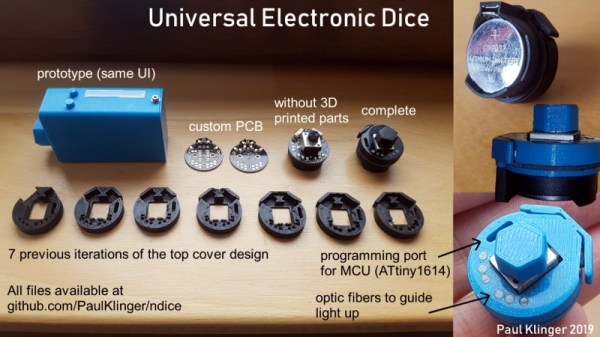
The 3D printed case that [Paul] came up with for his digital die is very clever, though it did take him awhile to nail it down. As shown in the video after the break, it took seven iterations before he got the various features such as the integrated button “flaps” right. There’s also a printed knob to go on the central potentiometer, to make it easier to select how many sides your virtual die will have.

In terms of the electronics, the design is actually quite simple. All that lives on the custom PCB is a ATtiny1614 microcontroller, the aforementioned LEDs, and a couple of passive components. A CR2032 coin cell powers the whole operation, and it should provide enough juice for plenty of games as it’s only turned on when the user is actively “rolling”.

We’ve seen a number of very impressive electronic dice projects over the years, and it doesn’t look like the trend is slowing down anytime soon. Of course, if you absolutely must hear those physical dice rolling, we can help you with that too.

Play Chess Like Harry Potter

If you are a Harry Potter fan, you might remember that one of the movies showed an Isle of Lewis chess set whose pieces moved in response to a player’s voice commands. This feat has been oft replicated by hackers and [amoyag00] has a version that brings together a Raspberry Pi, Arduino, Android, and the Stockfish chess engine in case you want to play by yourself. You can see a video of the game, below.

Interestingly, the system uses Marlin — the 3D printing software — to handle motion using the Arduino. We suppose moving chess pieces over a path isn’t much different than moving a print head. It is certainly a novel use of GCode.

Continue reading “Play Chess Like Harry Potter”

Arduboy Brings New Life To Dreamcast VMU

The Dreamcast VMU was a curious piece of hardware. Part memory card, part low-end LCD gaming toy, its fate was sealed once SEGA abandoned the console platform on January 31, 2001. With a limited market penetration and no major killer app, the VMU is a largely forgotten piece of ephemera from a past era. All the more reason to refit one with an Arduboy, instead.

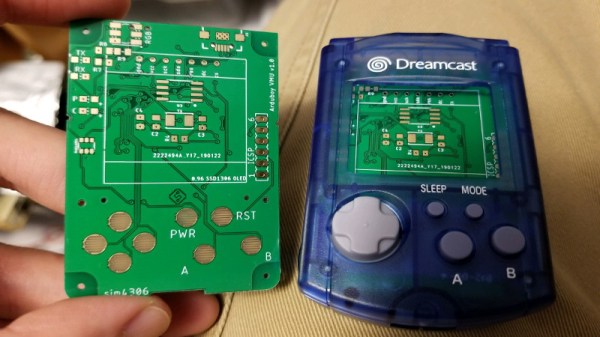
[sjm4306] has taken the Arduboy and repurposed it into a VMU-friendly form factor. The PCB is designed to fit snug inside the plastic case, with conductive traces for the original rubber membrane buttons already in place on the main board. There are some minor fit and finish issues with the first prototype – problems with drill sizes, and connectors that don’t quite fit flush with the housing. Mistakes like these are familiar to any maker who has built a custom PCB or two in their time, and [sjm4306] is confident the bugs will be worked out in the second revision.

It’s a fun project that brings some fun gaming action to an otherwise forgotten platform. If an Arduboy isn’t enough, you could always try to fit a Pi Zero instead. And if you don’t have a VMU, you can always emulate one. Video after the break.

Continue reading “Arduboy Brings New Life To Dreamcast VMU”

NVIDIA’s A.I. Thinks It Knows What Games Are Supposed Look Like

Videogames have always existed in a weird place between high art and cutting-edge technology. Their consumer-facing nature has always forced them to be both eye-catching and affordable, while remaining tasteful enough to sit on retail shelves (both physical and digital). Running in real-time is a necessity, so it’s not as if game creators are able to pre-render the incredibly complex visuals found in feature films. These pieces of software constantly ride the line between exploiting the hardware of the future while supporting the past where their true user base resides. Each pixel formed and every polygon assembled comes at the cost of a finite supply of floating point operations today’s pieces of silicon can deliver. Compromises must be made.

Often one of the first areas in games that fall victim to compromise are environmental model textures. Maintaining a viable framerate is paramount to a game’s playability, and elements of the background can end up getting pushed to “the background”. The resulting look of these environments is somewhat more blurry than what they would have otherwise been if artists were given more time, or more computing resources, to optimize their creations. But what if you could update that ten-year-old game to take advantage of today’s processing capabilities and screen resolutions?

NVIDIA is currently using artificial intelligence to revise textures in many classic videogames to bring them up to spec with today’s monitors. Their neural network is able fundamentally alter how a game looks without any human intervention. Is this a good thing?

Continue reading “NVIDIA’s A.I. Thinks It Knows What Games Are Supposed Look Like”

Screen Shake In VR, Minus The Throwing Up

In first-person games, an effective way to heighten immersion is to give the player a sense of impact and force by figuratively shaking the camera. That’s a tried and true practice for FPS games played on a monitor, but to [Zulubo]’s knowledge, no one has implemented traditional screen shake in a VR title because it would be a sure way to trigger motion sickness. Unsatisfied with that limitation, some clever experimentation led [Zulubo] to a method of doing screen shake in VR that doesn’t cause any of the usual problems.

Screen shake doesn’t translate well to VR because the traditional method is to shake the player’s entire view. This works fine when viewed on a monitor, but in VR the brain interprets the visual cue as evidence that one’s head and eyeballs are physically shaking while the vestibular system is reporting nothing of the sort. This kind of sensory mismatch leads to motion sickness in most people.

The key to getting the essence of a screen shake without any of the motion sickness baggage turned out to be a mix of two things. First, the shake is restricted to peripheral vision only. Second, it is restricted to an “in and out” motion, with no tilting or twisting. The result is a conveyance of concussion and impact that doesn’t rely on shaking the player’s view, at least not in a way that leads to motion sickness. It’s the product of some clever experimentation to solve a problem, and freely downloadable for use by anyone who may be interested.

Speaking of fooling one’s senses in VR environments, here is a fascinating method of simulating zero gravity: waterproof the VR headset and go underwater.

[via Reddit]