Making A Smaller Keyboard

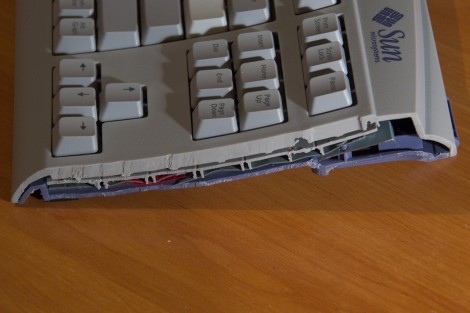
The keyboard on [Marek’s] laptop stopped working. He didn’t want to buy a replacement so he decided to start using an external keyboard. But hauling around a full 104-key model is a bit of a pain so he decided to make himself a shorter keyboard. He basically chopped off the 10-key pad on the right side of the board. This had the unexpected consequence of removing the screws that hold the top and bottom of the case together so he ended up adding a few extra screws to shore it up. You may be wondering how the key matrix still works if a portion of it has been cut off. [Marek] used the simple trick of folding the extra part of the membrane over and covering the unused contacts with some tape.

If you try this you should consider getting rid of the directional arrows and editing keys as well. There must be a way to map those keys elsewhere. Perhaps the half-qwerty keyboard hack will give you some inspiration for that.
Arduino Based Thermal Printer

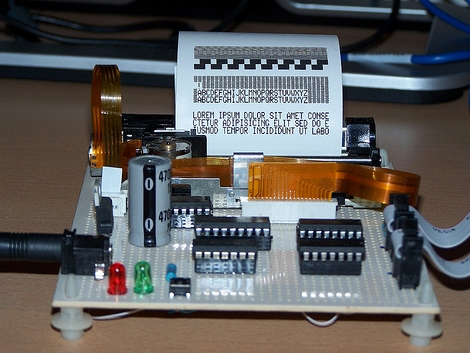
[Manuel] built his own thermal printer based around an Arduino. We’re a bit confused about the parts, his webpage specifies an EFA-1019HW2 print head but the bill of materials on his github shows EPT-1019W2. We can’t find a source for either product number, but we did find similar thermal line printers for as low as $32.00. The controller boards on the other hand look to be around $150 so building your own is a definite win. [Manuel’s] version can print 96 points and has a font set that prints 32 characters per line. Check out the video after the break and let us know if the noise of the print head is a deal killer for you.

Continue reading “Arduino Based Thermal Printer”

USB Typewriter

clickety-clackity-clickety-clackety-DING

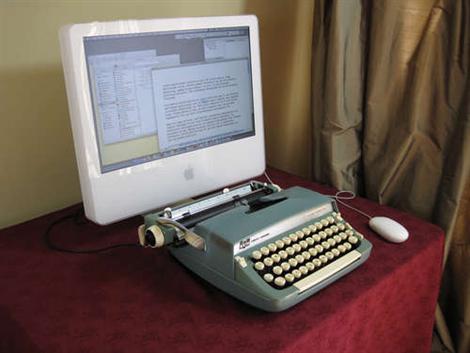
[Jackzylkin] has posted an instructible showing, in detail, the process of creating a USB typewriter. He takes us through the process of disassembling the typewriter, mounting all the sensors where the little hammers strike, and wiring it all up to a custom board to interface with the computer via USB. While he is selling the board, the schematics are available if you want to build your own. We think the clickety-clack of a real typewriter could be very satisfying to the touch, though it might drive your co workers insane. The younger ones might also quiz you as to what that archaic machine is. We’ve actually seen this done before, way back in 2005.

Microsoft Engineers Reinvent The Optimus Keyboard

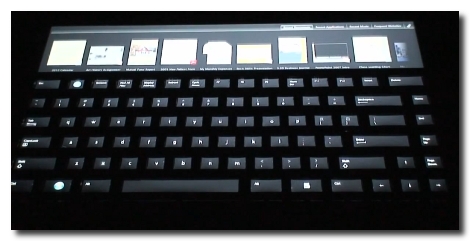
Looks like Microsoft has come up with a pretty slick little keyboard. It’s very much like the Optimus, which has an OLED screen in every key, except that it doesn’t have a screen in every key. Instead there’s just one screen on the whole unit and they keys have been overlayed on top while allowing the image to show through. Brilliant really, since this should drastically reduce the $2400 price tag of the original. That is, if you could buy the device. Microsoft’s not selling this hardware (yet anyway), but offering it up as test hardware for the UIST Innovation Contest. It will be interesting to see what the students come up with. This keyboard should be easier to program for since it involves manipulating just one screen. There is also extra space at the top that is touch-sensitive. See for yourself after the break.

Continue reading “Microsoft Engineers Reinvent The Optimus Keyboard”

Brain Wave Skimming On The Go

Mentok: The Mind Taker

Master EEG hackers [MOG] and [Tim] over at the Makers Local 256 have been working on creating a Bluetooth EEG listener made from a Mattel Mindflex. This build is based on an earlier build of a group called [Frontier Nerds] (thanks for the heads up [Nathan]!), but this version ditches the Arduino in favor of a basic serial to bluetooth adapter for the sake of power efficiency (as well as not having to keep an Arduino strapped to you head). We have covered a few Mindflex hacks before, but this seems to be the most useful in a practical sense. They have included the code for a Bluetooth serial data logger, and the earlier build shows a good example of captured data visualization.

One-handed GameCube Controller

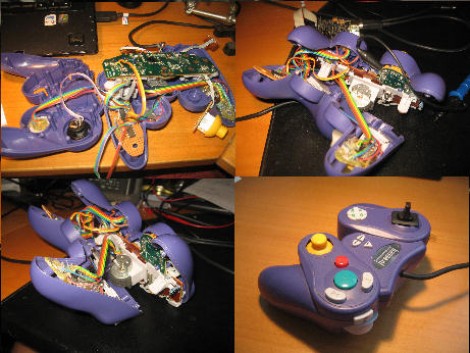
[Hasse] built a one-handed video game controller for his brother. He fit everything he needed into the body of an existing controller and came up with a very usable system. The controller will be right-hand only, so the left shoulder button was moved underneath the right side where your middle finger can get at it. This leaves the d-pad and the left analog stick to account for. By combining an ATtiny44A, an accelerometer, and a digital to analog converter the controller can sense motion. The microcontroller reads in the accelerometer data, gives user feedback via four added LEDs on the d-pad, and the DAC feeds the appropriate signals back into the controller as if you were using the stick. There is even a switch to select whether the motion data is mapped to the analog stick or to the d-pad. We’ve included a demo video after the break.

Find that you also need some one-armed typing assistance? Check out this half-qwerty keyboard hack. Continue reading “One-handed GameCube Controller”

Make Your Own Mindstorm Sensors

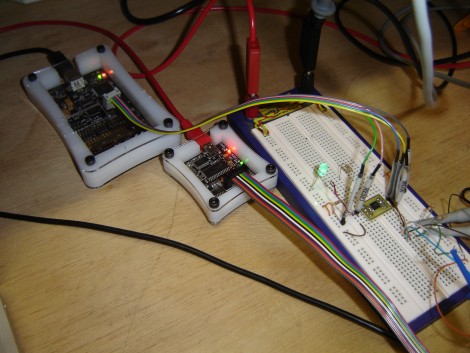
[Stewart Allen] acquired a Mindstorm kit about a month ago and he’s already building his own sensors for it. He wanted a more accurate range finder with a narrower measurement field than the stock sensor. Mindstorm has the option to communicate with sensors via an I2C bus. [Stewart] set up an ATtiny45 to act as a the slave on the bus, facilitating the analog measurement of the distance voltage by using and lookup table, and handling the data transfer with the NXT brick. His testing setup is pictured above, with an AVR Dragon for programming the tiny45 and a Bus Pirate for sniffing the I2C data during the development process. The sensor, looking great on a professionally made PCB he ordered, requires a simple driver that [Stewart] hammered out for use with leJOS, the alternative Mindstorm firmware we’ve seen before.