Dial-a-SID Is A Glorious Chiptune Jukebox

Old-school rotary telephones aren’t particularly useful for their original intended purpose in this day and age, but they’re great fun to hack into new projects. [Linus Åkesson] has done just that, with his Dial-a-SID jukebox build. (Video, embedded below.)

The build installs a Raspberry Pi 3 inside the body of the telephone, running a SID chip emulator and loaded up with the High Voltage SID Collection. The Pi inside outputs sound to an external stereo system for playing chiptunes at a party.

The real party piece, however, is that the handset can be lifted and the telephone dialled in order to listen to and select tracks for the playlist. Tracks can be selected by individual codes, by composer, or even by year. In the event the playlist grows empty, the default behaviour can be set to keep playing random tracks in the meantime.

With over 2000 hours of SID music inside, it’s unlikely the Dial-a-SID will run out of tunes anytime soon. We’d love to see a similar interface used for a jukebox hooked up to a modern streaming service, too. If you build one, let us know! Alternatively, consider hooking up your rotary phone to your smartphone. Video after the break.

Continue reading “Dial-a-SID Is A Glorious Chiptune Jukebox”
Installing Linux Like It’s 1989

A common example of the sheer amount of computing power available to almost anyone today is comparing a smartphone to the Apollo guidance computer. This classic computer was the first to use integrated circuits so it’s fairly obvious that most modern technology would be orders of magnitude more powerful, but we don’t need to go back to the 1960s to see this disparity. Simply going back to 1989 and getting a Compaq laptop from that era running again, while using a Raspberry Pi Zero to help it along, illustrates this point well enough.

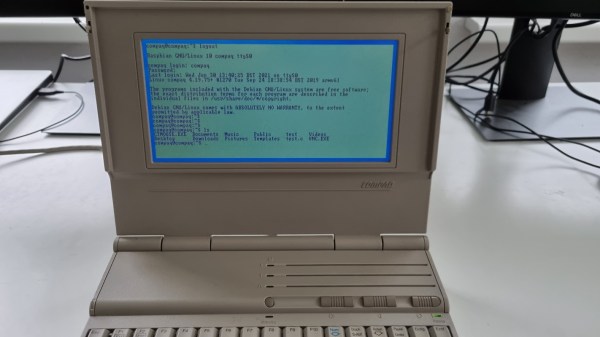
[befinitiv] was able to get a Raspberry Pi installed inside of the original computer case, and didn’t simply connect the original keyboard and display and then call it a completed build. The original 286 processor is connected to the Pi with a serial link, so both devices can communicate with each other. Booting up the computer into DOS and running a small piece of software allows the computer into a Linux terminal emulator hosted on the Raspberry Pi. The terminal can be exited and the computer will return back to its original DOS setup. This also helps to bypass the floppy disk drive for transferring files to the 286 as well, since files can be retrieved wirelessly on the Pi and then sent to the 286.

This is quite an interesting mashup of new and old technology, and with the Pi being around two orders of magnitude more powerful than the 286 and wedged into vacant space inside the original case, [befinitiv] points out that this amalgamation of computers is “borderline useful”. It’s certainly an upgrade for the Compaq, and for others attempting to get ancient hardware on the internet, don’t forget that you can always use hardware like this to access Hackaday’s retro site.

Continue reading “Installing Linux Like It’s 1989”

Just How Vulnerable To Accidental Erasure Are EPROMs Anyway?

On the scale of things worth worrying about, having to consider whether your EPROMs will be accidentally erased by some stray light in the shop is probably pretty low on the list. Still, losing irreplaceable data can make for a bad day, so it might just pay to know what your risks really are.

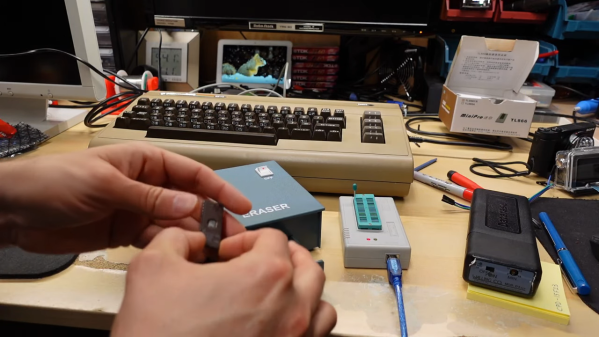
To address this question, [Adrian] set out to test just how susceptible to accidental erasure some common EPROM chips are. An EPROM, or “erasable programmable read-only memory”, is a non-volatile memory chip that can be programmed electrically and then erased optically, by exposing the die inside the chip to light at a specific wavelength, usually in a special chip erasing tool. But erasure can also happen in daylight (even if it takes a few weeks), so [Adrian] cooked up an experiment to see what the risk really is.

He exposed a selection of EPROMs with known contents to UV and checked their contents. Three of the chips had a simple paper or foil label applied, while one had its quartz window exposed to the UV. As expected, the unprotected chip was erased in just 30 minutes. The covered chips, though, all survived that onslaught, and much more — up to 780 minutes of continuous exposure.

So rest easy — it seems that even a simple paper label is enough to protect your precious retro EPROMs. It’s a good data point, and hats off to [Adrian] for taking a look at this. But now we can’t help but wonder: what would a little sunscreen applied to the quartz window do to erasability? Sounds like a fun experiment, too.

Continue reading “Just How Vulnerable To Accidental Erasure Are EPROMs Anyway?”

Tiny Operating System For Tiny Computer

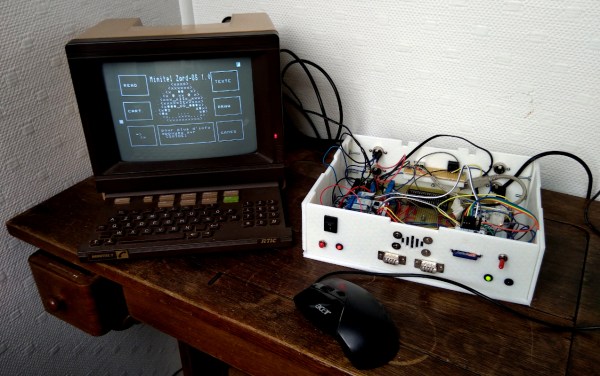
Before the World Wide Web became ubiquitous as the de facto way to access electronic information, there were many other ways of retrieving information online. One of the most successful of these was Minitel, a French videotex service that lasted from 1980 all the way until 2012. But just because the service has been deactivated doesn’t mean its hardware can’t be used for modern builds like this Arduino-based operating system. (Google Translate from French)

Called ZARDOS, the operating system is built to run on an Arduino MEGA although a smaller version is available for the Uno. The Arduino is connected by a serial cable to the Minitel terminal. It can take input from a keyboard and PS/2 mouse and displays video on the terminal screen with the same cable. There is functionality built-in for accessing data on a cartridge system based on SD cards which greatly expands the limited capabilities of the Atmel chip as well, and there is also support for a speaker and a Videotex printer.

Even though the build uses a modern microcontroller, it gives us flashbacks to pre-WWW days with its retro terminal. All of the code is available on the project site for anyone looking to build an Arduino-based operating system, although it will take a little bit of hardware hacking to build a Minitel terminal like this. Either way, it’s a great way to revive some antique French hardware similar to a build we’ve seen which converts one into a Linux terminal.

Thanks to [troisieme_type] for the tip!

Pi Pico-Powered ATX Motherboard

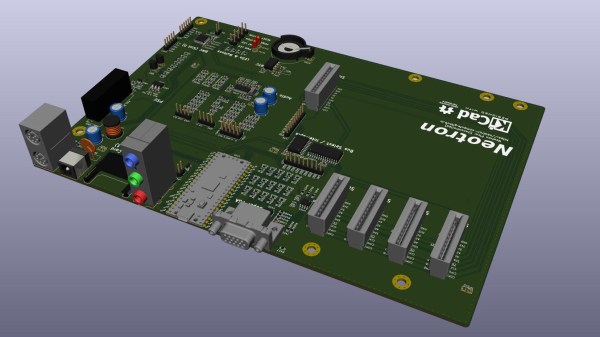
For a couple of years, embedded developer and Rust addict [Jonathan Pallant] aka [theJPster] has been working on a simple computer which he calls the Neotron. The idea is to make a computer that is not only easy to use but easy to understand as well. He describes it as a CP/M- or DOS-like operating system for small ARM microcontrollers. His most recent project is powered by a Raspberry Pi RP2040 Pico and built in the format of a microATX motherboard. This board packs a lot of features for a Pico-based design, including 12-bit color VGA and seven expansion slots. See his GitHub repository for a full list of specifications, and all the files needed to build your own — it is an Open Source project after all.

Besides the Neotron Pico itself, a couple of gems caught our eye in this well-documented project. [theJPster] was running out of I/O pins on the Pico, and didn’t have enough left over for all the peripherals’ chip selects. Check out how he uses an MCP23S17 SPI-bus I/O expander and a tri-state buffer to solve the problem.

On a more meta level, we are intrigued by his use of GitHub Actions. Per the standard concept of repositories, they shouldn’t contain the results of a build, be that an executable binary or Gerber files. Distribution of the build products is typically handled outside of GitHub, using something like GitHub’s Large File Storage service, or just ignoring convention altogether and putting them in the repo anyway. [theJPster] uses another method, employing GitHub Actions to generate the files needed for PCB fabrication, for example.

The Neotron Pico is the latest in a series of boards made to run Neotron OS. Previous boards include:

  • Neotron 9x — Microchip SAM9X
  • Neotron 1000 — STM32H7 + Lattice Semi iCE40 FPGA
  • Neotron 600 — Teensy 4.1
  • Neotron 340ST — ST 32F746G-DISCOVERY

See Acorn Archimedes Get Repaired And Refurbished, In Glorious Detail

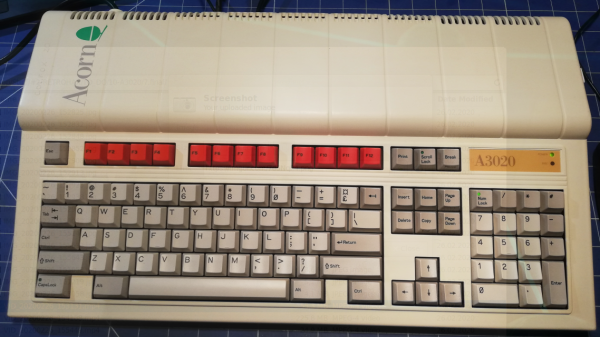
Want to see a 90s-era Acorn Archimedes A3020 home computer get opened up, refurbished, and taken for a test drive? Don’t miss [drygol]’s great writeup on Retrohax, because it’s got all that, and more!

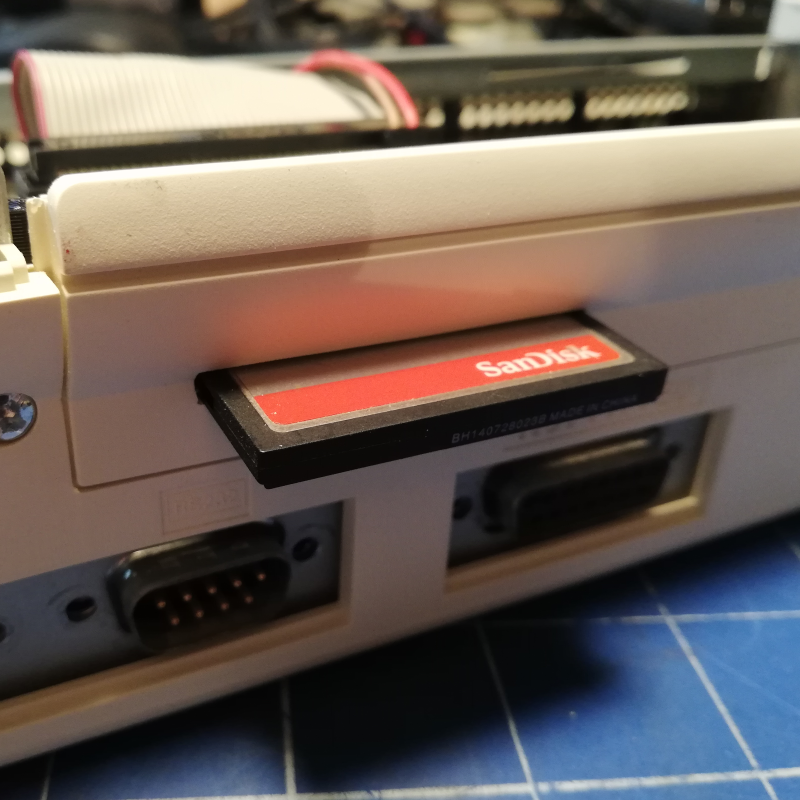
A modern upgrade allowing the use of a CF card in place of an internal hard drive, via a CF2IDE adapter and 3D-printed fixture.

The Archimedes was a line of ARM-based personal computers by Acorn Computers, released in the late 80s and discontinued in the 90s as Macintosh and IBM PC-compatible machines ultimately dominated. They were capable machines for their time, and [drygol] refurbished an original back into working order while installing a few upgrades at the same time.

The first order of business was to open the machine up and inspect the internals. Visible corrosion gets cleaned up with oxalic acid, old electrolytic capacitors are replaced as a matter of course, and any corroded traces get careful repair. Removing corrosion from sockets requires desoldering the part for cleaning then re-soldering, so this whole process can be a lot of work. Fortunately, vintage hardware was often designed with hand-assembly in mind, so parts tend to be accessible for servicing with decent visibility in the process. The keyboard was entirely disassembled and de-yellowed, yielding an eye-poppingly attractive result.

Once the computer itself was working properly, it was time for a few modern upgrades. One was to give the machine an adapter to use a CF card in place of an internal IDE hard drive, and [drygol] did a great job of using a 3D-printed piece to make the CF2IDE adapter look like a factory offering. The internal floppy drive was also replaced with a GOTEK floppy emulator (also with a 3D-printed adapter) for another modern upgrade.

The fully refurbished and upgraded machine looks slick, so watch the Acorn Archimedes A3020 show off what it can do in the video (embedded below), and maybe feel a bit of nostalgia.

Continue reading “See Acorn Archimedes Get Repaired And Refurbished, In Glorious Detail”

Raspberry Pi Floppy Driver Uncovers Fishy Secrets

A forum post by New Zealand electronics enthusiast [zl2wrw] about retreiving waypoints from a mysterious floppy disk caught our eye. The navigation system on his friend’s fishing boat had died and was replaced. But the old waypoints were stored on a 3-1/2 inch floppy disk that was unreadable on a normal PC. Not to be deterred, [zl2wrw] then looked for another solution — apparently a list of hot NZ fishing spots is worth quite the effort.

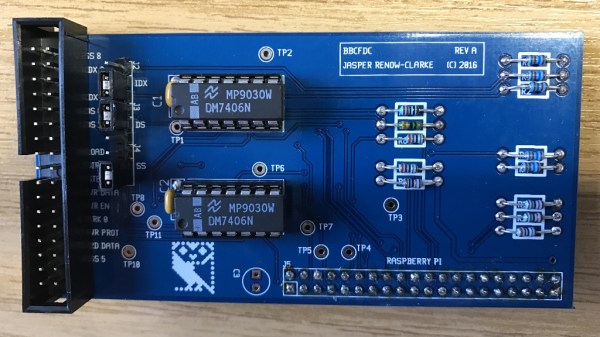
The tool he discovered, and the main point of this story, is the bbc-fdc by [Jasper Renow-Clarke] aka [picosonic]. [Jasper] made this project to read 5-1/4 inch Acorn DFS floppies from his BBC Micro. But bbc-fdc can be used to read a variety of floppy disk formats, such as DOS, C64, Apple II, and others It can also just capture raw magnetic flux transitions on the disk, blissfully unaware of any logical structure to the data. We recently wrote about another Raspberry Pi Floppy Drive Controller project by [Scott Baker]. What sets [picosonic]’s project apart is that he’s not using an FDC controller chip here. The only interface electronics is a couple of open-collector 7406 ICs. Data is read using the SPI peripheral. If you need to archive old floppy disks or do a forensic analysis of unknown disks like [zl2wrw], then one of these two projects will almost certainly do the trick.

Meanwhile back in New Zealand, [zl2wrw] discovered that the floppy format was standard (Modified Frequency Modulation, MFM) by examining the raw flux dump. However, the filesystem was a mystery — it didn’t quite match any of the usual suspects. So [zl2wrw] dug into the hex dump of the data and figured out enough of the structure to manually recover the waypoints. Subsequently, a user on the forum found a document describing the file system used by Furuno GPS units, which proved to be a close match albeit after the fact. Alas, [zl2wrw] hasn’t publish the coordinates of those good fishing spots.

Have you had any successes (or failures) when it comes to reading data from old disks? Or have you encountered peculiar disk formats and/or file systems, where having a tool like this could have been helpful? Let us know in the comments below.