Repurposing Old Smartphones: When Reusing Makes More Sense Than Recycling

When looking at the specifications of smartphones that have been released over the past years, it’s remarkable to see how aspects like CPU cores, clockspeeds and GPU performance have improved during this time, with even new budget smartphones offering a lot of computing power, as well as a smattering of sensors. Perhaps even more remarkable is that of the approximately 1.5 billion smartphones sold each year, many will be discarded again after a mere two years of use. This seems rather wasteful, and a recent paper by Jennifer Switzer and colleagues proposes that a so-called Computational Carbon Intensity (CCI) metric should be used to determine when it makes more sense to recycle a device than to keep using it.

What complicates the decision of when it makes more sense to reuse than recycle is that there are many ways to define when a device is no longer ‘fit for purpose’. It could be argued that the average smartphone is still more than good enough after two years to be continued as a smartphone for another few years at least, or at least until the manufacturer stops supplying updates. Beyond the use as a smartphone, they’re still devices with a screen, WiFi connection and a capable processor, which should make it suitable for a myriad of roles.

Unfortunately, as we have seen with the disaster that was Samsung’s ‘upcycling’ concept a few years ago, or Google’s defunct Project Ara, as promising as the whole idea of ‘reuse, upcycle, recycle’ sounds, establishing an industry standard here is frustratingly complicated. Worse, over the years smartphones have become ever more sealed-up, glued-together devices that complicate the ‘reuse’ narrative.

Continue reading “Repurposing Old Smartphones: When Reusing Makes More Sense Than Recycling”

Move Over Steel, Carbon-Reinforced Concrete Is Here

Reinforced concrete is the miracle material which made possible so many of the twentieth century’s most iconic structures, but here in this century its environmental footprint makes it something of a concern. As part of addressing this problem, a team at TU Dresden in Germany have completed what is believed to be the world’s first building made with carbon-reinforced concrete, in which the steel rebar is replaced with carbon fiber.

New materials are always of interest here at Hackaday, so it’s worth reading further about the nature of the reinforcement. The carbon fiber is woven into a mesh, or as a composite material that mimics existing rebar structures. These two types of reinforcement can be combined in a composite to produce a concrete structure much lighter than traditional steel-reinforced ones. If you page through the architecture critic description, it’s this lightness which has enabled the curving structure of the Dresden building to be so relatively thin.

The carbon saving comes presumably in the lower energy cost from not smelting iron to make steel, as well as the need for less concrete due to the lightness. All we need now is a low-carbon replacement for Portland cement.

Want to know more about concrete reinforcement? We’ve got you covered.

Laptop Motherboard? No, X86 Single-Board Computer!

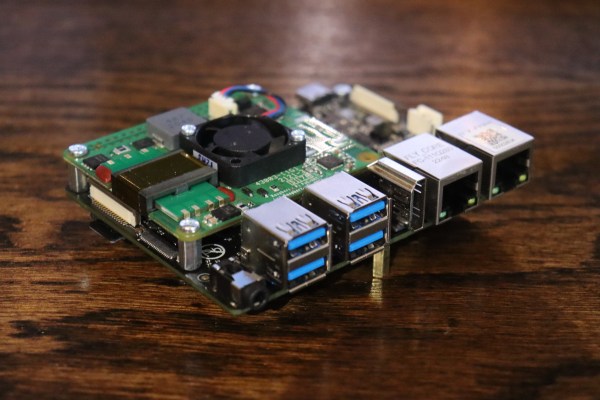
Sometimes a Raspberry Pi will not cut it – especially nowadays, when the prices are high and the in-stock amounts are low. But if you look in your closet, you might find a decently-specced laptop with a broken screen or faulty hinges. Or perhaps someone you know is looking to get rid of a decent laptop with a shattered case. Electronics recycling or eBay, chances are you can score a laptop with at least some life left in it.

Let’s hack! I’d like to show you how a used laptop motherboard could be the heart of your project, and walk you through some specifics you will want to know.

And what a great deal it could be for your next project! Laptop motherboards can help bring a wide variety of your Linux- and Windows-powered projects to life, in a way that even NUCs and specialized SBCs often can’t do. They’re way cheaper, way more diverse, and basically omnipresent. The CPU can pack a punch, and as a rule PCIe, USB3, and SATA ports are easily accessible with no nonsense like USB-throttled Ethernet ports.

Continue reading “Laptop Motherboard? No, X86 Single-Board Computer!”

Answering Some Pico Balloon Questions

When the US Air Force shot down some suspected Chinese spy balloons a couple of weeks ago, it was widely reported that one of the targets might have been a much more harmless amateur radio craft. The so-called pico balloon K9YO was a helium-inflated Mylar balloon carrying a tiny solar-powered WSPR beacon, and it abruptly disappeared in the same place and time in which the USAF claimed one of their targets. When we coveredĀ  the story it garnered a huge number of comments both for and against the balloonists, so perhaps it’s worth returning with the views of a high-altitude-ballooning expert.

[Dave Akerman] has been sending things aloft for a long time now, we think he may have been one of the first to put a Raspberry Pi aloft back in 2012. In his blog post he attempts to answer the frequently asked questions about pico balloons, their legality, whether they should carry a beacon, and what the difference is between these balloons and the latex “weather balloon” type we’re familiar with. It’s worth a read, because not all of us are part of the high-altitude balloon community and thus it’s good to educate oneself.

Meanwhile, you can read our original report here.

Illustrated Kristina with an IBM Model M keyboard floating between her hands.

Keebin’ With Kristina: The One Where Shift (Really) Happens

Hooray, the system works! [Sasha K.] wrote to let me know about their Thumbs Up! keyboard, which is the culmination of a long journey down the DIY rabbit hole to end game. (Seriously, it’s kind of a wild ride, and there’s a ton of pictures).

Thumbs Up! comes in both monoblock and full split versions, but both are designed for Kailh chocs. Fans of the Kinesis Advantage will dig the key wells and possibly the thumb cluster, which in this case is raised up a bit from the mainlands. I’m pretty fond of the naked PCB approach to keyboard building, especially when they’re stacked and look as good as these do.

While the full split only comes in RP2040 (not that there’s anything wrong with that), the monoblock split is available in Pro Micro, ATmega Mini, and RP2040 versions. You can find the STL for the tilt stand and other goodies on Thingiverse.

Continue reading “Keebin’ With Kristina: The One Where Shift (Really) Happens”

All About USB-C: Replying Low-Level PD

Last time, we configured the FUSB302 to receive USB PD messages, and successfully received a “capability advertisement” message from a USB-C PSU. Now we crack the PD specification open, parse the message, and then craft a reply that makes the PSU give us the highest voltage available.

How did the buffer contents look, again?

>>> b
b'\xe0\xa1a,\x91\x01\x08,\xd1\x02\x00\x13\xc1\x03\x00\xdc\xb0\x04\x00\xa5@\x06\x00<!\xdc\xc0H\xc6\xe7\xc6\x00\x00\x00\x00\x00\x00\x00\x00\x00\x00\x00\x00\x00\x00\x00\x00\x00\x00\x00\x00\x00\x00\x00\x00\x00\x00\x00\x00\x00\x00\x00\x00\x00\x00\x00\x00\x00\x00\x00\x00\x00\x00\x00\x00\x00\x00\x00\x00\x00'

The zeroes at the end might look non-significant, and they indeed are not with 99.99% certainty – that said, don’t just discard the entire tail end; one of the bytes in the beginning encodes the length of the message. We’ll read those bytes first, and then read only exactly as much as we need, making sure we aren’t reading two messages and interpreting it as one, and that we’re not discarding zeroes that are part of the message.

Today, we will write code that parses messages right after reading them from the FIFO buffer – however, keep this message handy for reference, still; and if you don’t have the hardware, you can use it to try your hand at decoding nevertheless. If you wanna jump in, you can find today’s full code here!

Continue reading “All About USB-C: Replying Low-Level PD”

Retro Gadgets: Make Your Scope Dual Channel

We live in a time when having an oscilloscope is only a minor luxury. But for many decades, a good scope was a major expense, and almost no hobbyist had a brand new one unless it was of very poor quality. Scopes were big and heavy and, at the price most people were willing to pay, only had a single channel. Granted, having one channel is better than having nothing. But if the relative benefit of having a single channel scope is 10 points, the benefit of having two channels is easily at least 100 points. So what was a poor hacker to do when a dual-trace or higher scope cost too much? Why, hack, of course. There were many designs that would convert a single trace scope into a poor-quality multichannel scope. Heathkit made several of these over the years like the ID-22, the ID-101, and the ID-4101. They called them “electronic switches.” The S-2 and S-3 were even earlier models, but the idea wasn’t unique to Heathkit and had been around for some time.

For $25, you could change your scope to dual trace!

There were two common approaches. With alternative or alt mode, you could trigger a sync pulse and draw one trace. Then trigger again and draw the second trace with a fixed voltage offset. If you do this fast enough, it looks like there are two traces on the screen at one time. The other way is to rapidly switch between voltages during the sweep and use the scope’s Z input to blank the trace when it is between signals. This requires a Z input, of course, and a fast switching clock. This is sometimes called “chopper mode” or, simply, chop. This wasn’t just the realm of adapters, though. Even “real” analog scopes that did dual channels used the same methods, although generally with the benefit of being integrated with the scope’s electronics.

Continue reading “Retro Gadgets: Make Your Scope Dual Channel”