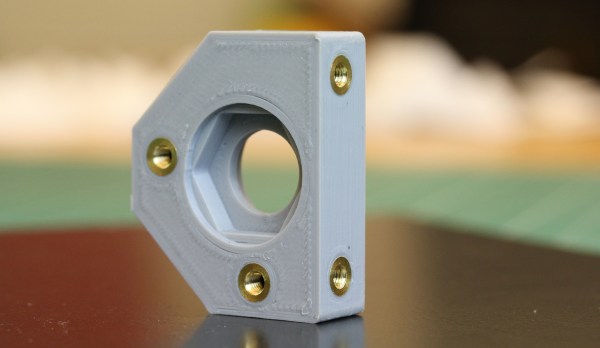
We can make our 3D-printed parts even more capable when we start mixing them with some essential “mechanical vitamins.” By combining prints with screws, nuts, fasteners, and pins, we get a rich ecosystem for mechanism-making with capabilities beyond what we could simply print alone.
Today I’d like to share some tips on one of my favorite functional 3D-printing techniques: adding heat-set inserts. As someone who’s been installing them into plastic parts for years manually, I think many guides overlook some process details crucial to getting consistent results.
Make no mistake; there are a handful of insert guides already out there [1, 2]. (In fact, I encourage you to look there first for a good jump-start.) Over the years though, I’ve added my own finishing move (nothing exotic or difficult) which I call the Plate-Press Technique that gives me a major boost in consistency.
Join me below as I fill in the knowledge gaps (and some literal ones too) to send you back to the lab equipped with a technique that will give you perfectly-seated inserts every time.
Our digital world is so much more interactive than the paper one it has been replacing. That becomes very obvious in the features of Jupyter Notebooks. The point is to make your data beautiful, organized, interactive, and shareable. And you can do all of this with just a bit of simple coding.
We already leveraged computer power by moving from paper spreadsheets to digital spreadsheets, but they are limited. One thing I’ve seen over and over again — and occasionally been guilty of myself — is spreadsheet abuse. That is, using a spreadsheet program to do something I probably ought to write a program to do. For those times that you want something quick but want something more than a spreadsheet, you should check out Jupyter Notebooks. The system is most commonly associated with Python, but it isn’t Python-specific. There are over 100 languages supported — many community-developed. You can even install a C++ interpreter backend for it. Because of the client/server architecture, it is very simple to share notebooks with other users.
You can — in theory — use Jupyter for anything you could use Python for. In practice, it seems to get a lot of workout with people analyzing large data sets, doing machine learning, and similar tasks.
The Good: Simple, Powerful, Extensible
The idea is simple. Think of a Markdown-enabled web page that can connect to a backend (a kernel, in Jupyter-speak). The backend can run on your machine or remotely and will support some kind of language — often Python. The document has cells that line up vertically (like a single wide spreadsheet column). For example, here’s a simple notebook I created to explain how a bunch of sine waves add up to a square wave:
It’s no secret that I rather enjoy connecting things to the Internet for fun and profit. One of the tricks I’ve learned along the way is to spin up simple APIs that can be used when prototyping a project. It’s easy to do, and simple to understand so I’m happy to share what has worked for me, using Web2Py as the example (with guest appearances from ESP8266 and NodeMCU).
Barring the times I’m just being silly, there are two reasons I might do this. Most commonly I’ll need to collect data from a device, typically to be stored for later analysis but occasionally to trigger some action on a server in the cloud. Less commonly, I’ll need a device to change its behavior based on instructions received via the Internet.
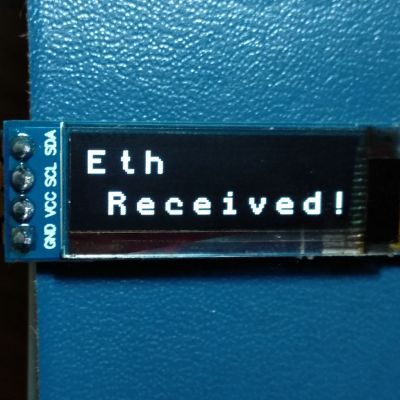
Etherscan is an example of an API that saves me a lot of work, letting me pull data from Ethereum using a variety of devices.
In the former case, my first option has always been to use IoT frameworks like Thingsboard or Ubidots to receive and display data. They have the advantage of being easy to use, and have rich features. They can even react to data and send instruction back to devices. In the latter case, I usually find myself using an application programming interface (API) – some service open on the Internet that my device can easily request data from, for example the weather, blockchain transactions, or new email notifications.
Occasionally, I end up with a type of data that requires processing or is not well structured for storage on these services, or else I need a device to request data that is private or that no one is presently offering. Most commonly, I need to change some parameter in a few connected devices without the trouble of finding them, opening all the cases, and reprogramming them all.
At these times it’s useful to be able to build simple, short-lived services that fill in these gaps during prototyping. Far from being a secure or consumer-ready product, we just need something we can try out to see if an idea is worth developing further. There are many valid ways to do this, but my first choice is Web2Py, a relatively easy to use open-source framework for developing web applications in Python. It supports both Python 2.7 and 3.0, although we’ll be using Python 3 today.
Today’s story is one of victory and defeat, of mystery and adventure… It’s time to automate the garage door. Connecting the garage door to the internet was a must on my list of smart home features. Our opener has internet connection capabilities built-in. As you might guess, I’m very skeptical of connecting a device to the internet when I have no control over the software running on it.
The garage door is controlled by a button hung on the garage wall. There is only a pair of wires, so a simple relay should be all that is needed to simulate the button press from a Raspberry Pi. I wired a relay module to a GPIO on the Pi mounted in the garage ceiling, and wrote a quick and dirty test program in Python. Sure enough, the little relay was clicking happily– but the garage door wasn’t budging. Time to troubleshoot. Does the push button still work? *raises the garage door* yep. How about the relay now? *click…click* nope.
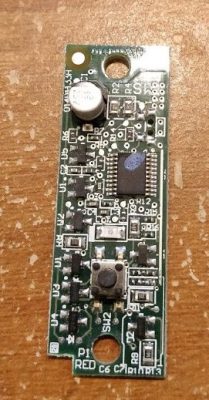
You may have figured out by now, but this garage door opener isn’t just a simple momentary contact push button. Yes, that’s a microcontroller, in a garage door button. This sort of scenario calls for forensic equipment more capable than a simple multimeter, and so I turned to Amazon for a USB oscilloscope that could do some limited signal analysis. A device with Linux support was a must, and Pico Technology fit the bill nicely.
Searching for a Secret We Don’t Actually Need
My 2 channel Picotech oscilloscope, the 2204A, finally arrived, and it was time to see what sort of alien technology was in this garage door opener. There are two leads to the button, a ground and a five volt line. When the button is pressed, the microcontroller sends data back over that line by pulling the 5 V line to ground. If this isn’t an implementation of Dallas 1-wire, it’s a very similar concept.
In an earlier installment of Linux Fu, I mentioned how you can use inotifywait to efficiently watch for file system changes. The comments had a lot of alternative ways to do the same job, which is great. But there was one very easy-to-use tool that didn’t show up, so I wanted to talk about it. That tool is entr. It isn’t as versatile, but it is easy to use and covers a lot of common use cases where you want some action to occur when a file changes.
I’ve always been fascinated by AI and machine learning. Google TensorFlow offers tutorials and has been on my ‘to-learn’ list since it was first released, although I always seem to neglect it in favor of the shiniest new embedded platform.
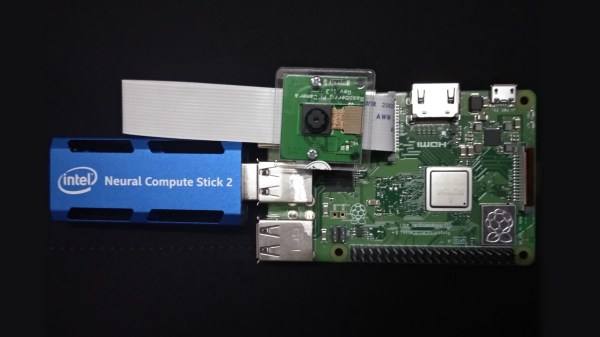
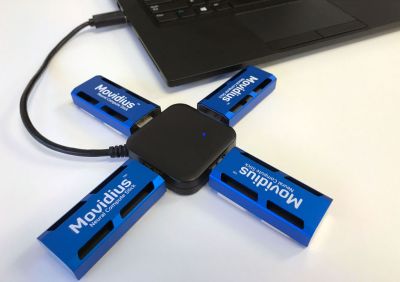
Last July, I took note when Intel released the Neural Compute Stick. It looked like an oversized USB stick, and acted as an accelerator for local AI applications, especially machine vision. I thought it was a pretty neat idea: it allowed me to test out AI applications on embedded systems at a power cost of about 1W. It requires pre-trained models, but there are enough of them available now to do some interesting things.
You can add a few of them in a hub for parallel tasks. Image credit Intel Corporation.
I wasn’t convinced I would get great performance out of it, and forgot about it until last November when they released an improved version. Unambiguously named the ‘Neural Compute Stick 2’ (NCS2), it was reasonably priced and promised a 6-8x performance increase over the last model, so I decided to give it a try to see how well it worked.
I took a few days off work around Christmas to set up Intel’s OpenVino Toolkit on my laptop. The installation script provided by Intel wasn’t particularly user-friendly, but it worked well enough and included several example applications I could use to test performance. I found that face detection was possible with my webcam in near real-time (something like 19 FPS), and pose detection at about 3 FPS. So in accordance with the holiday spirit, it knows when I am sleeping, and knows when I’m awake.
That was promising, but the NCS2 was marketed as allowing AI processing on edge computing devices. I set about installing it on the Raspberry Pi 3 Model B+ and compiling the application samples to see if it worked better than previous methods. This turned out to be more difficult than I expected, and the main goal of this article is to share the process I followed and save some of you a little frustration.
Open-Source Extruded Profile systems are a mature breed these days. With Openbuilds, Makerslide, and Openbeam, we’ve got plenty of systems to choose from; and Amazon and Alibaba are coming in strong with lots of generic interchangeable parts. These open-source framing systems have borrowed tricks from some decades-old industry players like Rexroth and 80/20. But from all they’ve gleaned, there’s still one trick they haven’t snagged yet: affordable springloaded T-nuts.