Learning Verilog For FPGAs: The Tools And Building An Adder

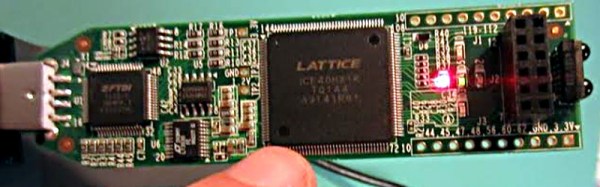
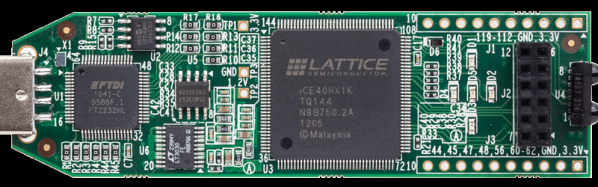
Over the last year we’ve had several posts about the Lattice Semiconductor iCEstick which is shown below. The board looks like an overgrown USB stick with no case, but it is really an FPGA development board. The specs are modest and there is a limited amount of I/O, but the price (about $22, depending on where you shop) is right. I’ve wanted to do a Verilog walk through video series for awhile, and decided this would be the right target platform. You can experiment with a real FPGA without breaking the bank.

In reality, you can learn a lot about FPGAs without ever using real hardware. As you’ll see, a lot of FPGA development occurs with simulated FPGAs that run on your PC. But if you are like me, blinking a virtual LED just isn’t as exciting as making a real one glow. However, for the first two examples I cover you don’t need any hardware beyond your computer. If you want to get ready, you can order an iCEstick and maybe it’ll arrive before Part III of this series if published.

Continue reading “Learning Verilog For FPGAs: The Tools And Building An Adder”

Zynq And The OPL3 Music Synthesizer

We’re big fans of the Zynq, which is an answer to the question: what do you get when you cross a big ARM processor with a big FPGA? So it isn’t surprising that [GregTaylor’s] project to emulate the OPL3 FM Synthesis chip in an FPGA using the Zynq caught our eye.

The OPL3 (also known as the Yamaha YMF262) was a very common MIDI chip on older PC sound cards. If you had a Sound Blaster Pro or 16 board, you had an OPL3 chip in your PC. The OPL3 was responsible for a lot of the music you associate with vintage video games like Doom. [Greg] not only duplicated the chip’s functions, but also ported imfplay from DOS to run on the Zynq’s ARM processors so he could reproduce those old video game sounds.

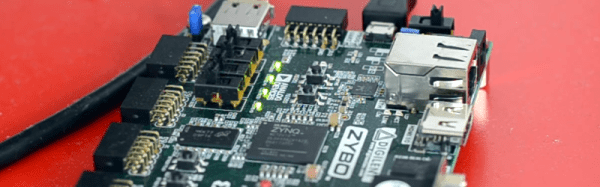
The Zybo board that [Greg] uses includes an Analog Devices SSM2603 audio codec with dual 24-bit DACs and 256X oversampling. However, the interface to the codec is isolated in the code, so it ought to be possible to port the design to other hardware without much trouble.

To better match the original device’s sampling rate with the faster CODEC, this design runs at a slightly slower frequency than the OPL3, but thanks to the efficient FPGA logic, the new device can easily keep up with the 49.7 kHz sample rate.

Using an FPGA to emulate an OPL3 might seem to be overkill, but we’ve seen worse. If you prefer to do your synthesis old school, you can probably get a bulk price on 555 chips.

Continue reading “Zynq And The OPL3 Music Synthesizer”

Hacking A Universal Assembler

I have always laughed at people who keep multitools–those modern Swiss army knives–in their toolbox. To me, the whole premise of a multitool is that they keep me from going to the toolbox. If I’ve got time to go to the garage, I’m going to get the right tool for the job.

Not that I don’t like a good multitool. They are expedient and great to get a job done. That’s kind of the way I feel about axasm — a universal assembler I’ve been hacking together. To call it a cross assembler hack doesn’t do it justice. It is a huge and ugly hack, but it does get the job done. If I needed something serious, I’d go to the tool box and get a real assembler, but sometimes you just want to use what’s in your pocket.

Continue reading “Hacking A Universal Assembler”

Teach Yourself Verilog With This Tiny CPU Design

You probably couldn’t write a decent novel if you’d never read a novel. Learning to do something often involves studying what other people did before you. One problem with trying to learn new technology is finding something simple enough to start your studies.

[InfiniteNOP] wanted to get his feet wet writing CPUs and developed a simple 8-bit architecture that would be a good start for a classroom or self-study. It is a work in progress, so there may be a few bugs in it still to squash, but squashing bugs might be educational too. You can read the documentation in the HACKING file for details on the architecture. Briefly, the instruction’s top four bits encode the operation, while the last four bits select the register operands (there are four registers).

[InfiniteNOP] used the Xilinx tools to simulate and synthesize the CPU, but we thought it might be a good excuse to play with EDAPlayground. You can find a testbench that works with EDAPlayground, although you’ll probably want to update the CPU files to match the latest version.

Continue reading “Teach Yourself Verilog With This Tiny CPU Design”

Build Your Own CPU? That’s The Easy Part!

You want to build your own CPU? That’s great fun, but you might find it isn’t as hard as you think. I’ve done several CPUs over the years, and there’s no shortage of other custom CPUs out there ranging from pretty serious attempts to computers made out of discrete chips to computers made with relays. Not to trivialize the attempt, but the real problem isn’t the CPU. It is the infrastructure.

What Kind of Infrastructure?

I suppose the holy grail would be to bootstrap your custom CPU into a full-blown Linux system. That’s a big enough job that I haven’t done it. Although you might be more productive than I am, you probably need a certain amount of sleep, and so you may want to consider if you can really get it all done in a reasonable time. Many custom CPUs, for example, don’t run interactive operating systems (or any operating system, for that matter). In extreme cases, custom CPUs don’t have any infrastructure and you program them in straight machine code.

Machine code is error prone so, you really need an assembler. If you are working on a big machine, you might even want a linker. Assembly language coding gets tedious after a while, so maybe you want a C compiler (or some other language). A debugger? What about an operating system?

Each one of those things is a pretty serious project all by itself (on top of the project of making a fairly capable CPU). Unless you have a lot of free time on your hands or a big team, you are going to have to consider how to hack some shortcuts.

Continue reading “Build Your Own CPU? That’s The Easy Part!”

Open Source FPGA Toolchain Builds CPU

When you develop software, you need some kind of toolchain. For example, to develop for an ARM processor, you need a suitable C compiler, a linker, a library, and a programmer. FPGAs use a similar set of tools. However, instead of converting source code to machine language, these tools map the intent of your source code into configuration of FPGA elements and the connections between them.

There’s some variation, but the basic flow in an FPGA build is to use a synthesizer to convert Verilog or VHDL to a physical design. Then a mapper maps that design to the physical elements available on a particular FPGA. Finally, a place and route step determines how to put those elements in a way that they can be interconnected. The final step is to generate a bitstream the chip understands and somehow loading it to the chip (usually via JTAG or by programming a chip or an external EEPROM).

One problem with making your own tools is that the manufacturers typically hold the bitstream format and other essential details close to their chest. Of course, anything can be reverse engineered (with difficulty) and [James Bowman] was able to build a minimal CPU using  an open source Lattice toolchain. The project relies on several open source projects, including  IceStorm, which provides configuration tools for Lattice iCE40 FPGAs (there is a very inexpensive development platform available for this device).

We’ve covered IceStorm before. The IceStorm project provides three tools: one to produce the chip’s binary format from an ASCII representation (and the reverse conversion), a programmer for the iCEstick and HX8K development boards, and database that tells other open source tools about the device.

Those tools blend with other open source tools to form a complete toolchain–a great example of open source collaboration. Yosys does the synthesis (one of the tools available on the EDAPlayground site). The place and route is done by Arachne. The combined tools are now sufficient to build the J1A CPU and can even run a simple version of Forth. If you’ve ever wanted to play with an FPGA-based CPU design, you now have a $22 hardware option and free tools.

Continue reading “Open Source FPGA Toolchain Builds CPU”

Learn FPGAs In Your Browser

FPGAs aren’t really programmed, they are configured. Most designers use Verilog or VHDL to describe the desired circuit configuration. Developers typically simulate these configurations before committing them to silicon (a good habit, especially if you ever graduate from FPGAs to ASICs where changes are very expensive). That simulation takes a lot of software you have to install and learn, right?

Not necessarily. You can do e-mail, word processing, and PCB layout in your browser. Why not FPGA design? The EDAPlayground website provides two editor views: one for your main “code” and another for the testbench (the simulation driver you use to test your design). You can even open multiple files, if you have a complex design.

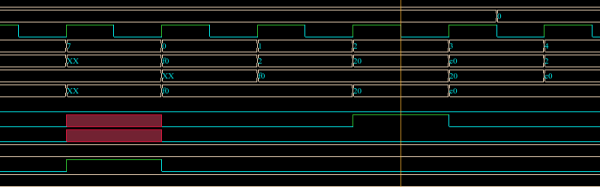
Once you’ve entered your Verilog or VHDL (or picked one of many examples) you can run the simulation and see the result right in your browser. No software to install, and–outside of actually learning VHDL or Verilog–not much learning curve.

As [Strauburn], [combinatorylogic], and others commented on our recent post about a VHDL CPU, you can do a lot of learning without ever having your hands on real hardware. The web site gives you access to several different tools (useful if you want to see how your code will behave on different tools) and also many standard verification libraries. There are limited synthesis tools, but honestly, if you want to go to real hardware, you are going to want the vendor tools for the specific FPGA you are using.

Continue reading “Learn FPGAs In Your Browser”