Automation For The NES

Old hardware might not be anywhere close to as powerful as modern technology, but it does have a few perks. Aesthetics can of course drive the popularity of things like retro gaming systems, but the ease of understanding the underpinnings of their inner workings is also critical. The Nintendo Entertainment System, now nearly four decades old, is a relatively simple machine by modern standards and this lends the system to plenty of modifications, like this controller that allows the system to be somewhat automated.

The original NES controller used a fairly simple shift register to send button presses to the system. The system outputted a latch signal to the controller, the shift register would take as input the current state of the buttons, and then would send them one-by-one to the system at a rate of around 1000 times per second. These signals can be sent without a controller easily enough, too. This build uses a CD4021 shift register, which is the same as the original controller, but instead of reading button states it accepts its inputs from a separate computer via a latching circuit. In this case, the separate computer is a custom design that came about through adapting cassette storage for a 6502-based computer, but it could come from anything else just as easily.

With this system in place, it’s possible to automate gameplay to some extent. Since the system can’t get feedback about the game in its current state, it requires some precise timing to get it to play the game well, and a lot of tuning needs to go into it. This isn’t just a one-off, either. Similar methods are how we get tool-assisted speedruns of games and although these are often done in emulators instead of on real hardware, they can result in some interesting exploits.

Continue reading “Automation For The NES”

Install ChimeraOS And Never Leave The Sofa

There are some projects that initially don’t seem to make sense, but actually turn out to have valid use cases. ChimeraOS appears to be one of those. The idea is that if you own a gaming PC, but it is not necessarily located where you want to be all the time (like in a gaming den or office for example) then ChimeraOS allows you to play games on it remotely via a local machine. That machine may be a media PC attached to your main TV, or perhaps a mobile device like a steam deck.

With support for AMD GPUs only, there is one issue with deployment — if you’re an Nvidia owner you’re out of luck — the premise is to be able to boot up into a gaming-friendly environment with minimal fuss. Hook up a controller and you’re good to go. Support is also there for a few mobile devices, specifically some Aokzoe, Aya Neo, and OneXPlayer devices as well as some preliminary support for the Asus ROG Ally not to mention the Steam Deck as we touched on earlier. From a software perspective, it obviously supports the Steam platform but also Epic Games, Good Old Games (GOG), and tentatively a mention of console platforms. Sadly the website doesn’t mention much detail on that last bit, but there are some tantalizing hints in the project’s Twitter/X/whatever feed. Reading the release notes, there are mentions of PCSX2 (Playstation 2) Super Game Boy and Atari platforms, so digging into the GitHub repo might be instructive, or you know, actually installing it and trying. This scribe doesn’t own an AMD GPU so that isn’t an option, but do drop us a line in the comments if you’ve tried it and how it works for you.

Many of us at Hackday are avid gamers, especially of the retro kind, which is why we really like these projects. Here’s a nice game controller you can print yourself. For self-builds, there’s nothing quite like the satisfaction of a DIY arcade machine, but what if you think outside the box?

Running DOOM In A Keycap Takes Careful Work

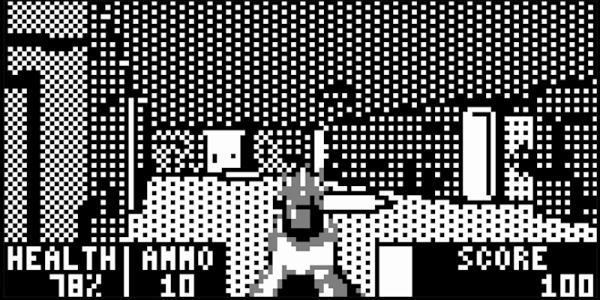
Shoehorning DOOM into different hardware is a classic hacker’s exercise, and [TheKeebProject] managed to squeeze the 1993 classic into a custom keycap with the help of a Raspberry Pi RP2040, a custom PCB, and a clear resin enclosure. It even has a speaker for sound!

All processing is done inside the keycap, which is a clever feat. There is a USB connection, but it’s only for power and keyboard controls, so it’s completely playable without needing a whole lot of external support. The custom PCB and code are based off an earlier RP2040 DOOM project, and [TheKeebProject] has certainly made it their own by managing to get everything so tightly integrated. There’s a quick video mashup embedded below. There’s still a bit of work to do, but the code and design files are all on GitHub should you wish for a closer look.

Making DOOM physically smaller is a good challenge, but we’d like to remind fans that we’ve also seen DOOM shrink in terms of power consumption, all the way down to 1 mW.

Continue reading “Running DOOM In A Keycap Takes Careful Work”

Super Mario In Sed, Sort Of

We definitely needed to reach for a sed reference guide for this one, but looking at the animated GIF of the script running, it is recognizably Super Mario Bros. albeit with minimal gameplay beyond jumping obstacles and avoiding or destroying koopas et al. Creator [Ivan Chebykin] is for certain a master of the dark arts.

Digging in a bit deeper, it’s not strictly speaking 100% sed. A wrapper shell script is required to interface to the shell and grab the keyboard input to pass along. This is simply because sed is a stream processor, and as such it requires text to be fed into it, and it produces a text output. It has no way of reading the terminal input directly, hence the wrapper script. However, all the game logic and ‘graphics’ rendering is pure sed, so that’s perfectly reasonable.

Such programming demos are a great way to hone the finer points of various tools we use every day, whilst not being serious enough to matter if we fail. Pushing the boundaries of what can be done with these basic nuts and bolts we take for granted, is for us the very essence of software hacking, and bravo we say.

Reckon you could top this? Show us! In the meantime, here’s a guide to hacking the recently released Game and Watch, and then doing the decent thing and running DOOM on it. Finally, sed is notoriously tricky to work with, so to help here’s a graphical debugger to make things a little clearer.

It’s Snake, In A QR Code, But Smaller

We’re not sure that many of you have recognised the need in your life for an x86 machine code program encoded into a QR code, but following on from someone else work [donno2048] has created a super-tiny Snake clone in assembly which comes in at only 85 bytes long. It fits far better in a QR code than the previous effort, but perhaps more useful is a web page demo which runs an in-browser DOS compatibility library. We followed the compilation instructions and got it running on our Manjaro installation, with the result of a somewhat unplayable but recognisable Snake, we’re guessing because it was written for a slower platform. The web version is more usable, and allows us to investigate its operation more thoroughly.

To achieve a working game in so little code is an impressive feat, and since we found different keys responded on machines with different keyboards we’re curious how it does its keyboard input. Also we think it has the Snake bug where turning back on yourself means instant game over. We would be interested to hear the views in the comments of readers who know something about x86 assembly, to help explain these points.

This RISC-V CPU Games In Rust From Inside The Game

[Xander Naumenko] has created something truly impressive — a working RISC-V CPU completely contained in a Terraria world. And then for added fun, he wrote the game of pong, playable in real time, from within the game of Terraria. It’s all based on the in-game wiring system, combined with a bit of a hack that uses the faulty lamp mechanic to create a very odd AND gate. In Terraria, the existing logic gates have timing issues that make them a no-go for complicated projects like this one. The faulty lamp is intended to do randomized outputs, by stacking multiple inputs to get a weighted output when a clock signal is applied. The hack is to simply give this device a single input, turning it into a clocked IF gate. Two of them together in series makes a clocked AND gate, and two in parallel make a clocked OR gate.

Why would [Xander] embark on this legendary endeavor? Apparently after over eight thousand hours clocked in game, one gets a bored of killing slimes and building NPC houses. And playing with the game’s wiring system turned on a metaphorical lightbulb, that the system could be used to build interesting systems. A prototype CPU, with a completely custom instruction set came next, and was powerful enough to compute Fibonacci. But that obviously wasn’t enough. Come back after the break for the rest of the story and the impressive video demonstration.

Continue reading “This RISC-V CPU Games In Rust From Inside The Game”

A small B/W TV showing a Pong-like game being played on a Soviet-era game console

Soviet-Era Pong Console Is Easy To Repair

Many early home video game consoles were developed by American and Japanese companies: think Nintendo, Commodore, and Atari. But on the other side of the Iron Curtain, which was still very much in place in the 1980s, an entirely separate industry was built on names like Tesla and Elektronika. As a resident of the republic of Georgia, [Thomas] over at Workshop Nation has built up a sizeable collection of such Soviet-era hardware. A while back, he stumbled upon an Elektronika Video Sport 3, a 1990-vintage Pong-like video game console made in the USSR, and made a delightful video that shows him bringing it back to life.

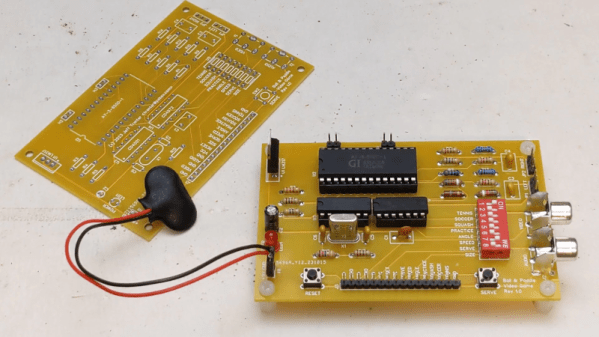
A circuit board from an Elektronika game consoleLike its Western counterparts, the Video Sport 3 is built around a dedicated chip, in this case a K145IK17. This is a Soviet clone of the GI AY-3-8500 that powered nearly every TV Pong console in the West, allowing it to run several variations of Pong as well as a simple target shooting game. Interestingly, the Video Sport 3 also has a “test” mode in which it outputs a test signal to help you adjust your TV settings — quite useful in the days of analog CRTs. It also came with a comprehensive user manual, as well as full schematics to help you repair it in case anything breaks.

[Thomas]’s device didn’t immediately work, which is why he opened it up and tried to find any errors. The main board he found inside was a beautifully hand-made, single-layer board with around a dozen chips and lots of discrete components. Nothing seemed obviously broken, but [Thomas] decided to replace a few electrolytic capacitors as a precaution. This turned out to be enough to get the console working again — dodgy caps truly are a universal problem with older hardware.

A small Elektronika black-and-white TV that [Thomas] found earlier forms a perfect complement to the Video Sport 3. Together, they give us a glimpse into what a typical video game setup may have looked like in an early 1990s Soviet home. In fact, the Eastern Bloc supplied a reasonably wide selection of home computers, although not many people could actually buy them. Some truly bizarre machines were also produced for professional users.

Continue reading “Soviet-Era Pong Console Is Easy To Repair”