This excellent content from the Hackaday writing crew highlights recurring topics and popular series like Linux-Fu, 3D-Printering, Hackaday Links, This Week in Security, Inputs of Interest, Profiles in Science, Retrotechtacular, Ask Hackaday, Teardowns, Reviews, and many more.
Hackaday editors Mike Szczys and Elliot Williams gab about all of the geeky things. We had a delightful time watching NASA bring Perseverance down to the Red planet. In Kristina’s words, we pour one out for Fry’s Electronics. And then we jump into a parade of excellent hacks with a magnetic bearing for crooked ball screws, a science-based poop-burning experiment, and the music hack only microcontroller enthusiasts could love as an FTDI cable is plugged directly into a speaker. Smart circuit design is used to hack a dimmer into non-dimmable LED fixtures, and an octet of living clams are the early warning sensors for water pollution.
Take a look at the links below if you want to follow along, and as always, tell us what you think about this episode in the comments!
Everyone wants to print using metal. It is possible, but the machines to do the work are usually quite expensive. So it caught our eye when MakerBot announced a printer — armed with an experimental extruder — that can print stainless steel parts. Then we read a bit more and realized that it can only sort of do the job. It needs a lot of help. And with some reasonable, if not trivial, modifications, your printer can probably print metal as well.
The key part of the system is BASF Ultrafuse 316L Stainless Steel filament, something that’s been around for a few years. This is a polymer with metal incorporated into it. This explains the special extruder, since metal-bearing filament is hell on typical 3D printer nozzles. However, what comes out isn’t really steel — not yet. For that, you have to send the part to a post-processing facility where it is baked at 1380 °C in a pure hydrogen atmosphere using special equipment. This debinding and sintering produces a part that the company claims can be up to 96% pure metal.
When do you need to use a real-time operating system (RTOS) for an embedded project? What does it bring to the table, and what are the costs? Fortunately there are strict technical definitions, which can also help one figure out whether an RTOS is the right choice for a project.
The “real-time” part of the name namely covers the basic premise of an RTOS: the guarantee that certain types of operations will complete within a predefined, deterministic time span. Within “real time” we find distinct categories: hard, firm, and soft real-time, with increasingly less severe penalties for missing the deadline. As an example of a hard real-time scenario, imagine a system where the embedded controller has to respond to incoming sensor data within a specific timespan. If the consequence of missing such a deadline will break downstream components of the system, figuratively or literally, the deadline is hard.
In comparison soft real-time would be the kind of operation where it would be great if the controller responded within this timespan, but if it takes a bit longer, it would be totally fine, too. Some operating systems are capable of hard real-time, whereas others are not. This is mostly a factor of their fundamental design, especially the scheduler.
These days, nearly everyone communicates through some kind of keyboard, whether they are texting, emailing, or posting on various internet discussion forums. Talking over the phone is almost outmoded at this point. But only a few decades ago, the telephone was king of real-time communication. It was and still is a great invention, but unfortunately the technology left the hearing and speaking-impaired communities on an island of silence.
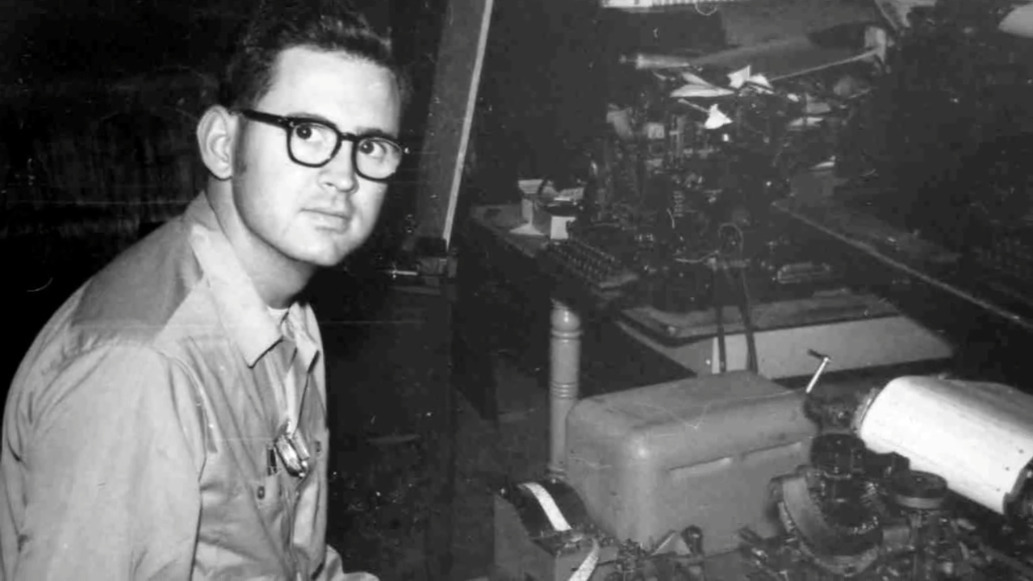
Engineer and professor Paul Taylor was born deaf in 1939, long before cochlear implants or the existence of laws that called for testing and early identification of hearing impairment in infants. At the age of three, his mother sent him by train to St. Louis to live at a boarding school called the Central Institute for the Deaf (CID).
Here, he was outfitted with a primitive hearing aid and learned to read lips, speak, and use American sign language. At the time, this was the standard plan for deaf and hearing-impaired children — to attend such a school for a decade or so and graduate with the social and academic tools they needed to succeed in public high schools and universities.
After college, Paul became an engineer and in his free time, a champion for the deaf community. He was a pioneer of Telecommunications Devices for the Deaf, better known as TDD or TTY equipment in the US. Later in life, he helped write legislation that became part of the 1990 Americans with Disabilities Act.
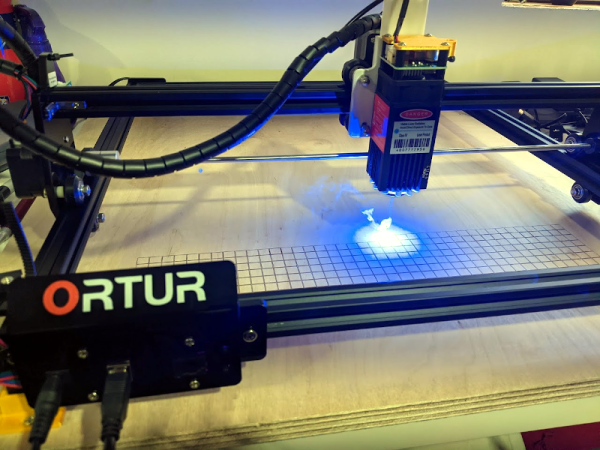
I couldn’t write very much without a computer. Early in my career, I wrote with a typewriter. Unless you are pretty close to perfect — I’m not — it is very frustrating to make edits on typewritten stuff. The equivalent in the real world, for me, has been 3D printers and CNC machines. I can visualize a lot of things that I’m not careful enough to build with normal tools. Despite my 7th-grade shop teacher’s best efforts, everything I did turned out to be a toothpick or a number 7. But I can get my ideas into CAD and from there the machines do the rest. That’s why I was excited to get a laser cutter this past Christmas. You might wonder why I’d need a laser cutter if I have the other tools. Then again, if you read Hackaday, you probably don’t need me to explain why you need a new gadget. I’ve had my eye on a laser for a good long time, but recent developments made it more attractive. I thought I’d share with you some of what I’ve found getting started with the Ortur laser cutter. The cutter is easy to put together and costs somewhere in the $200-$400 range depending on what you get with it. I thought I’d take some time to share what I’ve learned about it.
Why a Laser?
If you haven’t had experience with a laser cutter or engraver before, you might think it is a very specific instrument. Sure, the Ortur is good at engraving some things (but not all things). It can cut some things, too, but not as many things as a big serious laser cutter. However, creative people find lots of ways to use cutting and engraving to produce things you might not expect.
Watch a film about a mad scientist from the golden age of Hollywood and chances are good that among the other set pieces, you’ll see human brains floating in jars of cloudy fluid wired up to electrodes and fancy machines. It’s all made up, of course, but tropes work because they’re based on a kernel of truth, and we in the audience know that our brains and the other parts of our nervous system do indeed work on electricity. Or more precisely, excitable tissues in our nervous systems pass electrochemical signals between themselves as waves of potential across cell membranes.
Studying this electrical world locked away inside our heads is a challenging, but by no means impossible, pursuit. Usable signals can be picked up, amplified, digitized, and recorded to help us understand what’s going on when we think, feel, move, sleep, wake, or just be. Neuroscience has made tremendous strides looking at these signals, but the equipment to do so has largely remained the province of large universities and teaching hospitals with ample budgets, leaving the amateur neuroscientist out of luck.
Tim Marzullo, co-founder of Backyard Brains, is looking to change all that. While working on his Ph.D. in neuroscience at the University of Michigan, he and Greg Gage looked for ways to make the tools of neuroscience research affordable to everyone. The result is the Neuron SpikerBox, a low-cost bioamplifier that can tap into the “spikes” of action potential in live neurons. Open-source tools like these have helped educators bring neuroscience experiments to STEM students, and even helped other scientists set up novel, low-cost experiments.
Tim will join us on the Hack Chat to talk about doing DIY neuroscience and designing the instruments that make it possible. Bring your “mad scientist” questions as we push back the veil of ignorance on how our brains work, one neuron at a time.
Click that speech bubble to the right, and you’ll be taken directly to the Hack Chat group on Hackaday.io. You don’t have to wait until Wednesday; join whenever you want and you can see what the community is talking about.
Well, that was quite a show! The Perseverance rover arrived on Mars Thursday. Don’t tell the boss, but we spent the afternoon watching the coverage in the house on the big TV rather than slaving away in the office. It was worth it; for someone who grew up watching Jules Bergman and Frank Reynolds cover the Apollo program and the sometimes cheesy animations provided by NASA, the current coverage is pretty intense. A replay of the coverage is available – skip to about the 1:15:00 mark to avoid all the filler and fluff preceding the “Seven Minutes of Terror” main event. And not only did they safely deliver the package, but they absolutely nailed the landing. Perseverance is only about 2 km away from the ancient river delta it was sent to explore for signs of life. Nice shooting!
We’re also being treated to early images from Jezero crater. The first lowish-rez shots, from the fore and after hazard cameras, popped up just a few seconds after landing — the dust hadn’t even settled yet! Some wags complained about the image quality, apparently without thinking that the really good camera gear was stowed away and a couple of quick check images with engineering cameras would be a good idea while the rover still had contact with the Mars Reconnaissance Orbiter. Speaking of which, the HiRISE camera on the MRO managed to catch a stunning view of Perseverance’s descent under its parachute; the taking of that photo is an engineering feat all by itself. But all of this pales in comparison to a shot from one of the down-looking cameras in the descent stage, show Perseverance dangling from the skycrane just before touchdown. It was a really good day for engineering.
Would that our Earthly supply chains were as well-engineered as our Martian delivery systems. We’ve been hearing of issues all along the electronics supply chain, impacting a wide range of industries. Some of the problems are related to COVID-19, which has sickened workers staffing production and shipping lines. Some, though, like a fire at the AKM semiconductor plant in Japan, have introduced another pinch point in an already strained system. The fire was in October, but the impact on the manufacturer depending on the plant’s large-scale integration (LSI) and temperature-compensated crystal oscillators (TCXO) products is only just now being felt in the amateur radio market. The impact is likely not limited to that market, though — TCXOs pop up lots of gear, and the AKM plant made LSI chips for all kinds of applications.
What do you get when you combine a 3D-printer, a laser cutter, a CNC router, and a pick-and-place robot? Drones that fly right off the build plate, apparently. Aptly enough, it’s called LaserFactory, and it comes from MITs Computer Science and Artificial Intelligence Lab. By making different “bolt-on” tools for a laser cutter, the CSAIL team has combined multiple next-generation manufacturing methods in one platform. The video below shows a drone frame being laser-cut from acrylic, to which conductive silver paste is added by an extruder. A pick-and-place head puts components on the silver goo, solders everything together with a laser, and away it goes. They also show off ways of building up 3D structures, both by stacking up flat pieces of acrylic and by cutting and bending acrylic in situ. It’s obviously still just a proof of concept, but we really like the ideas presented here.
And finally, as proof that astronomers can both admit when they’re wrong and have fun while doing so, the most remote object in the Solar System has finally received a name. The object, a 400-km diameter object in a highly elliptical orbit that takes it from inside the orbit of Neptune to as far as 175 astronomical units (AU) from the Sun, is officially known as 2018 AG37. Having whimsically dubbed the previous furthest-known object “Farout,” astronomers kept with the theme and named its wayward sister “Farfarout.” Given the rapid gains in technology, chances are good that Farfarout won’t stay the Sun’s remotest outpost for long, and we fear the (Far)nout trend will eventually collapse under its own weight. We therefore modestly propose a more sensible naming scheme, perhaps something along the lines of “Farthest McFaraway.” It may not scale well, but at least it’s stupid.