Car Lights For Reflow Heat Source

If you only have a car and you need to unsolder some tricky surface mount components: what would you do? If you’re Kasyan TV, you’d remove your car’s halogen lights and get to town. That’s right: car lights for reflow.

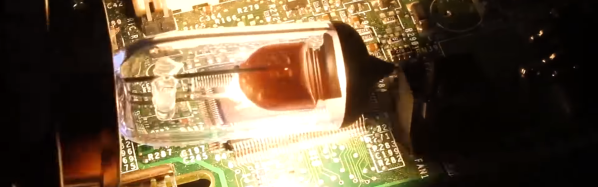
When the friend of the host of Kasyan TV needed to remove some roasted toasted FETs from his motherboard but didn’t have anything for reflowing, she took some headlights and used them as an infrared source to desolder the FETs. Powered by a lab supply (although car batteries work too), the process works with 60 and 100-watt bulbs.

Now, reflowing with halogen bulbs isn’t new, and we’ve seen it done with the run of the mill 100-watt bulbs and a halogen floodlight. However, what we really like about using car lights is that they’re available everywhere and we already own some that we could (temporarily) repurpose. Now, don’t get us wrong – if you’re going to be reflowing more than just a little, there are plenty of alternative methods that don’t involve staring at “rather bright lights” for extended periods of time.

People ’round these parts can’t seem to get enough of reflow: from open source reflow oven controllers to reflowing with a hair straightener we’ve seen quite a bit. If you’re new to the reflow arena, we’ve got zero to hero: reflow style just for you. And if DIY at home reflow isn’t intense enough for you, we’ve got next level reflowing as well.

The full video is after the break, complete with Kasyan TV’s sponsored segment in the middle..

Continue reading “Car Lights For Reflow Heat Source”

Laser Cutter Alignment Mod Skips Beam Combiner

A lot of the DIY laser engravers and cutters we cover here on Hackaday are made with laser diodes salvaged from Blu-ray drives and projectors, which are visible lasers in the 400 – 450nm range (appearing as violet or blue). Unfortunately there is an upper limit in terms of power on visible diode lasers, most builds max out at 5W or so. If you need more power than that, you’ll likely find yourself looking at gas laser cutters like the K40. While the K40 is a great starting point if you’re looking to get into “real” lasers, it’s a very different beast from the homebrew builds using visible lasers.

With a gas laser the beam itself is invisible, making it much more difficult to align or do test runs. One solution is to add a visible laser to the K40 which can be used to verify alignment, but making sure it’s traveling down the same path as the primary laser usually requires an expensive beam combiner. Looking to avoid this cost, [gafu] wanted to see if it was possible to simply move the visible laser into the path of the primary beam mechanically.

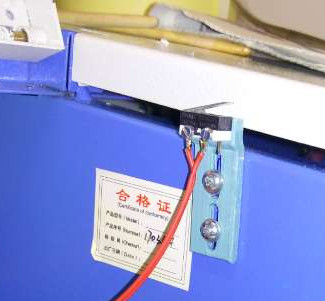
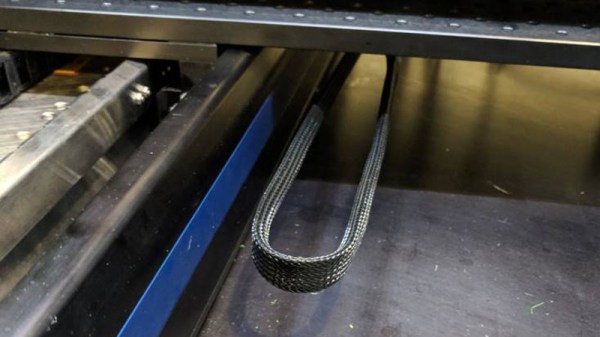
An adjustable microswitch detects when the lid has been opened.

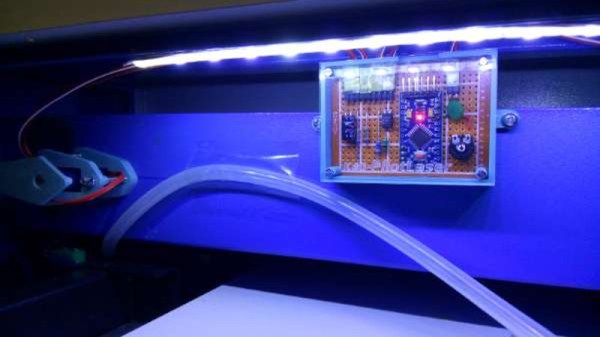
In the setup that [gafu] has come up with, a cheap laser module (the type from a handheld laser pointer) is moved into the path of the primary laser on an arm that’s actuated by a simple hobby servo. To prevent the primary and visible lasers from firing at the same time, an Arduino is used to control the servo given the current state of the K40’s lid. If the lid of the K40 is open, the primary laser is shutoff and the visible laser is rotated into position so the operator can see where the primary laser’s beam would be hitting. Once the lid is closed, the visible laser rotates out of the way and the primary is powered back up.

Running the cutting or engraving job with the lid of the K40 machine open now let’s [gafu] watch a “dry run” of the entire operation with the visible laser before finally committing to blasting the target with the full power beam.

We’ve covered many hacks and modifications for everyone’s favorite entry-level CO2 laser cutter. From replacing the controller to making it bigger, K40 owners certainly seem like a creative bunch.

Mike Harrison At The Superconference: Flying LCD Pixels

Mike Harrison, perhaps better known to us as the titular Mike of YouTube channel mikeselectricstuff, is a hardware hacking genius. He’s the man behind this year’s Superconference badge, and his hacks and teardowns have graced our pages many times. The best thing about Mike is that his day job is designing implausibly cool one-off hardware for large-scale art installations. His customers are largely artists, which means that they just don’t care about the tech as long as it works. So when he gets together with a bunch of like-minded hacker types, he’s got a lot of pent-up technical details that he just has to get out. Our gain.

He’s been doing a number of LCD installations lately. And he’s not using the standard LCD calculator displays that we all know and love, although the tech is exactly the same, but is instead using roughly 4″ square single pixels. His Superconference talk dives deep into the behind-the-scenes cleverness that made possible a work of art that required hundreds of these, suspended by thin wires in mid-air, working together to simulate a flock of birds. You really want to watch this talk.


Continue reading “Mike Harrison At The Superconference: Flying LCD Pixels”

MIT Is Building A Better 3D Printer

Traditional desktop 3D printing technology has effectively hit a wall. The line between a $200 and a $1000 printer is blurrier now than ever before, and there’s a fairly prevalent argument in the community that you’d be better off upgrading two cheap printers and pocketing the change than buying a single high-end printer if the final results are going to be so similar.

The reason for this is simple: physics. Current printers have essentially hit the limits of how fast the gantry can move, how fast plastic filament can pushed through the extruder, and how fast that plastic can be melted. To move forward, we’re going to need to come up with something altogether different. Recently a team from MIT has taken the first steps down that path by unveiling a fundamental rethinking of 3D printing that specifically addresses the issues currently holding all our machines back, with a claimed 10-fold increase in performance over traditional printing methods.

MIT’s revolutionary laser-assisted hot end.

As anyone who’s pushed their 3D printer a bit too hard can tell you, the first thing that usually happens is the extruder begins to slip and grind the filament down. As the filament is ground down it starts depositing plastic on the hobbed gear, further reducing grip in the extruder and ultimately leading to under-extrusion or a complete print failure. To address this issue, MIT’s printer completely does away with the “pinch wheel” extruder design and replaces it with a screw mechanism that pulls special threaded filament down into the hot end. The vastly increased surface area between the filament and the extruder allows for much higher extrusion pressure.

An improved extruder doesn’t do any good if you can’t melt the incoming plastic fast enough to keep up with it, and to that end MIT has pulled out the really big guns. Between the extruder and traditional heater block, the filament passes through a gold-lined optical cavity where it is blasted with a pulse modulated 50 W laser. By closely matching the laser wavelength to the optical properties of the plastic, the beam is able to penetrate the filament and evenly bring it up to nearly the melting point. All without physically touching the filament and incurring frictional losses.

There are still technical challenges to face, but this research may well represent the shape of things to come for high-end printers. In other words, don’t expect a drop-in laser hot end replacement for your $200 printer anytime soon; the line is about to get blurry again.

Speeding up 3D printing is a popular topic lately, and for good reason. While 3D printing is still a long way off from challenging traditional manufacturing in most cases, it’s an outstanding tool for use during development and prototyping. The faster you can print, the faster you can iterate your design.

Thanks to [Maave] for the tip.

Continue reading “MIT Is Building A Better 3D Printer”

Finished Dryer Will Text You

Here’s a slightly different way to check on the status of your laundry. Instead of checking if the machine is vibrating, or listening for sound, or pulling everything apart and hacking an ESP8266 into it, check the power that the machine is drawing. This is what [Scrand] did in his IoT dryer build.

The secret behind the hack is the Sonoff POW, a small device that sits in between the wall and the dryer. It has a relay in it that controls it, but, importantly for this hack, it’s able to measure the power consumption used by what’s plugged into it. By installing the ESPurna firmware on it, he can now use all the power of the firmware to control and monitor what’s connected to the POW. He wrote a PowerShell script to monitor the http server now running on the POW checking on how much power is being drawn by the dryer. When that power drops, the laundry is done, and in the case of [Scrand], a text is sent saying so.

When you’re sitting on the couch relaxing, why get up every five minutes to check your laundry when you can have it text you when you know it’s done? Then you can decide whether to get up and deal with it or just leave it until later. The whole reason ESPurna exists to begin with is to check on the status of the laundry.  Or, you can go a bit overboard with this laundry room monitor.

Curbside Mower Gets Electric Transplant

There’s few things more exciting to a hacker or maker than seeing a piece of hardware on the curb. An old computer, an appliance, maybe if you’re really lucky some power tools. So we can only imagine the rush that known lawn equipment aficionado [AmpEater] had when he saw a seemingly intact push mower in the trash. The pull start was broken on the gas engine, but where this mower was going, it wouldn’t need a gas engine.

When he got the mower back to his garage, he started on the process of converting it over to electric. Of course this means basically everything but the wheels, handle, and deck would get tossed. But starting with a trashed gas mower still sounds a lot easier compared to trying to figure out how to make or source a wheeled mower deck.

Step one in this conversion was stripping all the paint off the deck and welding a plate over where the original gas engine was. [AmpEater] then 3D printed some mounts to hold the DeWalt tool batteries he would be using as a power source, taking the extra time to align everything so it would have the look of an old flathead gasoline engine. A tongue-in-cheek reference to the mower’s old gasoline gulping days, and an awesome little detail that gives the final product a great look.

The controller is a commercial model intended for electric bikes, and the heart of this new mower is a brushless direct-drive motor capable of 3,000 RPM at 40 A. [AmpEater] reports a respectable one hour run time with the six DeWalt batteries, and more power than his store-bought Ryobi electric mower.

If the name [AmpEater] looks familiar, it’s because this isn’t the first time he’s graced us with a mower conversion: back in 2013 he impressed us with his solar-electric Cub Cadet zero-turn. This build isn’t quite as slick as the Cub Cadet, but the much lower cost and difficulty level means that you may be able to follow in his footsteps even if you don’t have his Zeus-level mastery of the electric motor.

As electric mowers have gotten more popular, we’ve seen an increasing flow of hacks and mods for them. Everything from replacing the batteries to turning them into something else completely.

Biometric Authentication With A Cheap USB Hub

It’s fair to say that fingerprints aren’t necessarily the best idea for device authentication, after all, they’re kind of everywhere. But in some cases, such as a device that never leaves your home, fingerprints are an appealing way to speed up repetitive logins. Unfortunately, fingerprint scanners aren’t exactly ubiquitous pieces of hardware yet. We wouldn’t hold out much hope for seeing a future Raspberry Pi with a fingerprint scanner sitting on top, for example.

Looking for a cheap way to add fingerprint scanning capabilities to his devices, [Nicholas] came up with a clever solution that is not only inexpensive, but multi-functional. By combining a cheap USB hub with a fingerprint scanner that was intended as a replacement part of a Thinkpad laptop, he was able to put together a biometric USB hub for around $5 USD.

After buying the Thinkpad fingerprint scanner, he wanted to make sure it would be detected by his computer as a standard USB device. The connector and pinout on the scanner aren’t standard, so he had to scrape off the plastic coating of the ribbon cable and do some probing with his multimeter to figure out what went where. Luckily, once he found the ground wire, the order of the rest of the connections were unchanged from normal USB.

When connected to up his Ubuntu machine, the Thinkpad scanner came up as a “STMicroelectronics Fingerprint Reader”, and could be configured with libpam-fprintd.

With the pintout and software configuration now known, all that was left was getting it integrated into the USB hub. One of the hub’s ports was removed and filled in with hot glue, and the fingerprint scanner connected in its place. A hole was then cut in the case of the hub for the scanner to peak out of. [Nicholas] mentions his Dremel is on loan to somebody else at the moment, and says he’ll probably try to clean the case and opening up a bit when he gets it back.

[Nicholas] was actually inspired to tackle this project based on a Hackaday post he read awhile back, so this one has truly come full circle. If you’d like to learn more about fingerprint scanning and the techniques being developed to improve it, we’ve got some excellent articles to get you started.