Last year, the FCC introduced new regulations requiring router manufacturers to implement software security to limit the power output in specific 5GHz bands. Government regulations follow the laws of unintended consequences, and the immediate fear surrounding this new directive from the FCC was that WiFi router manufacturers would make the easiest engineering decision. These fears came true early this year when it was revealed a large router manufacturer was not following the FCC regulations to the letter by limiting the output of the radio module itself, but instead locking down the entire router.
The FCC’s rules regarding the power output of 5GHz routers was never a serious concern; the FCC is, after all, directed to keep the spectrum clean, and can force manufacturers to limit the power output of the wireless devices. The problem comes from how manufacturers implement this regulation – the easiest solution to prevent users from modifying the output of the radio module will always be preventing users from modifying the entire router. Developers don’t like it, the smart users are horrified, and even the FCC is a little flustered with the unintended consequences of its regulation.
While the easiest solution to preventing the modification of a radio module is to prevent modification to the entire router, there is another way. The folks at Imagination Technologies have come up with a virtualization scheme that allows router manufacturers to lock down the radio module per the FCC directive while still allowing the use of Open Source router firmware like OpenWrt.
A demonstration of the capabilities of this next-generation router comes from the prpl Security Working Group and uses MIPS Warrior CPUs to create multiple trusted environments. The control of the router can be handled by one secure environment, while the rest of the router firmware – OpenWrt included – can be run in an environment more conducive to Open Source firmware.
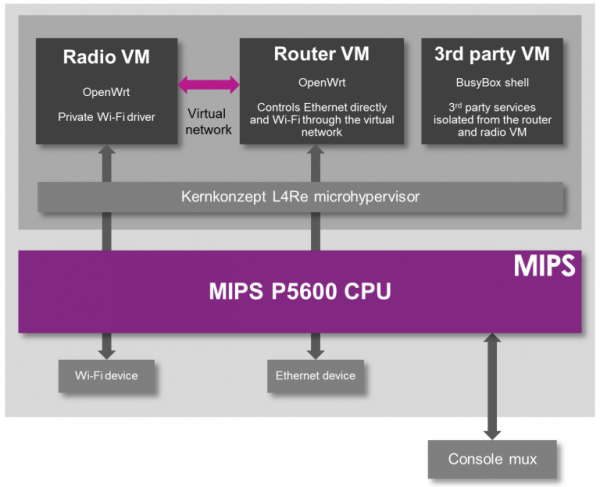
The demo of a compartmentalized, virtualized router uses a dev kit consisting of a dual-core MIPS P5600 CPU running at 1GHz, and a Realtek RTL8192 WiFi adapter plugged into the USB port. The driver for the WiFi adapter runs under a secure hypervisor, making it secure enough to pass the FCC’s muster.
This build wouldn’t be possible without hardware virtualization in microprocessors and microcontrollers. Imagination Technologies has been working on this for a while, and only a few years ago demonstrated a PIC32 with baked in virtualization.
In the video below, Imagination Technologies demonstrates a MIPS board running three virtual machines. The first machine is running OpenWrt, the second is running a WiFi driver, and the third is running third-party applications. Crashing one machine doesn’t bring down the others, and the WiFi driver is locked away in a secure environment in accordance with the FCC regulations.
While it’s hard to imagine a router based on a MIPS board that would be cheaper than the already inexpensive router SoCs found in today’s routers, this method of secure virtualization is the best way to give consumers what they deserve: an open source option for all their devices.
Continue reading “Virtualizing Around The FCC’s Firmware Modification Rules” →