The Latest, Best WiFi Module Has Been Announced

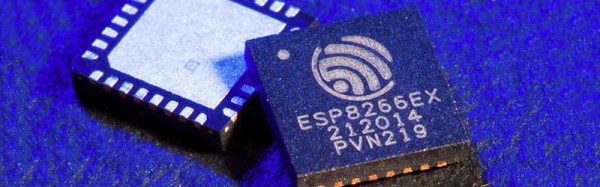
A little more than a year ago, a new product was released onto the vast, vast marketplace of cheap electronics. It was the ESP8266, and this tiny and cheap WiFi module has since taken over the space of hobbyist electronics and become the de facto standard for connecting tiny microcontrollers to the Internet.

Now there’s an upgrade on the horizon. [John Lee], the public face of Espressif, the makers of the ESP8266, has announced the next product they’re working on. It’s called the ESP32, and if the specs given are correct, it looks to be the next great thing for the Internet of Things.

The ESP32 will now contain two Tensilica processors running at 160MHz, compared to the ‘8266’s one processor running at 80 MHz. The amount of RAM has been increased to 400 kB, Bluetooth LE has been added, WiFi is faster, and there are even more peripherals tucked away in this tiny piece of silicon.

The new ESP32 includes new, simplified APIs and unlike when the ESP8266 was announced, documentation in English.

Right now, Espressif is beta testing the ESP32, with about 200 boards manufactured so far. If you’re one of the few lucky people who have one of these boards on your workbench, we’d love to see your take on it.

Cutest Possible Atari Disk Drive

[rossumur]’s first computer was an Atari 400, and after riding a wave of nostalgia and forgetting the horrible keyboard found in the Atari 400, he decided it was time to miniaturize the venerable Atari 810 disk drive by putting an entire library of Atari games on a single microSD card.

SD cards have been slowly but surely replacing disk drives for just about every old computer system out there. You no longer need 400k disks for your old mac, and your Commodore 64 can run directly off an SD card. The Atari 8-bits have been somewhat forgotten in this movement towards modern solid state storage, and although a solution does exist, this implementation is a pretty pricey piece of hardware.

[rossumur]’s hardware for giving the Atari 8-bit computers an SD card slot is just one chip – an LPC1114 ARM Cortex M0. This, along with an SD card slot, 3.3V regulator, a LED and some caps allows the Atari to talk to SD card and hold the entire 8-bit Atari library on a piece of plastic the size of a fingernail.

Designing a circuit board doesn’t have the street cred it once did, and to give his project a little more pizzazz he chose to emulate the look of the very popular miniaturized Commodore 1541 disk drive with a tiny replica of the Atari 810 disk drive. This enclosure was printed at Shapeways, and with some enamel hobby paint, [rossumur] had a tiny, tiny 810 drive.

While this build does require the sacrifice of a somewhat rare and certainly old Atari SIO cable, it is by far the best solution yet seen for bringing a massive game library to the oft-forgotten Atari 8-bit home computers.

Thanks [lucas] for the tip.

You’re Never Too Young To Be A Rocket Scientist

We’ve been keeping tabs on the progress SpaceX has made toward landing a rocket so that it can be reused for future orbital launches. As you would imagine, this is incredibly difficult despite having some of the world’s greatest minds working on the task. To become one of those minds you have to start somewhere. It turns out, high school students can also build guided rockets, as [ArsenioDev] demonstrates in his project on hackaday.io.

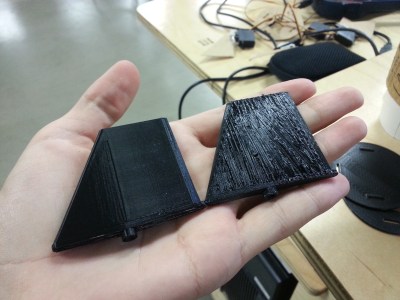
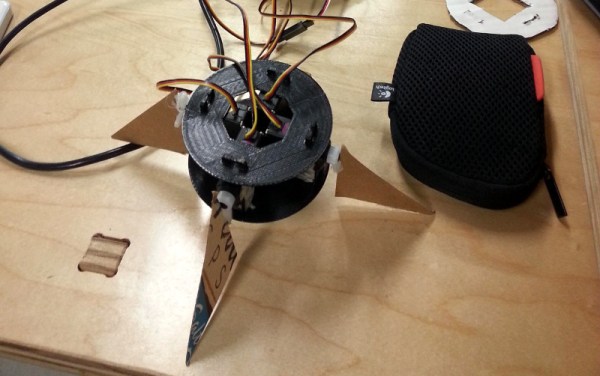
arseniodev-3d-printed-fin[Arsenio]’s design targets amateur rockets with a fuselage diameter of four inches or so. The main control module is just a cylinder with four servos mounted along the perimeter and some fancy 3D printed fins bolted onto the servo. These are controlled by an Arduino and a 6DOF IMU that’s able to keep the rocket pointing straight up. Staaaay on target.
We saw this project back at the Hackaday DC meetup a month ago, and [Arsenio] was kind enough to give a short lightning talk to the hundred or so people who turned up. You can catch a video of that below, along with one of the videos of his build.

Continue reading “You’re Never Too Young To Be A Rocket Scientist” →

Use The Esp As A Serial Adapter

One of the most useful tools in the hardware hackers toolbox is a USB to serial adapter. With this, you can flash new firmware to routers, and ply the vast binary seas of embedded hardware. The common form of the USB to Serial adapter is an FTDI breakout board. This requires drivers, though, and there is actually a simpler – and wireless – solution: the ESP8266 WiFi module.

Despite being the best little IoT device on the block, the ESP8266 was originally designed to be a USB to WiFi adapter. In our haste to build WiFi throwies, WiFi blinkies, and freaking WiFi server farms, we seem to have forgotten that there’s still a use for a device that turns a 3.3V TTL into a WiFi connection. It’s the perfect device for reflashing a cheap WiFI router with new firmware, or just providing you with wireless serial connections to go along with your wireless Internet.

This project uses jeelabs’ ESP-link firmware for the ESP8266. It’s a simple bridge between WiFi and serial, and can function as an AVR programmer in a pinch. The web interface for this firmware is very nice, but you really don’t need it; the entire purpose of this firmware is to be even more transparent than an FTDI USB to serial adapter. For the next time you’re flashing a router with OpenWRT, don’t bother digging out the USB adapter; an ESP is all you need.

Atmel Introduces Rad Hard Microcontrollers

The Internet is full of extremely clever people, and most of the time they don’t realize how stupid they actually are. Every time there’s a rocket launch, there’s usually a few cubesats tucked away under a fairing. These cubesats were designed and built by university students around the globe, so whenever a few of these cubesats go up, Internet armchair EEs inevitably cut these students down: “That microcontroller isn’t going to last in space. There’s too much radiation. It’ll be dead in a day,” they say. This argument disregards the fact that iPods work for months aboard the space station, Thinkpads work for years, and the fact that putting commercial-grade microcontrollers in low earth orbit has been done thousands of times before with mountains of data to back up the practice.

For every problem, imagined or not, there’s a solution. Now, finally, Atmel has released a rad tolerant AVR for space applications. It’s the ATmegaS128, the space-grade version of the ‘mega128. This chip is in a 64-lead ceramic package, has all the features you would expect from the ATmega128 and is, like any ‘mega128, Arduino compatible.

Atmel has an oddly large space-rated rad-hard portfolio, with space-grade FPGAs, memories, communications ICs, ASICs, memories, and now microcontrollers in their lineup.

While microcontrollers that aren’t radiation tolerant have gone up in cubesats and larger commercial birds over the years, the commercial-grade stuff is usually reserved for low Earth orbit stuff. For venturing more than a few hundred miles above the Earth, into the range of GPS satellites and to geosynchronous orbit 25,000 miles above, radiation shielding is needed.

Will you ever need a space-grade, rad-hard Arduino? Probably not. This new announcement is rather cool, though, and we can’t wait for the first space grade Arduino clone to show up in the Hackaday tips line.

Bluetooth Thermometer Minds Your Meats

The summer may have come to a close here in the USA, but any time of the year is a good time for grilling. In the colder weather, it’s a drag to have to stay near the hot grill to keep an eye on your burgers and franks. [Eric Ely] thought it would be smarter to have a meat thermometer that sent his phone the current reading via Bluetooth.

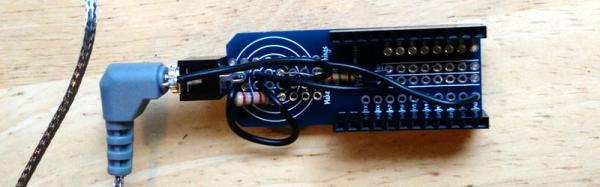
Instead of starting from scratch, [Eric] took an off the shelf electronic thermometer and removed its temperature probe (which was a thermistor). The hardware used an off the shelf Bluetooth board with a companion battery board and prototype board. If you can’t bear to cut up a good thermometer, you can get replacement probes that ought to work just as well.

In addition to the boards and the scavenged thermistor, [Eric] used a couple of resistors. One resistor is in parallel with the thermistor to improve the linearity of the device’s response curve. The second resistor forms a voltage divider that the Bluetooth board reads.

The software (using Node.js and C) is available on Github. The C program reads the temperature and pushes it out using JSON. Node.js provides a server that [Eric] can hit with his phone’s Web browser.

Sure, you can buy wireless thermometers, but what self-respecting hacker wants to carry around a store-bought box just to display meat temperature? Viewing it on your phone has much more street cred.  Of course, a real hacker isn’t going to cook on a conventional grill, either.

Continue reading “Bluetooth Thermometer Minds Your Meats” →

Fail Of The Week: Marginally Documented Pad Shorts To Maskless PCB

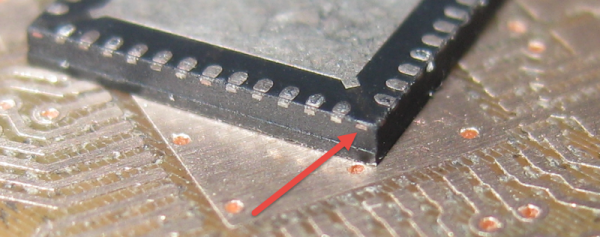
[Erich Styger] was bit by a nasty gotcha when soldering a QFN surface mount chip. The problem rears its ugly head when combining a chip possessing a padless conductor and a PCB without a solder mask. As you can see in the image above, there is a conductor exiting the side of the plastic QFN, but there is no pad associated with it. For this reason, you won’t see the conductor documented in the datasheet as a pin. It is documented in the mechanical drawing of the package, without any explicit reference to its existence. This is the Jason Bourne of package quirks.

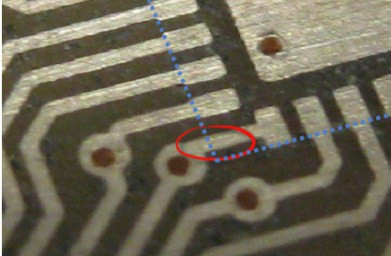
The PCB layout just happens to have a trace exiting right under this conductor. The two aren’t touching, but without solder mask, a bit of melted metal was able to mind the gap and connect the two conductors. [Eric] notes that although the non-pad isn’t documented, it’s easy to prove that it is connected to ground and was effectively pulling down the signal on that trace.



In a recent article on Hackaday I talked about “dangling pointers” and the challenge when interrupts expose the bug. [Erich’s] covered a ton of posts about embedded software. I was doing some poking around and was delighted to find that he covered the same concept and a solution for it using a program called cppcheck.