Liberating The ESP8266 From Its Development Board

While the ESP32 is clearly a superior piece of hardware, we think you’ll agree that the ESP8266 is just too useful not to have a dozen or so kicking around the parts bin at any given time. Cheap, easy to use, and just enough capabilities to bring your projects into the wonderful world of IoT. But if you really want to get the most out of it, you’ll eventually have to skip the development board and start working with the bare module itself.

It can be a scary transition, but luckily, [Ray] has collected some notes that should prove helpful for anyone looking use modules like the ESP-12F in their own custom PCBs. From different tips on making sure the power-hungry modules get enough juice, to cost cutting measures that help reduce the ancillary parts needed in your circuit design, it’s a worthwhile read for new and experienced ESP8266 wranglers alike.

An auto-reset circuit with the CH340C

For example, [Ray] talks a bit about using the infamous GPIO10 pin. This pin is on the rear of the ESP8266 module, and on many development boards, it isn’t even connected. That’s because its internally hooked up to the ESP8266’s SPI flash chip, and using it can cause problems if you’re not careful. But as explained in the blog post, as long as you make sure the flash mode is set to “dual IO” (DIO), then GPIO10 can be used just like any other free pin.

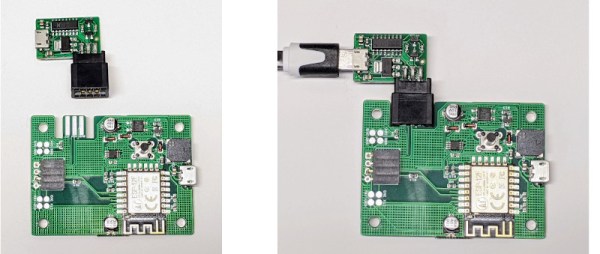
We also really liked the tip [Ray] shares at the end for making your boards more easily programmable. Sure you can leave an unpopulated header on the board, or fiddle with some pogo pin setup, but his edge connector approach is quite clever. Just slip the programmer on for the initial burn, and then after that you can update over the air.

There’s no denying how easy it is to throw something together with an ESP8266 development board, but we’ve covered so many incredible projects that have made use of the bare module’s diminutive dimensions that you’ll ultimately be missing out if you don’t cut out the middle-man.
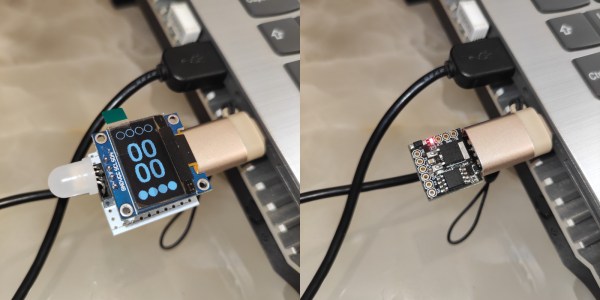
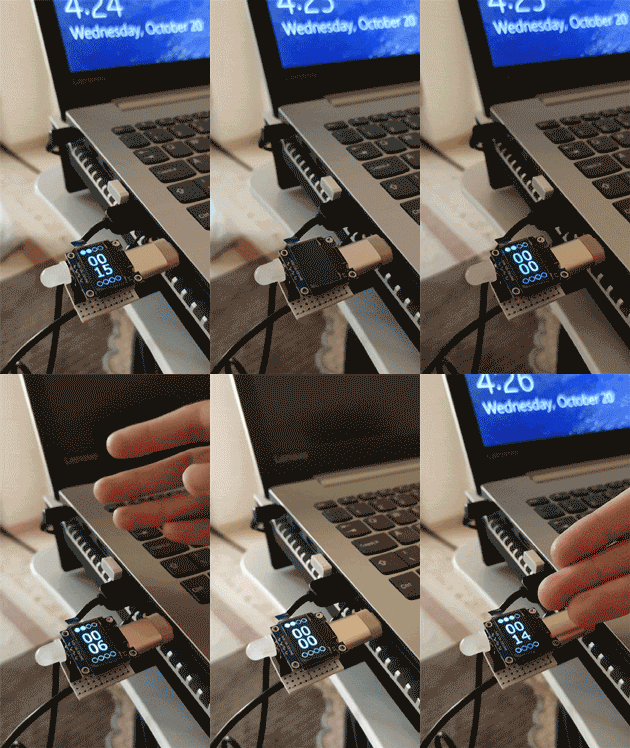
Tiny pomodoro timer starts as soon as you plug it in.

Cherry Pomodoro Timer Forces You To Follow

If you have trouble staying focused and getting work done, the Pomodoro Technique of working in 25-minute intervals with 5-minute breaks is pretty hard to beat. The only problem is that it requires a lot of input from the user, and all that timer-setting can get in the way of actually getting down to business. The absolute worst is when you find yourself working hard, but see that forgot to set the damn timer (ask us how we know). In essence, the tomato itself can only do so much — you have to actually use it and honor the timer, put in the work, and believe in the system.

A tiny Pomodor Timer that starts automatically when plugged into a USB port.But what if you didn’t have to do as much? With [Erfan Sn]’s design, all you have to do is plug it in to a USB port and the countdown starts automatically. Not only does this Pomodoro timer force you to get with the program, it also makes you take breaks from the screen by putting the computer into sleep mode when the 25 minutes (or whatever time you set in the software) are up. This thing even keeps track of your Pomodoro count.

At the heart of this build is the Digispark ATtiny85 dev board, which has a handy onboard USB plug. It can be built with or without the OLED screen, which is good if you are easily distracted by the timer itself. This cherry tomato only costs about $10 to make, it’s tiny, and you can take it anywhere.

As you will see in the gifs on GitHub, [Erfan Sn] has it plugged into a female USB-A to male USB-C, which is probably better for the computer long-term, what with all the plugging and unplugging. When we make ours, we’ll probably plug it into a hub that has power switches for each port.

If all of this sounds like too much work, check out this build that senses whether or not you’re in the chair.

An animated newspaper image from Harry Potter

Muggle Uses E-Paper For Daily Prophet Replica

News from the wizarding world is a little hard to come by for common muggles, but [Deep Tronix] has brought us one step closer to our magical counterparts with their electronic replica of the Daily Prophet newspaper.

Those familiar with the Harry Potter series will no doubt be familiar with the Daily Prophet. In the films, the newspaper is especially eye-catching with its spooky animated images, a reflection of the magic present throughout the wizarding world. This was achieved with post-production special effects for the films, but this fan-made front page of the Prophet brings the concept to life using e-paper technology and a few other interesting gadgets, all hidden away in a picture frame.

As mentioned, the heart of this project is the e-paper display and a Teensy microcontroller. While e-paper displays are excellent for displaying static text and simple graphics, they are usually not suitable for moving images due to suffering from a form of ‘burn in’, which can leave errant pixels on the screen. This means that e-paper technology typically has a relatively low frame rate for video. [Deep Tronix] has used a custom dithering library to somewhat mitigate this issue, and the results are impressive. Moving images are loaded from an external SD card, processed, and then displayed on the e-paper display, which is almost indistinguishable from the newspaper print that surrounds it.

The seemingly magical newspaper also has a face detection feature, which is enabled by a hidden camera and the venerable ESP32 microcontroller. This system integrates with the Teensy to record and then display the reader’s face on the e-paper display. A neat trick, which is made all the more eerie when these faces are later displayed at random.

We’ve seen Daily Prophet replicas before using more traditional display technology, however the move to an e-paper display goes a long way to improving the overall aesthetics, despite the lower frame rates. With Halloween just around the corner, you might just end up tricking a few people with this clever prop – check out all the build details here.

Continue reading “Muggle Uses E-Paper For Daily Prophet Replica”

Turn A Parking Sensor Into An Anemometer

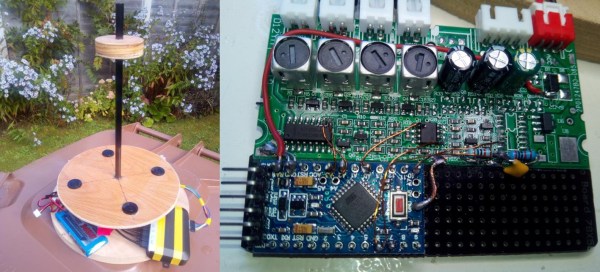
To measure wind speed and direction, most people turn the traditional cup anemometer and wind vane. Another less-known method is to use an array of ultrasonic transducers, which doesn’t need any moving parts. [Andy] demonstrates building an ultrasonic anemometer using a cheap after-market parking distance sensor kit and an Arduino. Demo video after the break.

Aside from the price, these kits have the added advantage of including waterproof ultrasonic transducers, perfect for an outdoor weather station, and all the required circuitry to drive them. Some circuit surgery is required to remove the existing 8-pin microcontroller and wire in an Arduino Pro Micro and a few passives to take control of the pulse outputs and processing of the received signal to calculate direction and velocity. The ultrasonic transducers are mounted in a circular baseplate pointing up to an “echo plate” mounted on a carbon fiber rod. [Andy]’s latest version also added an ESP8266 Wi-Fi module for connectivity.

One of the challenges of DIY environmental sensors is calibrating them to output reliable absolute values, and this is especially the case for wind speed. You need another anemometer that is known to be accurate or a wind source of a known velocity. A while back we covered [Jianjia Ma]’s ultrasonic anemometer build, where he mounted it on top of his car and went for his drive, but still couldn’t quite get consistent results.

While the lack of moving parts are nice, ultrasonic anemometers are significantly more complex on the software and electronics side, and a DIY cup and vane anemometer is still a viable alternative.

Continue reading “Turn A Parking Sensor Into An Anemometer”

A tiny bedside clock that's packed with features.

ESP32 Clock Takes Time To Give Weather Info, Too

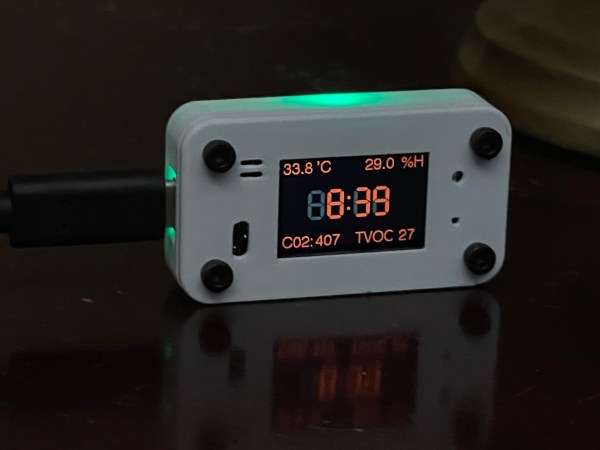
It’s fall in the northern hemisphere, so [Mike Rankin]’s kids are back in school and have returned to consulting him every morning about the weather and what they should wear. Since he’s no meteorologist, [Mike] built a beautifully dim and diminutive clock that does all the work for him, plus much more. It glows a lovely dark orange that’s perfect for the nightstand and those early morning interrogations.

In default mode, this clock displays the time, CO2 level, room temperature, and humidity in that eye-friendly orange. But wave your hand in front of the time of flight sensor, and it goes external, displaying the low and high temperatures for the day, plus the weather conditions forecast. After a few seconds of that, it goes back to default mode. The ESP fetches the time from an NTP server, then gets the weather from the OpenWeather API. The indoor weather comes from a combination sensor on the board.

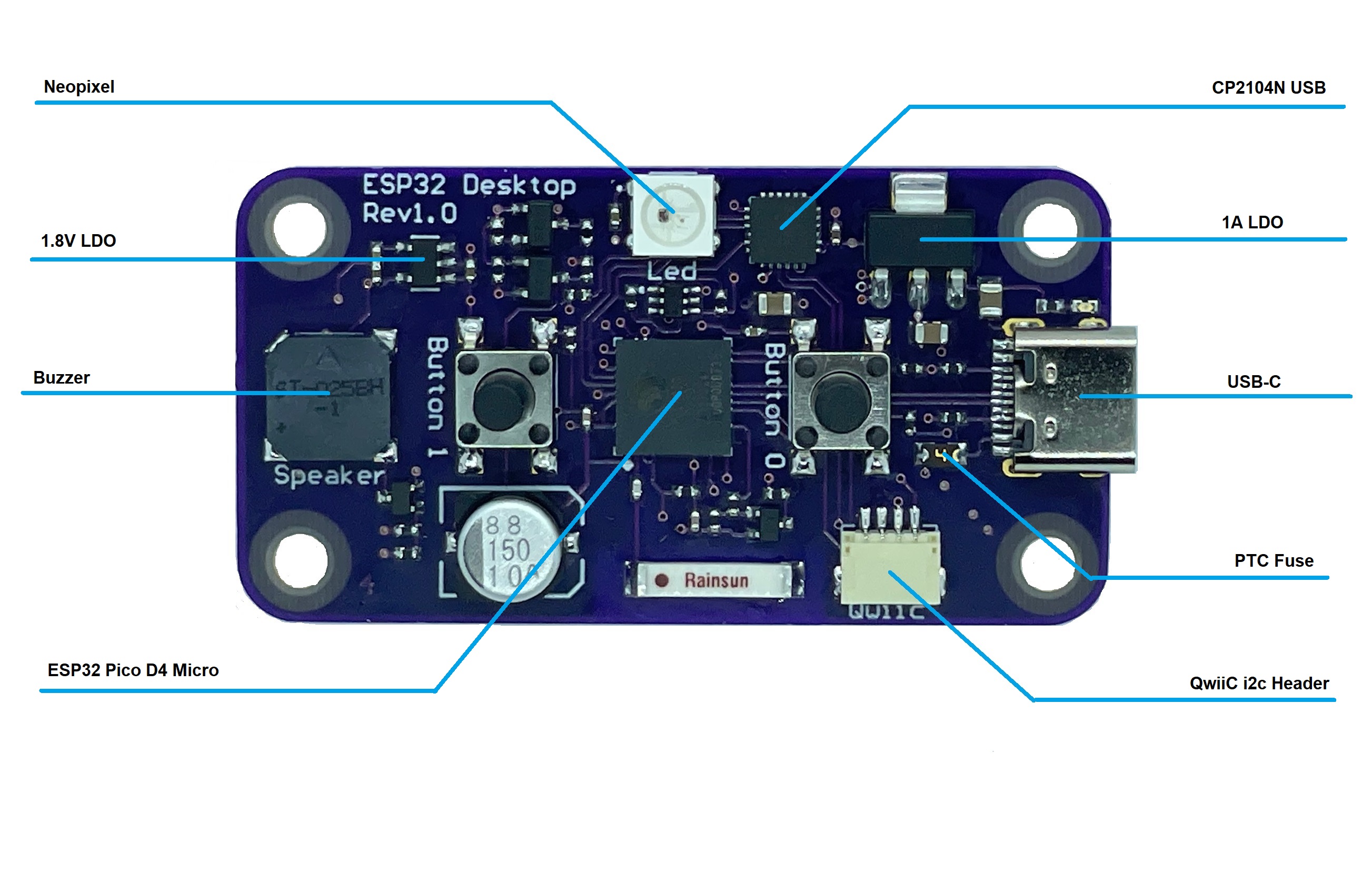
Diagram of the components on the circuit boardInside this tiny package is a beautifully-spun board with an ESP32 Pico D4 for a brain. In addition to the climate sensors there is a combination CO2/TVOC sensor (that’s total volatile organic compounds) to sniff out danger. There is also a pair of push buttons on the back and an ambient light sensor, but [Mike] isn’t using those just yet. Add in the Qwiic connector for future doo-dads, and you have quite the little gadget. Although the pictures make it look kind of big, you can see exactly how small it is in the demo video after the break.

[Mike] seems to like things tiny, and we admire that in a big way. Check out his positively Lilliputian ESP32 dev board.

Continue reading “ESP32 Clock Takes Time To Give Weather Info, Too”

Omni-Wheeled Cane Steers The Visually-Impaired Away From Obstacles

Sure, there are smart canes out there, commercial and otherwise. We’ve seen more than a few over the years. But a group of students at Stanford University have managed to bring something novel to the augmented cane.

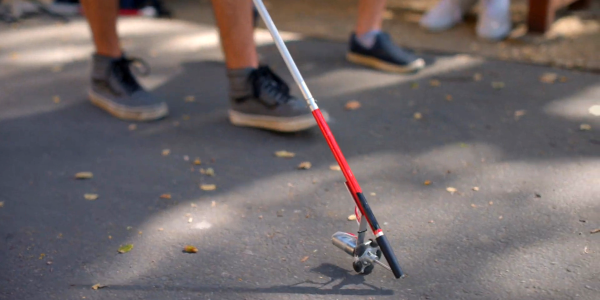
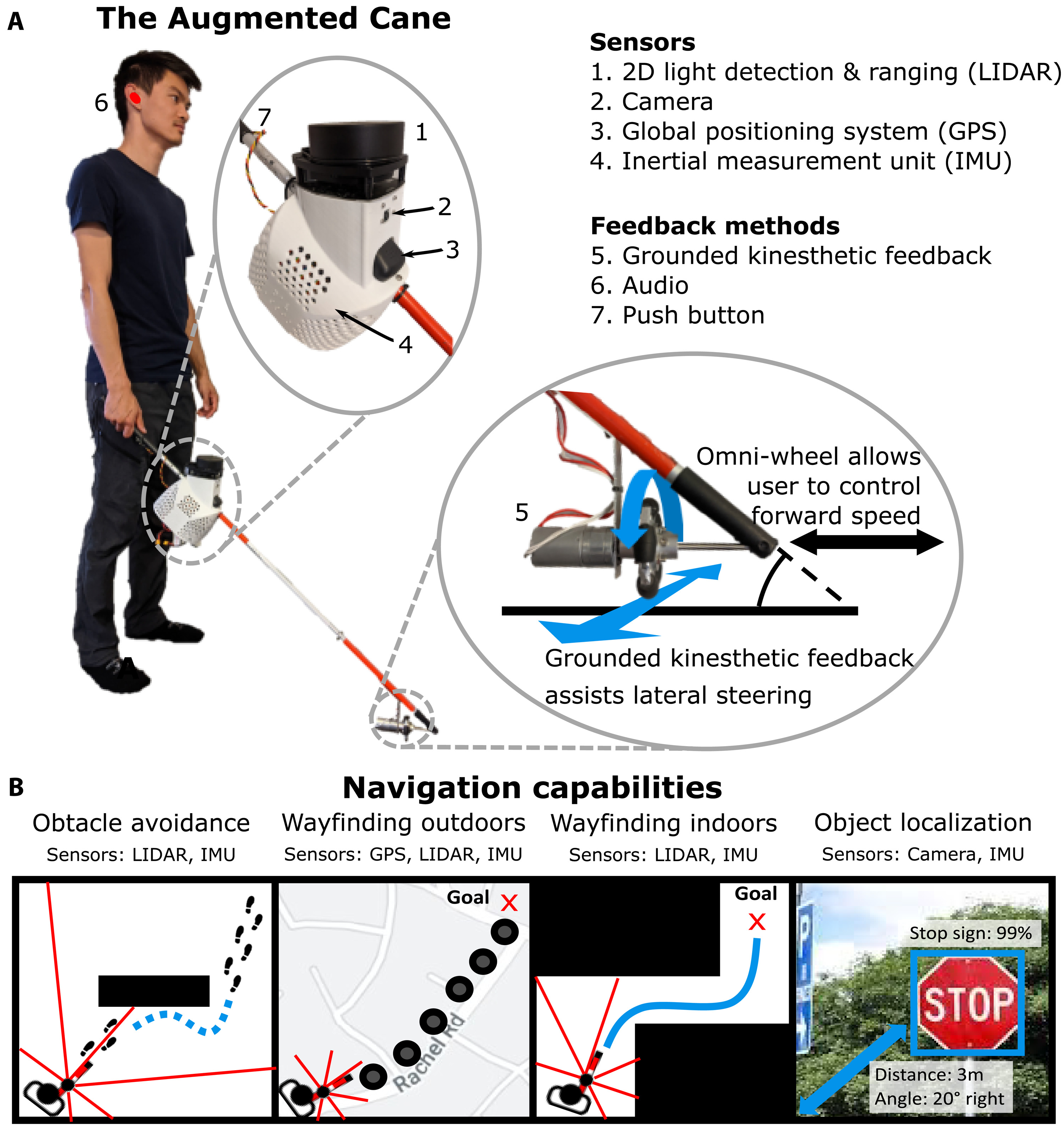
The details of an augmented cane for the visually impaired that features an omni wheel to steer them away from obstacles.Theirs features a motorized omni wheel that sweeps smoothly from left to right during normal cane operation, and when the cane senses an object that turns out to be an obstacle, the omni wheel goes into active mode, pulling the user out of the path of danger.

Tied for best part of this build is the fact that they made the project with open hardware and published all the gory details in a repo, so anyone can replicate it for about $400.

The cane uses a Raspi 4 with camera to detect objects, and a 2-D LIDAR to measure the distance to those objects. There’s a GPS and a 9-DOF IMU to find the position and orientation of the user. Their paper is open, too, and it comes with a BOM and build instructions. Be sure to check it out in action after the break.

There’s more than one way to guide people around with haptic feedback. Here’s the smartest pair of shoes we’ve seen lately.

Continue reading “Omni-Wheeled Cane Steers The Visually-Impaired Away From Obstacles”

ESP32 Clock Pushes Outrun Graphics Over Composite

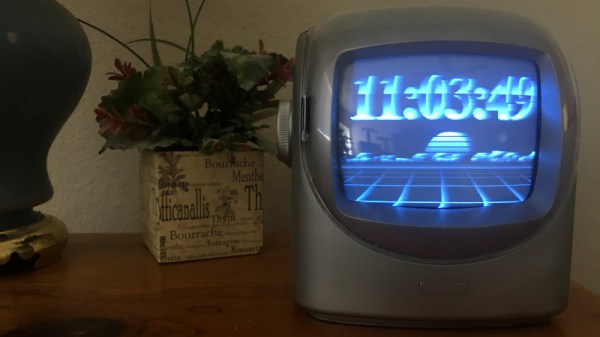
We’ve covered plenty of clocks powered by the ESP32, but this one from [Marcio Teixeira] is really something special. Rather than driving a traditional physical display, the microcontroller is instead generating a composite video signal of an animated digital clock. This could be fed into whatever device you wish, but given the 80’s synthwave style it’s pumping out, you’ll probably want to find a suitably retro CRT to do it justice.

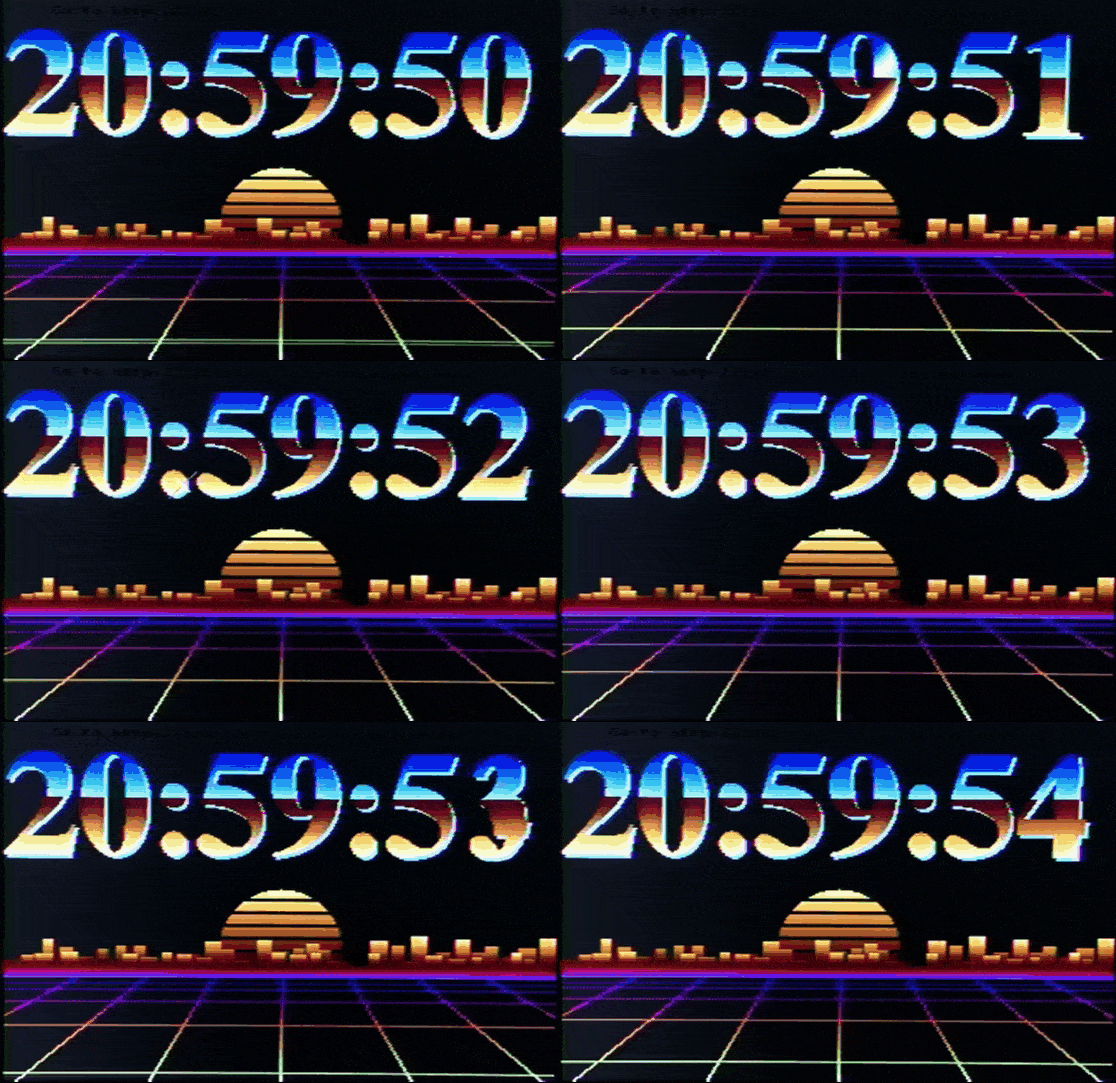
Specifically this is a variant of the “Dali” clock, where each digit seems to melt and morph into its successor. Though his version doesn’t necessarily share code with all the previous iterations, [Marcio] does credit the developers who have pulled off similar visual tricks going all the way back to 1979. Given the vintage of this particular animation, the neon skyline and infinite scrolling grid certainly feel like a perfect fit.

Want to add a little vaporwave vibe to your own workbench? Assuming you’ve already got a 80s style CRT, all you need is an ESP32 and two wires stuck into the composite video port. One goes to ground, and the other goes to the chip’s analog pin. Once everything is powered up, you’ll be able to configure the clock with a web-based interface. It doesn’t get much easier than that.

In the documentation, [Marcio] calls out a few open source projects which were instrumental to getting his clock off the ground. The pioneering work [bitluni] did to get video out of the ESP32 is something of a given, but he also sends a hat tip to [rossumur] for his collection of 8-bit game console emulators written for the microcontroller. Projects like this are a fantastic example of what’s possible when a community works together to truly push the envelope.

Continue reading “ESP32 Clock Pushes Outrun Graphics Over Composite”