Microsoft has just announced a way to disable JScript in Internet Explorer. This would have been very useful a few years ago, to proactively prevent problems found in the now-ancient JScript engine, which ran their own slightly different version of standard JavaScript. Even though IE is no longer under active development, it still receives security updates. JScript, on the other hand, is basically done. If you’re one of the 1.06% that still use IE, then go flip the switch to protect yourself from additional JScript vulnerabilities.
Zerologon and Samba?
Samba is an open source re-implemenation of Microsoft’s SMB protocol. There’s a clever term that describes the reality of this situation: “Bug for bug compatibility”. Remember Zerologon, the flaw where a security token’s generation could be manipulated to vastly reduce the key space? Samba follows the specification, and therefore suffers from the same issue, though it seems to be unusual to actually run Samba in a vulnerable configuration.
Despite the popularity of social media, for communication that actually matters, e-mail reigns supreme. Crucial to the smooth operation of businesses worldwide, it’s prized for its reliability. Google is one of the world’s largest e-mail providers, both with its consumer-targeted Gmail product as well as G Suite for business customers [Jeffrey Paul] is a user of the latter, and was surprised to find that URLs in incoming emails were being modified by the service when fetched via the Internet Message Access Protocol (IMAP) used by external email readers.
This change appears to make it impossible for IMAP users to see the original email without logging into the web interface, it breaks verification of the cryptographic signatures, and it came as a surprise.
Security Matters
A test email sent to verify the edits made by Google’s servers. Top, the original email, bottom, what was received.
For a subset of users, it appears Google is modifying URLs in the body of emails to instead go through their own link-checking and redirect service. This involves actually editing the body of the email before it reaches the user. This means that even those using external clients to fetch email over IMAP are affected, with no way to access the original raw email they were sent.
The security implications are serious enough that many doubted the initial story, suspecting that the editing was only happening within the Gmail app or through the web client. However, a source claiming to work for Google confirmed that the new feature is being rolled out to G Suite customers, and can be switched off if so desired. Reaching out to Google for comment, we were directed to their help page on the topic.
The stated aim is to prevent phishing, with Google’s redirect service including a link checker to warn users who are traveling to potentially dangerous sites. For many though, this explanation doesn’t pass muster. Forcing users to head to a Google server to view the original URL they were sent is to many an egregious breach of privacy, and a security concern to boot. It allows the search giant to further extend its tendrils of click tracking into even private email conversations. For some, the implications are worse. Cryptographically signed messages, such as those using PGP or GPG, are broken by the tool; as the content of the email body is modified in the process, the message no longer checks out with respect to the original signature. Of course, this is the value of signing your messages — it becomes much easier to detect such alterations between what was sent and what was received.
Inadequate Disclosure
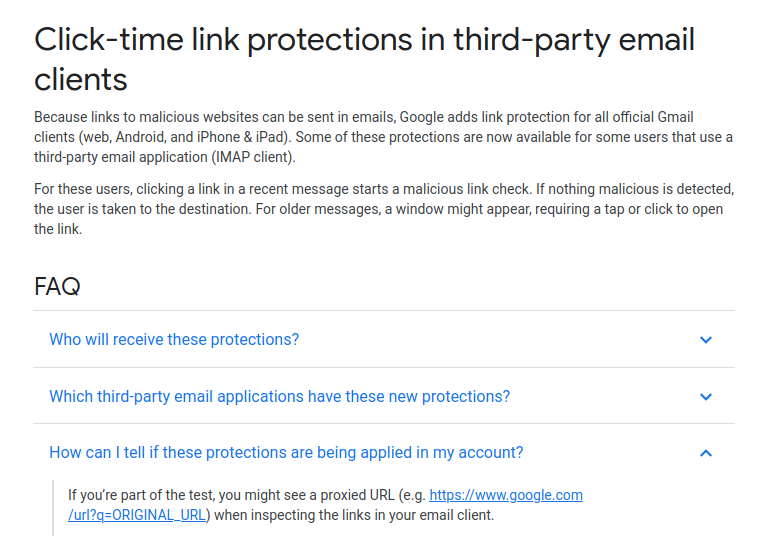
Understandably, many were up in arms that the company would implement such a measure with no consultation or warning ahead of time. The content of an email is sacrosanct, in many respects, and tampering with it in any form will always be condemned by the security conscious. If the feature is a choice for the user, and can be turned off at will, then it’s a useful tool for those that want it. But this discovery was a surprise to many, making it hard to believe it was adequately disclosed before roll-out. The question unfolded in the FAQ screenshot above hints at this being part of Google’s A/B test and not applied to all accounts. Features being tested on your email account should be disclosed yet they are not.
Protecting innocent users against phishing attacks is a laudable aim, and we can imagine many business owners enabling such a feature to avoid phishing attacks. It’s another case where privacy is willingly traded for the idea of security. While the uproar is limited due to the specific nature of the implementation thus far, we would expect further desertion of Google’s email services by the tech savvy if such practices were to spread to the mainstream Gmail product. Regardless of what happens next, it’s important to remember that the email you read may not be the one you were sent, and act accordingly.
Update 30/10/2020: It has since come to light that for G Suite users with Advanced Protection enabled, it may not be possible to disable this feature at all.
If you need an oscilloscope, function generator, or other piece of kit for your electronics workbench, there are plenty of modern options. Dropping $4,000 for a modern oscilloscope is nice if you have the money, but if you’d rather put it to better use there are great options that don’t cost a fortune. There are some addons that can turn a smartphone into an oscilloscope but one of the best values out there are older pieces of equipment from the 80s that still work great. You can even upgrade them with some more modern features too, like [NFM] did with this vintage function generator.
This function generator is an HP3325A and it is several decades old, so some work was needed just to restore it to original working condition. The cooling fan and capacitors all needed to be replaced, as well as a few other odds and ends. From there [NFM] set about adding one of the two optional upgrades available for this device, the high voltage output. This allows the function generator to output 40 volts peak-to-peak at 40 milliamps. While he did have an original version from HP, he actually had a self-made design produced that matches the function of the original.
Even if you don’t have this specific function generator, this guide goes into great details about the functioning of older equipment like this. Most of the parts are replaceable and upgrades aren’t completely out of the question like some modern equipment, and with the right care and maintenance these pieces of equipment could last for decades longer.
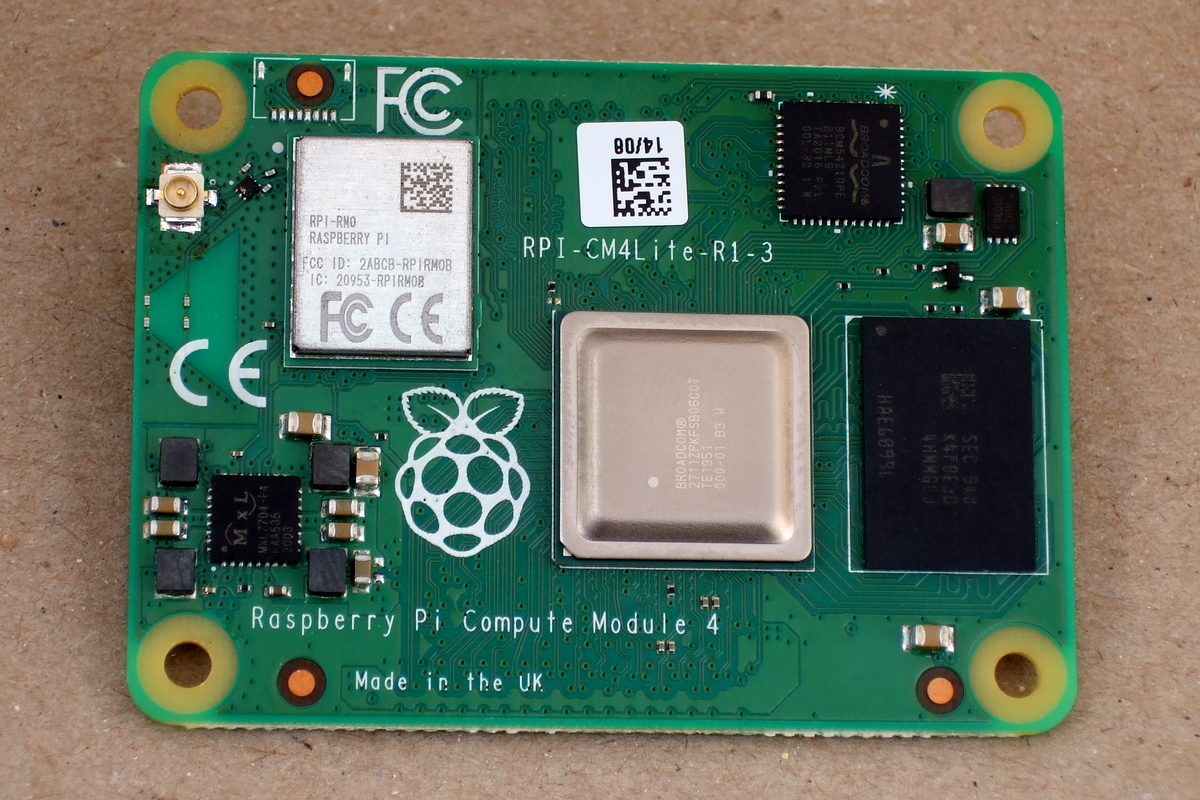
The form factor got a total overhaul, but there’s bigger changes in this little beastie than are visible at first glance, and we’re going to walk you through most of them. The foremost bonuses are the easy implementation of PCIe and NVMe, making it possible to get data in and out of SSDs ridiculously fast. Combined with optional WiFi/Bluetooth and easily designed Gigabit Ethernet, the CM4 is a connectivity monster.
One of the classic want-to-build-it-with-a-Pi projects is the ultra-fast home NAS. The CM4 makes this finally possible.
If you don’t know the compute modules, they are stripped-down versions of what you probably think of as a Raspberry Pi, which is officially known as the “Model B” form-factor. Aimed at commercial applications, the compute modules lack many of the creature comforts of their bigger siblings, but they trade those for flexibility in design and allow for some extra functionality.
The compute modules aren’t exactly beginner friendly, but we’re positively impressed by how far Team Raspberry has been able to make this module accessible to the intermediate hacker. Most of this is down to the open design of the IO Breakout board that also got released today. With completely open KiCAD design files, if you can edit and order a PCB, and then reflow-solder what arrives in the mail, you can design for the CM4. The benefit is a lighter, cheaper, and yet significantly more customizable platform that packs the power of the Raspberry Pi 4 into a low-profile 40 mm x 55 mm package.
So let’s see what’s new, and then look a little bit into what is necessary to incorporate a compute module into your own design.
In America, corn syrup is king, and real sugar hovers somewhere around prince status. We’re addicted to corn, and corn, in turn, is addicted to nitrogen. A long time ago, people figured out that by rotating crops, the soil will stay nutrient-rich, which helps to an extent by retaining nitrogen. Then we figured out how to make nitrogen fertilizer, and through its use we essentially doubled the average crop yield over the last hundred years or so.
The aerial roots of the Sierra Mixe corn stalk help the plant produce its own nitrogen. Image via Wikimedia Commons
Not all plants need extra nitrogen. Legumes like beans and soybeans are able to make their own. But corn definitely needs nitrogen. In the 1980s, the now-chief of agriculture for Mars, Inc. Howard-Yana Shapiro went to Mexico, corn capital of the world, looking for new kinds of corn. He found one in southern Mexico, in the Mixes District of Oaxaca. Not only was this corn taller than American corn by several feet, it somehow grew to these dizzying heights in terrible soil.
So if we already have nitrogen fertilizer, why even look for plants that do it themselves? The Haber-Bosch fertilizer-making process, which is an artificial form of nitrogen fixation, does make barren soil less of a factor. But that extra nitrogen in ammonia-based fertilizer tends to run off into nearby streams and lakes, making its use an environmental hazard. And the process of creating ammonia for fertilizer involves fossil fuels, uses a lot of energy, and produces greenhouse gases to boot. All in all, it’s a horrible thing to do to the environment for the sake of agriculture. But with so many people to feed, what else is there to do?
Over the last decade, the UC Davis researchers use DNA sequencing to determine that the mucus on the Sierra Mixe variety of the plant provides microbes to the corn, which give it both sugars to eat and a layer of protection from oxygen. They believe that the plants get 30-80% of their nitrogen this way. The researchers also proved that the microbes do in fact belong to nitrogen-fixing families and are similar to those found in legumes. Most impressively, they were able to transplant Sierra Mixe corn to both Davis, California and Madison, Wisconsin, and have it grow successfully, proving that the nitrogen-fixing trick isn’t limited to the corn’s home turf. Now they are working to identify the genes that produce the aerial roots.
One Step in a Longer Journey of Progress
We probably won’t be switching over to Sierra Mixe corn anytime soon, however. It takes eight months to mature, which is much too slow for American appetites used to a three-month maturation period. If we can figure out how to make other plants do their own nitrogen fixation, who knows how far we could go? It seems likely that more people would accept a superpower grafted from a corn cousin instead of trying to use CRISPR to grant self-nitrogen fixation, as studies have shown a distrust of genetically modified foods.
The issue of intellectual property rights could be a problem, but the researchers started on the right foot with the Mexican government by putting legal agreements in place that ensure the Sierra Mixe community benefits from research and possible commercialization. We can’t wait to see what they’re able to do. If they’re unable to transplant the power of self-fixation to other plants, then perhaps there’s hope for improving the Haber-Bosch process.
This week, the first details of BleedingTooth leaked onto Twitter, setting off a bit of a frenzy. The full details have yet to be released, but what we know is concerning enough. First off, BleedingTooth isn’t a single vulnerability, but is a set of at least 3 different CVEs (Shouldn’t that make it BleedingTeeth?). The worst vulnerability so far is CVE-2020-12351, which appears to be shown off in the video embedded after the break.
There’s good news and there’s bad news in what we’re about to tell you. The good news is that a team of physicists has found a blend of hydrogen, carbon, and sulfur that exhibit superconductivity at 59F. Exciting, right? The bad news is that it only works when being crushed between two diamonds at pressures approaching that of the Earth’s core. For perspective, the bottom of the Marianas trench is about 1,000 atmospheres, while the superconductor needs 2.6 million atmospheres of pressure.
Granted, 59F is a bit chilly, but it is easy to imagine cooling something down that much if you could harness superconductivity. We cool off CPUs all the time. However, unless there’s a breakthrough that allows the material to operate under at least reasonable pressures, this isn’t going to change much outside of a laboratory.