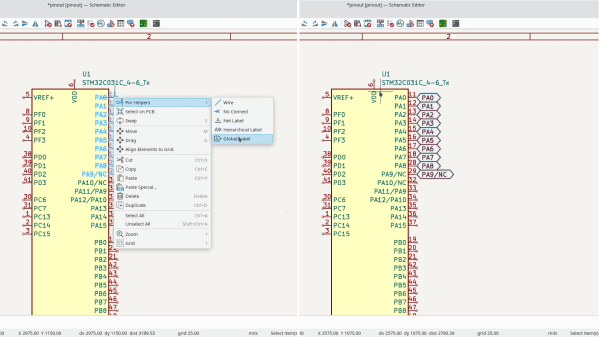
A few days ago, KiCad 8 was released, and it’s a straight upgrade to any PCB designer’s quality of life. There’s a blog post as usual, and, this year, there’s also a FOSDEM talk from [Wayne Stambaugh] talking about the changes that we now all get to benefit from. Having gone through both of these, our impression is that KiCad 8 developers went over the entire suite, asking: “this is cool, but could we make it better”? The end result is indeed a massive improvement in a thousand different ways, from small to fundamental, and all of them seem to be direct upgrades from the KiCad 7 experience.
Intuitive Machines’ first mission (IM-1) featuring the Nova-C Odysseus lunar lander was launched on top of a SpaceX Falcon 9 on February 15th, 2024, as part of NASA’s Commercial Lunar Payload Services (CLPS). Targeting a landing site near the lunar south pole, it was supposed to use its onboard laser range finders to help it navigate safely for a soft touchdown on the lunar surface. Unfortunately, it was this component that was found to have malfunctioned as the spacecraft was already in lunar orbit. Fortunately, there was a workaround. By using one of the NASA payloads on the lander, the Navigation Doppler Lidar (NDL), the mission could continue.
Perhaps unsurprisingly, the use of the NDL as a fallback option was considered before launch, and since its functionality overlaps with that of the primary laser range finders of Nova-C, it was pressed into service with a new configuration uploaded by IM operators back on Earth before Nova-C committed to a landing burn. Then, on February 22nd, the spacecraft began its descent to the surface, which also involved the Eaglecam payload that was designed to be released before snapping a self-portrait of the lander as it descended.
For a smart home company with an emphasis on cloud-connected cameras, what could possibly be worse than accidentally showing active cameras to the wrong users? Doing it again, to far more users, less than 6 months after the previous incident.
The setup for this breach was an AWS problem, that caused a Wyze system outage last Friday morning. As the system was restored, the load spiked and a caching library took the brunt of the unintentional DDoS. This library apparently has a fail state of serving images and videos to the wrong users. An official report from Wyze mentions that this library had been recently added, and that the number of thumbnails shown to unauthorized users was around 13,000. Eek. There’s a reason we recommend picking one of the Open Source NVR systems here at Hackaday.
Huntress has a guide out, detailing how embarrassingly easy the vulnerabilities are to exploit. The authentication bypass is a result of a .Net quirk, that adding an additional directory on the end of a .aspx URL doesn’t actually change the destination, but is captured as PathInfo. This allows a bypass of the protections against re-running the initial setup wizard: hostname/SetupWizard.aspx/literallyanything
The second vulnerability triggers during extension unpack, as the unzipping process doesn’t prevent path traversal. The most interesting part is that the unzip happens before the extension installation finishes. So an attacker can compromise the box, cancel the install, and leave very little trace of exploitation. Continue reading “This Week In Security: Wyze, ScreenConnect, And Untrustworthy Job Postings”→
Good news, procrastineers! A few folks asked us for a little more time to get their proposals together for our upcoming 2024 Hackaday Europe event in Berlin, and we’re listening. So now you’ve got an extra week – get your proposals for talks or workshops in before February 29th.
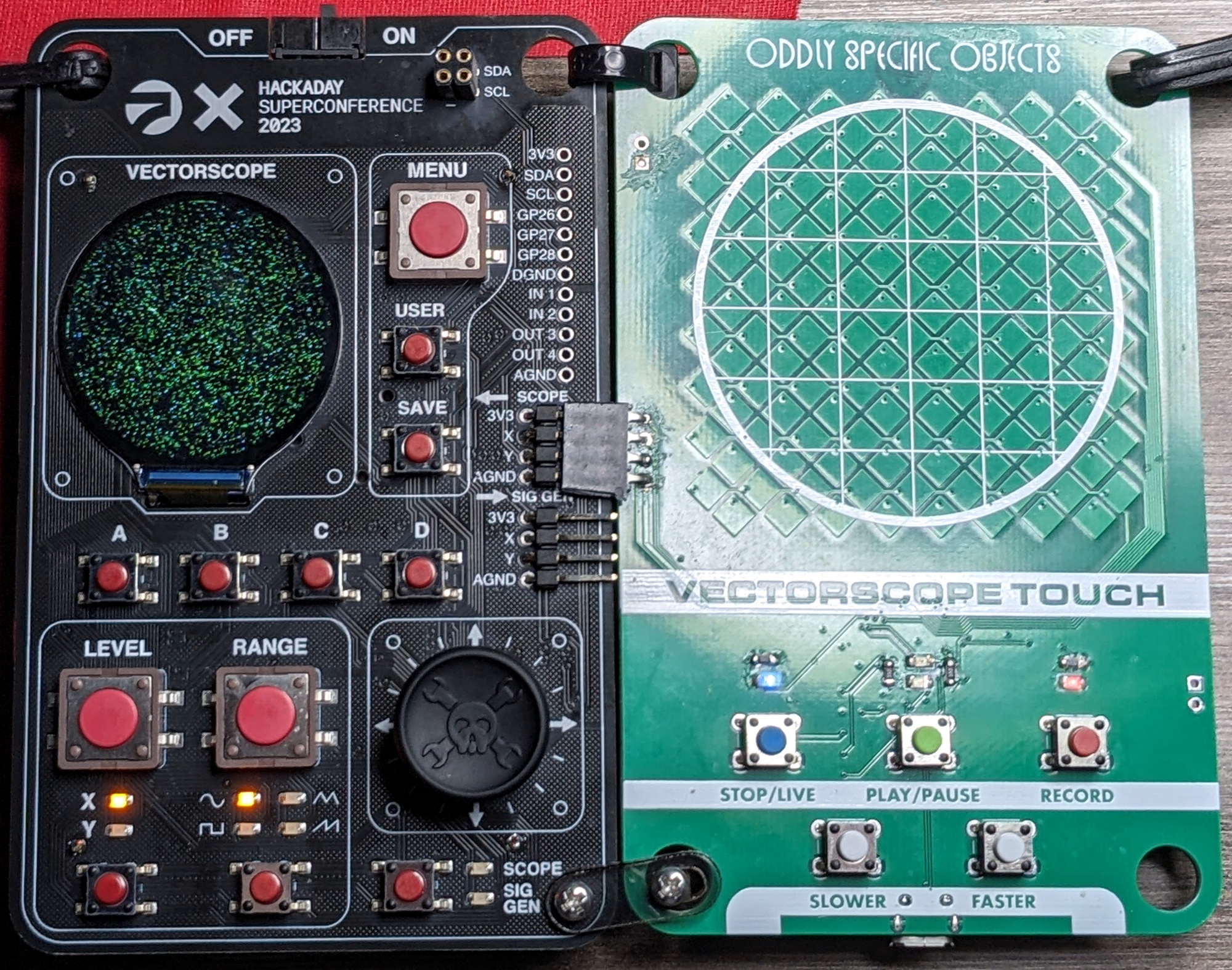
[Joey Castillo]’s awesome custom touchpadHackaday Europe is a two-day event taking place April 13th and 14th in Berlin, Germany. Saturday the 13th is the big day, with a full day of badge hacking, talks, music, and everything else. We’ve got the place booked until 2 AM, so get your sleep the night before. Sunday is a half-day of brunch, lightning talks, and showing off the badge hacks from the day before. And if you’re in town on Friday the 12th, we’ll be going out in the evening for drinks and dinner, location TBA but hopefully closer than where we ended up last year!
The badge is going to be a re-spin of the Supercon badge for all of you who couldn’t fly out to the US last November. There are no secrets anymore, so get your pre-hacks started now. We’ve seen some sweet all-analog hacks, some complete revisions of the entire firmware loadout, and, of course, all sorts of awesome hardware bodged onto it. Heck, we even saw Asteroids and DOOM. But we haven’t seen any native Jerobeam Fenderson-style oscilloscope music. You’ve got your homework.
What to Bring?
A few other people have asked if they could bring in (art) projects to show and share. Of course! Depending on the scale, though, you may need to contact us beforehand. If it’s larger than a tower PC, get in touch with us, and we’ll work it out. Smaller hacks, projects in progress, and anything you want to bring along to show and inspire others with, are, of course, welcome without any strings attached.
What else might you need? A computer of your choice and a micro USB cable for programming the badge. There will be soldering stations, random parts, and someone will probably be able to lend you nearly any other piece of gear, so you can pack light if you want to. But you don’t have to.
If you’d like to attend but you don’t have tickets yet – get them soon! Space is limited, and we tend to sell out. Or better yet, submit a talk and sneak in the side door. We’d love to hear what you’ve got going on, and we can’t wait to see you all.
Your home is your castle, and what’s better than a fully automatic castle? Nothing! That’s why we’re inviting you to submit your sweetest home automation hacks for a chance to win one of three $150 DigiKey gift certificates. The contest starts now and runs until April 16th.
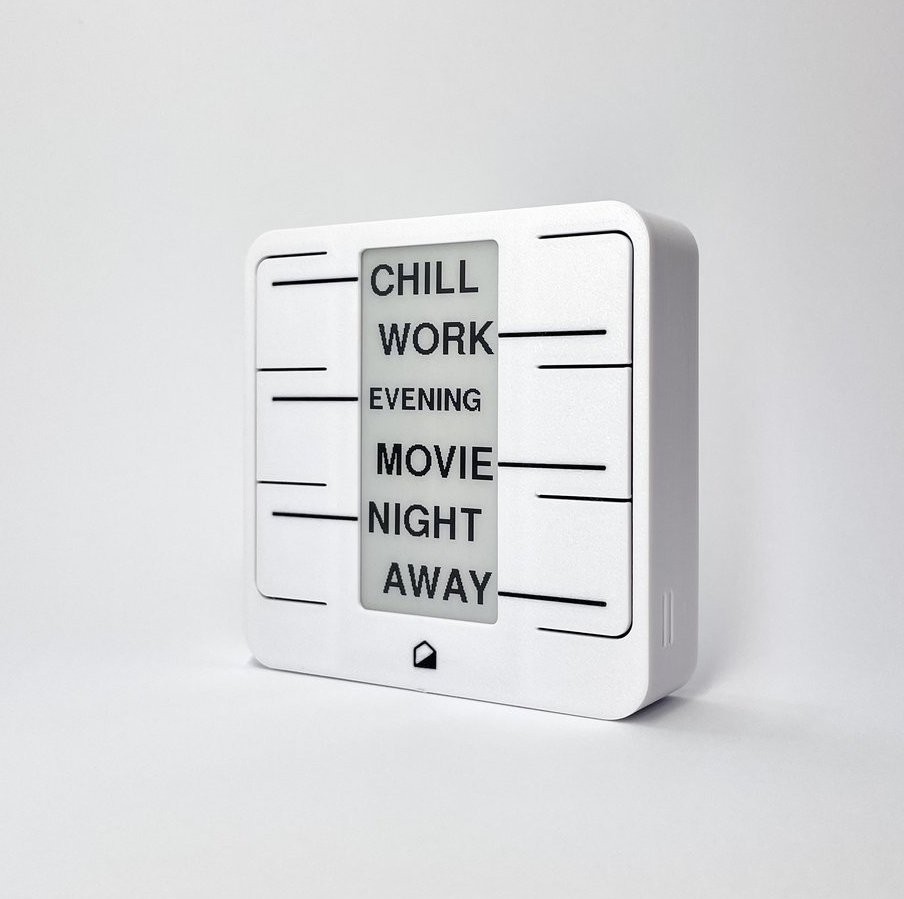
[Matej]’s Home Buttons gets the job done in open-source style.We love to play around with home automation setups and have seen our fair share, ranging from the simple “turn some lights on” to full-blown cyber-brains that learn your habits and adapt to them. Where is your project on this continuum?
Whether you’re focused on making your life easier, saving energy, gathering up all the data about your usage patterns, or simply stringing some random functions together and calling it a “system,” we’d like to see it. Nothing is too big or too small if it makes your home life easier.
Home is where the home automation is!
To enter, head over to Hackaday IO and start documenting your project there. We are, of course, interested in learning from what you’ve done, so the better the docs, the better your chances of winning. And if you need some inspiration, check out these honorable mention categories.
Honorable Mention Categories
Creature Comforts: Does your system make your house a home? Maybe it turns on and off the heaters to keep rooms just right, opens and closes the blinds for you, or maybe it turns on the nightlights when you’re heading downstairs for a midnight snack. The Creature Comforts category is for you.
Rube Goldberg: A “system” sounds so formal, but a lot of ad hoc home automation projects are nonetheless super effective. If your home system grew organically and maybe resembles a collection of hacks more than a carefully orchestrated plan, it could be a Rube Goldberg setup.
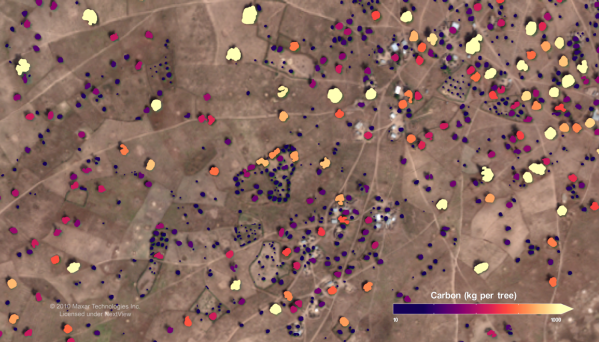
Figuring out what the Earth’s climate is going to do at any given point is a difficult task. To know how it will react to given events, you need to know what you’re working with. This requires an accurate model of everything from ocean currents to atmospheric heat absorption and the chemical and literal behavior of everything from cattle to humans to trees.
In the latter regard, scientists need to know how many trees we have to properly model the climate. This is key, as trees play a major role in the carbon cycle by turning carbon dioxide into oxygen plus wood. But how do you count trees at a continental scale? You’ll probably want to get yourself a nice satellite to do the job.
Reading through a vulnerability report about ClamAV, I came across a phrase that filled me with dread: “The file name is not sanitized”. It’s a feature, VirusEvent, that can be enabled in the ClamnAV config. And that configuration includes a string formatting function, where the string includes %v and %s, which gets replaced with a detected virus name and the file name from the email. And now you see the problem, I hope: The filename is attacker supplied input.
Where this really gets out of hand is what ClamAV does with this string. execle("/bin/sh", "sh", "-c", buffer_cmd, NULL, env). So let’s talk defensive program design for a minute. When it comes to running a secondary command, there are two general options, system() and the exec*() family of system calls. system() is very simple to use. It pauses execution of the main process and asks the operating system to run a string, just as if the user had typed that command into the shell. While this is very convenient to use, there is a security problem if any of that command string is user-supplied. All it takes is a semicolon or ampersand to break assumptions and inject a command.
To the rescue comes exec(). It’s a bit more complicated to use, requiring the programmer to manually call fork() and wait(). But it’s not running the command via the shell. exec() executes a program directly, totally eliminating the potential for command injection! Except… oops.
Yeah, exec() and related calls don’t offer any security protections when you use them to execute /bin/sh. I suspect the code was written this way to allow running a script without specifying /bin/sh in the config. The official fix was to disable the filename format character, and instead supply it as an environment variable. That certainly works, and that fix is available in 1.0.5, 1.2.2, and 1.3.0.