The 7400 Quad 2-Input NAND Gate, A Neglected Survivor From A Pre-Microprocessor World

There are a range of integrated circuits that most of us would regard as definitive examples of their type, devices which became the go-to for a particular function and which have entered our collective consciousness as electronics enthusiasts. They have been in production since the early days of consumer integrated circuits, remaining in use because of a comprehensive understanding of their characteristics among engineers, and the job they do well.

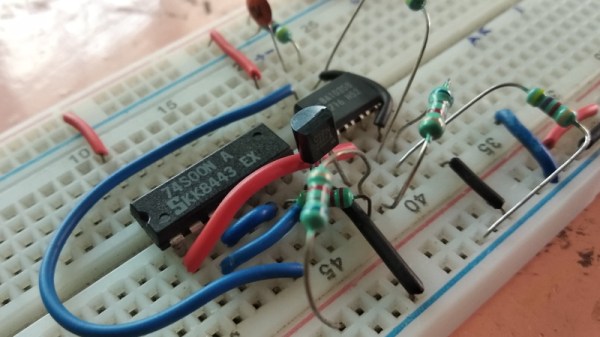
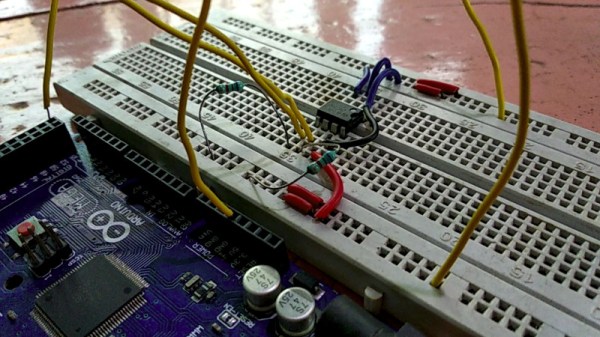
You can probably name the ones I’m going to rattle off here, the µA741 op-amp designed by David Fullagar for Fairchild in 1968, the NE555 timer from Hans Camenzind for Signetics in 1971, and a personal favourite, Bob Widlar’s µA723 linear regulator for Fairchild in 1967. There may be a few others that readers will name in the comments, but there’s one that until today it’s likely that few of you would have considered. Texas Instruments’ 5400 and 7400 TTL quad 2-input NAND gate has been in continuous production since 1964 and is the progenitor of what is probably the most numerous breed of integrated circuits, yet it doesn’t trip off the tongue when listing famous chips, and none of us can name its designer. So today we’re turning the spotlight on this neglected piece of silicon, and trying to bring it the adulation it deserves. Continue reading “The 7400 Quad 2-Input NAND Gate, A Neglected Survivor From A Pre-Microprocessor World”

Cheap Multimeter Leads Come With Extra Ohms, Free!

[Nop head] discovered that cheap multimeter leads costing only a few bucks can come with more than one may have bargained for. The first set had a large amount of useful-looking attachments, but the wires used for the leads were steel with a resistance of about one ohm each. With two leads in use, that means any resistance measurement gets two ohms added for free. More seriously, when measuring current, the wires can heat up rapidly. Voltage measurements would be affected the least, but the attachments and lead design expose a large amount of bare metal, which invites accidental shorts and can be a safety hazard with higher voltages.

Are all cheap multimeter leads similarly useless? Not necessarily. [nop head] also purchased the set pictured here. It has no attachments, but was a much better design and had a resistance of only 64 milliohms. Not great, but certainly serviceable and clearly a much better value than the other set.

It’s usually not possible to identify garbage before it’s purchased, but [nop head] reminds us that if you do end up with trash in hand, poor quality counterfeits can be good for a refund. That goes for electronic components, too.

True Transparent Parts From A Desktop 3D Printer

We’re no strangers to seeing translucent 3D printed parts: if you print in a clear filament with thin enough walls you can sorta see through the resulting parts. It’s not perfect, but if you’re trying to make a lamp shade or decorative object, it’s good enough. You certainly couldn’t print anything practical like viewing windows or lenses, leaving “clear” 3D printing as more of a novelty than a practical process.

But after months of refining his process, [Tomer Glick] has finally put together his guide for creating transparent prints on a standard desktop FDM machine. It doesn’t even require any special filament, he says it will work on PLA, ABS, or PETG, though for the purposes of this demonstration he’s using the new Prusament ABS. The process requires some specific print settings and some post processing, but the results he’s achieved are well worth jumping though a few hoops.

According to [Tomer] the secret is in the print settings. Essentially, you want the printer to push the layers together far closer than normal, in combination with using a high hotend temperature and 100% infill. The end result (hopefully) is the plastic being laid down by the printer is completely fused with the preceding one, making a print that is more of a literal solid object than we’re used to seeing with FDM printing. In fact, you could argue these settings generate internal structures that are nearly the polar opposite of what you’d see on a normal print.

The downside with these unusual print settings is that the outside of the print is exceptionally rough and ugly (as you might expect when forcing as much plastic together as possible). To expose the clear internals, you’ll need to knock the outsides down with some fairly intense sanding. [Tomer] says he starts with 600 and works his way up to 4000, and even mentions that when you get up to the real high grits you might as well use a piece of cardboard to sand the print because that’s about how rough the sandpaper would be anyway.

[Tomer] goes on to demonstrate a printed laser lens, and even shows how you can recreate the effect of laser-engraved acrylic by intentionally putting voids inside the print in whatever shape you like. It’s a really awesome effect and honestly something we would never have believed came off a standard desktop 3D printer.

In the past we’ve seen specialized filament deliver some fairly translucent parts, but those results still weren’t as good as what [Tomer] is getting with standard filament. We’re very interested in seeing more of this process, and are excited to see what kind of applications hackers can come up with.

Continue reading “True Transparent Parts From A Desktop 3D Printer”

Laptop Chargers Team Up To Get The Juice Flowing

There’s perhaps nothing harder to throw away than a good power supply. Whether it’s the classic “wall wart” whose mate has long since been misplaced or a beefy ATX you pulled out of a trashed computer, it always seems like there should be something you could do with these little wonders of modern power conversion. So into the parts bin it goes, where it will stay evermore. But not for the [TheRainHarvester], who figured out that the secret to putting a drawer full of old laptop chargers to use was combing them like hacker Voltron.

Using three old IBM laptop chargers, he’s able to produce up to 48 volts DC at a healthy 4.5 amps. His cobbled together power supply even features an variable output, albeit with some mighty coarse adjustment. As each charger is individually rated for 16V, he can unplug one of the adapters to get 32V.

In the video after the break [TheRainHarvester] walks viewers through the construction of his simple adapter, which could easily be made with salvaged parts. Built on a trace-free piece of fiber board, the adapter consists of the three barrel jacks for the chargers and a trio of beefy Schottky diodes.

The nature of the barrel jacks (which short a pin once the plug is removed) along with the diodes allows [TheRainHarvester] to combine the output of the three adapters in series without running the risk of damaging them if for example one is left plugged into the adapter but not the wall. He’s also looking to add some status LEDs to show which chargers are powered on.

Unfortunately, [TheRainHarvester] realized a bit too late that what he thought was an inert piece of board actually had a ground plane, so he’s going to have to come up with a new way to tie the whole thing together on the next version which he says is coming now that he knows the concept seems workable.

In the meantime, if you’re thinking of hacking something together with the wealth of old laptop chargers we know are kicking around the lab, you might want to take a look at our primer for understanding all those hieroglyphs on the back of the thing.

Continue reading “Laptop Chargers Team Up To Get The Juice Flowing”

A Hacked Solution For Non-Standard Audio Modules

When life hands you lemons, lemonade ends up being your drink of choice. When life hands you non-standard components, however, you’ve got little choice but to create your own standard to use them. Drinking lemonade in such a situation is left to your discretion.

The little audio record and playback modules [Fran Blanche] scored from eBay for a buck a piece are a good example. These widgets are chip-on-board devices that probably came from some toy manufacturer and can record and playback 20 seconds of audio with just a little external circuitry. [Fran] wants to record different clips on a bunch of these, and pictured using the card-edge connector provided to plug them the recording circuit. But the pad spacing didn’t fit any connector she could find, so she came up with her own. The module and a standard 0.1″ (2.54 mm) pitch header are both glued into a 3D-printed case, and the board is connected to the header by bonding wires. It makes a nice module that’s easily plugged in for recording, and as [Fran] points out, it’s pretty adorable to boot. Check it out in the video below.

Sure, the same thing could have been accomplished with a custom PCB breaking out the module’s pins to a standard card-edge connector. But [Fran] knows a thing or two about ordering PCBs, and our guess is she wanted to get this done with what was on hand rather than wait for weeks. There’s something to be said for semi-instant gratification, after all. And lemonade.

Continue reading “A Hacked Solution For Non-Standard Audio Modules”

A 3D Printed Kinematic Camera Mount

[Enginoor] is on a quest. He wants to get into the world of 3D printing, but isn’t content to run off little toys and trinkets. If he’s going to print something, he wants it to be something practical and ideally be something he couldn’t have made quickly and easily with more traditional methods. Accordingly, he’s come out the gate with a fairly strong showing: a magnetic Maxwell kinematic coupling camera mount.

If you only recognized some of those terms, don’t feel bad. Named for its creator James Clerk Maxwell who came up with the design in 1871, the Maxwell kinematic coupling is self-orienting connection that lends itself to applications that need a positive connection while still being quick and easy to remove. Certainly that sounds like a good way to stick a camera on a tripod to us.

But the Maxwell design, which consists of three groves and matching hemispheres, is only half of the equation. It allows [enginoor] to accurately and repeatably line the camera up, but it doesn’t have any holding power of its own. That’s where the magnets come in. By designing pockets into both parts, he was able to install strong magnets in the mating faces. This gives the mount a satisfying “snap” when attaching that he trusts it enough to hold his Canon EOS 70D and lens.

[enginoor] says he could have made the holes a bit tighter for the magnets (thereby skipping the glue he’s using currently), but otherwise his first 3D printed design was a complete success. He sent this one off to Shapeways to be printed, but in the future he’s considering taking the reins himself if he can keep coming up with ideas worth committing to plastic.

Of course we’ve seen plenty of magnetic camera mounts in the past, but we really like the self-aligning aspect of this design. It definitely seems to fit the criterion for something that would otherwise have been difficult to fabricate if not for 3D printing.

Many Ways To Drive A Small Motor

Tiny motors used for haptic feedback and vibration come in a variety of shapes and sizes. The most familiar is the “eccentric rotating mass” (ERM) variety which just spins an imbalanced weight on a small motor and comes packaged in two form factors. The classic is the pager “pager motor” which just looks like a tiny, adorable motor and the squat cylindrical “pancake style”. ERMs are simple to use but provide imprecise response when compared to their new-age cousin the “linear resonant actuator”. Unlike the motor in an ERM, LRAs are typically an enclosed mass on a spring placed near a coil which pushes the mass back and forth. The name LRA might not be familiar but Apple’s branded implementation, the Taptic Engine, might be a little more recognisable.

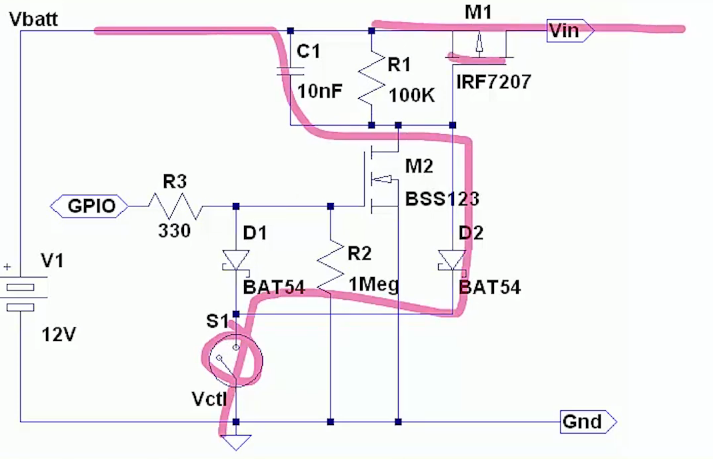
[Precision Microdrives] is a vendor of these sorts of devices who happens to have a pleasantly approachable set of application notes covering any conceivable related topic. A great place to start is this primer on ways to drive motors with constant voltage in a battery powered environment. It starts with the most simple option (a voltage divider, duh) and works through a few other options through using an LDO or controller.

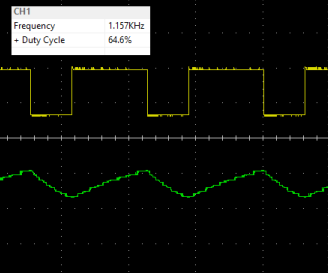
If you’re thinking about adding haptics to a project and are wondering what kind of actuator to use (see: the top of this post) AB-028 is a great resource. It has a thorough discussion on the different options available and considerations for mounting location, PCB attachment, drive modes, and more. Digging around their site yields some other interesting documents too like this one on mounting to fabric and other flexible surfaces. Or this one on choosing PWM frequencies.