Active Racing Simulator Pedal

Racing virtual cars from behind a PC monitor might be cheaper than doing it in the real world, but high-end sim racing peripherals still come with high-end prices. With the increasing popularity of force-feedback pedals [Tristan Fenwick] built built an active pedal that can provide significant resistance.

[Tristan] integrated a load cell into the 3D printed pedal linkage, which is connected to a 130 W NEMA23 servo motor via a 8 mm lead screw. With constant feedback from the load cell, a simple PID controller running on an Arduino to actively adjust the pedal’s position and the amount of resistance it provides.

At ~$250 in parts, it’s a significantly more affordable than the $2300 price tag on a single Simucube pedal, which served as inspiration for this project. There are still some issues to address, such as shaky ADC readings and a lack of computing power on the Arduino, the demo video after the break looks incredibly promising. [Tristan] also notes that 300 kg is overkill and a slightly smaller servo motor would probably also work.

For more incredible simulator inspiration, check out the A-10 Warthog cockpit, a 3D printed flight sim yoke and pedals, and a tank driving simulator from before the age of computer graphics.

Continue reading “Active Racing Simulator Pedal”

New Drivers For Ancient Webcam

For those of us who are a little older, the 90s seem like they were just a few years ago. The younger folks might think that the 90s were ancient history though, and they might be right as we’ve been hearing more bands like Pearl Jam and The Offspring playing on the classic rock stations lately. Another example of how long ago the 90s were is taking a look at the technological progress that has happened since then through the lens of things like this webcam from 1999, presuming you load up this custom user space driver from [benjojo].

Thankfully the driver for this infamous webcam didn’t need to be built completely from scratch. There’s a legacy driver available for Windows XP which showed that the camera still physically worked, and there’s also a driver for Linux which was used as a foundation to start working from. From there a USB interface was set up which allowed communication to the device. Not a simple task, but apparently much easier than the next steps which involve actually interpreting the information coming from the webcam. This is where a background in digital signal processing is handy to have. First, the resolution and packet size were sorted out which led to a somewhat recognizable image. From there a single monochrome image was pieced together, and then after deconstructing a Bayer filter and adding color, the webcam is back to its former 90s glory.

[benjojo] has hosted all of the code for this project on a GitHub page for anyone who still has one of these webcams sitting around in the junk drawer. The resolution and color fidelity are about what we’d expect for a 25-year-old device that predates Skype, Facebook, Wikipedia, and Firefox. And, while there are still some things that need to be tweaked such as the colors, white balance, and exposure, once that is sorted out the 90s and early 00s nostalgia is free to flood in.

RP2040 Gets Intellikeys Keyboard Up And Running

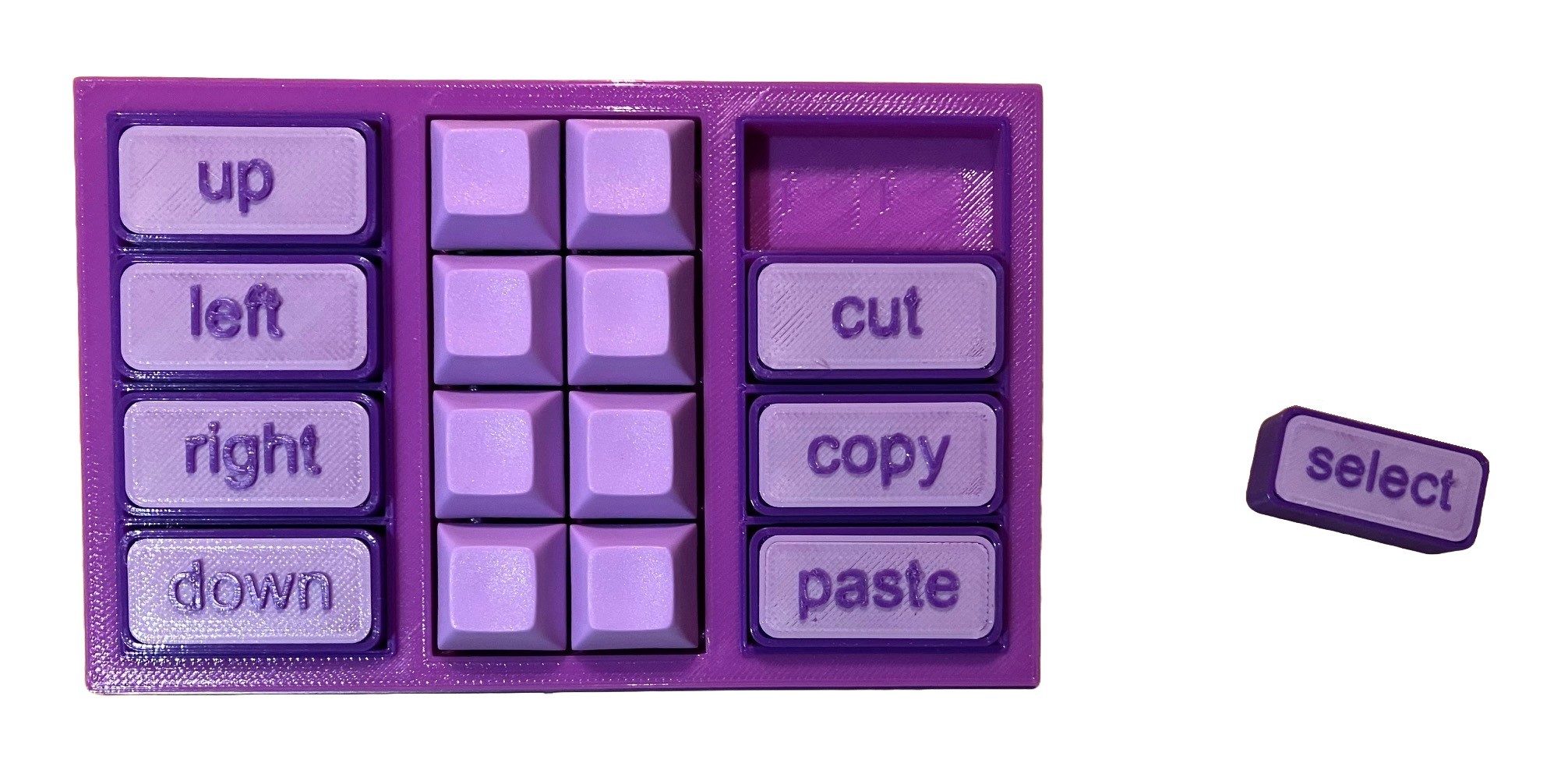
The Spectronic Intellikeys was an innovative keyboard-like accessibility device that used special plastic overlays that change its functionality. While a USB version of the accessible keyboard exists, it doesn’t work like a normal HID device, so it’s not plug and play as you might expect. It’s also no longer in production or supported by the manufacturer. Where industry falls down, the community steps in, right? To that end, Adafruit has built a tool for interfacing with these useful accessibility devices.

The key is the way the Intellikeys was intended to work with a computer. It was designed to download its firmware from the host machine, using special drivers that are only compatible with certain versions of Windows. That means you can’t use it with iPads or Chromebooks, for example.

To get around this, Adafruit used an RP2040 Feather configured as a USB host to talk to the Intellikeys. It queries the device, determines which overlay it currently has installed, and provides it the necessary firmware. On the other end, the Feather enumerates as a regular USB HID device. That allows it to work with a wide variety of tablets, computers, and even smartphones.

If you’ve got an Intellikeys USB device and miss using it, this could be just the thing you need. Meanwhile, you can check out some of the other interesting keyboard designs we’ve featured over the years.

Continue reading “RP2040 Gets Intellikeys Keyboard Up And Running”

3D Scanning A Room With A Steam Deck And A Kinect

It may not be obvious, but Valve’s Steam Deck is capable of being more than just a games console. Demonstrating this is [Parker Reed]’s experiment in 3D scanning his kitchen with a Kinect and Steam Deck combo, and viewing the resulting mesh on the Steam Deck.

The two pieces of hardware end up needing a lot of adapters and cables.

[Parker] runs the RTAB-Map software package on his Steam Deck, which captures a point cloud and color images while he pans the Kinect around. After that, the Kinect’s job is done and he can convert the data to a mesh textured with the color images. RTAB-Map is typically used in robotic applications, but we’ve seen it power completely self-contained DIY 3D scanners.

While logically straightforward, the process does require some finessing and fiddling to get it up and running. Reliability is a bit iffy thanks to the mess of cables and adapters required to get everything hooked up, but it does work. [Parker] shows off the whole touchy process, but you can skip a little past the five minute mark if you just want to see the scanning in action.

The Steam Deck has actual computer chops beneath its games console presentation, and we’ve seen a Steam Deck appear as a USB printer that saves received print jobs as PDFs, and one has even made an appearance in radio signal direction finding.

Continue reading “3D Scanning A Room With A Steam Deck And A Kinect”

Illustrated Kristina with an IBM Model M keyboard floating between her hands.

Keebin’ With Kristina: The One With The Music Typewriter

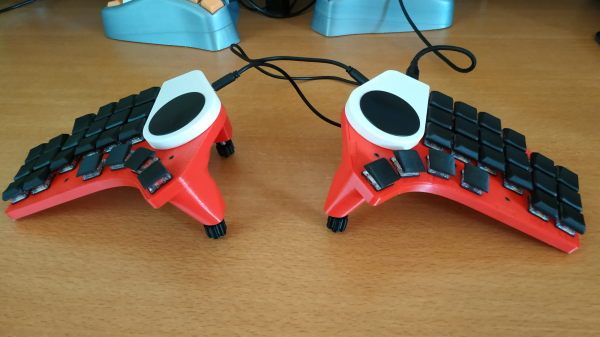
This edition’s community build comes from the Yes They Could, But Should They Have? file. Well, I ultimately say yes, this is intriguing. Redditor [dj_edit] looked at the venerable Model M and thought, this buckling-spring masterpiece can yet be improved upon. Yeah! Well, to each their own. I must say that it does sound great, especially with the solenoid feedback enabled via rotary encoder. Just check out the typing test.

To be clear, this is essentially a new keyboard that fits inside a Model M case, but that alone is quite a feat, especially if you consider the curvature of the backplate. Because of this hurdle, [dj_edit] went with 1 mm FR4 for the switch PCB, which is a nice compromise of sturdiness and flexibility.

Underneath those stunning reproduction keycaps are Kailh box white switches, which are pretty chonky-sounding on their own. But turn on that sweet solenoid action and you really get noisy.

Those box whites are sitting in hot-swap sockets, a design decision that kind of made things difficult because of the curvature. [dj_edit] ended up using an acrylic plate that gets bent to match the curvature by the switches themselves.

Continue reading “Keebin’ With Kristina: The One With The Music Typewriter”

PiEEG Offers Affordable Brain-Computer Interface

One day in the future, we may interact with our electronic devices not with physical input or even voice commands, but simply by thinking about what we want to do. Such brain–computer interfaces (BCIs), combined with machine learning, could allow us to turn our ideas into reality faster and with less effort than ever before — imagine being able to produce a PCB design simply by thinking about how the completed circuit would work. Of course as an assistive technology, BCIs would be nothing less than life-changing for many.

Today BCIs are in their infancy, but that doesn’t mean there isn’t room for hackers and makers to experiment with the concept. [Ildar Rakhmatulin] has been working on low-cost open source BCIs for years, and with the recent release of his PiEEG on Crowd Supply, thinks he’s finally found an affordable solution that will let individuals experiment with this cutting edge technology.

Implemented as a shield that can be connected to a Raspberry Pi 3 or 4, the PiEEG features 8 channels for connecting wet or dry electrodes that can measure biosignals such as those used in electroencephalography (EEG), electromyography (EMG), and electrocardiography (ECG). With the electrodes connected, reading these biosignals is as easy as running a Python script. While primarily designed for neuroscience experimentation, [Ildar] says the device is also useful for learning more about signal processing, filters, and machine learning.

Continue reading “PiEEG Offers Affordable Brain-Computer Interface”

Modern Dance Or Full-Body Keyboard? Why Not Both!

If you felt in your heart that Hackaday was a place that would forever be free from projects that require extensive choreography to pull off, we’re sorry to disappoint you. Because you’re going to need a level of coordination and gross motor skills that most of us probably lack if you’re going to type with this full-body, semaphore-powered keyboard.

This is another one of [Fletcher Heisler]’s alternative inputs projects, in the vein of his face-operated coding keyboard. The idea there was to be able to code with facial gestures while cradling a sleeping baby; this project is quite a bit more expressive. Pretty much all you need to know about the technical side of the project can be gleaned from the brilliant “Hello world!” segment at the start of the video below. [Fletcher] uses OpenCV and MediaPipe’s Pose library for pose estimation to decode the classic flag semaphore alphabet, which encodes characters in the angle of the signaler’s extended arms relative to their body. To extend the character set, [Fletcher] added a squat gesture for numbers, and a shift function controlled by opening and closing the hands. The jazz-hands thing is just a bonus.

Honestly, the hack here is mostly a brain hack — learning a complex series of gestures and stringing them together fluidly isn’t easy. [Fletcher] used a few earworms to help him master the character set and tune his code; the inevitable Rickroll was quite artistic, and watching him nail the [Johnny Cash] song was strangely satisfying. We also thoroughly enjoyed the group number at the end. Ooga chaka FTW.

Continue reading “Modern Dance Or Full-Body Keyboard? Why Not Both!”