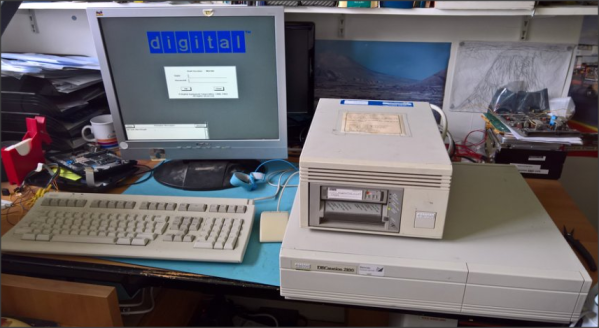
Retrocomputing With Modern Hardware, No Emulation Required

The x86 processor family is for the time being, the most ubiquitous type of processor in the PC world, and has been since the 1980s when the IBM PC came on the scene. Emulating these older devices is easy enough if you want to play an old LucasArts game or experience Windows 3.1 again, but the true experience is found on original hardware. And, thanks to industrial equipment compatibility needs, you can build a brand new 486 machine with new hardware that will run this retro software as though it was new itself.

[The Rasteri] masterminded this build which is reminiscent of the NES classic and other nostalgic console re-releases. It’s based on the PC/104 standard which was introduced in the early 90s, mostly for industrial controls applications. The platform is remarkably small, and the board chosen for this build hosts a 486 processor running at 300 MHz. It has on-board VGA-compatible graphics but no Sound Blaster card, so he designed and built his own ISA-compatible sound card that fits in the PC/104’s available expansion port.

After adding some more tiny peripherals to the build and installing it in a custom case, [The Rasteri] has a working DOS machine on new, bare-metal 486 hardware which can play DOOM as it was originally intended. It can also run early versions of  Windows to play games from the Microsoft Entertainment Pack if you feel like being eaten by a snow monster while skiing. [The Rasteri] is no stranger to intense retro computing like this either, as he was the one who got DOOM to run on original NES hardware.

Continue reading “Retrocomputing With Modern Hardware, No Emulation Required”

4-bit Retrocomputer Emulator Gets Custom PCB

It might be fair to suspect that most people who are considered digital natives have very little to no clue about what is actually going on inside their smartphones, tablets, and computers. To be fair, it is not easy to understand how modern CPUs work but this was different at the beginning of the 80s when personal computers just started to become popular. People who grew up back then might have a much better understanding of computer basics thanks to computer education systems. The Busch 2090 Microtronic Computer System released in 1981 in Germany was one of these devices teaching people the basics of programming and machine language. It was also [Michael Wessel]’s first computer and even though he is still in proud possession of the original he just recently recreated it using an Arduino.

The original Microtronic was sold under the catchy slogan “Hobby of the future which has already begun!” Of course, the specs of the 4-bit, 500 kHz TMS 1600 inside the Microtronic seem laughable compared to modern microcontrollers, but it did run a virtual environment that taught more than the native assembly. He points out though that the instruction manual was exceptionally well written and is still highly effective in teaching students the basics of computer programming.

Already, a couple of years back he wrote an Arduino-based Microtronic emulator. In his new project, he got around to extending the functionality and creating a custom PCB for the device. The whole thing is based on ATMega 2560 Pro Mini including an SD card module for file storage, an LCD display, and a whole bunch of pushbuttons. He also added an RTC module and a speaker to recreate some of the original functions like programming a digital clock or composing melodies. The device can also serve as an emulator of the cassette interface of the original Microtronic that allowed to save programs with a whopping data rate of 14 baud.

He has certainly done a great job of preserving this beautiful piece of retro-tech for the future. Instead of an Arduino, retro computers can also be emulated on an FPGA or just take the original hardware and extend it with a Raspberry Pi.

The First Real Palmtop

Back before COVID-19, I was walking through the airport towards the gate when suddenly I remembered a document I wanted to read on the flight but had forgotten to bring along. No worry, I paused for a bit on the concourse, reached into my pocket and proceeded to download the document from the Internet. Once comfortably seated on the plane, I relaxed and began reading. Afterwards, I did a little programming in C on a shareware program I was developing.

Today this would be an ordinary if not boring recollection, except for one thing: this happened in the 1990s, and what I pulled out of my pocket was a fully functional MS-DOS computer:

Introducing the HP-200LX, the first real palmtop computer. I used one of these daily up until the mid-2000s, and still have an operational one in my desk drawer. Let’s step back in time and see how this powerful pocket computer began its life. Continue reading “The First Real Palmtop”

This Expedient Microfiche Reader Illuminates Retro Datasheets

You have to be of a certain vintage to remember doing research on microfilm and microfiche. Before the age of mass digitization of public records, periodicals, and other obscure bits of history, dead-tree records were optically condensed onto fine-grain film, either in roll form or as flat sheets, which were later enlarged and displayed on a specialized reader. This greatly reduced the storage space needed for documents, but it ended up being a technological dead-end once the computer age rolled around.

This was the problem [CuriousMarc] recently bumped into — a treasure trove of Hewlett-Packard component information on microfiche, but no reader for the diminutive datasheets. So naturally, he built his own microfiche reader. In a stroke of good luck, he had been gifted a low-cost digital microscope that seemed perfect for the job. The scope, with an HD camera and 5″ LCD screen, was geared more toward reflective than transmissive use, though, so [Marc] had trouble getting a decent picture of the microfiches, even with a white paper backing.

Version 2.0 used a cast-off backlight, harvested from a defunct DVD player screen, as a sort of light box for the stage of the microscope. It was just about the perfect size for the microfiches, and the microscope was able to blow up the tiny characters as well as any dedicated microfiche reader could, at a fraction of the price. Check out the video below for details on the build, as well as what [Marc] learned from the data sheets about his jackpot of HP parts.

With the wealth of data stored on microforms, we’re surprised that we haven’t seen any readers like this before. We have talked about microscopic wartime mail, though.

Continue reading “This Expedient Microfiche Reader Illuminates Retro Datasheets”

Making A Little Smalltalk

While things like object oriented computing and model-view-controller are old hat these days, when Smalltalk burst on the scene, many people had never heard of these new ideas. While the little language with roots at Xerox and based on Simula never caught fire, it was very influential in a number of ways. Now Smalltalk luminary [Dan Ingalls] has the Smalltalk Zoo, a collection of Smalltalk-related items including several historical simulations you can run in your browser.

We were especially impressed with the AltoSmalltalk-72 simulation since our chances of running a real Alto are pretty slim. The JavaScript behind it actually implements the Alto’s Nova instruction set. The emulator then runs a 45-year old memory dump from a real Alto. According to [Dan], there’s no file system and the microcoded music and animation instructions are missing, but he hopes someone will add them as a spare-time project.

Continue reading “Making A Little Smalltalk”

Surfing The Web With 7400 Logic

We see more computers built from logic gates than you might expect. However, most of them are really more demonstration computers and can’t do much of what you’d consider essential today. No so with [Alastair Hewitt’s] Novasaur. Although built using 34 TLL chips (and a few memory and analog chips, too, along with one PAL), it boasts some impressive features:

  • Dual Processor CPU/GPU (Harvard Architecture).
  • 33 MHz dot clock, 16.5 MHz data path, 8.25 MHz per processor (~3.5 CPU MIPs)
  • 256k ROM: 96k ALU, 64k native program, 64k cold storage, 32k fonts.
  • 128/512k RAM: 1-7 banks of 64k user, 60k display, 4k system.
  • 76 ALU functions including multiply/divide, system, and math functions.
  • Bitmapped Graphics: Hi-res mode up to 416×240 with 8 colors and 4 dithering patterns. Lo-res mode up to 208×160 with 256 colors, double-buffered.
  • Text Mode: 8 colors FG/BG, 256 line buffer, up to 104×60 using 8×8 glyphs, 80×36, and 64×48 rows using  8×16 glyphs.
  • Audio: 4 voice wavetable synthesis, ADSR, 8-bit DAC, 8Hz-4.8kHz.
  • PS2 Keyboard: Native interface built-in.
  • RS232 Serial Port: Full duplex, RTS/CTS flow control, 9600 baud.
  • Expansion Port: 7 addressable 8-bit register ports, 4 interrupt flags

Continue reading “Surfing The Web With 7400 Logic”

A Lambda 8300 Lives Again

If you follow retrocomputing — or you are simply old enough to remember those days — you hear the same names over and over. Commodore, Apple, Radio Shack, and Sinclair, for example. But what about the Lambda 8300? Most people haven’t heard of these but [Mike] has and he has quite a few of them. The computer is similar to a Sinclair ZX81, but not an exact clone. All of his machines need some repairs (he’s promised repair videos are on their way), but for the video below he wired a monitor directly to the PCB to get steady output, so apparently the RF modulator is the failing subsystem in this case.

Once the video cleared up, you can see a walkthrough of running a simple BASIC program. As was common in those days, the computer used an audio cassette recorder for data storage. [Mike] picked up some dedicated recorders meant for computer use, but neither were in working shape. However, a consumer player works fine.

Continue reading “A Lambda 8300 Lives Again”