In the comments to our recent article about Wimshurst machines, we saw that some hackers had never heard of them, reminding us that we all have different backgrounds and much to share. Well here’s one I’m guessing even fewer will have heard of. It’s never even shown up in a single Hackaday article, something that was also pointed out in a comment to that Wimshurst article. It is the Lord Kelvin’s Water Dropper aka Lord Kelvin’s Thunderstorm, invented in the 1860s by William Thomson, 1st Baron Kelvin, the same fellow for whom the Kelvin temperature scale is named. It’s a device that produces a high voltage and sparks from falling drops of water.
The nuclear age changed steel, and for decades we had to pay the price for it. The first tests of the atomic bomb were a milestone in many ways, and have left a mark in history and in the surface of the Earth. The level of background radiation in the air increased, and this had an effect on the production of steel, so that steel produced since 1945 has had elevated levels of radioactivity. This can be a problem for sensitive instruments, so there was a demand for steel called low background steel, which was made before the trinity tests.
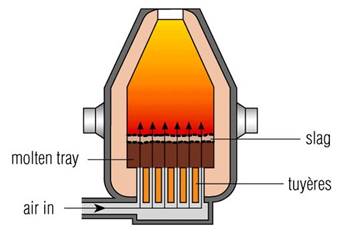
The Bessemer process pumps air through the iron to remove impurities. shropshirehistory.com
The production of steel is done with the Bessemer process, which takes the molten pig iron and blasts air through it. By pumping air through the steel, the oxygen reacts with impurities and oxidizes, and the impurities are drawn out either as gas or slag, which is then skimmed off. The problem is that the atmospheric air has radioactive impurities of its own, which are deposited into the steel, yielding a slightly radioactive material. Since the late 1960s steel production uses a slightly modified technique called the BOS, or Basic Oxygen Steelmaking, in which pure oxygen is pumped through the iron. This is better, but radioactive material can still slip through. In particular, we’re interested in cobalt, which dissolves very easily in steel, so it isn’t as affected by the Bessemer or BOS methods. Sometimes cobalt is intentionally added to steel, though not the radioactive isotope, and only for very specialized purposes.
Recycling is another reason that modern steel stays radioactive. We’ve been great about recycling steel, but the downside is that some of those impurities stick around.
Why Do We Need Low Background Steel?
Imagine you have a sensor that needs to be extremely sensitive to low levels of radiation. This could be Geiger counters, medical devices, or vehicles destined for space exploration. If they have a container that is slightly radioactive it creates an unacceptable noise floor. That’s where Low Background Steel comes in.
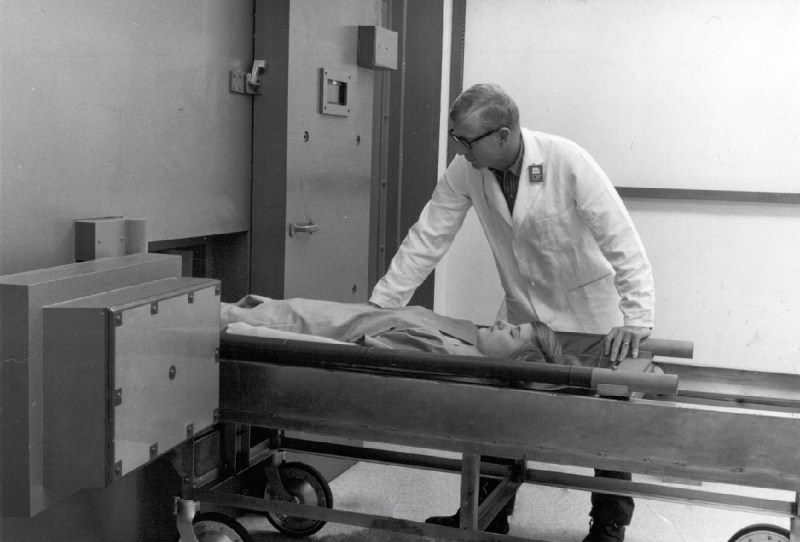
A person is placed into a low background steel container with sensitive equipment to measure the radioactivity of the body, which may be near the background level. Photo from orau.org
So where do you get steel, which is a man-made material, that was made before 1945? Primarily from the ocean, in sunken ships from WWII. They weren’t exposed to the atomic age air when they were made, and haven’t been recycled and mixed with newer radioactive steel. We literally cut the ships apart underwater, scrape off the barnacles, and reuse the steel.
Fortunately, this is a problem that’s going away on its own, so the headline is really only appropriate as a great reference to a popular movie. After 1975, testing moved underground, reducing, but not eliminating, the amount of radiation pumped into the air. Since various treaties ending the testing of nuclear weapons, and thanks to the short half-life of some of the radioactive isotopes, the background radiation in the air has been decreasing. Cobalt-60 has a half-life of 5.26 years, which means that steel is getting less and less radioactive on its own (Cobalt-60 from 1945 would now be at .008% of original levels). The newer BOS technique exposes the steel to fewer impurities from the air, too. Eventually the need for special low background steel will be just a memory.
Oddly enough, steel isn’t the only thing that we’ve dragged from the bottom of the ocean. Ancient Roman lead has also had a part in modern sensing.
What makes [mwagner1]’s Raspberry Pi Zero-based WiFi camera project noteworthy isn’t so much the fact that he’s used the hardware to make a streaming camera, but that he’s taken care to document every step in the process from soldering to software installation. Having everything in one place makes it easier for curious hobbyists to get those Pi units out of a drawer and into a project. In fact, with the release of the Pi Zero W, [mwagner1]’s guide has become even simpler since the Pi Zero W now includes WiFi.
Using a Raspberry Pi as the basis for a WiFi camera isn’t new, but it is a project that combines many different areas of knowledge that can be easy for more experienced people to take for granted. That’s what makes it a good candidate for a step-by-step guide; a hobbyist looking to use their Pi Zero in a project may have incomplete knowledge of any number of the different elements involved in embedding a Pi such as basic soldering, how to provide appropriate battery power, or how to install and configure the required software. [mwagner1] plans to use the camera as part of a home security system, so stay tuned.
If Pi Zero camera projects catch your interest but you want something more involved, be sure to check out the PolaPi project for a fun, well-designed take on a Pi Zero based Polaroid-inspired camera.
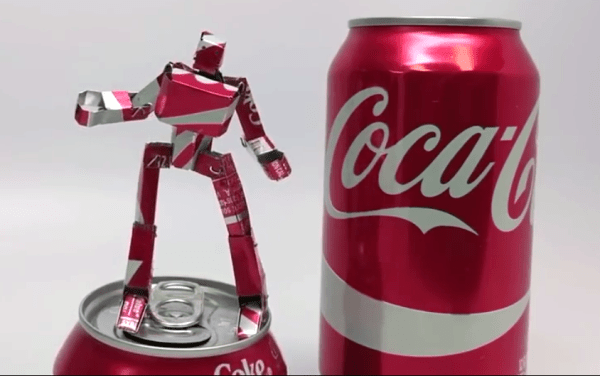
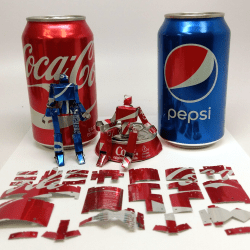
[apollocrowe] at Carbide 3D (a company that does desktop CNC machines) shared a project of his that spent years being not-quite-there, but recently got dusted off and carried past the finish line. His soda can robot action figures were originally made by gluing a paper design to aluminum from a soda can, but [apollocrowe] was never really able to cut the pieces as reliably or as accurately as he wanted and the idea got shelved. With a desktop CNC machine to take care of accurate cutting, the next issue was how to best hold down a thin piece of uneven metal during the process. His preferred solution is to stick the metal to an acrylic wasteboard with hot glue, zero high enough and cut deep enough to account for any unevenness, and afterwards release the hot glue bond with the help of some rubbing alcohol.
Assembly involves minor soldering and using a few spare resistors. A small spring (for example from a retractable pen) provides the legs with enough tension for the figure to stand by itself. The results look great, and are made entirely from a few cents worth of spare parts and recycled materials. A video of the process is embedded below, and the project page contains the design files.
If you’ve played Fallout 4, you’re familiar with the wall-mounted terminals in the game. They’ve got a post-apocalyptic aesthetic and the glowing green screen that calls out to anyone that grew up with computers and hacker movies from the 80s and 90s. Remember the first time you set your command line text to green? Don’t be embarrassed, we were all young once.
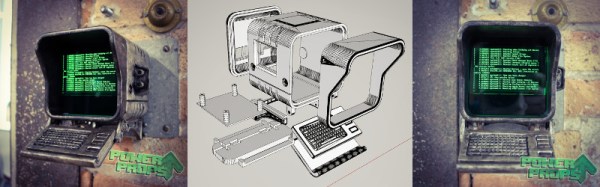
[PowerUpProps] liked the Fallout terminal so much they developed a replica. It’s a build that leans heavily on maker standards, a Raspberry Pi and 3D printing form the basis of the terminal. With ready access to such powerful tools, it makes starting such a project much more approachable. The key to the success of this build is the fine attention to detail in the finishing – the paint job looks incredible, and when photographed appropriately, it could be mistaken for the real thing an in-game screenshot.
An interesting touch is the use of a dark green acrylic window in front of the LCD, which gives the display a tinted hue. We’d like to see this compared with a clear glass window with a classic fishbowl curve to it, combined with greening up in software. The creator readily admits that this looks great at the command line, but is somewhat of a letdown when using the GUI.
Perhaps the only thing the prop build could use is some sort of user interface — the keyboard is only 3D printed and there’s no mouse or other pointing device included. There are some creative solutions to this problem, which we often see in other Fallout projects, like the ever popular Pip-Boy replica builds.
Suppose you take a few measurements of a time-varying signal. Let’s say for concreteness that you have a microcontroller that reads some voltage 100 times per second. Collecting a bunch of data points together, you plot them out — this must surely have come from a sine wave at 35 Hz, you say. Just connect up the dots with a sine wave! It’s as plain as the nose on your face.
Sampling a 35 Hz wave at 100 Hz
35 Hz with -65 Hz
35 Hz with 135 Hz
And then some spoil-sport comes along and draws in a version of your sine wave at -65 Hz, and then another at 135 Hz. And then more at -165 Hz and 235 Hz or -265 Hz and 335 Hz. And then an arbitrary number of potential sine waves that fit the very same data, all spaced apart at positive and negative integer multiples of your 100 Hz sampling frequency. Soon, your very pretty picture is looking a bit more complicated than you’d bargained for, and you have no idea which of these frequencies generated your data. It seems hopeless! You go home in tears.
But then you realize that this phenomenon gives you super powers — the power to resolve frequencies that are significantly higher than your sampling frequency. Just as the 235 Hz wave leaves an apparent 35 Hz waveform in the data when sampled at 100 Hz, a 237 Hz signal will look like 37 Hz. You can tell them apart even though they’re well beyond your ability to sample that fast. You’re pulling in information from beyond the Nyquist limit!
This essential ambiguity in sampling — that all frequencies offset by an integer multiple of the sampling frequency produce the same data — is called “aliasing”. And understanding aliasing is the first step toward really understanding sampling, and that’s the first step into the big wide world of digital signal processing.
Whether aliasing corrupts your pristine data or provides you with super powers hinges on your understanding of the effect, and maybe some judicious pre-sampling filtering, so let’s get some knowledge.
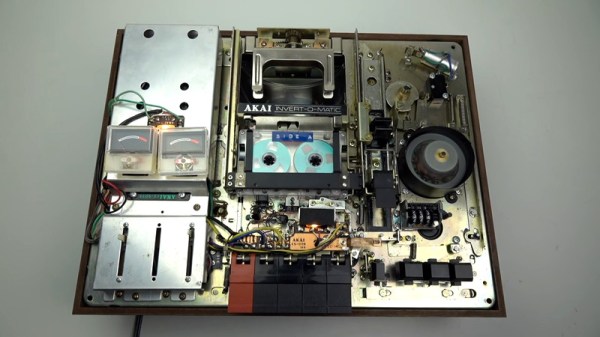
The audio cassette is an audio format that presented a variety of engineering challenges during its tenure. One of the biggest at the time was that listeners had to physically remove the cassette and flip it over to listen to the full recording. Over the years, manufacturers developed a variety of “auto-reverse” systems that allowed a cassette deck to play a full tape without user intervention. This video covers how Akai did it – the hard way.
Towards the end of the cassette era, most manufacturers had decided on a relatively simple system of having the head assembly rotate while reversing the motor direction. Many years prior to this, however, Akai’s system involved a shuttle which carried the tape up to a rotating arm that flipped the cassette, before shuttling it back down and reinserting it into the deck.
Even a regular cassette player has an astounding level of complexity using simple electromechanical components — the humble cassette precedes the widespread introduction of integrated circuits, so things were done with motors, cams, levers, and switches instead. This device takes it to another level, and [Techmoan] does a great job of showing it in close-up detail. This is certainly a formidable design from an era that’s beginning to fade into history.
The video (found after the break) also does a great job of showing glimpses of other creative auto-reverse solutions — including one from Phillips that appears to rely on bouncing tapes through something vaguely resembling a playground slide. We’d love to see that one in action, too.



 Fortunately, this is a problem that’s going away on its own, so the headline is really only appropriate as a great reference to a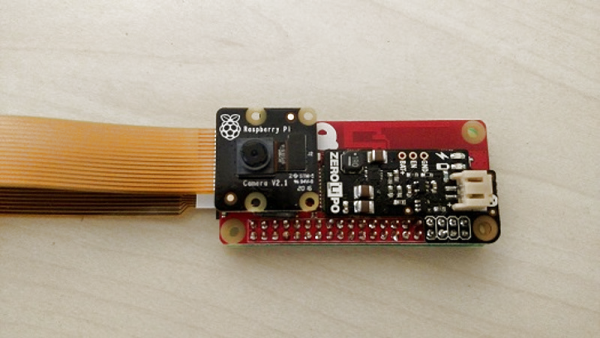




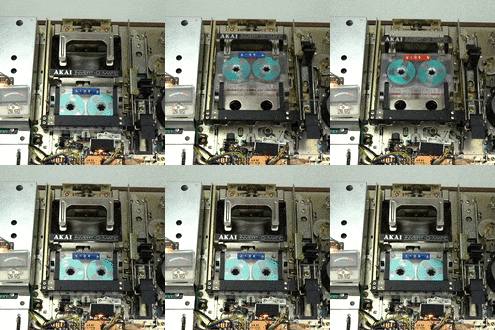 Towards the end of the cassette era, most manufacturers had decided on a relatively simple system of having the head assembly rotate while reversing the motor direction. Many years prior to this, however, Akai’s system involved a shuttle which carried the tape up to a rotating arm that flipped the cassette, before shuttling it back down and reinserting it into the deck.








