Raspberry Pi As 433 MHz To MQTT Gateway

Many low-cost wireless temperature and humidity sensors use a 433 MHz transmitter to send data back to their base stations. This is a great choice for the manufacturer of said devices because it’s simple and the radios are cheap, but it does limit what we as the consumer can do with it a bit. Generally speaking, you won’t be reading data from these sensors on your computer unless you’ve got an SDR device and some experience with GNU Radio and reading the Nexus protocol.

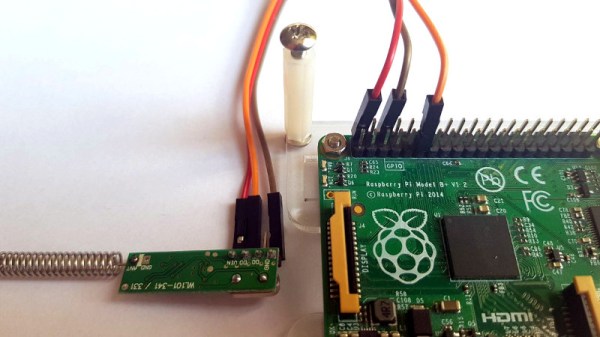
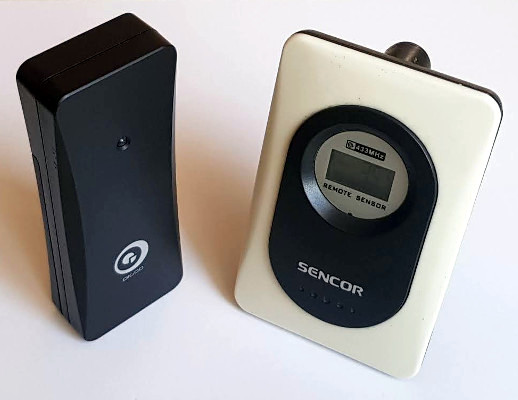
But [Aquaticus] has developed a very comprehensive piece of software that should make integrating these type of sensors into your home automation system much easier, as long as you’ve got a spare Raspberry Pi lying around. Called nexus433, it uses a cheap 433 MHz receiver connected to the Pi’s GPIO pins to receive data from environmental sensors using the popular Nexus communication protocol. A few known compatible sensors are listed in the project documentation, one of which can be had for as little as $5 USD shipped.

In addition to publishing the temperature, humidity, and battery level values from the sensors to MQTT, it even tracks connection quality for each individual sensor and when they go on and offline. To be sure, this is no simple hack. In nexus433, [Aquaticus] has created a mature Linux service with enough flexibility that you shouldn’t have any problems working it into your automation setup, whether it’s Home Assistant or something you’ve put together yourself.

We’ve seen a number of home automation hacks using these ubiquitous 433 MHz radios,  from controlling them with an ESP8266 to hacking a popular TP-LINK router into a low-cost home automation hub.

This Hackable Phone Makes WiFi Calls.

Over the years, we’ve seen dozens of projects that sell themselves as an ‘Open Source’ cellphone, a hackable cellphone, or some other confabulation of a microcontroller, screen, and a cellular module. The WiPhone is not one of these projects. That’s not to say it’s not an Open Source phone that’s intended to be hackable. No, this is a DIY phone that doesn’t make cellular calls, because this is a phone that only works with SIP and VoIP apps. It’s a WiPhone, and something a lot of us have been waiting for.

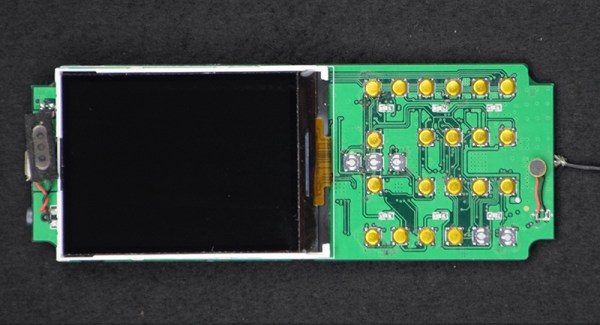
The hardware for this WiFi enabled phone is extremely minimal, but there are some interesting tricks up its sleeve. Instead of letting the main microcontroller handle capturing all the button presses, the team behind the WiPhone are using a SN7326 key-scan controller. This cheap part is able to scan 64 buttons, although there are only 25 buttons on the phone. The audio board is a  WM8750BL, a cheap codec with a stereo microphone interface and a 400 mW speaker driver. The display is a simple SPI TFT, and apart from the microcontroller, that’s about it.

But it’s the microcontroller that makes it, and for that we turn to the incredible ESP-32. This chip has enough power to play Doom, be a Game Boy, and in this case, make and receive calls from a VoIP provider, scan and connect to WiFi networks, and yes, it can even play snake.

While this is just about the simplest phone you can imagine, and it only works where there’s a WiFi network, a device like this could be invaluable. And really, these days how far are you from a WiFi network you’re already connected to anyway?

Turning Cheap WiFi Modules Into Cheap WiFi Swiss Army Knives

When the ESP8266 was released, it was sold as a simple device that would connect to a WiFi network over a UART. It was effectively a WiFi modem for any microcontroller, available for just a few bucks. That in itself is awesome, but then the hackers got their hands on it. It turns out, the ESP8266 is actually a very capable microcontroller as well, and the newest modules have tons of Flash and pins for all your embedded projects.

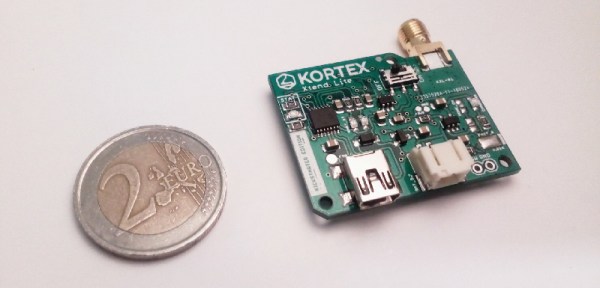
For [Amine]’s entry to the Hackaday Prize, he’s using the ESP8266 as the ultimate WiFi Swiss Army knife. The Kortex Xttend Lite is a tiny little WiFi repeater that’s capable of doing just about anything with a WiFi network, and with a bit of added hardware, can connect to Ethernet as well.

The hardware on this board sports an ESP8266-07S module, with two free GPIO pins for multiple functions. There’s a USB to UART in there, and a voltage regulator that’s capable of outputting 600mA for the slightly power hungry radio. There’s also an integrated battery management and charge controller, allowing this board to charge an off-the-shelf lithium cell and run for hours without any wires at all.

So, what can this board do? Just about everything you would want for a tiny little WiFi Swiss Army knife. There’s traffic shaping, port mapping, packet sniffing, and even support for mesh networking. There’s also an SMA connector on there, so grab your cantennas — this is a great way to extend a WiFi network, too.

This is a well-designed and well-executed project, and what makes this even more amazing is that this was done as one of [Amine]’s high school projects. Yes, it took about a year to finish this project, but it’s still amazing work for [Amine]’s first ‘high-complexity’ design. That makes it an excellent learning experience, and an awesome entry to this year’s Hackaday Prize.

Beginning BLE Experiments And Making Everything Better

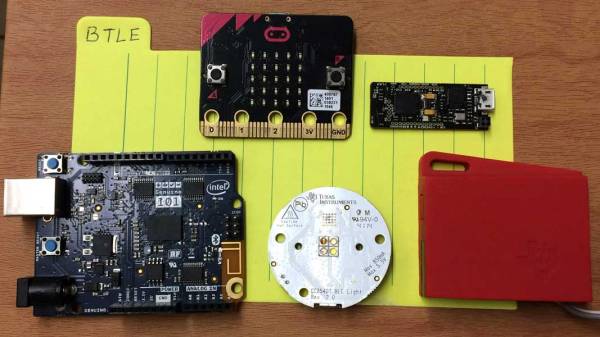
Successfully connecting things without physical wires has a profound effect on the maker brain. Machines talking to each other without any cables is as amazing today as it was a decade ago. When Bluetooth came out, it was a breakthrough since it offered a wireless way to connect cellphones to a PC. But Bluetooth is a complicated, high-bandwidth power hog, and it didn’t make sense for battery-powered devices with less demanding throughput requirements to pay the energy price. Enter Bluetooth LE (BLE), with power requirements modest enough to enable a multitude of applications including low power sensor nodes and beacons.

Over the years, a number of gadgets with BLE have popped up such as the LightBlue Bean, BLE Beacons as well as quadcopters like the FlexBot that rely on BLE for communication. Android or iOS apps are the predominant method of talking to these wonderful gadgets though there are alternatives.
This is the first in a two part series on building with BLE devices. First, I’ll survey some BLE devices and how to get started with BLE from the Linux command line. Later, we will go into describing the process of making a NodeJS cross-platform app that will leverage the BLE capabilities and connect it to the Internet.
Lets get started.
Continue reading “Beginning BLE Experiments And Making Everything Better”

Screaming Channels Attack RF Security

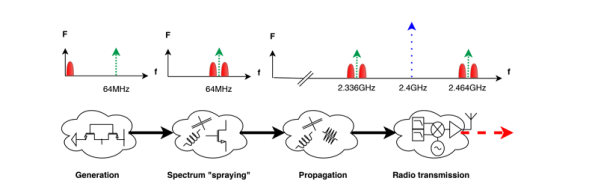
As long as there has been radio, people have wanted to eavesdrop on radio transmissions. In many cases, it is just a hobby activity like listening to a scanner or monitoring a local repeater. But in some cases, it is spy agencies or cyberhackers. [Giovanni Camurati] and his colleagues have been working on a slightly different way to attack Bluetooth radio communications using a technique that could apply to other radio types, too. The attack relies on the ubiquitous use of mixed-signal ICs to make cheap radios like Bluetooth dongles. They call it “Screaming Channels” and — in a nutshell — it is relying on digital information leaking out on the device’s radio signal.

Does it work? The team claims to have recovered an AES-128 key from 10 meters away. The technique reminds us a bit of TEMPEST in that unintended radio transmissions provide insight into the algorithm the device applies to encrypt or decrypt data. Most (if not all) encryption techniques assume you can’t see inside the “black box.” If you can, then it’s because it is relatively easy to break the code.

Continue reading “Screaming Channels Attack RF Security”

Simple RC To USB Interface

With the radio control hobby arguably larger now than it ever has been in the past, there’s a growing demand for high-fidelity PC simulators. Whether you want to be able to “fly” when it’s raining out or you just want to practice your moves before taking that expensive quadcopter up for real, a good simulator on your computer is the next best thing. But the simulator won’t do you much good if it doesn’t feel the same; you really need to hook your normal RC transmitter up to the computer for the best experience.

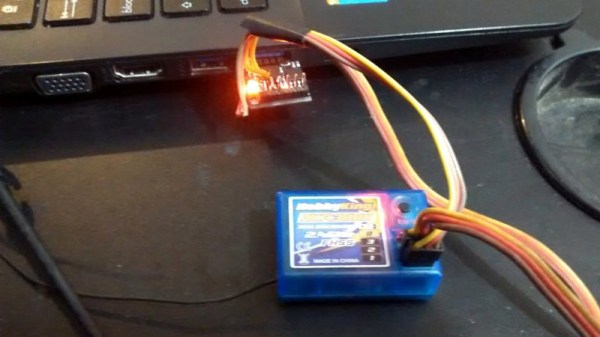
[Patricio] writes in to share with us his simple hack for interfacing his RC hardware to his computer over USB. Rather than plugging the transmitter into the computer, his approach allows the receiver to mimic a USB joystick. Not only is this more convenient since you can use the simulator without wires, but it will make sure that the minutiae of your radio hardware (such as response lag) is represented in the simulation.

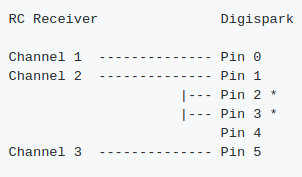
The setup is actually very simple. [Patricio] used the ATtiny85 based Digispark development board because it’s what he had on hand, but the principle would be the same on other microcontrollers. Simply connect the various channels from the RC receiver to the digital input pins. RC receivers are 5 VDC and draw very little current, so it’s even possible to power the whole arrangement from the USB port.

On the software side, the Arduino sketch does about what you expect. It loops through listening for PWM signals on the input pins, and maps that to USB joystick position information. The current code only supports three channels for a simple airplane setup (X and Y for joystick, plus throttle), but it should be easy enough to follow along and add more channels if you needed them for more complex aircraft.

For more information on the intricacies of RC transmitter and receiver interaction, check out this fascinating research on receiver latency.

Classroom Gadget Turned Arduino Compatible

Cheap second-hand hardware is usually a fertile ground for hacking, and by looks of this project, the digital classroom aids that were all the rage a few years back are no exception. [is0-mick] writes in to tell us how he managed to hack one of these devices, a SMART Reponse XE, into an Arduboy compatible game system. As it turns out, this particular gadget is powered by an ATmega128RFA, which is essentially an Arduino-compatible AVR microcontroller with a 2.4GHz RF transceiver tacked on. This makes it an extremely interesting platform for hacking, especially since they are going for as little as $3 USD on eBay.

There’s no USB-Serial converter built into the SMART Response XE, so you’ll need to provide your own external programmer to flash the device. But luckily there’s a labeled ISP connector right on the board which makes it pretty straightforward to get everything wired up.

Of course, getting the hardware working was slightly more complicated than just flashing an Arduino Sketch onto the thing. [is0-mick] has provided his bootloader and modified libraries to get the device’s QWERTY keyboard and ST7586S controlled 384×160 LCD working.

Playing games is fun, but when his friend [en4rab] sent him the SMART Response XE to fiddle with, the goal was actually to turn them into cheap 2.4 GHz analyzers similar to what was done with the IM-ME. It seems they’re well on their way, and [is0-mick] invites anyone who might be interested in filling in some of the blanks on the RF side to get involved.

Continue reading “Classroom Gadget Turned Arduino Compatible”