Control An Arduino From Android Over Bluetooth

Whether you’d like to do some real-time logging of data, or just want to control a project with your Android phone, [Thomas]’s Arduino-Android Bluetooth connection instructable is sure to be useful

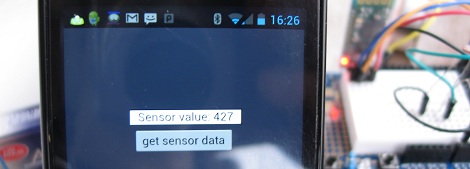
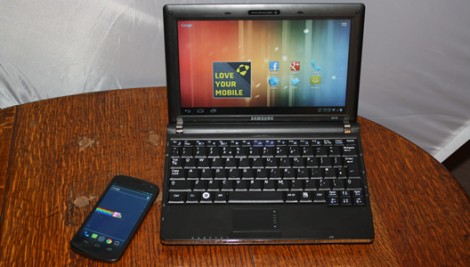
[Thomas]’ build uses the very inexpensive JY-MCU Bluetooth module that’s available on eBay or dealextreme. This Bluetooth module ties directly into the Tx and Rx lines of the Arduino so a wireless serial connection between an Android device can be established. On the Android side of the build, Python for Android and the Scripting Layer for Android allow for reading wireless sensor data over Bluetooth.

While connecting an Android device to an Arduino is also possible with an IOIO  or an Android Open Accessory dev kit, we haven’t seen much (barring this) about controlling or reading simple electronics with Android over Bluetooth. Sometimes you just don’t need an awesome dev board to bodge up a simple project, so we hope [Thomas]’s very nice instructable will help get a few more builds off the ground.

3D Printing From An Android Device

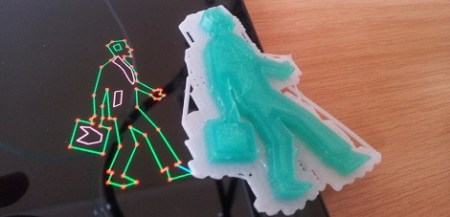
[skullkey] over at the House4Hack hackerspace in Pretoria, South Africa wanted a way to get kids excited about technology and desktop fabrication labs. Wanting to give kids a visceral feel for the march of technology, he created Makerdroid, an android app that allows for the creation 3D objects on an Android tablet and preparing them to be printed on a Reprap or Makerbot.

What’s really interesting about this build is not only the fact that [skullkey] and his lovely beta testers are generating .STL files on an Android device, the object files are also being converted to GCode on the Android, without the need for a conventional computer. Makerdroid uses the very popular Skeinforge to generate the instructions for the printer (although a lot of people are switching over to Slic3r).

Makerdroid doesn’t need a PC to print objects out on a 3D printer, but we think the process of shuffling GCode files from a tablet to the printer with an SD card is a little archaic. It might be possible to print directly from an Android tablet over Bluetooth with the Android Bluetooth Reprap app that is currently in development. Still, we love the idea of printing objects we just created on a touch screen, as shown in the Makerdroid demo video after the break.

Continue reading “3D Printing From An Android Device”

Monitoring And Controlling Your Garage Door From Afar With An IP Camera

remote-control-garage-door

Last year, [Mark Simonelli’s] wife asked him if he could design something that would allow her to remotely check if their garage door had been left open. [Mark] jumped at the chance to tinker with electronics and designed a system around an old TrendNet IP camera. When remotely connected to the camera using IP Cam Viewer Pro for his Android phone, [Mark] could watch the video stream and also trigger the garage door opener via a small relay circuit he built.

His remote opener worked well, but his camera unfortunately lacked any sort of IR vision/low light capabilities. Since his camera wasn’t very useful in the dark, he decided that he needed to add some way to trigger a light when remotely monitoring his garage. He figured the best way to do this would be to control a power strip-connected light using a circuit similar to the one he built to open the garage door itself.

He stopped by the hardware store and picked up a cheap power strip, disassembling it and removing the power toggle once he got home. He fitted it with a small 5v relay, which he connected to the camera’s terminal block. While he admits that it might not be the absolute safest solution, he can easily control both the light and the garage door with a simple swipe of his phone’s screen.

Continue reading to see his remote controlled power strip in action, and be sure to swing by his site to see more details about his camera-controlled garage door opener.

Continue reading “Monitoring And Controlling Your Garage Door From Afar With An IP Camera”

Control MIDI With An Android Device

[Lewis] wanted to control MIDI devices with the huge touch screen that is his Android phone. After he couldn’t find a simple hardware implementation of MIDI out, he turned to an IOIO board to send MIDI notes to just about any imaginable musical hardware. It’s a clean build and fills a gap in the abilities of the Android platform.

Because of the woeful support of MIDI in Android, [Lewis] couldn’t find a good way to push MIDI notes from his phone to other devices. While there are a few high-overhead options like MIDI over wi-fi or a Bluetooth connection, there wasn’t much in the way of a straight-up hardware connection to other MIDI devices. [Lewis] got around this limitation by using an IOIO board and the right software to send MIDI notes though a DIN-5 connector.

Although the project works as intended, [Lewis]’ build could be made more permanent by building one of these MIDI interfaces and wiring that to the IOIO. All the Android code is up and available, along with a neat demo of [Lewis] controlling the delay time of an effects unit in his guitar rig. You can check that video out after the break.

Continue reading “Control MIDI With An Android Device”

ElectroDroid – Your Android Electronic Reference App

Earlier this week, fellow Hack a Day-er [Mike Nathan] reviewed Adafruit’s new iPhone/iPad app Circuit Playground. The comments on [Mike]’s review turned to suggesting ElectroDroid as an alternative to Circuit Playground. Surprisingly,  Hack a Day authors actually pay attention to the comments, so I’ve decided to throw my hat into the ring and offer up my review of ElectroDroid. For purposes of full disclosure, I have to add that I paid the $2.59 donation for a copy of ElectroDroid without ads, and have had no contact with the developers.

Continue reading “ElectroDroid – Your Android Electronic Reference App”

Control Android With A Projector And Kinect

If you’re going to build a giant touch screen, why not use an OS that is designed for touch interfaces, like Android? [Colin] had the same idea, so he connected his phone to a projector and a Kinect.

Video is carried from [Colin]’s Galaxy Nexus to the projector via an MHL connection. Getting the Kinect to work was a little more challenging, though. The Kinect is connected to a PC running Simple Kinect Touch. The PC converts the data from the Kinect into TUIO commands that are received using TUIO for Android.

In order for the TUIO commands to be recognized as user input, [Colin] had to compile his own version of Android. It was a lot of work, but using an OS designed for touch interface seems much better than all the other touch screen hacks that start from the ground up.

You can check out [Colin]’s demo after the break. Sadly, there are no Angry Birds.

Continue reading “Control Android With A Projector And Kinect”

Remote Entry Via Android And Launchpad

[MarkoeZ] had an issue with keys breaking off in his door lock, and while normal people might try to simply replace the lock all together, [MarkoeZ] decided to do it the “Hackaday” way by adding a bluetooth lock to his door. His door is already setup where someone can walk up to it, page an internal intercom and have someone buzz you in. From the inside the intercom was modded with a TI Launchpad with a “deal extreme” bluetooth module and relay.

Access is granted by the use of an android phone running “BT_Serial_Tester” which is a simple app that allows you to send characters over bluetooth. Just enter a pin, grab the door before the buzzer times out, and you’re in! A starting point for the MSP code and schematics are available on his blog. Join us after the break for a quick demonstration video.

Continue reading “Remote Entry Via Android And Launchpad”