A Virtual Cane For The Visually Impaired

[Roman] has created an electronic cane for the visually impaired. Blind and visually impaired people have used canes and walking sticks for centuries. However, it wasn’t until the 1920’s and 1930’s that the white cane came to be synonymous with the blind. [Roman] is attempting to improve on the white cane design by bringing modern electronics to the table. With a mixture of hardware and clever software running on an Android smartphone, [Roman] has created a device that could help a blind person navigate.

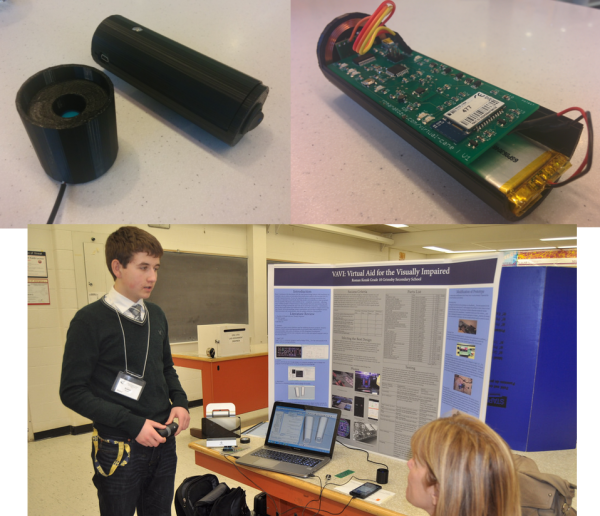
The white cane has been replaced with a virtual cane, consisting of a 3D printed black cylinder. The cane is controlled by an ATmega328 running the Arduino bootloader and [Roman’s] code. Peeking out from the end of the handle is a Maxbotix ultrasonic distance sensor. Distance information is reported to the user via a piezo buzzer and a vibration motor. An induction coil allows for charging without fumbling for tiny connectors. A Bluetooth module connects the virtual cane to the other half of the system, an Android phone.

[Roman’s] Android app runs solely on voice prompts and speech syntheses. Navigation commands such as “Take me to <address>” use the phone’s GPS and Google Maps API to retrieve route information. [Roman’s] app then speaks the directions for the user to follow. Help can be summoned by simply stating “Send <contact name> my current location.” In the event that the user drops their virtual cane, “Find my device” will send a Bluetooth command to the cane. Once the command is received, the cane will reveal its position by beeping and vibrating.

We’ve said it before, and we’ll say it again. Using technology to help disabled people is one of the best hacks we can think of. Hackaday alum [Caleb Kraft] has been doing just that with his work at The Controller Project. [Roman] is still actively improving his cane. He’s already won a gold medal at the Niagara Regional Science and Engineering Fair. He’s entered his project in several more science events, including the Canada Wide Science Fair and the Google Science Fair. Good luck [Roman]!

Reach Out And Touch Your Next Project With Long Range RC Controller

RC01

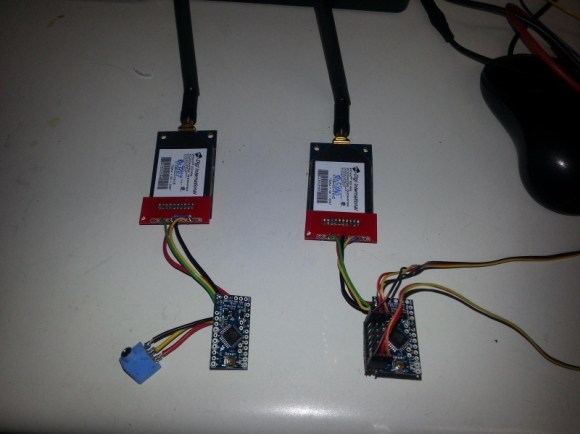
Long range wireless control of a project is always a challenge. [Mike] and his team were looking to extend the range of their current RC setup for a UAV project, and decided on a pair of Arduino mini’s and somewhat expensive Digi Xtend 900Mhz modems to do the trick. With a range of 40 miles, the 1 watt transceivers provide fantastic range. And paired with the all too familiar Arduino, you’ve got yourself an easy long range link.

[Mike] set the transmitter up so it can plug directly into any RC controller training port, decoding the incoming signal and converting it into a serial data package for transmitting. While they don’t provide the range of other RF transmitters we’ve seen, the 40 mile range of the modem’s are more than enough for most projects, including High Altitude Balloon missions.

The code for the Arduino transmitter and receiver sides is available at their github. Though there is no built-in error correction in the code, they have not had any issues.  Unfortunately, a schematic was not provided, but you should be able to get enough information from the images and datasheets to construct a working link.


Using SIMMs To Add Some Extra RAM On Your Arduino UNO

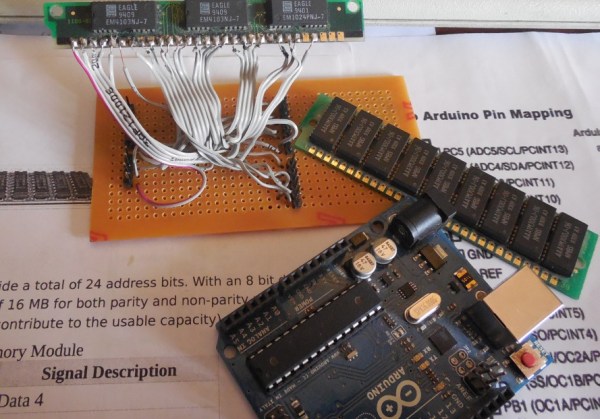
A Single In-line Memory Module (SIMM) is a type of memory module containing Random Access Memory (RAM) which was used in computers from the early 1980s to the late 1990s (think 386, 486, Macintoshs, Atari STE…). [Rafael] just made a little library that allows you to interface these modules to the Atmega328p-based Arduino UNO in order to gain some memory space. His work was actually based on the great Linux on the 8bit ATMEGA168 hack from [Dmitry Grinberg] but some tweaks were required to make it work with [Rapfael]’s SIMM but also to port it to the Arduino platform. The 30-pin SIMM shown above is capable of storing up to (hold on to your chairs…) 16MB but due to limited amount of available IOs on the Atmega328p only 256KB can be used. Our guess it that an SPI / I2C IO extender could lift this limitation. A quick (shaky) video is embedded after the break.

Continue reading “Using SIMMs To Add Some Extra RAM On Your Arduino UNO”

Serial Monitor Without A PC

serial01

A serial monitor is an easy way to debug your projects. As we step through code, it’s nice to see a “Hey! I’m working, moving to next thing!” across the monitor, and not so nice to see nothing – the result of a bug that needs debugging. This has always meant needing a PC loaded with your favorite serial terminal program close at hand.

Most of the time this is not an issue, because the PC is used to compile the code and program the project at hand. But what if you’re in the field, with a mission of fixing a headless system, and in need a serial monitor? Why lug around your PC when you can make your own External Serial Monitor!

[ARPix] built this fully functional serial monitor based on an Atmega328 and a 102 x 64 LCD display. While it doesn’t have a keyboard port like this microcontroller based serial terminal, tact switches allow access to the user interface to start and stop the reading and set the baud rate. The Atmega328 has 2K of SRAM, which is needed for the project. Apparently, 1K was not enough to handle all the data. All code, schematics and a very well done parts layout are available, making this sure to be your next weekend project!


Arduino Controlled Dahlander Motor Switch


Dahlander Switch

[Jean-Noel] is fixing a broken Lurem woodworking machine. This machine uses a three-phase Dahlander motor, which has three operation modes: stop, half speed, and full speed. The motor uses a special mechanical switch to select the operating mode. Unfortunately, the mechanical bits inside the switch were broken, and the motor couldn’t be turned on.

To solve the problem without sourcing a new switch, [Jean-Noel] built his own Arduino based Dahlander switch. This consists of three relays that select the wiring configuration for each speed mode. There’s also a button to toggle settings, and two lamps to show what mode the motor is currently in.

The Arduino runs a finite-state machine (FSM), ensuring that the device transitions through the modes in the correct order. This is quite important, since the motor could be damaged if certain restrictions aren’t followed. The state machine graph was generated using Fizzim, a free tool that generates not only FSM graphs, but also Verilog and VHDL code for the machines.

The final product is housed in a DIN rail case, which allows it to be securely mounted along with the rest of the wiring. The detailed write-up on this project explains all the details of the motor, and the challenges of building this replacement switch.

Boxing + Arduino + Geometry = Awesomeness

arduino-boxing-blocker

Imagine a machine that [Anderson Silva] could throw a punch at, that would locate his fist in real time and move a punching pad to meet his moving fist. How would you do it? Kinect? Super huge sensor array? Sticking charm? What if we told you it could be done with two electret microphones, an Arduino, and a Gumstix? Yeah, that’s right. You might want to turn your phone off and sit down for this one.

[Benjamin] and his fellow students developed this brilliant proof of concept design that blocks incoming punches for their final project. We’ve seen boxing robots here before, but this one takes the cake. The details are sparse, but we’ve dug into what was made available to us and have a relatively good idea on how they pulled off this awesome piece of electrical engineering.

Continue reading “Boxing + Arduino + Geometry = Awesomeness”

Using A Door Handle Conductivity To Detect Intruders

Sometimes the simplest projects can be quite interesting, provided they’re well documented. We hope that the Hackaday readers also think that the door sensor that [Alexander] developed falls into this category. Instead of using common methods such as a magnet + reed switch, he decided to use the strike plate and door conductivity to detect someone walking in. The setup he put together includes an Arduino, a PowerSwitch Tail (a power cord that switches 120vac with a dc control voltage of 3-12vdc), a battery pack made of 8 AA batteries and two crocodile clips for door connections.

Most new hobbyists would have stopped there, but [Alexander] checked his platform’s power consumption and continued his work to decrease it. He therefore put the microcontroller in power-down mode by default and uses an AVR external interrupt to wake it up. In case beginners can’t understand [Alexander]’s code, he actually put a nice flow diagram on his website. Embedded after the break is a video of the system working.

Continue reading “Using A Door Handle Conductivity To Detect Intruders”