Decoding S/PDIF With A Microcontroller Brings A Few Headaches

The average punter shunts audio around with analog 3.5 mm cables, RCA jacks, or Bluetooth on a regular basis. A useful standard that hasn’t really bothered most of us is S/PDIF, standing for Sony/Phillips Digital Interface. It’s a useful way to pump digital audio around over copper cables or optic fiber. [Andrew Jeddeloh] got curious about the standard after contemplating some long cable runs in his home, and decided to try decoding it.

The target for [Andrew]’s development efforts was the STM32L476 Discovery, which had no SPDIF decoding hardware on board. Instead, [Andrew] tinkered with the peripherals he had to see what would work. In the end, a cavalcade of internal timers were daisy chained to allow the microcontroller to recover a clock from the self-clocked S/PDIF signal. This was then used to generate a clock to sync up the onboard SPI hardware to actually read in the 16-bit PCM data from the S/PDIF signal.

[Andrew]’s original broader plan was to pipe the S/PDIF data to the onboard I2S DAC, though he struggled manipulating the remaining resources on the STM chip to do so successfully. Anyone wishing to have a crack can take a look at [Andrew]’s code over on GitHub. If completed, the STM32L476 would become a useful analog endpoint for S/PDIF streams, allowing you to pump tunes digitally over long distances without signal degradation. If you know the key to getting it done, sound off in the comments! Alternatively, if you need to get up and running more quickly, the Teensy platform has you covered!

Retro Recreations Hack Chat With Tube Time

Join us on Wednesday, March 17 at noon Pacific for the Retro Recreations Hack Chat with Tube Time!

join-hack-chatNostalgia seems to be an inevitable consequence of progress. Advance any field far enough into the future, and eventually someone will look back with misty eyes and fond memories of the good old days and start the process of turning what would qualify as junk under normal conditions into highly desirable collectibles.

In some ways, those who have been bitten by the computer nostalgia bug are lucky, since the sheer number of artifacts produced during their period of interest is likely to be pretty high, making getting gear to lovingly restore relatively easy. But even products produced in their millions can eventually get difficult to find, especially once they get snapped up by eager collectors, leaving the rest to make do or do without.

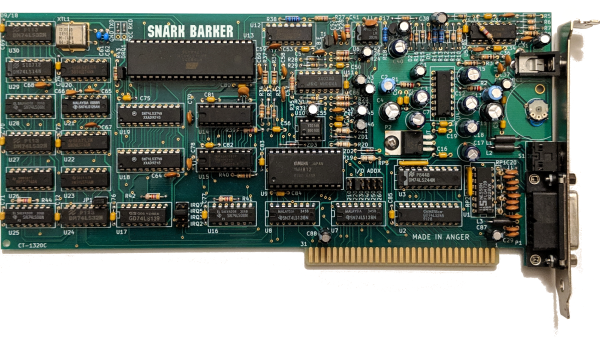
Of course, if you’re as resourceful as Tube Time is, there’s another alternative: build your own retro recreations. He has embarked on some pretty intense builds to recapture a little of what early computer enthusiasts went through trying to build useful machines. He has built replicas of early PC sound cards, like an ISA-bus AdLib card, its MCA equivalent, and the “Snark Barker”— or is it the “Snood Bloober”? — which bears an uncanny resemblance to the classic Sound Blaster card from the 1980s.

Tube Time will join us for the Hack Chat this week to answer questions about all his retro recreations, including his newest work on a retro video card. Be sure to bring your questions on retro rebuilds, reverse engineering, and general computer nostalgia to the chat.

Our Hack Chats are live community events in the Hackaday.io Hack Chat group messaging. This week we’ll be sitting down on Wednesday, March 17 at 12:00 PM Pacific time. If time zones have you tied up, we have a handy time zone converter.

Click that speech bubble to the right, and you’ll be taken directly to the Hack Chat group on Hackaday.io. You don’t have to wait until Wednesday; join whenever you want and you can see what the community is talking about.
Continue reading “Retro Recreations Hack Chat With Tube Time”

Free To Good Home: FPGA Supercharged Audio/Video Synthesizer

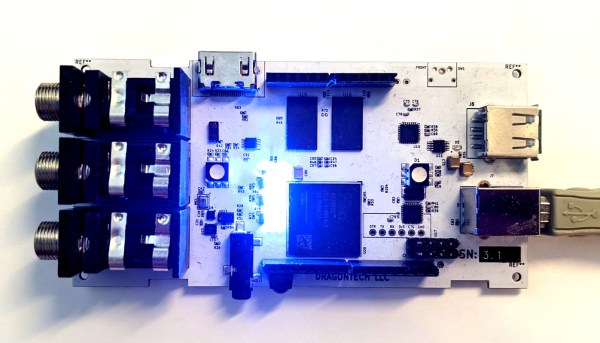
Audio and video synthesizers have been around for decades, and are pretty much only limited by one’s willingness to spend money on them.  That is, unless you can develop your own FPGA-supercharged synthesizer to really get a leg up on the consumer-grade components. Of course, as [Julian] found out in this four-year project, you tend to pay for it anyway in time spent working on your projects.

[Julian] has actually decided to stop working on the project and open-source it to anyone who wants to continue on. He has already finished the PCB layout on a gargantuan 8-layer print, done all of the routing and parts selection, and really only needed to finish testing it to complete the project. It’s powered by the Xilinx Zynq and is packed with features too: HDMI, DDR3 ram, USB, a handful of sensors, and an Arduino Uno-style header to make interfacing and programming a breeze.

While we’re sympathetic with setting aside a project that we’ve worked so hard on, with most of the work done on this one it should be pretty easy to pick up and adapt for anyone interested in carrying the torch. If you were hoping to wet your whistle with something with fewer PCB layers, though, we’ve seen some interesting (but slightly simpler) video synthesizers made out of other unique hardware as well.


Taking A Capacitor Microphone To The Next Level

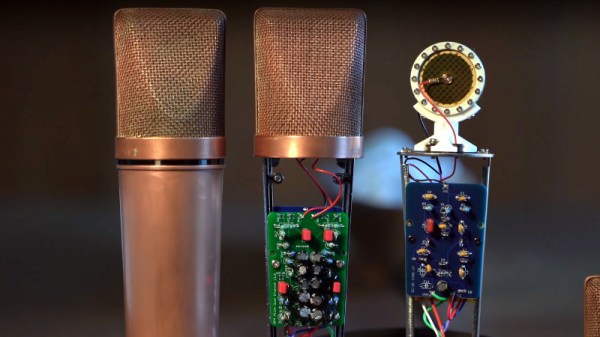
There was a time when a microphone for most people was a cheap plastic affair that probably came for free with their sound card, but in the age of pandemic video streaming no desktop is complete without a chunky model that looks for all the world as though it escaped from a studio. Few people make their own microphones, so the work of [DJJules] in building very high quality condenser microphones is a particularly fascinating read.

A condenser microphone is a capacitor in which one plate is formed by a conductive diaphragm. A bias voltage is supplied to the diaphragm via a resistor, and since the charge on the plate remains constant as its capacitance changes with the sound vibrations, the voltage on the capacitor changes accordingly. This is picked up by a high impedance buffer and from there fed to a normal microphone input. This Instructable uses a commercial condenser microphone capsule, and takes the reader through generating the bias voltage for it before describing the op-amp buffer circuit.

The most interesting part comes at the end, as we’re shown how the sensitivity pattern of a dual-microphone array can be tuned to be omnidirectional, cardoid, or figure-of-eight. This is probably the norm among audio engineers, but we rarely see this sort of insight in our community. We may never build a microphone of our own, but it’s fascinating to see this one from the ground up in the video below the break.

If you’re confused about the difference between a condenser microphone and the more common electret condenser microphone, we have published a guide to that topic. Continue reading “Taking A Capacitor Microphone To The Next Level”

Audio Out Over A UART With An FTDI USB-To-TRS Cable

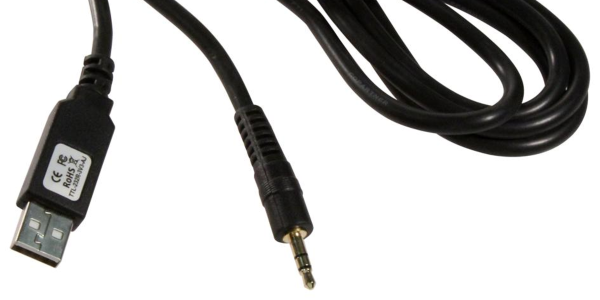
What is the easiest way to get audio from a WAV file into a line-level format, ready to be plugged into the amplifier of a HiFi audio set (or portable speaker)? As [Konrad Beckmann] demonstrated on Twitter, all you really need is a UART, a cable and a TRS phono plug. In this case a USB-TTL adapter based around the FTDI FT232R IC: the TTL-232R-3V3-AJ adapter with 12 Mbps USB on one end, and a 3 Mbps UART on the other end.

[Konrad] has made the C-based code available on GitHub. Essentially what happens underneath the hood is that it takes in a PCM-encoded file (e.g. WAV). As a demonstration project, it requires the input PCM files to be a specific sample rate, as listed in the README, which matches the samples to the baud rate of the UART. After this it’s a matter of encoding the audio file, and compiling the uart-sound binary.

The output file is the raw audio data, which is encoded in PDM, or Pulse-Density Modulation. Unlike Pulse-Code Modulation (PCM), this encoding method does not encode the absolute sample value, but uses binary pulses, the density of which corresponds to the signal level. By sending PDM data down the UART’s TX line, the other side will receive these bits. If said receiving device happens to be an audio receiver with an ADC, it will happily receive and play back the PDM signal as audio. As one can hear in the video embedded in the tweet, the end result is pretty good.


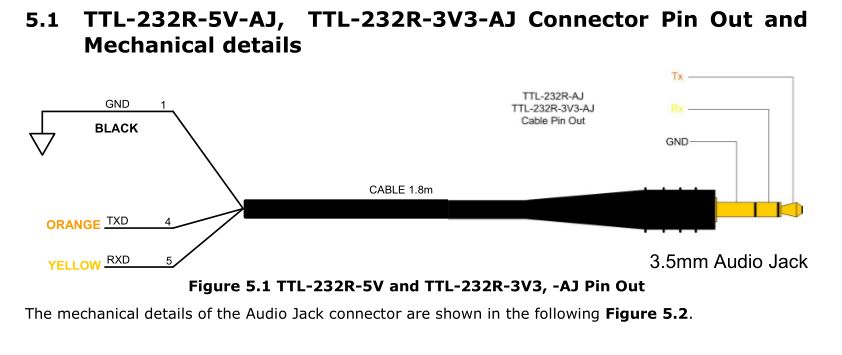
If we look at at the datasheet for the TTL-232R-3V3-AJ adapter cable, we can see how it is wired up:

When we compare this to the wiring of a standard audio TRS jack, we can see that the grounds match in both wirings, and TX (RX on the receiving device) would match up with the left channel, with the right channel unused. A note of caution here is also required: this is the 3.3V adapter version, and it lists its typical output high voltage as 2.8V, which is within tolerances for line-level inputs. Not all inputs will be equally tolerant of higher voltages, however.

Plugging random TRS-equipped devices into one’s HiFi set, phone or boombox is best done only after ascertaining that no damage is likely to result.  Be safe, and enjoy the music.

IKEA Shelf Becomes Kid Friendly MP3 Player

IKEA’s flatpack furniture has long been popular among makers for its modular nature and low cost, making it ideal for whacky experiments and custom builds. [Claus] is one such person, and built a fun MP3 player for his kids out of a basic LACK shelf.

The music is handled by an NodeMCU ESP8266, working in concert with a VS1053 audio board. The VS1053 is a highly capable chip, capable of decoding a variety of raw and compressed audio formats as well as MIDI, but here it’s used to read SD cards and play MP3s. An RC522 is used to read RFID cards to trigger various tracks, allowing kids to choose a song by simply placing a tag on the shelf. A cheap PAM8302 amplifier and speaker are used to output the music. All the hardware is installed neatly inside the LACK shelf, an easy job thanks to the primarily cardboard construction.

RFID cards are more fun than we normally give them credit for, and we’ve seen a few builds along similar lines to this one. Video of [Claus’s] child rocking out after the break.

Continue reading “IKEA Shelf Becomes Kid Friendly MP3 Player”

SOUL Wants To Process Your Audio

Abstraction is the core of nearly all progress in computing. Unless you are fabricating your own semiconductors and drawing wire, we all create with building blocks ranging from components like CPUs, to operating system functions, to specialized libraries. Just as you wouldn’t want to spend your time deblocking disk records or rendering fonts for output devices, you probably shouldn’t have to think too much about audio data. While there are some powerful audio processing libraries out there, a new embeddable language called SOUL (SOUnd Language) is now in version 1.0 and wants to help you create efficient code for processing audio.

The goal of SOUL is to target a runtime that can run on CPUs, but is better on DSPs. The code aims to be secure and real time with no pointers, garbage collection, and other things that typically interfere with audio processing or security.

Continue reading “SOUL Wants To Process Your Audio”