Laser Z-Axis Table Comes Into Focus

Laser cutters and 3D printers are game-changing tools to have in the workshop. They make rapid prototyping or repairs to existing projects a breeze as they can churn out new parts with high precision in a very short amount of time. The flip side of that, though, is that they can require quite a bit of maintenance. [Timo] has learned this lesson over his years-long saga owning a laser cutter, although he has attempted to remedy most of the problems on his own, this time by building a Z-axis table on his own rather than buying an expensive commercial offering.

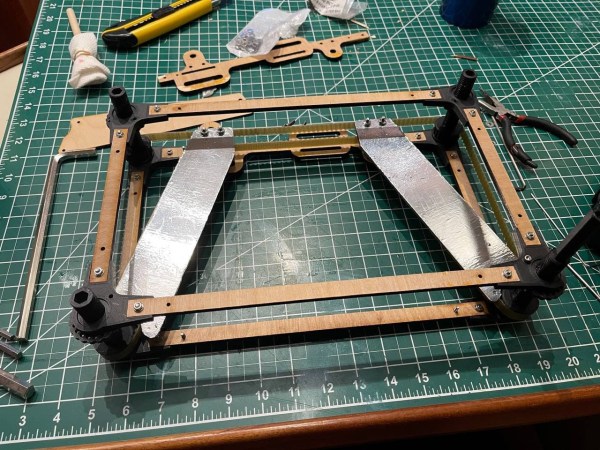
The Z-axis table is especially important for lasers because a precise distance from the lens to the workpiece is needed to ensure the beams’s focal point is correctly positioned. Ensuring this distance is uniform over the entire bed can be a project all on its own. For this build, [Timo] started by building a simple table that allowed all four corners to be adjusted, but quickly moved on to a belt-driven solution that uses a stepper motor in order to adjust the entire workspace. The key to the build was learning about his specific laser’s focal distance which he found experimentally by cutting a slot in an angled piece of wood and measuring the height where the cut was the cleanest.

After everything was built, [Timo] ended up with a Z-axis table that is easily adjustable to the specific height required by his laser. Having a laser cutter on hand to bootstrap this project definitely helped, and it also seems to be an improvement on any of the commercial offerings as well. This also illustrates a specific example of how a laser cutter may be among the best tools for prototyping parts and building one-off or custom tools of any sort.
Master craftsperson turns a huge bolt into a pneumatic engraving tool.

Impressive Hack Turns Bolt Into Pneumatic Engraver

Did you ever see one of those videos that causes you to look at an everyday object in a new light? This is one of those videos (embedded below). And fortunately for us, there’s a write-up to go along with it in case you don’t always understand what’s going on.

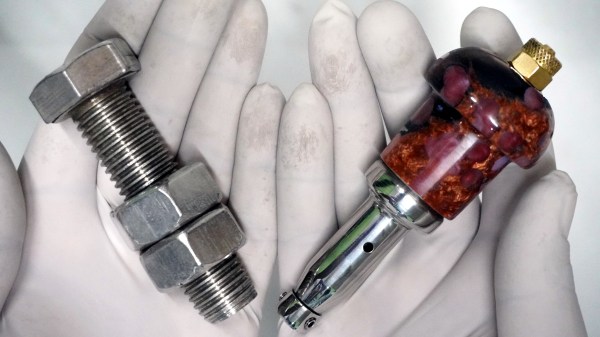
In this case, what’s going on is that [AMbros Custom] is masterfully turning a stainless steel M20 bolt into a pneumatic engraving tool. Yeah, you read that correctly. But the most amazing thing about this hack is the minimum of tools used to do it. For one thing, there’s not a lathe in sight — [AMbros Custom] just chucked it into the drill or added a few nuts and clamped it in a vise.

So, how does it work? [AMbros Custom] hooks it up to a compressor, which causes the piston inside to go up and down, agitating the engraving bit. If you don’t want to watch the video, there are a ton of build pictures in the write-up.

What else can you do with a bolt? If you have the tools, you can do plenty. You could even turn one into a secret cash stash for buying more large bolts.

Continue reading “Impressive Hack Turns Bolt Into Pneumatic Engraver”

Unique 3D Printer Turned CNC Engraver

As we’ve said in the past, one of the most exciting things about the proliferation of low-cost desktop 3D printers (beyond all the little boats we get to see on Reddit), is the fact that their motion control systems are ripe for repurposing. Outfitting a cheap 3D printer with a drag knife, pen holder, or even a solid-state laser module, are all very common ways of squeezing even more functionality out of these machines.

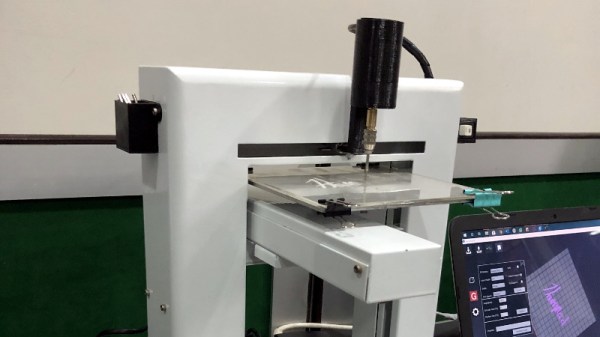
But thanks to the somewhat unusual nature of his printer, [Hammad Nasir] was able to take this concept a bit farther. Being considerably more rigid than the $99 acrylic-framed box of bolts we’ve become accustomed to, he was able to fit it with a basic spindle and use it for CNC engraving. He won’t be milling any steel on this rig, but judging by the pictures on the Hackaday.io page for the project, it does a respectable job cutting designs into plastic at least.

The IdeaWerk 3D printer that [Hammad] used for this project is phenomenally overbuilt. We don’t know whether the designers simply wanted to make it look futuristic and high-tech (admittedly, it does look like it could double as a movie prop) or they thought there was a chance it might get thrown down the stairs occasionally. In either event, it’s built like an absolute tank.

While the frame on lesser printers would likely flex as soon as the bit started moving across the workpiece, this thing isn’t going anywhere. Of course this machine is presumably still running on the standard GT2 belt and NEMA 17 arrangement that has been used in desktop 3D printers since the first wooden machines clattered to life. So while the frame might be ready to take some punishment, the drive system could respectfully disagree once the pressure is on.

Modification was simplified by the fact that the hotend and extruder assembly on the IdeaWerk is mounted to the X axis with just a single bolt. This makes it exceptionally easy to design alternate tool mounts, though arguably the 3D printed motor holder [Hammad] is using here is the weak link in the entire system; if it’s going to flex anywhere, it’s going to be there.

If you’re more photonically inclined, you might be interested in this similarly straightforward project that sees a 2.5 W laser module get bolted onto an entry level 3D printer.

A Super Easy Laser Engraver

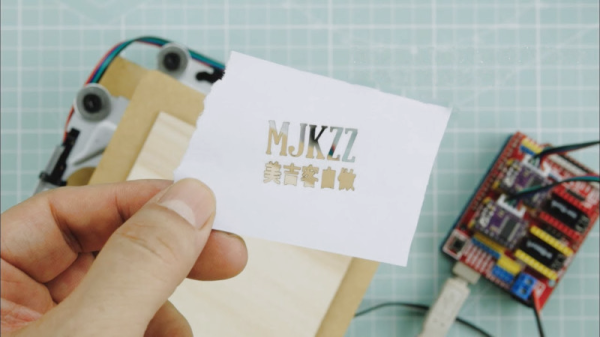
CNC comes in all shapes and sizes, from huge industrial lathes to homebuilt wire benders. [MJKZZ] has built their own compact rig, using optical drive parts to create a cute but effective laser engraver. (Video embedded below.)

The build aims to keep things simple by holding the laser stationary, and moving the bed instead. The laser in question is a 500 mW unit, driven by the Z axis on the Arduino CNC shield used to run the system. A DVD drive is taken apart, and the worm drive stepper motor assembly is used to slew the carriage back and forth, atop which is glued a bed. Upon this bed, a copy of the same assembly is then installed, offset 90 degrees, giving the X and Y axes.

The result of this setup is a lightweight moveable bed, controllable through Gcode with GRBL. With the laser situated above on some camera mounting gear, paper can be installed on the bed and engraved with ease. The resulting accuracy is admirable, and at full power, the laser is capable of cutting through the paper.

While it’s a lightweight rig, it could serve a purpose as a cheap and easy way to produce stencils from computerized artwork. Optical drives remain popular in the DIY CNC scene, as they’re a great way to source a moveable platform with all the mechanical considerations already worked out.

Continue reading “A Super Easy Laser Engraver”

Forget Printing Labels For Your Bathtub Hooch, Why Not Engrave The Bottle?

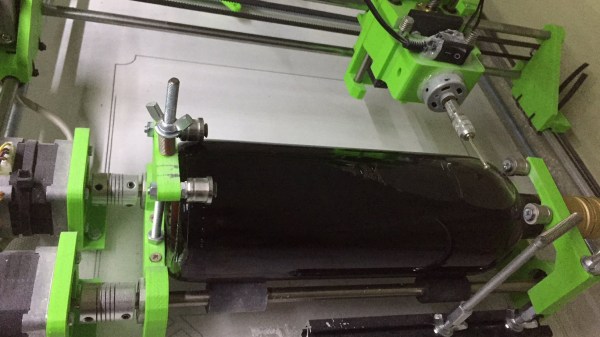
[BlueFlower] sends in this cool wine bottle engraver. It’s a simple machine that reminds us of the infamous EggBot. One axis can move in x and z while the other axis rotates the work piece. The EggBot works in spherical coordinates while this one lives in a cylindrical world.

The base of the device appears to be an older project of [BlueFlower]’s an XY-Plotter/Cutter. The plotter itself is a very standard twin-motor gantry design. In fact, it looks like when the machine is converted to bottle engraving, the drivers which previously moved the Y-axis are re-purposed to move two rollers. The rollers themselves are suspiciously similar to those found inside 2D printers. We all have them kicking around our junk drawers, but it’s rare to see them actually being used. The spindled is just a DC motor with a ball grinder coupled to the end.

As for the final result, we have to admit that the engraved bottles are quite fetching. Catch a video of the engraving process after the break.

Continue reading “Forget Printing Labels For Your Bathtub Hooch, Why Not Engrave The Bottle?”

Another Way To Make PCBs At Home

One of the more popular ways of rolling out your own custom PCB is to simply create the model in your CAD program of choice and send it off to a board manufacturer who will take care of the dirty work for you. This way there is no need to deal with things like chemicals, copper dust, or maintaining expensive tools. A middle ground between the board manufacturer and a home etching system though might be what [igorfonseca83] has been doing: using an inexpensive laser engraver to make PCBs for him.

A laser engraver is basically a low-power laser CNC machine that’s just slightly too weak to cut most things that would typically go in a laser cutter. It turns out that the 10W system is the perfect amount of energy to remove a mask from a standard PCB blank, though. This in effect takes the place of the printer in the old toner transfer method, and the copper still has to be dissolved in a chemical solution, but the results are a lot more robust than trying to modify a printer for this task.

If you aren’t familiar with the days of yore when homebrew PCBs involved a standard desktop printer, many people still use this method, although the results can be mixed based on printer reliability. If you want to skip the middleman, and the need for a chemical bath, a more powerful laser actually can cut the traces for you, too.

Continue reading “Another Way To Make PCBs At Home”

Watch This LEGO Pantograph Carve Chocolate Messages

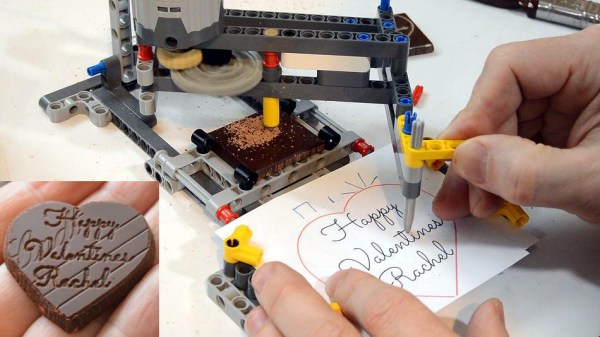
[Matthias Wandel] is best known for his deeply interesting woodworking projects, so you might be forgiven for not expecting this lovely chocolate-engraving pantograph made from LEGO. With it, he carves a delightful valentine’s message into a square of chocolate, but doesn’t stop there. He goes the extra mile to cut the chocolate carefully into a heart, and a quick hit with a heat gun takes the rough edges off for a crisp and polished end result.

The cutting end is a small blade stuck inside a LEGO piece, but that’s the only non-LEGO part in the whole assembly. A key to getting a good carve was to cool the chocolate before engraving, and you can see the whole process in the video embedded below.

Continue reading “Watch This LEGO Pantograph Carve Chocolate Messages”